Introduction
This manual provides comprehensive instructions for the setup, operation, maintenance, and troubleshooting of your Mecool Mechanical Gaming Keyboard. Please read this manual thoroughly before using the product to ensure optimal performance and longevity.
The Mecool Mechanical Gaming Keyboard features 104 keys with Red Switches, designed for a responsive and tactile typing experience. It includes white backlighting with multiple customizable modes and anti-ghosting technology for precise input during gaming or typing.
Package Contents
- Mecool Mechanical Gaming Keyboard (Red Switch Pink)
- USB Cable
Setup
The Mecool Mechanical Gaming Keyboard is a plug-and-play device, requiring no additional driver installation for basic functionality.
- Unpacking: Carefully remove the keyboard and USB cable from the packaging.
- Connection: Insert the USB-A connector of the provided USB cable into an available USB port on your computer.
- Initial Recognition: Your operating system (Windows 2000, ME, XP, 7, 8, or 10) will automatically detect and install the necessary generic drivers. This process may take a few moments.
- Placement: Place the keyboard on a stable, flat surface. Adjust the kickstands on the underside of the keyboard for a preferred typing angle, if desired.
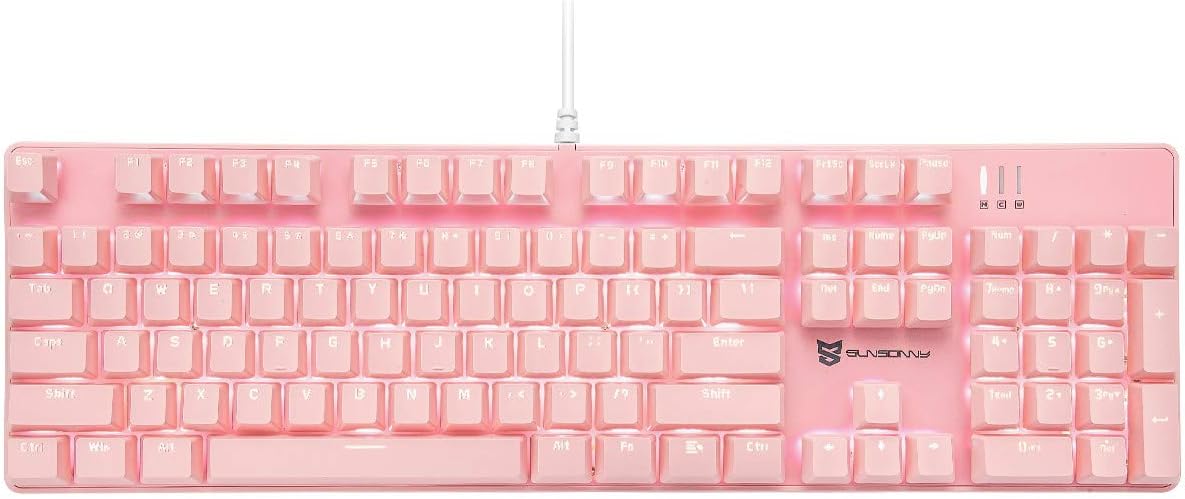
Image: Top-down view of the Mecool Mechanical Gaming Keyboard in pink, showcasing its full 104-key US layout and white backlighting. The wired connection is visible at the top center.
Operating Instructions
Basic Keyboard Functions
The keyboard operates as a standard 104-key US layout keyboard. All keys are anti-ghosting, ensuring accurate registration of multiple simultaneous key presses.
Backlight Control
The keyboard features white backlighting with various modes and intensity levels. Use the Function (FN) key in combination with other keys to control the backlighting.
| Key Combination | Function |
|---|---|
| FN + INS | Cycle through 21 different backlight modes. |
| FN + ↑ | Increase backlight intensity (5 levels). |
| FN + ↓ | Decrease backlight intensity (5 levels). |
| FN + ← | Decrease backlight flow velocity (6 levels). |
| FN + → | Increase backlight flow velocity (6 levels). |

Image: Examples of the keyboard's white backlighting in various modes, demonstrating different illumination patterns and intensities.
Multimedia and Shortcut Keys
The keyboard includes dedicated multimedia and shortcut functions accessible via the FN key combinations.
| Key Combination | Function |
|---|---|
| FN + F1 | My Computer |
| FN + F2 | Search |
| FN + F3 | Calculator |
| FN + F4 | Media Player |
| FN + F5 | Previous Track |
| FN + F6 | Next Track |
| FN + F7 | Play/Pause |
| FN + F8 | Stop |
| FN + F9 | Mute |
| FN + F10 | Volume Down |
| FN + F11 | Volume Up |
| FN + F12 | Lock Keyboard |
| FN + WIN | Lock/Unlock Windows Key |
Macro Setting
The keyboard supports macro settings, particularly for the number pad, to enhance efficiency. Specific software or detailed instructions for macro programming are typically provided by the manufacturer. Refer to the official Mecool website or support resources for advanced macro setup guides.

Image: A close-up view highlighting the mechanical red switches, which offer a smooth and consistent keystroke, ideal for gaming and fast typing.
Maintenance
Proper maintenance ensures the longevity and performance of your keyboard.
- Cleaning:
- Disconnect the keyboard from your computer before cleaning.
- Use a soft, lint-free cloth slightly dampened with water or a mild cleaning solution to wipe the surface of the keyboard.
- For dust and debris between keys, use compressed air.
- Avoid using harsh chemicals, abrasive cleaners, or excessive moisture.
- Keycap Removal (if applicable): If you need to clean under the keycaps or replace switches, use a keycap puller (not included) to gently remove the keycaps. Be careful not to damage the switches.
- Storage: When not in use for extended periods, store the keyboard in a clean, dry environment away from direct sunlight and extreme temperatures.
Troubleshooting
| Problem | Possible Cause | Solution |
|---|---|---|
| Keyboard not responding. | Loose USB connection, faulty USB port, driver issue. | Ensure USB cable is securely connected. Try a different USB port. Restart your computer. |
| Backlight not working or stuck. | Backlight turned off, low intensity, software glitch. | Press FN + ↑ to increase brightness. Cycle through modes with FN + INS. Disconnect and reconnect the keyboard. |
| Keys not registering or ghosting. | Debris under keycap, software conflict. | Clean under the affected keycap using compressed air. Ensure no other software is interfering with keyboard input. The keyboard features N-Key Rollover for anti-ghosting. |
| Incorrect key layout (e.g., @ and " swapped). | Operating system keyboard language setting is incorrect. | Ensure your operating system's keyboard input language is set to "English (United States)" or "US QWERTY". |
If the issue persists after attempting these solutions, please contact Mecool customer support for further assistance.
Specifications
| Feature | Detail |
|---|---|
| Brand | MECOOL |
| Model | Mechanical Gaming Keyboard (Red Switch Pink) |
| Connectivity | Wired (USB) |
| Switch Type | Mechanical Red Switches |
| Key Layout | US Layout, 104 Keys, Full Size |
| Backlighting | White Backlit, 21 Modes, 5 Intensity Levels, 6 Flow Velocities |
| Anti-Ghosting | All Keys Rollover |
| Key Lifespan | 50 Million Keystrokes |
| Dimensions (L x W x H) | 43 x 13 x 3 cm (16.9 x 5.1 x 1.2 inches) |
| Weight | 1.19 kg (2.62 lbs) |
| Compatibility | Win2000, Win ME, Win XP, Win 7, Win 8, Win 10 |

Image: Diagram illustrating the dimensions of the keyboard, measuring approximately 16.9 inches in length and 5.1 inches in width.
Warranty and Support
Mecool products are designed for durability and performance. For information regarding warranty coverage, technical support, or service, please refer to the official Mecool website or contact their customer service department directly.
For the most up-to-date support information, visit: Mecool Official Store on Amazon


