
Introduction
This manual provides instructions for the installation, operation, and maintenance of your Wolf-Guard Wireless Solar Siren Alarm System, Model LB-12T1. This system is designed to enhance the security of your property by detecting intrusions and alerting with a loud siren. It is a self-contained security solution, compatible exclusively with Wolf-Guard alarm accessories.
Package Contents
The Wolf-Guard Wireless Solar Siren Alarm System (Model LB-12T1) typically includes the following components:
- 1 x Solar Siren Alarm Unit
- 2 x Wireless Motion Sensors (PIR Detectors)
- 3 x Wireless Door/Window Contact Sensors
- 2 x Remote Controls
- Mounting hardware (screws, anchors)
- Power adapter (for initial charging/backup)

Figure 1: An overview of the Wolf-Guard Wireless Solar Siren Alarm System, showing the red solar siren unit, two white wireless motion sensors, three white wireless door/window contact sensors, and two white remote controls.
Product Overview
Solar Siren Unit
The main siren unit is powered by solar energy, with an integrated Lithium Metal battery (18650 3.7V/2200mAh) for continuous operation even during power outages or at night. It features a 110 dB alarm and tamper-proof functionality, triggering an alarm if removal is attempted.
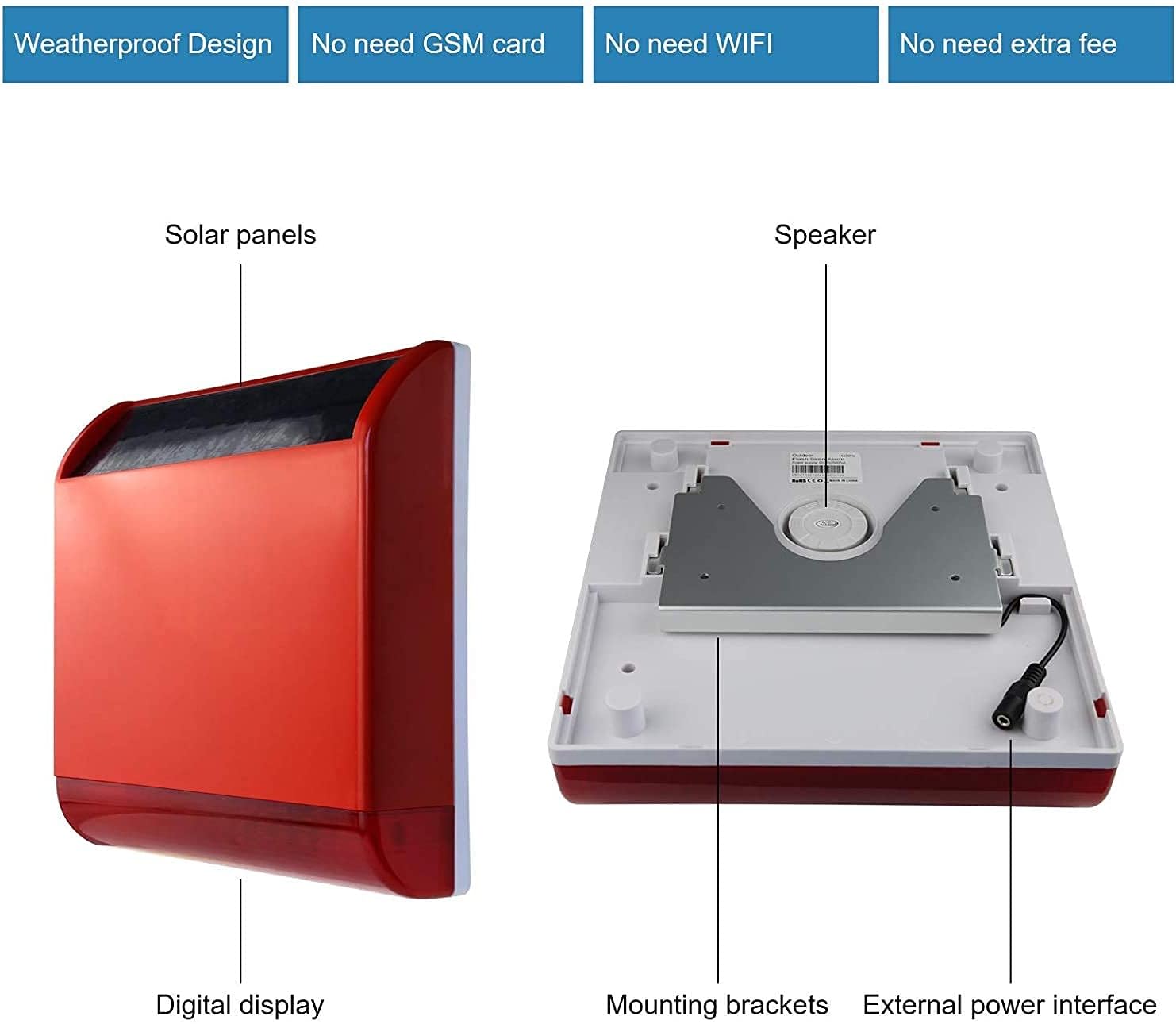
Figure 2: A detailed view of the Wolf-Guard solar siren unit, highlighting its key components: the solar panels for charging, the internal speaker, mounting brackets for installation, and the external power interface for supplementary charging.
Wireless Motion Sensors (PIR Detectors)
These HW-06A sensors detect movement within their detection area. They offer a 110° horizontal and 60° vertical detection angle. They are designed for indoor or protected outdoor use and connect wirelessly to the siren unit. Note: These sensors cannot be used alone and require connection to a Wolf-Guard alarm host.

Figure 3: Details about the HW-06A Smart Wireless PIR Detector, showing its detection angles and a universal mounting bracket. A diagram illustrates the infrared detection beam.
Wireless Door/Window Contact Sensors
These sensors consist of two parts that trigger an alarm when separated, indicating an open door or window. Each sensor includes one CR2450 battery.

Figure 4: A diagram showing the dimensions of the Wolf-Guard door/window contact detector. The larger part measures 68mm x 33mm, and the smaller magnetic part measures 50mm x 12mm. It also indicates that one CR2450 battery is included.
Remote Controls
The system includes remote controls for convenient arming, disarming, and triggering an SOS alarm. Each remote typically features buttons for arm, disarm, home arm, and SOS.
Setup and Installation
1. Solar Siren Unit Installation
The solar siren unit should be installed in a location that receives ample direct sunlight to ensure optimal charging of the internal battery. Mount it securely using the provided screws and anchors. Ensure the mounting surface is stable.

Figure 5: This image illustrates the installation process for the solar siren unit. It shows the siren mounted on a wall, with a diagram indicating the use of screws for secure attachment. The image also highlights the importance of installing the siren in a location with ample sunlight for charging.
2. Motion Sensor Installation
Install motion sensors in areas where intruders are likely to pass. Ensure they are mounted at an appropriate height and angle for effective detection. Avoid placing them directly facing heat sources, strong drafts, or windows where direct sunlight might cause false alarms. Use the universal mounting bracket for flexible positioning.
3. Door/Window Sensor Installation
Attach the two parts of each door/window sensor to the frame and the moving part of a door or window. Ensure they are aligned and close enough to each other (typically within 10-15mm) when the door/window is closed. The alarm triggers when the two parts separate.
4. Pairing Sensors and Remote Controls
The system supports up to 90 wireless alarm zones and 8 remote controls. Refer to the specific pairing instructions provided in the full product manual for detailed steps on how to link additional sensors and remote controls to your siren unit. This system is compatible only with Wolf-Guard alarms.
Operating Instructions
Arming the System
To arm the system, press the 'Arm' button (typically a closed padlock icon) on your remote control. The siren will emit a confirmation sound, indicating the system is armed and ready to detect intrusions.
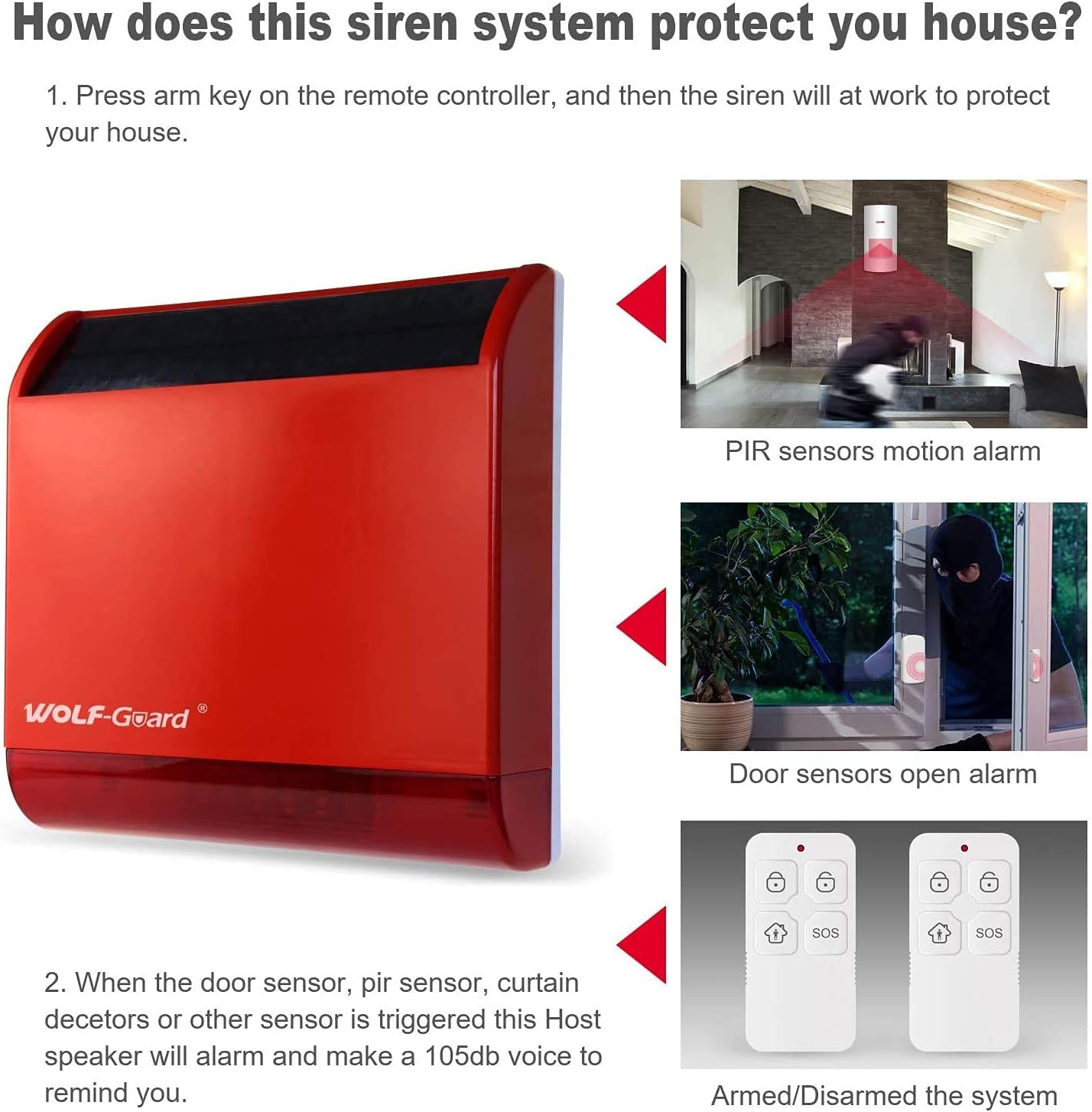
Figure 6: This image demonstrates the functionality of the Wolf-Guard siren system. It shows the siren unit and three scenarios: a PIR sensor detecting motion, a door sensor detecting an open door, and the remote controls used for arming/disarming the system. When a sensor is triggered, the siren activates.
Disarming the System
To disarm the system, press the 'Disarm' button (typically an open padlock icon) on your remote control. The siren will emit a confirmation sound, indicating the system is disarmed.
SOS Function
In an emergency, press the 'SOS' button on your remote control to immediately trigger the siren alarm.
Alarm Trigger
When an armed motion sensor detects movement or a door/window sensor is triggered, the siren will activate, emitting a loud 110 dB alarm. The system also features an anti-tamper alarm that triggers if someone attempts to remove the siren unit.
Maintenance
Solar Panel Care
Regularly clean the solar panel on the siren unit to ensure maximum sunlight absorption and efficient battery charging. Use a soft, damp cloth to remove dust and debris. Avoid abrasive cleaners that could scratch the panel surface.
Battery Replacement (Sensors)
The door/window sensors use CR2450 batteries. Replace them when the low battery indicator (if available) activates or if the sensor becomes unresponsive. Motion sensors also require periodic battery checks and replacement. Refer to the sensor-specific instructions for battery access.
System Checks
Periodically test the system by arming it and triggering a sensor (e.g., opening a protected door) to ensure all components are functioning correctly. This helps verify battery life and wireless connectivity.
Troubleshooting
Siren Not Activating / Low Battery
- Issue: Siren does not activate or has low battery, especially during prolonged periods of low sunlight or winter.
- Solution: Ensure the solar panel is clean and receiving sufficient direct sunlight. In colder or less sunny conditions, the internal battery may not charge adequately. Consider using the provided power adapter for supplementary charging if prolonged periods of low sunlight occur.
False Alarms
- Issue: The alarm triggers without an apparent intrusion.
- Solution: False alarms can be caused by improper sensor placement. Ensure motion sensors are not facing direct sunlight, strong drafts, or heat sources. Verify door/window sensors are securely mounted and not accidentally separating due to vibrations or loose installation.
Sensor Not Triggering
- Issue: A sensor does not trigger the alarm when activated.
- Solution: Check the battery in the sensor and replace if necessary. Ensure the sensor is properly paired with the siren unit. Verify the sensor is within the wireless range of the siren and that there are no significant obstructions interfering with the signal.
Remote Control Issues
- Issue: Remote control fails to arm or disarm the system.
- Solution: Check the remote control battery and replace if needed. Ensure you are within effective wireless range of the siren unit when attempting to arm or disarm.
Specifications
| Model Number | LB-12T1 |
| Brand | Wolf-Guard |
| Power Source | Solar-powered with integrated Lithium Metal battery |
| Battery Type (Siren) | 1 Lithium Metal (18650 3.7V/2200mAh) - included |
| Battery Type (Door/Window Sensor) | CR2450 - included |
| Sound Level | 110 Decibels |
| Connectivity Technology | Wireless |
| Installation Method | DIY (Do-It-Yourself) |
| Voltage | 5 Volts |
| Dimensions (Siren Unit) | 24 x 24 x 6.5 cm (L x W x H) |
| Weight (Siren Unit) | 1.49 kg |
| Usage Environment | Outdoor, Indoor |
| Compatible Devices | Wolf-Guard alarm systems |
Warranty and Support
For warranty information and technical support, please refer to the documentation included with your purchase or contact Wolf-Guard customer service directly. Specific warranty details are not provided in this manual. Please retain your proof of purchase for any warranty claims.


