
Air Choice ABC123
Air Choice 48-Inch Oscillating Tower Fan User Manual
Model: ABC123
Product Overview
The Air Choice 48-inch oscillating tower fan is designed to provide efficient and quiet cooling for your home or office. Featuring a bladeless design for enhanced safety, this fan offers multiple speed settings, operating modes, and a convenient timer function, all controllable via an intuitive LED touch panel or remote control.

The Air Choice 48-inch tower fan, showcasing its sleek design and the remote control for convenient operation.
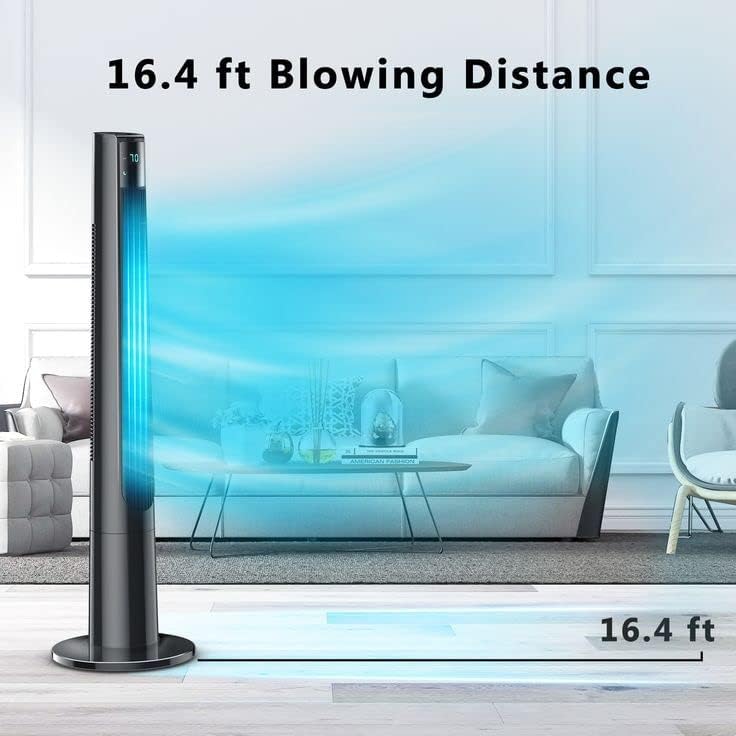
Illustration of the fan's effective blowing distance, reaching up to 16.4 feet for widespread cooling.
Key Features:
- Bladeless Design & 70° Oscillation: Ensures safety and wide air circulation, covering a large area effectively.
- Remote Control & LED Touch Panel: Offers dual control options for convenience, allowing easy adjustment of settings.
- 12H Timer & 3 Speed Modes: Customize airflow with three speeds and three modes (Normal, Natural, Sleep) for personalized comfort and energy saving.
- Quiet Operation & LED Auto-off: Operates quietly, especially in sleep mode (under 40dB), with an LED display that automatically turns off to prevent disturbance.
- Upgraded Safety: Features a tight fence and a heavy stand base for stability, making it suitable for households with children and pets.
Setup and Assembly
Before first use, ensure all components are present and undamaged. Assembly is straightforward and typically involves attaching the base to the main fan body.
- Carefully unpack all components from the packaging.
- Locate the fan base and the main fan body.
- Align the fan body with the base, ensuring the alignment tabs or grooves match.
- Secure the base to the fan body using the provided screws or locking mechanism. Refer to the diagram for proper orientation.
- Place the assembled fan on a flat, stable surface.
- Plug the power cord into a standard electrical outlet.

The bladeless design ensures safety, especially in homes with children, by preventing accidental contact with moving parts.
Operating Instructions
Your Air Choice tower fan can be operated using either the LED touch panel on top of the unit or the included remote control.
Control Panel and Remote Functions:

The remote control provides convenient access to all fan functions from a distance.

Choose from three speed settings and three distinct modes to personalize your cooling experience.
- Power On/Off: Press the power button (⏻) on the control panel or remote to turn the fan on or off.
- Speed Adjustment: Cycle through 3 speed settings (Low, Medium, High) by pressing the speed button (💨).
- Mode Selection: Select from 3 operating modes (Normal, Natural, Sleep) using the mode button (M).
- Normal Mode: Constant airflow at selected speed.
- Natural Mode: Simulates natural breeze by varying fan speed.
- Sleep Mode: Operates at a lower, quieter setting with reduced LED display brightness for undisturbed sleep.
- Oscillation: Activate or deactivate the 70° oscillation feature by pressing the swing button (↔). This distributes air across a wider area.

The 70-degree oscillation ensures wide air coverage, cooling larger spaces efficiently.
- Timer Function: Set the fan to automatically turn off after a specified period (1-12 hours) using the timer button (🕒). Each press increases the timer by one hour.
- Eco Mode: If available, activate Eco mode for energy-efficient operation.
- LED Display Auto-off: The LED display panel will automatically turn off after 3 minutes of inactivity to minimize light disturbance, especially useful during sleep.

Designed for quiet operation, the fan ensures a peaceful environment, with an auto-off LED display for undisturbed sleep.
Maintenance
Regular maintenance ensures optimal performance and longevity of your tower fan.
Cleaning:
- Always unplug the fan from the power outlet before cleaning.
- Use a soft, damp cloth to wipe the exterior surfaces of the fan. Do not use abrasive cleaners or solvents.
- For dust accumulation in the air intake or outlet grilles, use a vacuum cleaner with a brush attachment or compressed air to gently remove dust.
- Do not immerse the fan in water or allow water to drip into the motor housing.
- The care instructions specify "Hand Wash" for certain components; however, for the main unit, only wipe clean.
- Ensure the fan is completely dry before plugging it back in.
Storage:
- If storing the fan for an extended period, clean it thoroughly.
- Store the fan in its original packaging or a protective cover in a cool, dry place, away from direct sunlight and extreme temperatures.
Troubleshooting
If you encounter issues with your Air Choice tower fan, refer to the following common problems and solutions:
| Problem | Possible Cause | Solution |
|---|---|---|
| Fan does not turn on. | No power supply; power cord not securely plugged in. | Ensure the fan is properly plugged into a working electrical outlet. Check the circuit breaker. |
| Weak airflow. | Fan speed set too low; air intake/outlet blocked by dust. | Increase the fan speed setting. Clean any dust or obstructions from the air intake and outlet grilles. |
| Fan is noisy. | Fan not on a stable surface; internal components loose; dust accumulation. | Place the fan on a flat, stable surface. Ensure no foreign objects are inside. Clean the fan thoroughly. If noise persists, contact customer support. |
| Remote control not working. | Batteries are dead or incorrectly inserted; remote not pointed at the fan's receiver. | Replace batteries with new ones, ensuring correct polarity. Point the remote directly at the fan's control panel. Note that some remotes may interfere with other devices; this is a characteristic of certain IR remotes. |
| Oscillation not working. | Oscillation function not activated. | Press the oscillation (swing) button on the control panel or remote. |
Specifications
| Attribute | Detail |
|---|---|
| Brand | Air Choice |
| Model Name | BL-FS2-D (ABC123) |
| Color | Black |
| Electric Fan Design | Floor Fan |
| Power Source | Corded Electric |
| Room Type | Bedroom, Office |
| Special Feature | Oscillating |
| Wattage | 50 watts |
| Voltage | 120 Volts (AC) |
| Control Method | Touch, Remote |
| Blade Material | Plastic (Bladeless Design) |
| Number of Power Levels | 3 |
| Size | 48 inches |
| Item Weight | 9.93 pounds |
| Package Dimensions | 47.6 x 8.2 x 8 inches |
Warranty Information
This Air Choice tower fan comes with a 1-year manufacturer's warranty from the date of purchase. This warranty covers defects in materials and workmanship under normal use. It does not cover damage resulting from misuse, accident, alteration, or unauthorized repair.
Please retain your proof of purchase for warranty claims.
Customer Support
For any questions, technical assistance, or warranty claims, please contact Air Choice customer support. Refer to the product packaging or the official Air Choice website for the most current contact information.
When contacting support, please have your product model number (ABC123) and purchase details ready.
Related documentsABC123


Ask a question about this manual
Ask about setup, troubleshooting, compatibility, parts, safety, or missing instructions. Manuals+ will review the question and use this page’s manual context to help answer it.