
1. Introduction
RATIONAL OEM Cleaning Tablets 56.00.210A are specifically designed for the automatic cleaning of RATIONAL SelfCookingCenter and iCombiPro combi ovens. These tablets ensure optimal hygiene and performance of your cooking equipment by effectively removing food residues and maintaining cleanliness.
2. Product Overview
The RATIONAL Cleaning Tablets come in a re-sealable bucket containing 100 individually wrapped tablets. They are formulated to be used with the automatic cleaning programs of RATIONAL combi ovens, simplifying the cleaning process and ensuring consistent results.

Image 1: A white bucket filled with individually wrapped RATIONAL cleaning tablets. The bucket has a label with product information.
- Quantity: 100 tablets per bucket.
- Form: Solid tablets, individually wrapped for easy handling and precise dosing.
- Compatibility: Designed for RATIONAL SelfCookingCenter, iCombiPro, and other RATIONAL equipment manufactured after April 2004.
- Purpose: Primarily for cleaning the cooking chamber. For descaling the steam generator, RATIONAL Care Tabs (56.00.562) are typically used in conjunction.
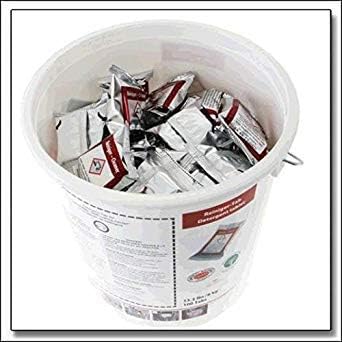
Image 2: The exterior of the RATIONAL cleaning tablets bucket, showing the product label and branding.
3. Setup and Preparation
Before initiating a cleaning cycle with RATIONAL Cleaning Tablets, ensure the following:
- The combi oven is completely empty of all food items, cooking accessories, and grids/containers.
- The oven door is properly closed before starting the cleaning program.
- Refer to your specific RATIONAL combi oven's user manual for detailed instructions on preparing the oven for a cleaning program.
4. Operating Instructions
These tablets are intended for use with the automatic cleaning program of your RATIONAL SelfCookingCenter or iCombiPro combi oven. Follow these general steps:
- Initiate Cleaning Program: On your RATIONAL combi oven's control panel, select the desired automatic cleaning program. The oven display will guide you through the process.
- Tablet Insertion: When prompted by the oven's display, open the designated compartment (usually located on the side or front of the cooking chamber) and insert the specified number of RATIONAL Cleaning Tablets.
- Close Compartment: Securely close the tablet compartment.
- Start Cycle: Confirm the start of the cleaning cycle on the control panel. The oven will then proceed with the automatic cleaning process.
- Completion: Allow the cleaning program to complete fully. The oven will indicate when the cycle is finished and ready for use.
Note: Typically, these cleaning tablets are used daily in conjunction with RATIONAL Care Tabs (56.00.562) for comprehensive cleaning and descaling, especially in areas with hard water.

Image 3: A screenshot of a RATIONAL combi oven's control panel display, illustrating various cleaning program options and maintenance status indicators.
5. Maintenance
Regular and correct use of RATIONAL OEM Cleaning Tablets is essential for maintaining the hygiene, efficiency, and longevity of your RATIONAL combi oven. Daily cleaning helps prevent the buildup of food residues, grease, and other contaminants, ensuring optimal cooking results and extending the lifespan of your equipment.
- Always follow the recommended cleaning frequency as specified in your combi oven's operating manual.
- Store tablets in their original re-sealable bucket in a cool, dry place, away from direct sunlight and moisture.
- Ensure the bucket is properly sealed after each use to maintain tablet integrity.

Image 4: A visual comparison showing the interior of a RATIONAL combi oven before and after an automatic cleaning cycle, highlighting the effectiveness of the cleaning tablets.
6. Troubleshooting
If you encounter issues with the cleaning process or unsatisfactory results, consider the following:
- Incomplete Cleaning: Ensure the correct number of tablets were used as prompted by the oven. Verify that the cleaning program completed without interruption.
- Incorrect Tablet Type: Confirm you are using RATIONAL Cleaning Tablets (56.00.210A) for cleaning and RATIONAL Care Tabs (56.00.562) for descaling, if your oven requires both.
- Oven Preparation: Double-check that the oven was empty of all items before starting the cleaning cycle.
- Persistent Issues: If problems persist, consult your RATIONAL combi oven's main user manual for specific error codes or cleaning cycle diagnostics. Contact RATIONAL customer support for further assistance.
7. Specifications
| Feature | Detail |
|---|---|
| Model Number | 56.00.210A |
| Brand | RATIONAL |
| Item Form | Tablet |
| Scent | Unscented |
| Specific Uses | Oven Cleaning |
| Unit Count | 100 Count |
| Item Weight | 6 kg (approximately 13.23 pounds) |
| Package Dimensions | 14.68 x 12.6 x 12.44 inches |
| Material Features | Kosher |
8. Warranty and Support
For product support, technical assistance, or warranty information regarding your RATIONAL combi oven or cleaning products, please contact RATIONAL customer service directly or visit the official RATIONAL website. Always use genuine RATIONAL cleaning and care products to ensure warranty validity and optimal performance of your equipment.
Legal Disclaimer: Statements regarding dietary supplements have not been evaluated by the FDA and are not intended to diagnose, treat, cure, or prevent any disease or health condition. This product is for commercial oven cleaning, not for human consumption.