
VYTRONIX P800CW
User Manual
VYTRONIX P800CW Upright Carpet Cleaner
Model: P800CW | Brand: VYTRONIX
1. Important Safety Information
Please read all instructions carefully before using your VYTRONIX P800CW Upright Carpet Cleaner. Retain this manual for future reference.
- Always disconnect the appliance from the power supply before cleaning or performing maintenance.
- Do not immerse the appliance in water or any other liquid.
- Use only VYTRONIX recommended cleaning solutions.
- Keep hair, loose clothing, fingers, and all parts of the body away from openings and moving parts.
- Do not use the appliance on wet surfaces other than carpets intended for wet cleaning.
- Ensure all tanks are securely in place before operation to prevent leaks.
2. Product Overview
The VYTRONIX P800CW is a powerful and lightweight upright carpet cleaner designed for deep cleaning carpets, rugs, and removing stains, odours, allergens, and pet hair. It features an 800W motor and twin tank technology for separate clean and dirty water.
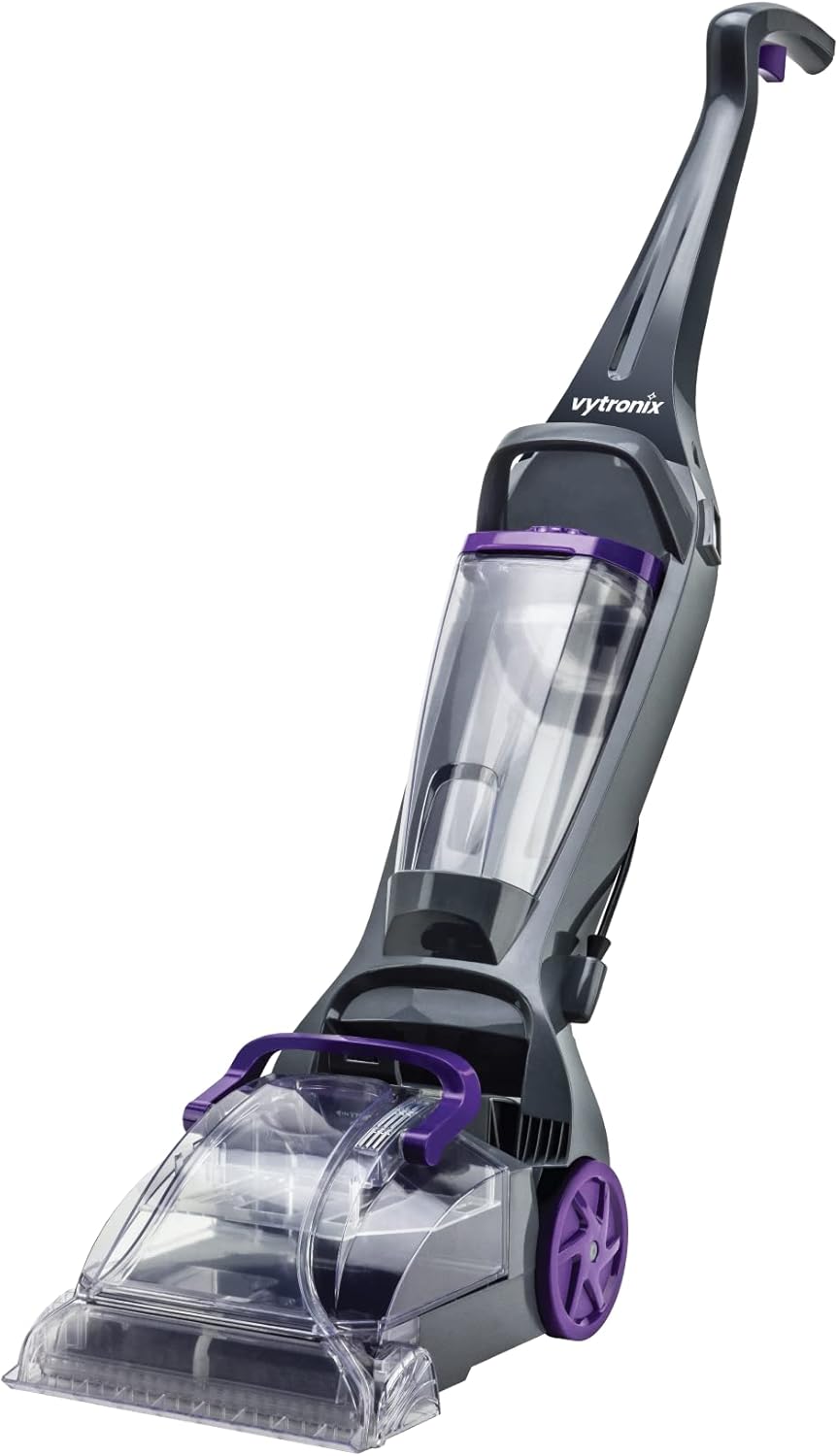
Figure 2.1: Overall view of the VYTRONIX P800CW Carpet Cleaner.

Figure 2.2: Front view highlighting the clear dirty water tank and brush head.

Figure 2.3: Side view showing the handle, main body, and wheels.
Key Components:
- Clean Water Tank: Located at the top, holds clean water and cleaning solution. Capacity: 3 litres.
- Dirty Water Tank: Located at the bottom, collects dirty water extracted from the carpet.
- Brush Bar: Features 5 rows of bristles for effective scrubbing and lifting of dirt.
- Handle: Ergonomically designed for comfortable operation.
- Power Cord: 6-meter length for extended reach.
3. Setup
- Unpack and Assemble: Carefully remove all components from the packaging. Ensure all parts are present and undamaged. The unit typically comes pre-assembled or requires minimal assembly of the handle.
- Fill Clean Water Tank:
- Remove the clean water tank from the main unit.
- Open the tank cap and fill with clean warm water up to the indicated fill line.
- Add the recommended amount of carpet cleaning solution as per the solution manufacturer's instructions. Do not overfill.
- Securely close the tank cap and reinsert the tank into the unit, ensuring it clicks firmly into place.

Figure 3.1: Side view showing the clean water tank ready for filling.
- Prepare Area: Before cleaning, thoroughly vacuum the carpet to remove loose dirt and debris. Move furniture as needed.
- Connect to Power: Plug the power cord into a suitable electrical outlet.
4. Operating Instructions
Follow these steps for effective carpet cleaning:
- Power On: Press the power switch to turn on the carpet cleaner.
- Apply Solution: Push the cleaner forward slowly over the carpet while holding down the spray trigger to apply the cleaning solution.
- Extract Dirty Water: Release the spray trigger and pull the cleaner back slowly over the same area. This action will suction up the dirty water and solution from the carpet.
- Repeat Passes: Continue making overlapping passes, pushing forward with solution and pulling back for extraction, until the area is clean. For heavily soiled areas, multiple passes may be required.
- Monitor Dirty Water Tank: The dirty water tank is transparent, allowing you to monitor its fill level. Empty the tank when it reaches the "MAX" fill line or when suction performance decreases.
- Spot Cleaning: For stubborn spots, pre-treat with a suitable carpet spot cleaner before using the machine.

Figure 4.1: The carpet cleaner in operation, showing the cleaning path.

Figure 4.2: Close-up of the brush bar engaging with the carpet fibers for deep cleaning.
5. Maintenance
Regular maintenance ensures optimal performance and extends the life of your carpet cleaner.
- Empty and Rinse Tanks: After each use, empty both the clean and dirty water tanks. Rinse them thoroughly with clean water to prevent residue buildup and odours. Allow them to air dry before reassembling.
- Clean Brush Bar: Remove any hair or debris tangled around the brush bar. A small brush or comb can be used for this. Ensure the brush bar spins freely.
- Clean Nozzle/Suction Path: Check the suction nozzle and the path to the dirty water tank for any blockages. Clear any debris to maintain strong suction.
- Wipe Down Unit: Wipe the exterior of the cleaner with a damp cloth. Do not use harsh chemicals or abrasive cleaners.
- Storage: Store the carpet cleaner in a dry, cool place, away from direct sunlight and extreme temperatures. Ensure the power cord is neatly wrapped.
6. Troubleshooting
If you encounter issues with your VYTRONIX P800CW, refer to the following common problems and solutions:
| Problem | Possible Cause | Solution |
|---|---|---|
| No Power | Not plugged in; power outlet fault; circuit breaker tripped. | Ensure plug is fully inserted. Test outlet with another appliance. Reset circuit breaker if necessary. |
| No Suction or Poor Suction | Dirty water tank full; dirty water tank not seated correctly; nozzle/suction path blocked; brush bar tangled. | Empty dirty water tank. Ensure tank is securely latched. Clear any blockages from the nozzle or suction path. Clean brush bar. |
| Water Leaking | Clean or dirty water tank not seated correctly; tank cap not closed properly; damaged tank/seal. | Ensure both tanks are securely in place and their caps are tightly closed. Inspect tanks and seals for damage. |
| Poor Cleaning Performance | Insufficient cleaning solution; brush bar not spinning effectively; too fast operation. | Refill clean water tank with solution. Clean brush bar. Operate the cleaner at a slower pace, allowing time for solution application and extraction. |
7. Specifications
| Feature | Detail |
|---|---|
| Brand | VYTRONIX |
| Model Number | P800CW |
| Colour | Purple |
| Product Dimensions | 27 x 44 x 115 cm |
| Item Weight | 7.2 kg (5.6kg operating weight mentioned in feature bullets) |
| Clean Water Capacity | 3 litres |
| Power / Wattage | 800 watts |
| Material | Plastic |
| Special Features | Lightweight (5.6Kg), Large 3.0L Water Tank, Powerful 800W Motor, 5 Rows Of Bristles, Twin Tank Technology |
8. Warranty and Support
For warranty information, please refer to the documentation included with your purchase or visit the official VYTRONIX website. For technical support, spare parts, or service inquiries, please contact VYTRONIX customer service through their official channels.
You can find more information and contact details on the VYTRONIX Store on Amazon.
Ask a question about this manual
Ask about setup, troubleshooting, compatibility, parts, safety, or missing instructions. Manuals+ will review the question and use this page’s manual context to help answer it.