
1. Product Overview
This manual provides detailed instructions for the installation, operation, and maintenance of the aqxreight Brushless Motor Controller. This driver board is designed for 3-phase BLDC motors, offering stable performance and precise speed control across a wide voltage range.
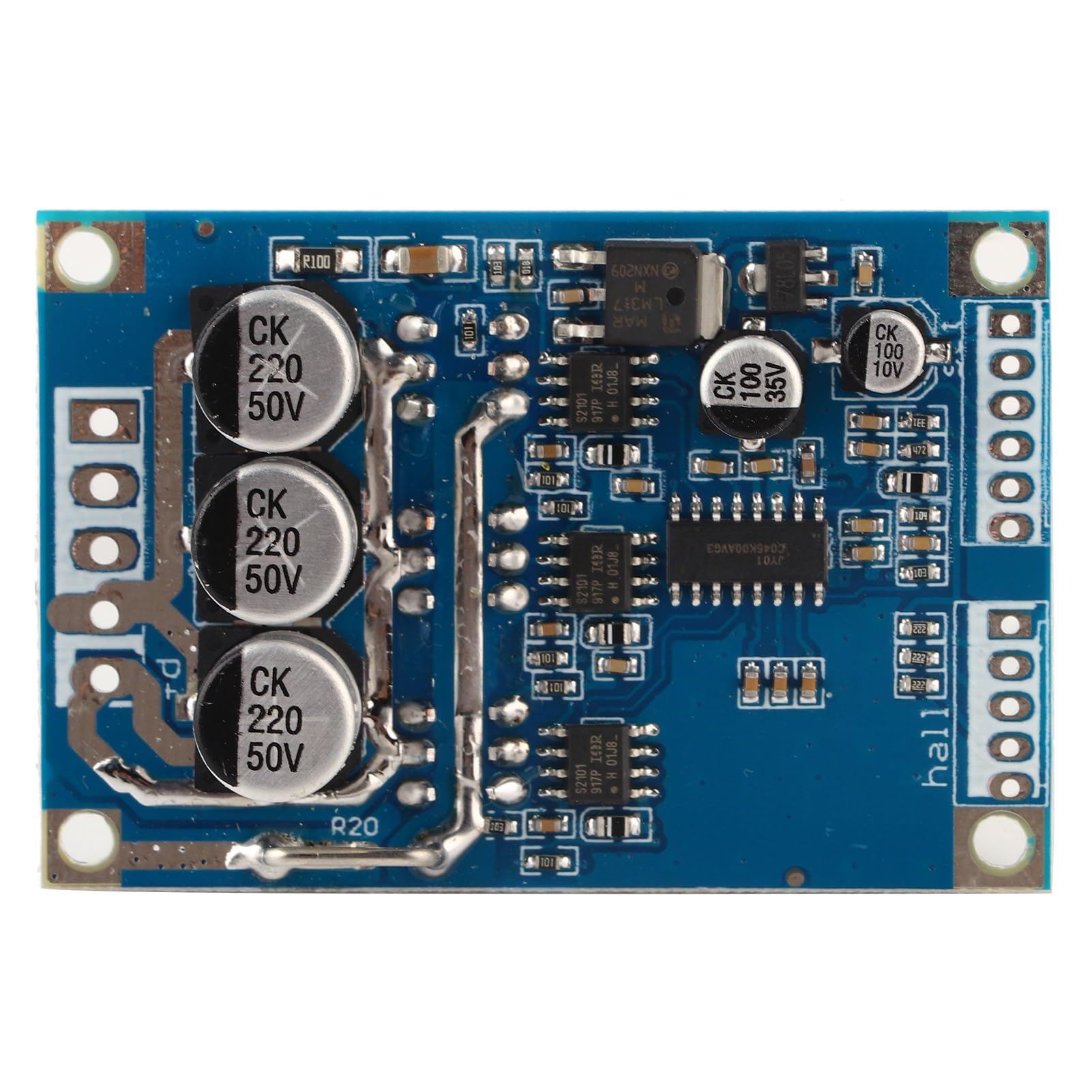
Figure 1: aqxreight Brushless Motor Controller with dimensions. The board measures approximately 6.4cm (2.52in) in length, 4.3cm (1.69in) in width, and 2cm (0.7in) in height.
Key Features:
- Compatibility: Works with most 3-phase BLDC motors within 12V to 36V.
- Performance: Delivers consistent power output up to 500W and handles currents up to 15A.
- Control: Speed voltage adjustment from 0.1V to 5V for fine-tuned motor control, including acceleration and deceleration.
- Dependability: Operates reliably in temperatures from -40 to 85 degrees Celsius.
- Installation: Compact design with straightforward wiring and clear labeling.
2. Specifications
| Parameter | Value |
|---|---|
| Operating Voltage | DC 12V-36V |
| Operating Current | <=15A |
| Driver Power | <=500W |
| Speed Voltage Adjustment | 0.1V-5V |
| Operating Temperature | -40 to 85°C |
| Humidity | 90%RH |
| Stall Protection | Yes |
| Overcurrent Protection | Yes |
| Steering Control | Yes |
| Speed Control | Yes |
| Dimensions (L*W*H) | 63mm * 42mm * 17mm |
| Mounting Hole Distance (Length) | 57mm |
| Mounting Hole Distance (Width) | 36.5mm |
3. Setup and Wiring
Carefully follow these instructions for proper installation and wiring of the brushless motor controller. Ensure all power is disconnected before making any connections.

Figure 2: Top view of the controller board, showing various electronic components and connection points. This view helps in identifying the layout for wiring.
3.1 Power Terminal Output
- VCC: Positive power supply input. Connect to the positive terminal of your DC power source (12V-36V).
- GND: Negative power supply input. Connect to the negative terminal of your DC power source.
- MC (Motor Phase W): Connect to one phase of your 3-phase BLDC motor.
- MB (Motor Phase V): Connect to another phase of your 3-phase BLDC motor.
- MA (Motor Phase U): Connect to the remaining phase of your 3-phase BLDC motor.
3.2 Control Side Connections
- GND (Control Terminal Ground): Common ground for control signals.
- VR (Governor End): Speed adjustment input. Connect a 0.1V-5V signal for motor speed control (0.1V corresponds to 10% speed, 5V to 100% speed).
- ZF (Reversing Control): Connect to 5V or ground to change the motor rotation direction.
- M (Tachometer Pulse Output): Provides pulse output for motor speed feedback. The number of pulses per revolution depends on the motor's pole count.
- EL (Enable Control Terminal): Connect to 5V to enable motor operation. Grounding this terminal stops the motor.
- 5V (Control Terminal): Provides a 5V output for external control components.
3.3 HALL Sensor Connections
If your BLDC motor includes Hall effect sensors for commutation, connect them to these terminals:
- 5V (Hall Power Positive): Positive power supply for Hall sensors.
- Ha (Hall A): Connect to Hall sensor A output.
- Hb (Hall B): Connect to Hall sensor B output.
- Hc (Hall C): Connect to Hall sensor C output.
- GND (Hall Negative): Ground for Hall sensors.

Figure 3: Bottom view of the controller board, illustrating the power MOSFETs and the clearly labeled connection pads for power, control, and Hall sensors. This view is crucial for correct wiring.
Video 1: An overview of the aqxreight Brushless Motor Controller, demonstrating its physical appearance and key features. This video can assist in visual identification during setup.
4. Operating Instructions
Once the controller is correctly wired, follow these steps to operate your BLDC motor:
- Power On: Apply DC power within the 12V-36V range to the VCC and GND terminals.
- Enable Motor: Ensure the EL (Enable Control) terminal is connected to 5V. If grounded, the motor will remain stopped.
- Adjust Speed: Use the VR terminal to control the motor speed. A voltage input from 0.1V to 5V will adjust the speed from 10% to 100% respectively.
- Change Direction: To reverse the motor's rotation, change the state of the ZF (Reversing Control) terminal (e.g., from 5V to ground, or vice-versa).
- Monitor Speed (Optional): If connected, the M terminal will provide pulse signals proportional to the motor's rotational speed.
- Power Off: To stop the motor and power down the controller, disconnect the main DC power supply.
5. Maintenance
The aqxreight Brushless Motor Controller is designed for robust and long-term functionality. To ensure optimal performance and longevity:
- Environmental Conditions: Operate the controller within the specified temperature range of -40 to 85 degrees Celsius and humidity of 90% RH. Avoid exposure to extreme moisture or corrosive environments.
- Cleanliness: Keep the board free from dust, debris, and conductive materials. Use a soft, dry brush or compressed air for cleaning if necessary.
- Connections: Periodically check all wiring connections to ensure they are secure and free from corrosion. Loose connections can lead to intermittent operation or damage.
- Ventilation: Ensure adequate airflow around the controller, especially during high-power operation, to prevent overheating.
6. Troubleshooting
If you encounter issues with your aqxreight Brushless Motor Controller, consider the following:
- Motor Not Starting:
- Verify power supply voltage is within 12V-36V and correctly connected (VCC, GND).
- Check if the EL (Enable Control) terminal is connected to 5V. If grounded, the motor will not run.
- Ensure motor phase wires (MA, MB, MC) are correctly connected to the motor.
- If using Hall sensors, confirm they are correctly wired (5V, Ha, Hb, Hc, GND).
- Incorrect Speed Control:
- Check the voltage input to the VR terminal. It should be between 0.1V and 5V for speed adjustment.
- Ensure the VR signal source is stable and correctly grounded.
- Motor Runs in Wrong Direction:
- Adjust the ZF (Reversing Control) terminal connection (5V or ground) to change direction.
- Alternatively, swap any two of the motor phase wires (MA, MB, MC) to reverse direction.
- Overheating:
- Ensure the motor load does not exceed the controller's 500W/15A rating.
- Provide adequate ventilation around the controller.
- Check for short circuits in the motor or wiring.
- Intermittent Operation:
- Inspect all wiring for loose connections or damaged insulation.
- Verify the stability of the power supply.
If problems persist after checking these points, please contact customer support for further assistance.
7. Warranty and Support
This aqxreight Brushless Motor Controller is covered by a standard manufacturer's warranty. For specific warranty terms and conditions, please refer to the product packaging or contact your retailer.
For technical support, troubleshooting assistance, or inquiries regarding replacement parts, please contact aqxreight customer service through the platform where the product was purchased or visit the official aqxreight store page.