
Jensen RBTTX10
Jensen Portable Wireless Audio Transmitter & Receiver User Manual
Model: RBTTX10
1. Introduction
The Jensen RBTTX10 is a versatile portable wireless audio transmitter and receiver designed to add Bluetooth connectivity to a wide range of audio devices. This device allows you to either transmit audio wirelessly from non-Bluetooth sources to Bluetooth-enabled headphones or speakers, or receive audio wirelessly from Bluetooth-enabled devices to non-Bluetooth audio systems.
With a range of up to 32 feet and a built-in rechargeable battery providing up to 13 hours of playback, the RBTTX10 offers flexible audio solutions for your home, car, or portable entertainment needs.

Image: The Jensen RBTTX10 unit, a compact black rectangular device with a power button on top and an audio jack and TX/RX switch on one end.
2. Key Features
- Dual Functionality: Operates as both a Bluetooth audio transmitter (TX) and receiver (RX).
- Wide Compatibility: Connects to TVs, sound systems, car audio, Nintendo Switch, and other devices via AUX input/output.
- Bluetooth Connectivity: Enables wireless audio streaming with a range of up to 32 feet.
- Extended Playback: Up to 13 hours of continuous audio playback on a single charge.
- Rechargeable Battery: Built-in battery allows for portable use and continuous streaming while charging.
- Low Latency: Designed for real-time, high-quality audio streaming with minimal lag.

Image: The Jensen RBTTX10 unit shown alongside icons indicating its 13-hour playtime, compatibility with TV/sound systems, and 32-foot Bluetooth range.

Image: The Jensen RBTTX10 connected to a home audio receiver, demonstrating its use for real-time audio with low latency, with a television displaying a basketball game in the background.
3. Package Contents
Please check the package for the following items:
- Jensen RBTTX10 Wireless Audio Transmitter & Receiver Unit
- Micro-USB Charging Cable
- AUX Cable (3.5mm audio cable)
- User Manual (this document)
4. Device Layout

Image: A close-up side view of the Jensen RBTTX10, highlighting the 3.5mm audio jack and the TX/RX mode switch.

Image: A close-up side view of the Jensen RBTTX10, showing the micro-USB charging port and three small indicator lights.
Familiarize yourself with the device's ports and controls:
- Power Button: Located on the top surface, used to turn the device on/off and for pairing.
- TX/RX Switch: Located on one end, used to select Transmitter (TX) or Receiver (RX) mode.
- 3.5mm Audio Jack: For connecting to audio sources or output devices via the AUX cable.
- Micro-USB Port: For charging the device using the provided micro-USB cable.
- LED Indicators: Small lights indicating power, charging status, and Bluetooth pairing status.
5. Charging the Device
Before first use, fully charge the RBTTX10. The device can also stream audio while charging.
- Connect the supplied micro-USB charging cable to the micro-USB port on the RBTTX10.
- Connect the other end of the USB cable to a USB power adapter (not included) or a computer's USB port.
- The LED indicator will show charging status (e.g., red for charging, off or blue for fully charged, refer to specific LED behavior in the full manual if available).
- A full charge typically takes approximately 2-3 hours and provides up to 13 hours of playback.
6. Operating Modes
6.1. Transmitter Mode (TX)
In Transmitter (TX) mode, the RBTTX10 sends audio from a non-Bluetooth device (e.g., TV, MP3 player, computer) to Bluetooth-enabled headphones or speakers.
- Set the TX/RX switch on the RBTTX10 to the TX position.
- Connect one end of the 3.5mm AUX cable to the RBTTX10's audio jack.
- Connect the other end of the AUX cable to the audio output (e.g., headphone jack, AUX out) of your non-Bluetooth device (e.g., TV, computer, MP3/MP4 player).
- Turn on the RBTTX10 by pressing and holding the power button until the LED indicator flashes, indicating pairing mode.
- Place your Bluetooth headphones or speakers in pairing mode.
- The RBTTX10 will automatically search for and connect to nearby Bluetooth audio devices. Once connected, the LED indicator will change (e.g., solid blue).
- Play audio on your non-Bluetooth device, and it will be transmitted wirelessly to your Bluetooth headphones or speakers.
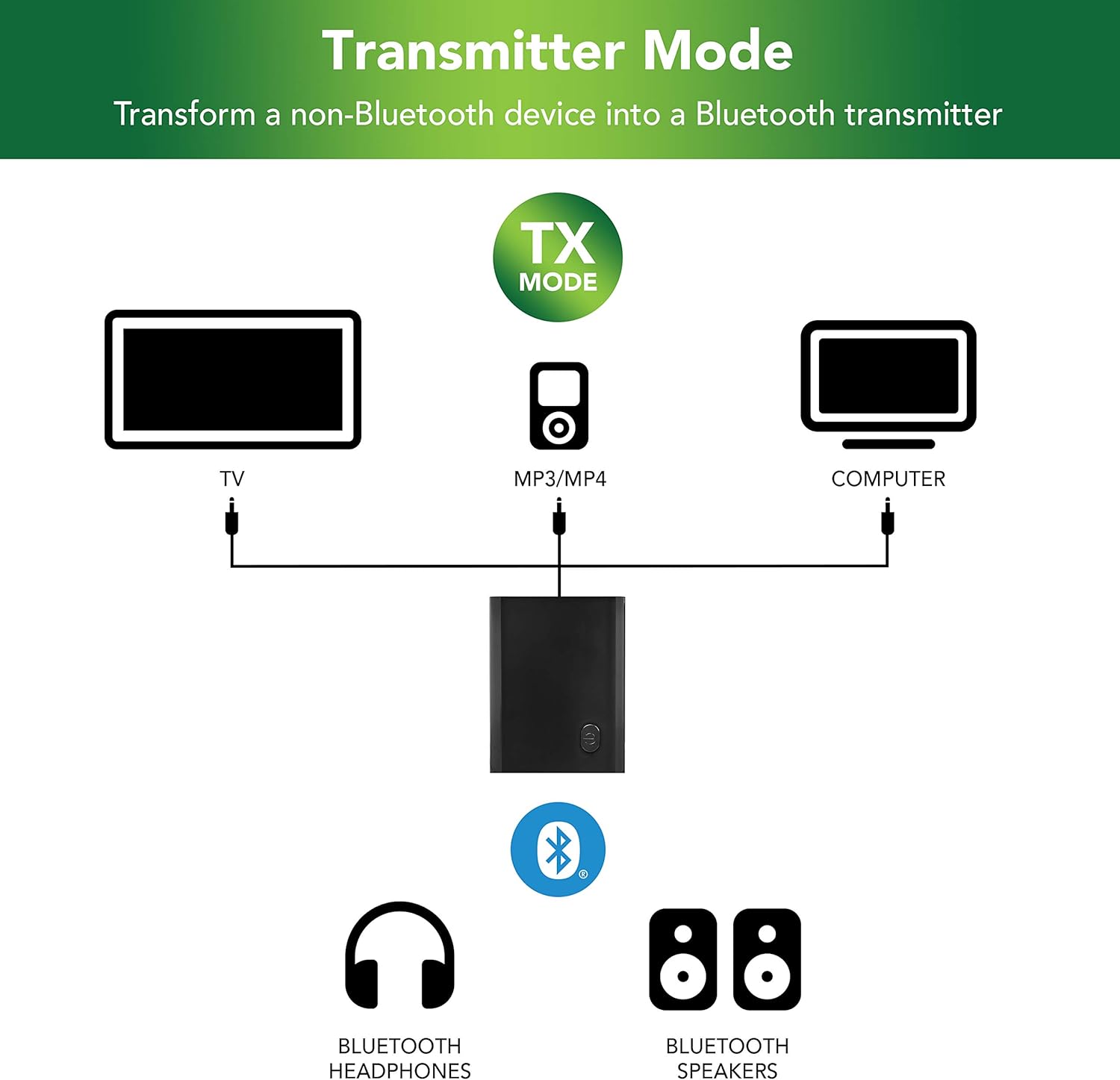
Image: A diagram illustrating the Transmitter Mode (TX) setup, showing the Jensen RBTTX10 connected via AUX cable to a TV, MP3/MP4 player, or computer, and wirelessly transmitting audio to Bluetooth headphones or speakers.
6.2. Receiver Mode (RX)
In Receiver (RX) mode, the RBTTX10 receives audio wirelessly from a Bluetooth-enabled device (e.g., smartphone, tablet, gaming console) and outputs it to a non-Bluetooth audio system (e.g., wired headphones, wired speakers, car AUX input).
- Set the TX/RX switch on the RBTTX10 to the RX position.
- Connect one end of the 3.5mm AUX cable to the RBTTX10's audio jack.
- Connect the other end of the AUX cable to the audio input (e.g., AUX in) of your non-Bluetooth audio system (e.g., wired headphones, wired speakers, car stereo).
- Turn on the RBTTX10 by pressing and holding the power button until the LED indicator flashes, indicating pairing mode.
- On your Bluetooth-enabled device (e.g., smartphone), go to Bluetooth settings and search for "RBTTX10" (or similar device name). Select it to pair.
- Once paired, the LED indicator on the RBTTX10 will change (e.g., solid blue).
- Play audio on your Bluetooth-enabled device, and it will be received by the RBTTX10 and outputted to your connected audio system.

Image: A diagram illustrating the Receiver Mode (RX) setup, showing a phone, gaming console, or tablet wirelessly transmitting audio to the Jensen RBTTX10, which is then connected via AUX cable to wired earphones or wired speakers.
7. Specifications
| Feature | Specification |
|---|---|
| Model Number | RBTTX10 |
| Product Dimensions | 4 x 6.1 x 1.1 inches |
| Item Weight | 0.704 ounces (0.02 Kilograms) |
| Connectivity Technology | Auxiliary, Bluetooth, USB |
| Bluetooth Range | Up to 32 feet |
| Battery Life | Up to 13 hours playback |
| Battery Type | 1 Lithium Ion battery (required) |
| Audio Output Mode | Stereo |
| Color | Black |
| Manufacturer | Voxx Accessories Corp. |
8. Troubleshooting
If you encounter issues with your Jensen RBTTX10, please refer to the following common solutions:
| Problem | Possible Solution |
|---|---|
| Device does not turn on. | Ensure the device is fully charged. Connect it to a power source using the micro-USB cable. |
| Cannot pair with a Bluetooth device. |
|
| No audio output/input. |
|
| Audio quality is poor or intermittent. |
|
9. Safety Information
Please read and follow these safety guidelines to ensure safe operation of your device:
- Do not expose the device to extreme temperatures, direct sunlight, or high humidity.
- Do not disassemble, repair, or modify the device yourself. Refer all servicing to qualified personnel.
- Keep the device away from water and other liquids.
- Use only the provided charging cable.
- Dispose of the device and its battery responsibly according to local regulations.
10. Warranty and Support
For warranty information and technical support, please refer to the official Jensen website or contact their customer service directly. Keep your purchase receipt as proof of purchase.
You can visit the Jensen Store on Amazon for more information: Jensen Store
Related documentsRBTTX10


Ask a question about this manual
Ask about setup, troubleshooting, compatibility, parts, safety, or missing instructions. Manuals+ will review the question and use this page’s manual context to help answer it.