
Introduction
This manual provides essential information for the safe and effective use of your DAYTON G8434544 Fuse Kit. Fuses are critical safety devices designed to protect electrical circuits from overcurrent, preventing damage to appliances and wiring. Please read this manual thoroughly before using the fuse kit.
Safety Information
- Disconnect Power: Always ensure the power supply to the circuit is disconnected before inspecting or replacing fuses. Failure to do so can result in electric shock or injury.
- Use Correct Rating: Only replace a blown fuse with a new fuse of the exact same type and amperage rating. Using a fuse with a higher rating can lead to circuit overload and fire hazards. Using a fuse with a lower rating may cause it to blow prematurely.
- Avoid Contact: Do not touch live electrical components. Use insulated tools when working with electrical systems.
- Professional Assistance: If you are unsure about any electrical procedure, consult a qualified electrician.
Package Contents
Verify that all items are present in your DAYTON G8434544 Fuse Kit:
- Assorted Fuses (various amperage ratings and types)
- Fuse Puller Tool (may be included depending on kit variation)
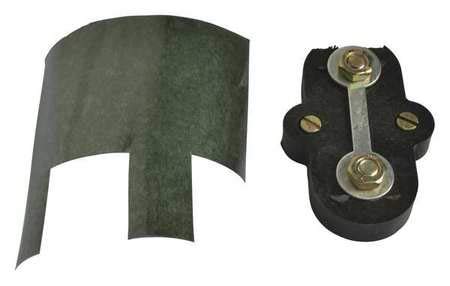
Figure 1: Contents of a typical fuse kit, including various fuses and a fuse puller.
Setup and Installation
Follow these steps to safely replace a blown fuse:
- Identify Blown Fuse: A blown fuse typically has a visible break in its internal wire or a discolored glass/plastic body.
- Disconnect Power: Turn off the power to the circuit or device where the fuse is located. This may involve flipping a circuit breaker or unplugging the device.
- Remove Blown Fuse: Carefully remove the blown fuse. For automotive or blade-type fuses, use the provided fuse puller tool. For glass fuses, gently twist and pull.
- Select New Fuse: Choose a new fuse from your kit that matches the exact amperage (e.g., 10A, 20A) and type (e.g., blade, glass, ceramic) of the blown fuse. Refer to the device's manual or fuse box cover for the correct specifications.
- Insert New Fuse: Insert the new fuse firmly into the fuse holder. Ensure it is seated correctly.
- Restore Power: Turn the power back on to the circuit or device.
Operating Instructions
Fuses are passive safety components and do not require active operation. Their function is to interrupt the circuit when an overcurrent condition occurs. Regularly check the fuses in your electrical systems as part of routine maintenance, especially if a device or circuit stops functioning.
Maintenance
- Storage: Store your DAYTON G8434544 Fuse Kit in a cool, dry place, away from direct sunlight and moisture. Keep fuses organized by type and amperage.
- Inspection: Periodically inspect fuses for any signs of damage or corrosion, even if they haven't blown. Replace any damaged fuses.
Troubleshooting
- Fuse blows immediately after replacement: This indicates a persistent short circuit or overload in the electrical system. Do not continue replacing fuses without addressing the underlying issue. Consult a qualified electrician.
- Device still not working after fuse replacement: The issue may not be fuse-related. Check other components of the device or circuit, or consult a professional.
- Difficulty removing/inserting fuses: Ensure you are using the correct fuse puller tool and applying gentle, even pressure. Do not force fuses, as this can damage the fuse holder.
Specifications
| Specification | Detail |
|---|---|
| Manufacturer | DAYTON |
| Part Number | G8434544 |
| Item Weight | 1.6 ounces |
| Product Dimensions | 4 x 2 x 1 inches |
| Item Model Number | G8434544 |
| Color | Black |
| Item Package Quantity | 1 |
| ASIN | B08SRBHWBF |
| Date First Available | March 14, 2025 |