
Introduction
The Mi Electric Toothbrush T100 is designed to provide an efficient and superior cleaning experience compared to traditional manual toothbrushes. It incorporates advanced features such as high-frequency vibrations, multiple brushing modes, and a smart timer to enhance your daily oral hygiene routine. This manual provides essential information for the proper use, maintenance, and care of your device.

Figure 1: Mi Electric Toothbrush T100 and packaging.
Key Features:
- Ultra Soft Bristles: Designed for effective yet gentle cleaning.
- High-Frequency Vibration: Up to 18,000 vibrations per minute for thorough cleaning.
- Dual Pro Brush Modes: Two distinct modes to suit individual preferences.
- EquiClean Auto Timer: Ensures optimal brushing duration for each quadrant of your mouth.
- IPX7 Waterproof Design: Allows for safe use and easy cleaning under running water.
- Long-Lasting Battery: Up to 30 days of usage on a single charge.
- USB Fast Charging: Convenient and quick recharging.
- LED Indicator: Provides battery status alerts.
- Low Noise Operation: Operates at approximately 60 dB.
- Anti-Slip Design: Ensures a secure grip during use.
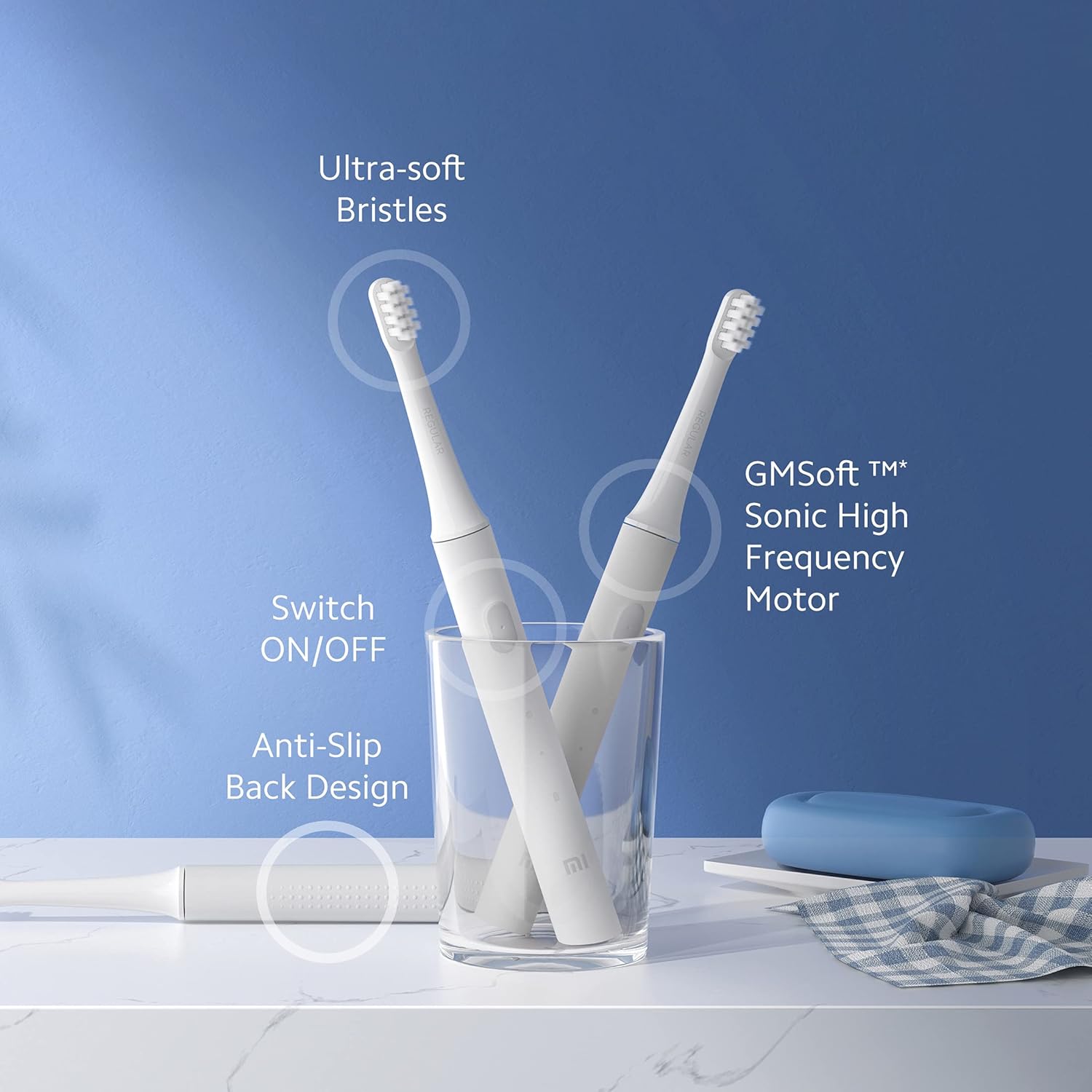
Figure 2: Overview of Mi Electric Toothbrush T100 features.
Package Contents
Before proceeding with setup, please verify that all items are present in the package:
- Mi Electric Toothbrush T100 Handle
- Brush Head (Ultra Soft Bristles)
- USB Charging Cable
- User Manual (this document)
Setup
1. Initial Charging
Before first use, fully charge the toothbrush. The device is equipped with a rechargeable Lithium-Ion battery.
- Locate the USB charging port at the bottom of the toothbrush handle.
- Open the protective cover of the charging port.
- Connect the provided USB charging cable to the toothbrush and a compatible USB power adapter (not included).
- Plug the adapter into a power outlet. The LED indicator on the handle will illuminate to show charging status.
- Allow the toothbrush to charge until the LED indicator shows a full charge (refer to the LED indicator section for details). A full charge typically provides up to 30 days of usage.

Figure 3: USB fast charging port.
2. Attaching the Brush Head
Align the brush head with the metal shaft on the toothbrush handle and push it down firmly until it clicks into place. Ensure it is securely attached before use.
Operating Instructions
1. Brushing Your Teeth
- Wet the bristles and apply a small amount of toothpaste.
- Place the brush head against your teeth at a slight angle towards the gum line.
- Press the power button to turn on the toothbrush.
- Gently move the brush head slowly across each tooth, allowing the high-frequency vibrations to clean. Avoid scrubbing vigorously.
- The EquiClean Auto Timer will pause briefly every 30 seconds to indicate when to move to the next quadrant of your mouth. After 2 minutes, the toothbrush will automatically turn off, signaling the completion of the recommended brushing time.
- After brushing, press the power button again to turn off the toothbrush if it hasn't already.
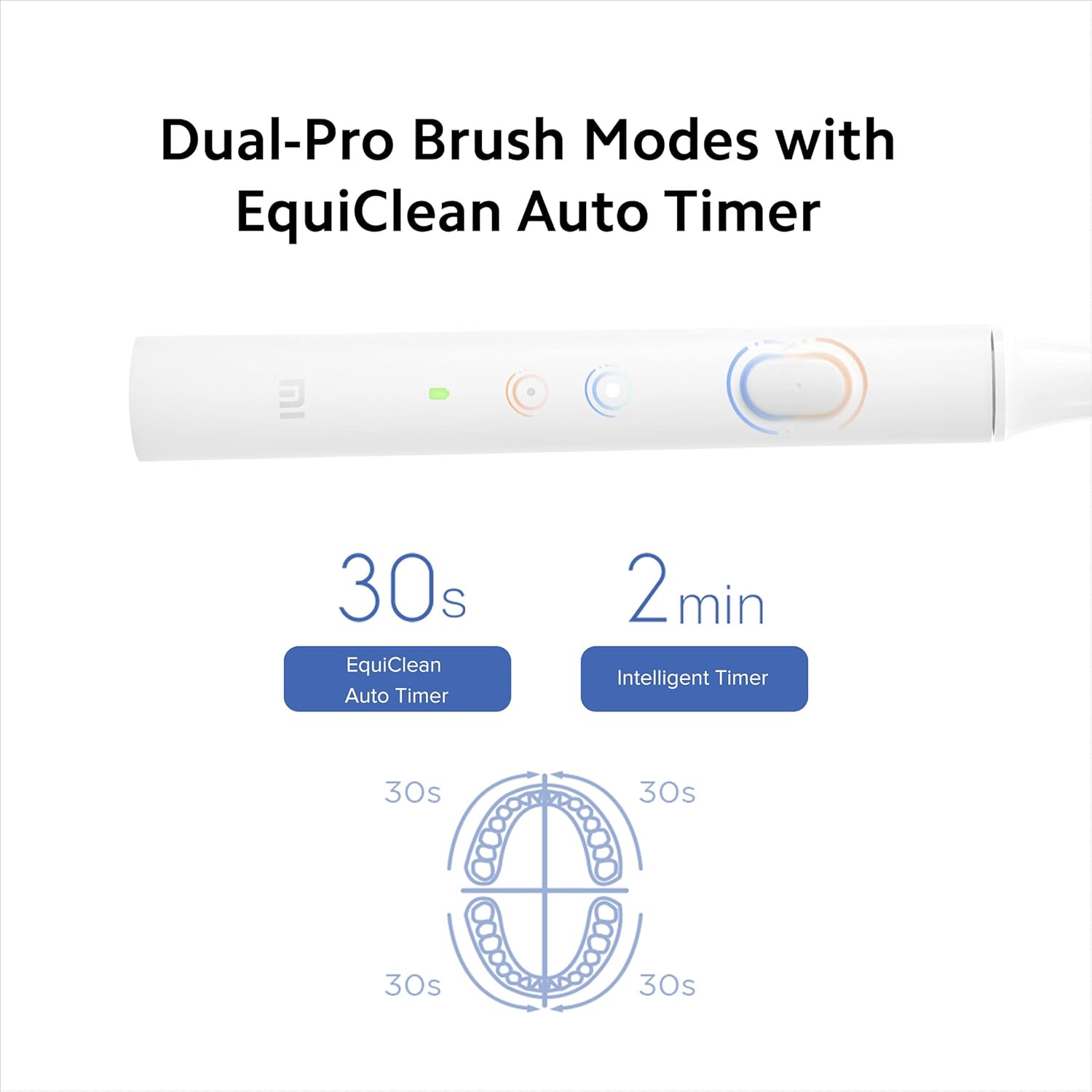
Figure 4: Dual-Pro Brush Modes and EquiClean Auto Timer.
2. Dual Pro Brush Modes
The Mi T100 offers two brushing modes. Press the power button repeatedly to cycle through the modes:
- Standard Mode: For daily cleaning.
- Gentle Mode: For sensitive teeth and gums.

Figure 5: GMSoft Sonic High Frequency Motor for multi-dimensional cleaning.
Maintenance
1. Cleaning the Toothbrush
Regular cleaning ensures hygiene and extends the lifespan of your toothbrush.
- After each use, rinse the brush head thoroughly under running water while the toothbrush is still on to remove any remaining toothpaste or debris.
- Turn off the toothbrush and remove the brush head.
- Rinse both the brush head and the handle separately under running water. Pay attention to the junction area between the head and the handle to prevent accumulation of residue.
- Wipe the handle dry with a soft cloth.
- The toothbrush is IPX7 waterproof, allowing it to be safely rinsed under water.

Figure 6: IPX7 Waterproof design for easy cleaning.
2. Brush Head Replacement
It is recommended to replace the brush head every three months, or sooner if the bristles become frayed or worn. Worn bristles are less effective at cleaning and can irritate gums.
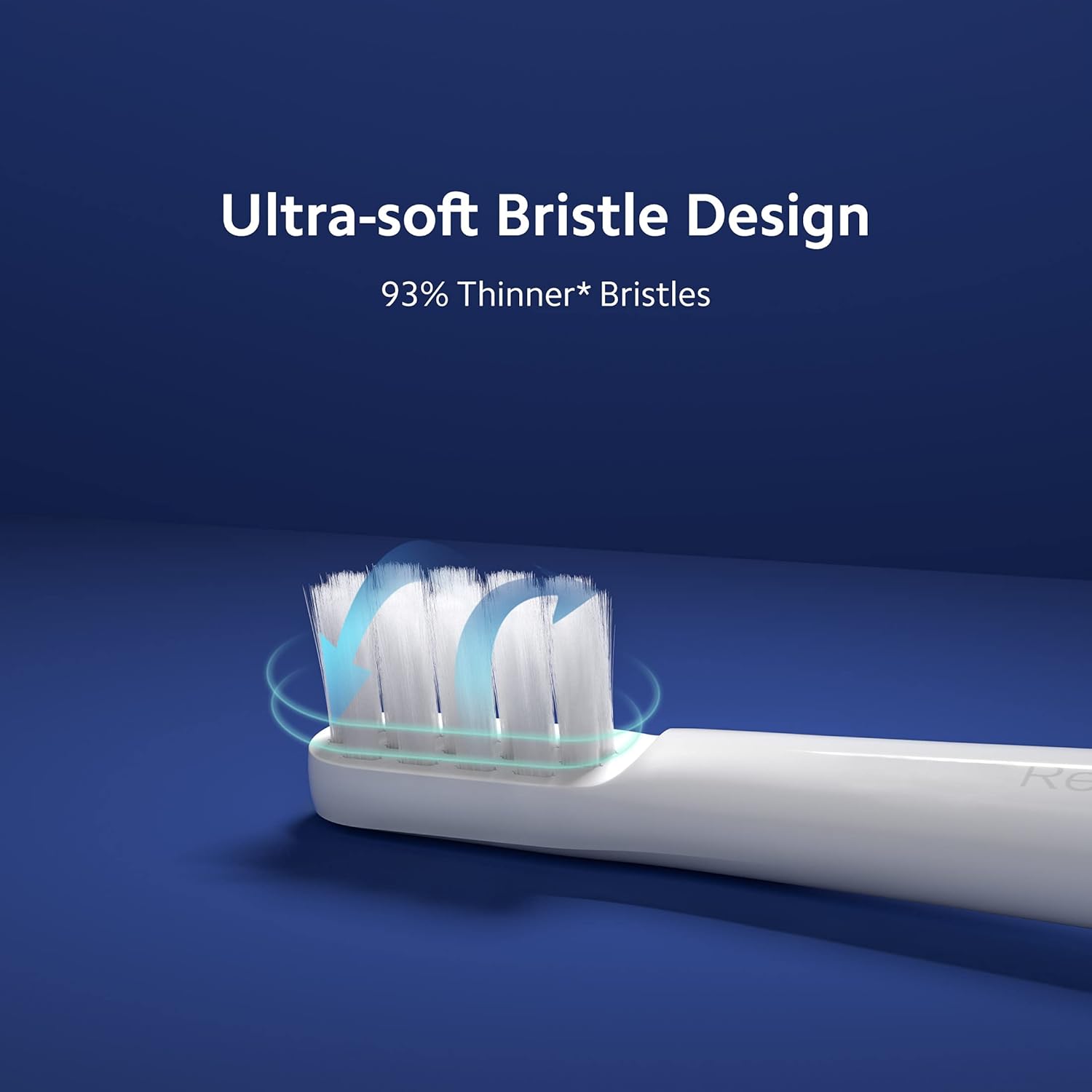
Figure 7: Ultra-soft bristle design.
3. Battery Care
To maintain optimal battery performance, avoid fully discharging the battery frequently. Recharge the toothbrush when the LED indicator signals low battery.
Troubleshooting
If you encounter issues with your Mi Electric Toothbrush T100, refer to the following common problems and solutions:
| Problem | Possible Cause | Solution |
|---|---|---|
| Toothbrush does not turn on. | Low or depleted battery. | Charge the toothbrush fully using the provided USB cable. |
| Reduced vibration intensity. | Low battery or worn brush head. | Recharge the battery. Replace the brush head if it is old or worn. |
| Toothbrush stops unexpectedly during use. | Battery protection mechanism or residue accumulation. | Ensure the battery is sufficiently charged. Clean the junction between the brush head and handle thoroughly to remove any dried toothpaste or water residue. |
| Charging indicator not working. | Faulty cable or power source. | Try a different USB cable or power adapter. Ensure the charging port is clean and free of debris. |
Specifications
| Feature | Detail |
|---|---|
| Model | T100 (Item model number: 26283) |
| Dimensions (LxWxH) | 21.9 x 2.1 x 2 cm |
| Weight | 46 g |
| Vibration Frequency | Up to 18,000 rpm |
| Battery Life | Up to 30 days (based on typical usage) |
| Waterproof Rating | IPX7 |
| Bristle Type | Ultra Soft |
| Power Source | Battery Powered (Rechargeable Lithium-Ion) |
| Noise Level | Approximately 60 dB |
| Color | White |
| Material Feature | Recyclable |
| Recommended Age Range | 15 to 65 years |
| Manufacturer | Wuxi Qinghe Xiaobei Technolody Co. Ltd. |
| Importer | Xiaomi Technology India Pvt. Ltd. |

Figure 8: Low noise design for comfortable use.

Figure 9: Anti-slip design for secure handling.
Warranty and Support
Warranty Information
The Mi Electric Toothbrush T100 comes with a One Year Pan-India Warranty covering all manufacturing defects. Please retain your purchase receipt for warranty claims.
Safety Information
- This product is intended for use by adults.
- Recommended for individuals 18 years and older.
- Do not use if you have severe oral conditions or have recently undergone oral surgery without consulting a dentist.
Customer Support
For further assistance, technical support, or warranty inquiries, please contact Xiaomi Technology India Pvt. Ltd. customer service. Refer to the official MI website or your purchase documentation for contact details.


