
1. Introduction
This manual provides essential information for the safe and efficient operation of your Crown DCi 2|300N 300-watt 2-channel Networked 70V Power Amplifier. Please read this manual thoroughly before installation and use, and retain it for future reference. The Crown DCi 2|300N is designed for professional audio installations, offering reliable power delivery and network control capabilities.
2. Safety Information
WARNING: To reduce the risk of electric shock, do not expose this appliance to rain or moisture. Do not remove cover. No user-serviceable parts inside. Refer servicing to qualified service personnel.
- Read these instructions.
- Keep these instructions.
- Heed all warnings.
- Follow all instructions.
- Do not use this apparatus near water.
- Clean only with a dry cloth.
- Do not block any ventilation openings. Install in accordance with the manufacturer's instructions.
- Do not install near any heat sources such as radiators, heat registers, stoves, or other apparatus (including amplifiers) that produce heat.
- Do not defeat the safety purpose of the polarized or grounding-type plug. A polarized plug has two blades with one wider than the other. A grounding-type plug has two blades and a third grounding prong. The wide blade or the third prong are provided for your safety. If the provided plug does not fit into your outlet, consult an electrician for replacement of the obsolete outlet.
- Protect the power cord from being walked on or pinched, particularly at plugs, convenience receptacles, and the point where they exit from the apparatus.
- Only use attachments/accessories specified by the manufacturer.
- Use only with the cart, stand, tripod, bracket, or table specified by the manufacturer, or sold with the apparatus. When a cart is used, use caution when moving the cart/apparatus combination to avoid injury from tip-over.
- Unplug this apparatus during lightning storms or when unused for long periods of time.
- Refer all servicing to qualified service personnel. Servicing is required when the apparatus has been damaged in any way, such as power-supply cord or plug is damaged, liquid has been spilled or objects have fallen into the apparatus, the apparatus has been exposed to rain or moisture, does not operate normally, or has been dropped.
Proposition 65 Warning: This product may contain chemicals known to the State of California to cause cancer and birth defects or other reproductive harm.
3. Package Contents
Verify that the following items are included in your package:
- Crown DCi 2|300N Power Amplifier
- AC Power Cord
- Rack Mount Hardware (if applicable)
- Quick Start Guide
- Warranty Registration Card
4. Product Overview
The Crown DCi 2|300N is a high-performance, 2-channel power amplifier designed for commercial and installed sound applications. It features 300 watts per channel at 4 ohms, 70V/100V constant voltage output, and integrated BLU link networking for advanced control and monitoring.
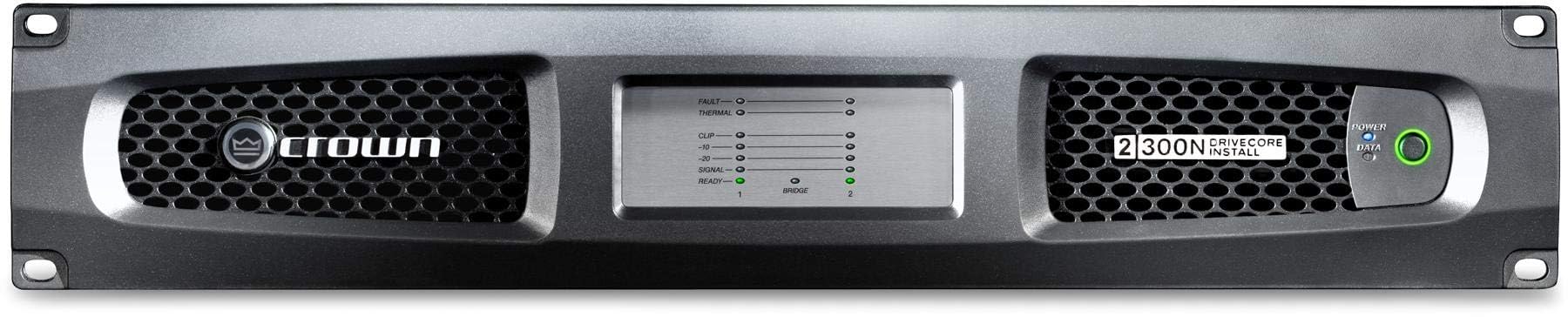
Figure 4.1: Front view of the Crown DCi 2|300N Power Amplifier, showing the power switch, status indicators, and ventilation.
4.1 Front Panel Features
- Power Switch: Turns the amplifier on or off.
- Status Indicators: LEDs for power, signal, clip, and fault conditions for each channel.
- Ventilation Grille: Ensures proper airflow for cooling.
4.2 Rear Panel Connections
- AC Power Inlet: Connects to the main power supply.
- Audio Inputs: Balanced analog inputs for each channel.
- Speaker Outputs: Terminal block connectors for 70V/100V constant voltage or low impedance speaker connections.
- BLU link Ports: RJ45 connectors for network audio and control.
- Network Control Port: RJ45 connector for Ethernet-based control and monitoring.
- GPIO Ports: General Purpose Input/Output for external control.
5. Setup
5.1 Rack Mounting
The DCi 2|300N is designed for standard 19-inch equipment rack mounting. Use the provided rack ears and screws to secure the amplifier in a well-ventilated rack. Ensure adequate space around the unit for airflow.
5.2 Audio Connections
Connect your audio source to the amplifier's input connectors. For speaker outputs, ensure correct wiring for either low impedance (4-8 ohms) or 70V/100V constant voltage systems. Refer to the wiring diagrams in the full technical manual for specific configurations.
- Low Impedance: Connect speakers directly to the appropriate terminals, observing polarity.
- 70V/100V Systems: Connect speakers with appropriate transformers to the 70V or 100V terminals.
5.3 Network Connections (BLU link & Control)
Connect the BLU link ports to other BLU link compatible devices for digital audio transport. Use the Network Control port to connect the amplifier to an Ethernet network for control and monitoring via compatible software (e.g., Audio Architect).
5.4 Power Connection
Connect the supplied AC power cord to the amplifier's AC inlet and then to a grounded power outlet. Ensure the power source matches the amplifier's voltage requirements.
6. Operating Instructions
6.1 Powering On/Off
Press the front panel power switch to turn the amplifier on. The power indicator LED will illuminate. To turn off, press the power switch again. It is recommended to power down all connected equipment before powering off the amplifier.
6.2 Basic Audio Operation
Once powered on and connected, the amplifier will pass audio from its inputs to the connected speakers. Monitor the signal and clip indicators on the front panel to ensure optimal audio levels without distortion. Adjust input levels from your source equipment as needed.
6.3 Network Control
For advanced control and monitoring, connect the amplifier to a network and use Crown's Audio Architect software. This allows for remote adjustment of parameters, monitoring of amplifier status, and integration into larger audio systems.
7. Maintenance
- Cleaning: Periodically clean the exterior of the amplifier with a soft, dry cloth. Do not use liquid cleaners or solvents. Ensure ventilation openings are free from dust and debris.
- Ventilation: Ensure the amplifier has adequate ventilation at all times. Do not block air vents. Overheating can lead to reduced performance and potential damage.
- Cable Inspection: Regularly inspect all power and audio cables for signs of wear or damage. Replace any damaged cables immediately.
8. Troubleshooting
| Problem | Possible Cause | Solution |
|---|---|---|
| No power | Power cord disconnected; no AC power; amplifier fault | Check power cord connection; verify AC outlet is live; if fault persists, contact service. |
| No audio output | Input cables disconnected; speaker cables disconnected; source not playing; amplifier muted/fault | Check all audio connections; verify source operation; check amplifier status indicators for faults or mute status. |
| Distorted audio | Input level too high; speaker impedance mismatch; damaged speaker | Reduce input level; verify speaker impedance matches amplifier output; test with different speakers. |
| Amplifier overheating | Blocked ventilation; excessive load; insufficient airflow | Ensure vents are clear; reduce load; provide adequate ventilation around the unit. |
9. Specifications
- Model: DCI8X300N-U-USFX
- Channels: 2
- Power Output: 300W @ 4 ohm per channel (also supports 70V/100V)
- Network: BLU link, Ethernet Control
- Item Weight: 25.6 pounds
- Product Dimensions: 22 x 22 x 8 inches
- Material Type: Metal
- ASIN: B08SQ4ZC4H
10. Warranty and Support
Crown products are designed for reliability and performance. For detailed warranty information, please refer to the warranty card included with your product or visit the official Crown website. For technical support, service, or replacement parts, please contact your authorized Crown dealer or Crown customer service.
Online Resources: For the latest documentation, software, and support, visit www.crownaudio.com.

