1. Introduction
This manual provides detailed instructions for the proper setup, operation, and maintenance of your Radioddity GM-30 GMRS Radio. Please read this manual thoroughly before using the device to ensure safe and efficient operation.
2. Package Contents
Verify that all items listed below are included in your package:
- 1 x GM-30 radio
- 1 x USB-C charging cable with power adapter
- 1 x Belt clip, wrist strap, earpiece
- User Manual

Description: This image displays the Radioddity GM-30 GMRS radio along with its standard accessories. The radio is shown prominently on the left, with its antenna, display, and keypad visible. To the right, the accessories include a UL certified power adapter, a Type-C charging cable, a wrist strap, an earpiece, and a belt clip. A lithium-ion battery is also shown, highlighting its Type-C charging capability.
3. Product Overview
The Radioddity GM-30 is a compact and robust GMRS handheld radio designed for reliable communication. Familiarize yourself with the main components and controls:
3.1 Physical Components
- Antenna: For transmitting and receiving radio signals.
- Volume/Power Knob: Controls power on/off and audio volume.
- PTT (Push-to-Talk) Button: Press and hold to transmit, release to receive.
- Function Buttons: Programmable buttons for quick access to features.
- Keypad: For manual frequency input, menu navigation, and feature activation.
- LCD Display: Shows channel information, frequency, battery status, and menu options.
- USB-C Charging Port: Located at the bottom of the battery for convenient charging.

Description: This composite image provides close-up views of various features on the Radioddity GM-30 GMRS radio. It highlights the keypad, the LCD display showing channel and frequency information, the USB-C charging port, the side buttons (including PTT), and the top-mounted volume/power knob with an indicator light. These images help users identify and understand the physical controls and ports of the device.
4. Setup
4.1 Battery Installation and Charging
The Radioddity GM-30 comes with a rechargeable Lithium-Ion battery. Ensure the battery is fully charged before initial use.
- Align the battery with the back of the radio and slide it into place until it clicks securely.
- Connect the USB-C charging cable to the port located at the bottom of the battery.
- Plug the USB-C cable into the provided power adapter, and then into a standard wall outlet. The charging indicator on the radio will illuminate.
- A full charge typically takes several hours. The indicator light will change or turn off once charging is complete.

Description: This image shows a close-up of the Radioddity GM-30's battery with the USB-C charging port clearly visible. This port allows for convenient charging of the radio or the battery independently using a standard USB-C cable and adapter.
5. Operating Instructions
5.1 Power On/Off and Volume
To power on the radio, rotate the Volume/Power knob clockwise until you hear a click. Continue rotating to adjust the volume. To power off, rotate counter-clockwise until it clicks off.
5.2 Channel Selection
The GM-30 comes pre-programmed with 30 default channels, including 22 GMRS channels for direct communication and 8 for GMRS repeaters. You can select channels using the up/down buttons on the keypad or by entering the channel number directly.
5.3 Dual-Band Scanning & Receiving
The GM-30 supports dual-band scanning and receiving on both UHF and VHF frequencies, extending beyond standard GMRS channels. This allows for broader monitoring capabilities.

Description: This image illustrates the Radioddity GM-30's dual-band scanning and receiving functionality for UHF and VHF frequencies. The radio is shown actively receiving signals, indicated by wavy lines representing radio waves. Other radios are visible in the background, suggesting a multi-device communication environment. This highlights the radio's versatility in monitoring different frequency bands.
5.4 NOAA Weather Scanning
The radio includes NOAA weather receiving and scanning capabilities, providing access to weather alerts and forecasts.
5.5 GMRS Repeater Capability
The GM-30 is GMRS repeater capable, allowing for extended communication range by utilizing GMRS repeaters. It includes 8 pre-programmed repeater channels and supports up to 24 customizable repeater channels.
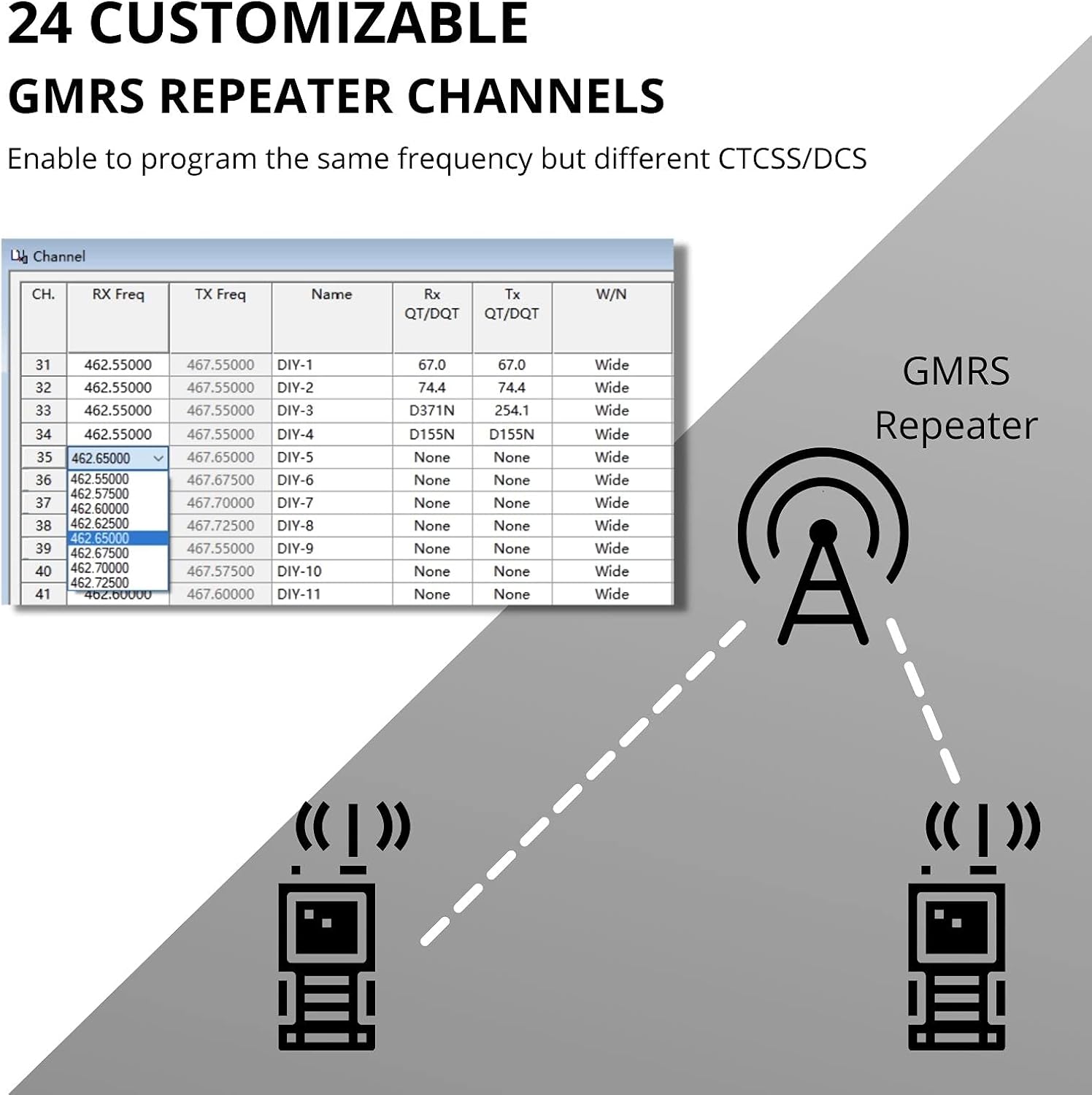
Description: This image visually explains the Radioddity GM-30's capability to program 24 customizable GMRS repeater channels. It shows a table with channel frequencies, RX/TX frequencies, and CTCSS/DCS settings, indicating how users can configure repeaters. A diagram illustrates two radios communicating via a GMRS repeater tower, emphasizing the extended range provided by this feature.
5.6 Display Sync Function
The Display Sync function allows the LCD screen to show both the channel name and frequency simultaneously in single watch mode, enhancing readability.
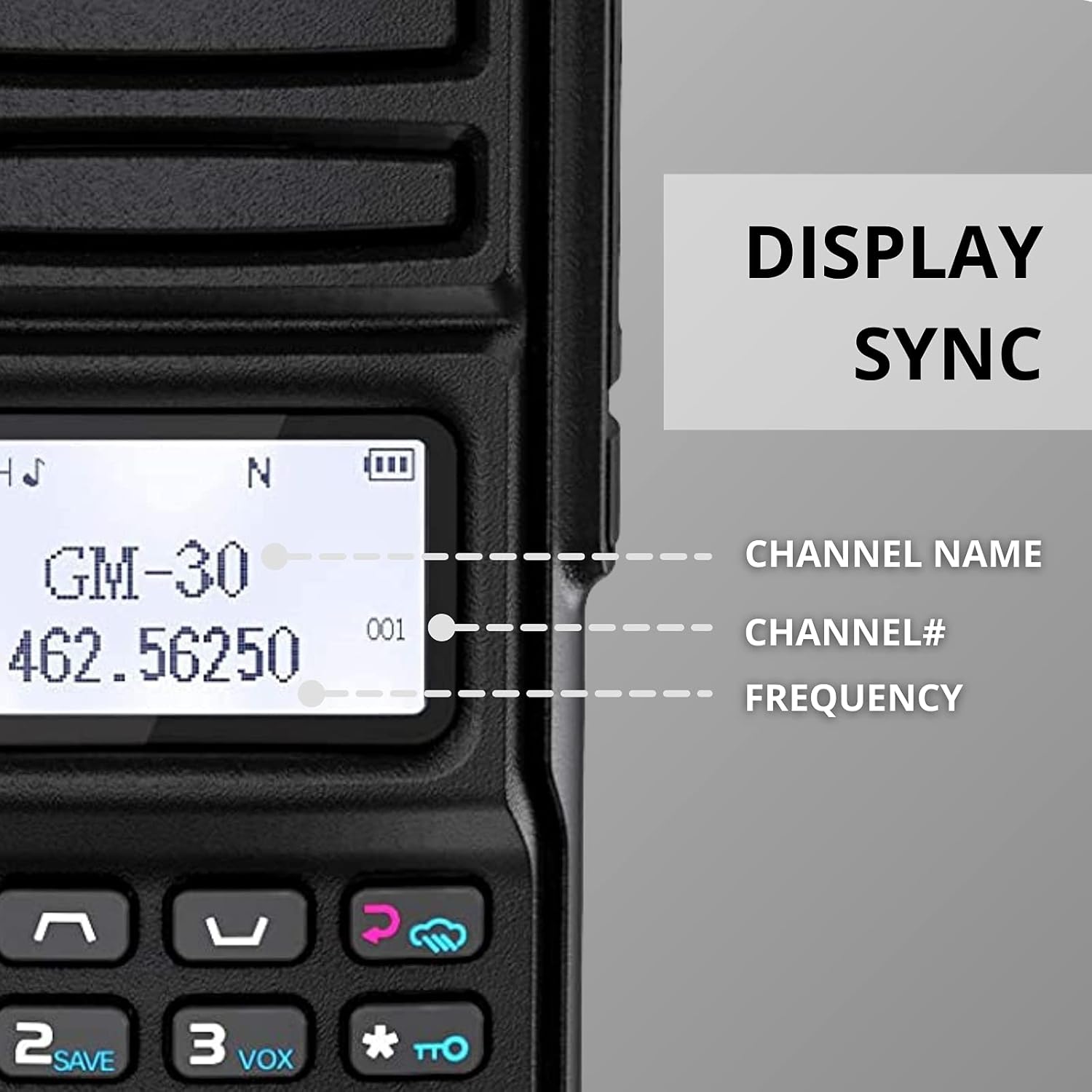
Description: This image highlights the Radioddity GM-30's Display Sync feature. It shows a close-up of the radio's LCD screen displaying
Related Documents - GM-30
 |
Radioddity GM-30 PRO User Manual: Features, Operation, and Safety Comprehensive user manual for the Radioddity GM-30 PRO handheld transceiver, detailing its features, operation, battery management, safety guidelines, and technical specifications for optimal use. |
 |
GM-30 PRO User Manual - Radioddity Comprehensive user manual for the Radioddity GM-30 PRO dual-band handheld transceiver, covering setup, operation, features, and safety guidelines. |
 |
GM-30 PRO User Manual - Radio Operation and Safety Comprehensive user manual for the GM-30 PRO two-way radio, covering setup, operation, battery care, and safety guidelines. Learn about features like dual-band scanning, NOAA weather alerts, and PC programmability. |
 |
Radioddity DB40-G GMRS Radio User Manual Comprehensive user manual for the Radioddity DB40-G GMRS radio, covering features, operation, setup, and technical specifications for optimal performance. Learn how to use your two-way radio effectively. |
 |
How to Connect Radioddity GM-30 Pro with the App A guide on connecting the Radioddity GM-30 Pro walkie-talkie to its companion mobile application via Bluetooth for programming and settings customization. |
 |
The Big Book of Ham Radio: A Comprehensive Guide Explore the exciting world of Ham Radio with 'The Big Book of Ham Radio'. This comprehensive guide covers everything from the history of amateur radio and licensing to shortwave, VHF/UHF, HF, digital modes like DMR and D-STAR, and essential equipment like antennas. Perfect for beginners and experienced operators alike. |