
Segotep GM1250W
Segotep GM1250W ATX 3.0 Gaming Power Supply User Manual
Model: GM1250W | Brand: Segotep
1. Introduction
Thank you for choosing the Segotep GM1250W ATX 3.0 Gaming Power Supply. This fully modular power supply is designed to provide stable and efficient power for high-performance gaming systems, featuring 80 PLUS Gold certification, PCIe 5.0 readiness, and advanced cooling technologies.
Key Features:
- ATX 3.0 & PCIe 5.0 Ready: Supports up to 200% total power excursion and 300% GPU power excursion, ensuring compatibility with the latest graphics cards like NVIDIA 4000 series.
- 80 PLUS Gold Certified: Achieves 91.8% ultra-high power efficiency at typical loads, reducing energy consumption and heat generation.
- 140mm Hydraulic Bearing Fan: Features a durable hydraulic bearing spindle for significantly reduced operating noise and an extended lifespan of up to 100,000 hours.
- Fully Modular Cable Design: Allows for cleaner cable management and improved airflow by using only the necessary cables.
- AI Cooler Technology: Intelligent fan speed adjustment for near-silent operation below 40% Thermal Design Power (TDP) and optimized cooling at higher loads.
- DC-to-DC Conversion: Resonant LLC topology with DC-to-DC conversion provides clean, consistent power and reduces coil whine.
2. Safety Information
Please read and understand all safety instructions before installing or operating the power supply. Failure to do so may result in injury or damage to the product or other components.
- Installation: Always ensure all other computer components are correctly installed before installing the power supply.
- Cable Connections: Verify that all power supply cables are securely and stably fixed to their respective components. Loose connections can cause system instability or damage.
- Ventilation: Ensure adequate airflow around the power supply to prevent overheating. Do not block the fan or ventilation openings.
- Power Source: Connect the power supply only to a grounded electrical outlet with the correct voltage as specified on the unit.
- Moisture: Do not expose the power supply to water or excessive humidity.
- Disassembly: Do not open the power supply unit. High voltages are present inside, and there are no user-serviceable parts. Opening the unit will void the warranty.
The Segotep GM1250W includes full guardian circuit protections to keep your hardware safe, including Over Voltage Protection (OVP), Over Current Protection (OCP), Over Power Protection (OPP), Short Circuit Protection (SCP), Over Temperature Protection (OTP), and Under Voltage Protection (UVP).
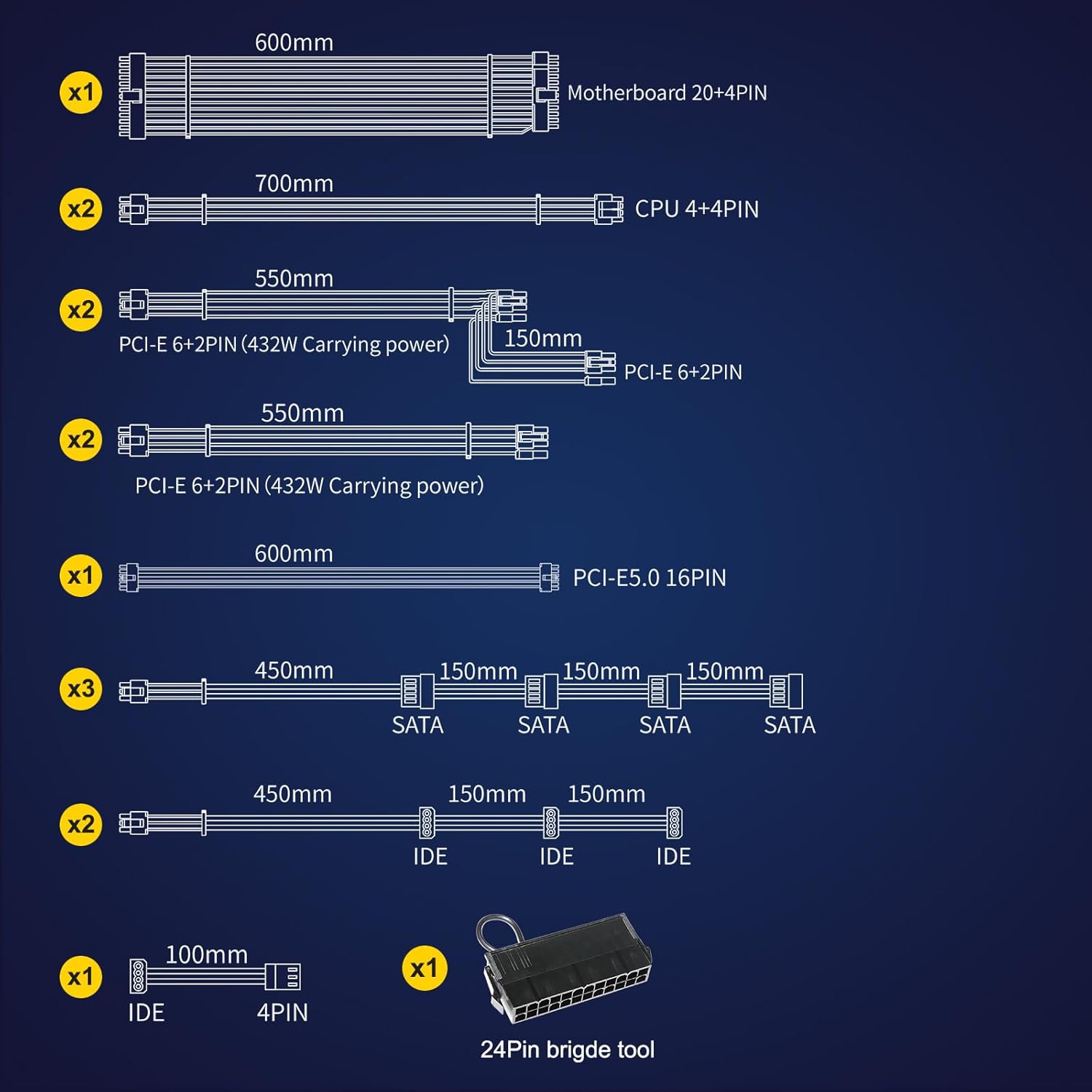
Figure 2.1: Comprehensive Safety Protections
3. Setup and Installation
The Segotep GM1250W features a fully modular design, allowing you to connect only the cables required for your system, which helps reduce clutter and improve airflow within your PC case.
3.1 Unboxing and Components
Upon unboxing, you will find the power supply unit, a power cord, and a set of modular cables. Ensure all components are present and undamaged.

Figure 3.1: Segotep GM1250W Power Supply and Box

Figure 3.2: Included Modular Cables and 24-Pin Bridge Tool
3.2 Installation Steps
- Mount the PSU: Secure the power supply unit into the designated PSU bay in your computer case using the provided screws.
- Connect Main Power: Connect the 20+4 pin ATX motherboard cable to your motherboard.
- Connect CPU Power: Connect the 4+4 pin CPU power cable(s) to the CPU power connector(s) on your motherboard.
- Connect PCIe Power (Graphics Cards):
- For traditional graphics cards, use the 6+2 pin PCIe cables. The PSU provides multiple 6+2 pin PCIe connectors.
- For NVIDIA RTX 40 series and newer GPUs requiring high power, use the dedicated 12VHPWR (PCIe 5.0 16-pin) cable. This connector can deliver up to 600W of power.

Figure 3.3: PCIe 5.0 12VHPWR Connection
- Connect SATA/IDE Devices: Connect SATA power cables to your SSDs, HDDs, or optical drives. Use IDE (Molex) cables for older peripherals or fan hubs if needed.
- Cable Management: Utilize the fully modular design to route cables efficiently, improving airflow and aesthetics.
- Power On: Once all connections are secure, connect the AC power cord to the PSU and a wall outlet. Flip the power switch on the PSU to the 'ON' position.
3.3 Product Overview

Figure 3.4: ATX 3.0 & PCIe 5.0 Ready Features

Figure 3.5: 140mm Hydraulic Bearing Fan

Figure 3.6: 80 PLUS Gold Efficiency
3.4 Official Product Video
Video 3.1: Official Segotep GM1250W Show Video. This video provides a visual overview of the power supply unit and its features.
4. Operating Instructions
4.1 AI Cooler Technology
The Segotep GM1250W incorporates original AI Cooler technology for intelligent fan speed management. This feature optimizes cooling performance while minimizing noise:
- Low Load Operation: When the Thermal Design Power (TDP) is below 40%, the fan automatically adjusts its speed to operate completely below 800 RPM, ensuring near-silent operation.
- High Load Operation: When TDP exceeds 40%, the fan speed automatically adjusts to a range of 800-1500 RPM to maintain optimal temperature control for critical components. This keeps the power supply cooler while generating less noise compared to traditional fan controls.
5. Maintenance
Proper maintenance ensures the longevity and optimal performance of your Segotep GM1250W Power Supply.
- Cleaning: Regularly clean the exterior of the power supply and its fan grille to prevent dust buildup. Use a can of compressed air to gently clear dust from the fan blades and internal components. Ensure the power supply is turned off and unplugged before cleaning.
- Environmental Conditions: Operate the power supply in a well-ventilated area with stable temperature and humidity. Avoid extreme temperatures or dusty environments.
- Cable Inspection: Periodically check all modular cable connections to ensure they remain secure and free from damage.
6. Troubleshooting
If you encounter issues with your Segotep GM1250W Power Supply, refer to the following common troubleshooting steps:
- No Power / System Not Starting:
- Ensure the AC power cord is securely plugged into both the power supply and a working wall outlet.
- Verify the power switch on the back of the PSU is in the 'ON' position.
- Check all modular cable connections (20+4 pin ATX, CPU, PCIe, SATA) to ensure they are firmly seated at both the PSU and component ends.
- Test the wall outlet with another device to confirm it has power.
- System Instability / Random Shutdowns:
- Ensure all cables are securely connected. Loose connections are a common cause of instability.
- Verify that your system's power requirements do not exceed the 1250W capacity of the PSU. While the PSU can handle power excursions, sustained overload can cause issues.
- Check for proper ventilation within your PC case to prevent overheating of components, including the PSU.
- Fan Not Spinning (at low load):
- The AI Cooler technology may keep the fan off or at very low RPMs under low system load for silent operation. This is normal behavior. The fan will spin up as the load increases.
- Unusual Noises:
- Ensure no cables are obstructing the fan blades.
- If coil whine is present, it is often a characteristic of high-performance power supplies and typically does not indicate a fault. The DC-to-DC conversion in this PSU is designed to minimize it.
If issues persist after following these steps, please contact Segotep customer support for further assistance.
7. Specifications
| Feature | Specification |
|---|---|
| Brand | Segotep |
| Model | GM1250W |
| Output Wattage | 1250 Watts |
| Form Factor | ATX |
| Power Supply Design | Full Modular |
| Efficiency Certification | 80 PLUS Gold |
| Cooling Method | Air (140mm Hydraulic Bearing Fan) |
| Compatible Devices | Personal Computer |
| Connector Types | 2×CPU 8pin, 6×PCIe 8pin, 6×SATA, 1×PCIe 5.0 16pin (12VHPWR) |
| Number of Connectors | 14 (various types) |
| Product Dimensions (L x W x H) | 14.37 x 5.31 x 8.39 inches |
| Weight | 8.56 Pounds |
| Date First Available | January 11, 2021 |
8. Warranty and Support
Segotep products are known for their quality and reliability. Based on customer feedback, Segotep generally offers a strong warranty and responsive customer support for their power supplies.
For specific warranty terms and conditions, please refer to the official documentation included with your product or visit the official Segotep website. Keep your proof of purchase for warranty claims.
8.1 Additional Resources
- User Manual (PDF): For a downloadable version of the user manual, please refer to the official product page or the provided link: Segotep GM1250W User Manual PDF
- Segotep Official Store: Explore other Segotep products and find more support information at the official store: Segotep Amazon Store
Related documentsGM1250W


Ask a question about this manual
Ask about setup, troubleshooting, compatibility, parts, safety, or missing instructions. Manuals+ will review the question and use this page’s manual context to help answer it.