
Dekain DT01585

Dekain Projector Lamp User Manual
Model: DT01585
Brand: Dekain
Introduction
This manual provides essential information for the proper installation, operation, and maintenance of your Dekain DT01585 Projector Lamp. This lamp is designed for Hitachi/Christie projectors and features an original Osram bulb inside, ensuring high quality and performance. Please read this manual thoroughly before use to ensure optimal functionality and longevity of your projector lamp.
Product Overview
The Dekain DT01585 Projector Lamp is a high-quality replacement lamp built with original bulbs from OEM manufacturers (UHP, P-VIP, NSH, SHP, UHE, UHM, and HS). The lamp module includes compatible housing made from durable materials, designed for a proper fit. Each lamp undergoes rigorous testing to meet OEM original standards for quality, function, and performance, offering a lifespan significantly longer than economic lamps.

Image: Visual comparison highlighting the superior quality of Dekain OEM lamps over generic alternatives, demonstrating clearer and more vibrant projection.
Using a genuine OEM replacement lamp ensures reliability and compatibility, preventing potential damage or reduced performance that can occur with non-OEM alternatives. OEM lamps also typically come with a warranty, providing added protection and peace of mind.
Video: An official video from Dekain Enterprise explaining the benefits of using a genuine OEM original projector replacement lamp, covering aspects like quality, compatibility, warranty, and reliability.
Installation Guide (Setup)
Follow these steps for safe and effective installation of your new projector lamp:
- Safety First: Before beginning, ensure your projector is completely shut down and unplugged from the power source. Allow the projector to cool down for at least 30 minutes to prevent burns from the hot lamp or internal components.
- Locate Lamp Compartment: Refer to your projector's specific user manual to locate the lamp compartment. This is typically secured by screws or a latch.
- Remove Old Lamp: Carefully open the lamp compartment. Gently unfasten any screws or clips holding the old lamp in place. Grasp the handle of the old lamp module and pull it straight out. Avoid touching the glass part of the old lamp.
- Insert New Lamp: Align the new Dekain lamp module with the slot in the projector. Gently push the new lamp in until it is securely seated. Ensure the electrical connector is well-connected. Do not force the lamp into place.
- Secure Lamp: Fasten any screws or clips that hold the new lamp module in place. Close the lamp compartment cover securely.
- Reset Lamp Timer: After installation, plug in your projector and power it on. Navigate to the projector's menu settings and locate the "Lamp Timer Reset" or similar option. Reset the lamp timer according to your projector's instructions. This is crucial for accurate lamp life tracking.
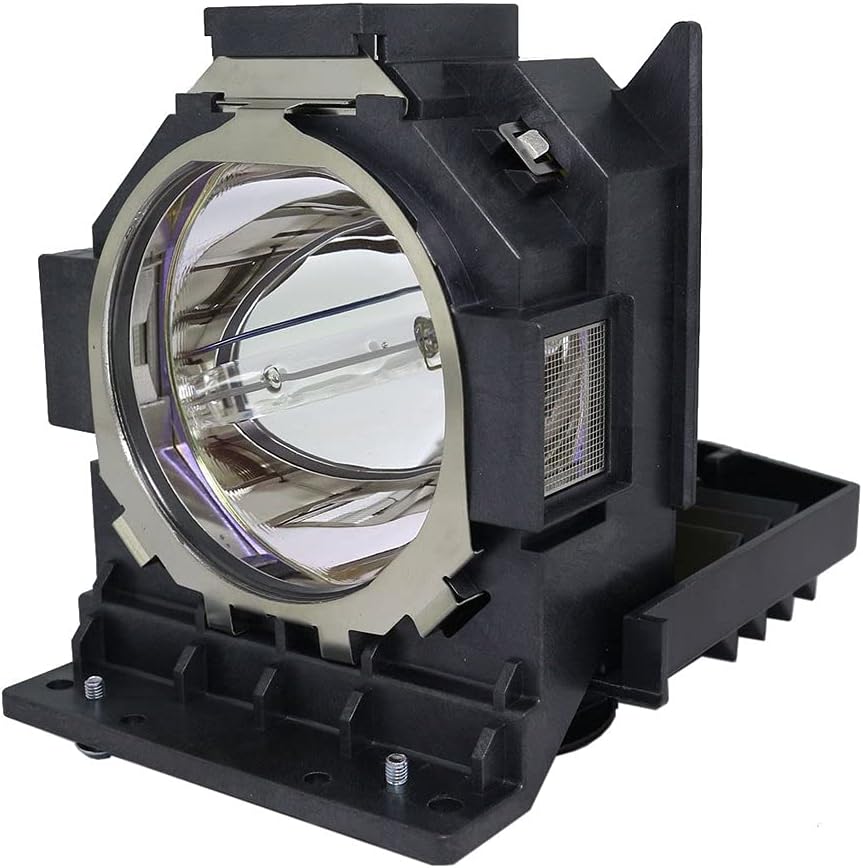
Image: The Dekain DT01585 projector lamp module, showing its integrated housing designed for easy installation.
Operating Guidelines
Once installed, your Dekain projector lamp operates as part of your projector's system. For optimal performance and to maximize lamp life, consider the following:
- Normal Usage: Most projector lamps, including this model, are rated for approximately 2,000-3,000 hours under normal operating conditions.
- Power Saving Mode: Utilizing your projector's power-saving or eco-mode can extend the lamp's lifespan, potentially up to 3,000-5,000 hours.
- Brightness Degradation: Projector lamp lifetime is often rated by "Half-Life," meaning the point at which the lamp's brightness becomes half of its original output. While the lamp may still function, its performance will gradually decrease over time.
- Cool-down Period: Always allow your projector to complete its cool-down cycle after turning it off. This helps to dissipate heat and prolong the lamp's life.

Image: A projector in operation, illustrating the light beam produced by the lamp, emphasizing its function.
Maintenance
Proper maintenance can help extend the life of your projector and its lamp:
- Clean Environment: Operate your projector in a clean, relatively dust-free environment to prevent dust accumulation on the lamp and internal components, which can lead to overheating.
- Air Filter Cleaning: Regularly clean or replace your projector's air filter as recommended by the projector manufacturer. A clogged filter restricts airflow and can cause the lamp to overheat and fail prematurely.
- Avoid Frequent On/Off Cycles: Minimize turning the projector on and off frequently, as this can stress the lamp and reduce its lifespan.
- Proper Shutdown: Always allow the projector to cool down completely after use before unplugging or moving it.
Troubleshooting
If you encounter issues with your projector lamp, consider the following common problems and solutions:
- Lamp Not Lighting Up:
- Ensure the lamp module is securely seated and the electrical connector is properly connected.
- Verify the lamp compartment cover is closed and latched correctly.
- Check if the lamp timer has been reset after installation.
- Confirm the projector is receiving power.
- Dim Image or Poor Color:
- The lamp may be nearing the end of its useful life. Check the lamp timer and consider replacement if hours are high.
- Ensure the projector's air filter is clean and not obstructing airflow, which can affect lamp performance.
- Verify projector display settings (brightness, contrast, color mode).
- Lamp Warning Light On:
- This indicates the lamp is due for replacement or has reached its end of life.
- Ensure the lamp timer was reset after the last lamp change.
- If a new lamp was just installed, recheck installation steps, especially the timer reset.
For persistent issues, consult your projector's specific user manual or contact Dekain customer support.
Specifications
Key technical specifications for the Dekain DT01585 Projector Lamp:
| Feature | Detail |
|---|---|
| Brand | Dekain |
| Model Number | DT01585 |
| Light Type | Metal Halide |
| Wattage | 370 watts |
| Bulb Shape Size | MR20 |
| Bulb Base | Prong |
| Specific Uses For Product | Lamp |
| Unit Count | 1.0 Count |
| UPC | 760660758573 |
Warranty and Support
Dekain OEM lamps typically come with a warranty, providing assurance against manufacturing defects. For specific warranty details and duration, please refer to the product packaging or the seller's information at the time of purchase. The buybox winner indicates a 30-day return policy for refund/replacement.
For technical assistance, troubleshooting, or warranty claims, please contact DEKAIN ENTERPRISE directly through the platform where the product was purchased or refer to their official contact information if available.
Ask a question about this manual
Ask about setup, troubleshooting, compatibility, parts, safety, or missing instructions. Manuals+ will review the question and use this page’s manual context to help answer it.