
Rybozen V401-US
Rybozen 3 Port HDMI Switcher (Model V401-US) User Manual
Model: V401-US | Brand: Rybozen
1. Introduction
The Rybozen 3 Port HDMI Switcher allows you to connect up to three HDMI source devices to a single HDMI display. This device supports 4K (3840x2160P) at 30Hz resolution, HDMI 1.4, and 3D display. It is designed for use with various HDMI devices such as Xbox, PlayStation, Blu-ray players, Apple TV, laptops, and HDTVs.
The switcher features a smart manual operation with a key-press-switching function, eliminating the need to constantly plug and unplug cables. Its gold-plated connectors ensure corrosion resistance and optimal signal transmission.
2. Package Contents
- Rybozen 3 Port HDMI Switcher (V401-US)
- Integrated 1.8ft HDMI Pigtail Cable
- User Manual (this document)
3. Key Features
- 3-Port HDMI Input: Connects up to three HDMI source devices.
- 1-Port HDMI Output: Connects to a single HDMI display.
- 4K Resolution Support: Supports HDTV 4K (3840x2160P) at 30Hz.
- HDMI 1.4 Compatible: Ensures broad compatibility.
- 3D Display Support: Compatible with 3D content.
- Gold Plated Connectors: Enhances durability and signal integrity.
- Plug and Play: No external power adapter required for most setups.
- HD Audio and HDCP Compliant: Supports LPCM, DOLBY AC3, DTS7.1, Direct Stream Digital audio formats.
4. Setup Instructions
Follow these steps to connect your Rybozen HDMI Switcher:
-
Connect to Display: Plug the integrated 1.8ft HDMI pigtail cable from the HDMI Switcher's "OUT" port into an HDMI input port on your HDTV or monitor.

Figure 4.1: Connection Diagram. The HDMI Switcher connects three source devices to one display.
-
Connect Source Devices: Connect your HDMI source devices (e.g., Xbox, PS4, Blu-ray player, laptop) to the "IN1", "IN2", and "IN3" ports on the HDMI Switcher using standard HDMI cables.

Figure 4.2: Input and Output Ports. Connect your source devices to IN1, IN2, or IN3.
-
Power: The HDMI Switcher is designed to be "Plug and Play" and typically draws power from the connected source devices through the HDMI ports.
Note: For some devices, if the HDMI port does not provide sufficient power, the switch may not function correctly. In such cases, ensure at least two or all three source devices are powered on to provide adequate power to the switcher.
5. Operating Instructions
The Rybozen HDMI Switcher features a simple manual selection process:
- Power On Devices: Ensure your display and all connected HDMI source devices are powered on.
-
Select Input: Press the "Select" button on the top of the HDMI Switcher to cycle through the connected input sources (IN1, IN2, IN3).
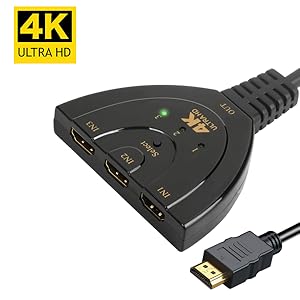
Figure 5.1: Select Button. Press to switch between input sources.
- Indicator Lights: An LED indicator light will illuminate next to the corresponding input number (1, 2, or 3) to show which source is currently active.
The switcher is designed for intelligent switching, meaning it can automatically detect and switch to a newly activated source. However, manual selection is always available via the "Select" button.
6. Maintenance
To ensure the longevity and optimal performance of your HDMI Switcher, follow these maintenance guidelines:
- Cleaning: Use a soft, dry cloth to clean the device. Avoid using liquid cleaners or aerosols.
- Storage: Store the device in a cool, dry place away from direct sunlight and extreme temperatures.
- Handling: Avoid dropping or subjecting the device to strong impacts. Do not attempt to disassemble the unit.
- Cable Care: Ensure HDMI cables are not bent sharply or under strain, as this can damage the cables or ports.
7. Troubleshooting
If you encounter issues with your Rybozen HDMI Switcher, please refer to the following common problems and solutions:
| Problem | Possible Cause / Solution |
|---|---|
| No signal or flickering image. |
|
| No audio. |
|
| Switcher does not automatically switch. |
|
| Specific device compatibility issues (e.g., PS4 Pro 2160P-RGB, Fire TV). |
|
8. Specifications
| Feature | Detail |
|---|---|
| Brand | Rybozen |
| Model Number | V401-US |
| Connector Type | HDMI |
| Number of Ports | 3 Input, 1 Output |
| Resolution Support | 4K (3840x2160P) @ 30Hz, Full HD 1080P, 3D |
| HDMI Version | HDMI 1.4 Compatible |
| HDCP Compliance | HDCP Compliant (Does NOT bypass HDCP) |
| Audio Formats | LPCM, DOLBY AC3, DTS7.1, Direct Stream Digital |
| Cable Length (Pigtail) | 1.8 ft (approx. 55 cm) |
| Power Supply | No external power required (powered via HDMI) |
| Dimensions (Approx.) | 83mm (width) x 15mm (height) - Refer to Figure 8.1 for visual reference. |

Figure 8.1: Approximate Dimensions of the HDMI Switcher.
9. Warranty Information
The Rybozen 3 Port HDMI Switcher (Model V401-US) comes with a 1 Year Parts and Labor Warranty from the date of purchase. This warranty covers manufacturing defects and malfunctions under normal use. It does not cover damage caused by misuse, accidents, unauthorized modifications, or improper installation.
Please retain your proof of purchase for warranty claims.
10. Customer Support
For further assistance, technical support, or warranty inquiries, please contact Rybozen customer service through the platform where you purchased the product. Provide your model number (V401-US) and a detailed description of your issue for efficient support.
Ask a question about this manual
Ask about setup, troubleshooting, compatibility, parts, safety, or missing instructions. Manuals+ will review the question and use this page’s manual context to help answer it.