1. Introduction
Thank you for choosing the tectake Portable Rechargeable Table Fan. This versatile fan is designed for convenience and portability, functioning as both a standing pedestal fan and a compact tabletop fan. Its foldable design and long-lasting battery make it ideal for various settings, including home, office, camping, and travel.
Key Features:
- Multifunctional Foldable Design: Easily transforms from a standing fan (up to 40 inches) to a compact tabletop fan.
- Portable & Rechargeable: Equipped with a 7200mAh battery for cordless operation, perfect for on-the-go use.
- Adjustable Angles: Features a 180-degree adjustable tilt angle and height adjustment from 4 to 40 inches.
- Long Working Life: Provides 5-24 hours of operation on a single charge, depending on speed mode.
- Super Quiet Operation: Operates at a low noise level of 30-40dB.
- Easy to Clean: Detachable design allows for simple cleaning.

The tectake fan can be used as a compact unit, a desk fan, or extended to a standing floor fan.

The fan's portability makes it suitable for outdoor activities like camping and picnics.
2. Safety Information
Please read all safety instructions carefully before using the fan. Keep this manual for future reference.
- Do not insert fingers or any objects into the fan grille when it is operating.
- Keep the fan away from water and moisture. Do not use in wet environments.
- Do not block the air inlets or outlets.
- Ensure the fan is placed on a stable, flat surface to prevent tipping.
- Keep out of reach of children and pets.
- Use only the provided USB charging cable. Do not use damaged cables or chargers.
- Do not attempt to disassemble or repair the fan yourself. Contact customer support for assistance.
- Store the fan in a cool, dry place when not in use for extended periods.
3. Package Contents
Please check the package for the following items:
- tectake Portable Rechargeable Table Fan Unit
- USB Charging Cable
- User Manual
4. Setup
4.1 Initial Charge
Before first use, fully charge the fan. Connect the provided USB charging cable to the fan's charging port and plug the other end into a USB power adapter (not included) or a computer USB port. The indicator lights will show charging status.

The fan charges via USB, typically taking 3-5 hours for a full charge.
A full charge typically takes 3-5 hours. The fan can be used while charging.
4.2 Adjusting Height and Angle
The fan features an adjustable telescopic pole and a 180-degree tiltable head.
- To adjust height: Gently pull the telescopic pole upwards to extend it to your desired height (from 4 to 40 inches). Push down to retract.
- To adjust angle: Tilt the fan head up or down to direct airflow as needed.
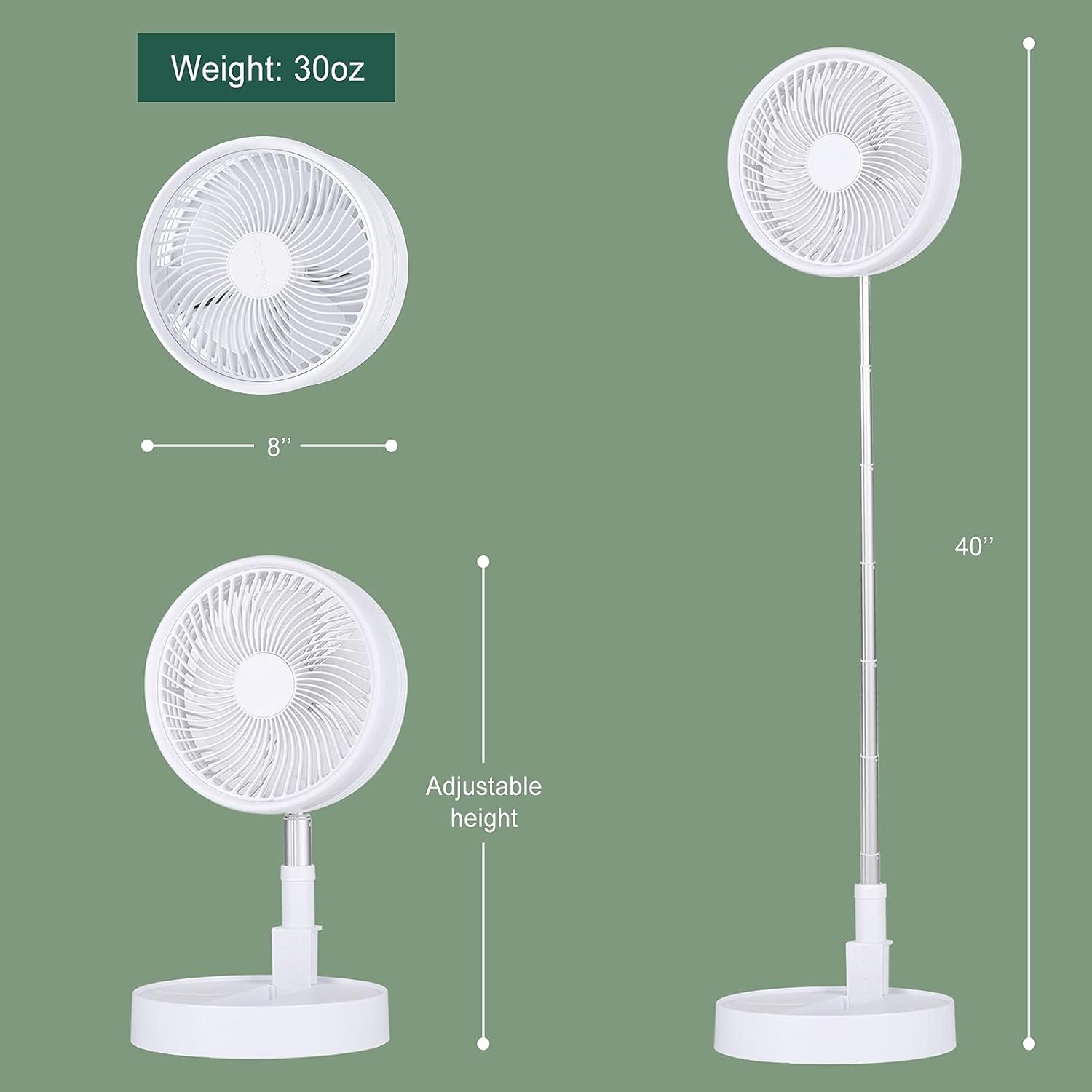
The fan's height can be adjusted from a compact 4 inches to a full 40 inches.
5. Operating Instructions
5.1 Power On/Off
To power on the fan, long press the power button located on the base. Long press again to power off.
5.2 Adjusting Wind Speed
The fan has 3 wind speed modes. Short press the power button to cycle through the speeds:
- First Press: Low speed
- Second Press: Mid speed
- Third Press: High speed

The fan offers three speed modes and operates quietly, making it suitable for use even while sleeping.
5.3 Battery Life
The 7200mAh battery provides extended operation time:
- Low Speed: Up to 24 hours
- Mid Speed: 6-10 hours
- High Speed: 3-6 hours

The fan offers long working times, suitable for extended use during activities.
6. Maintenance
6.1 Cleaning the Fan
To ensure optimal performance and hygiene, regularly clean your fan. The front grille is detachable for easy access to the blades.
- Ensure the fan is powered off and unplugged before cleaning.
- Gently twist or unclip the front grille to remove it.
- Use a soft, damp cloth to wipe down the fan blades and the interior of the grille. For stubborn dust, a mild detergent can be used.
- Allow all parts to dry completely before reassembling.
- Do not use abrasive cleaners or immerse the main unit in water.

The fan's design allows for easy removal of the front cover for thorough cleaning of the blades.
7. Troubleshooting
If you encounter issues with your fan, please refer to the following common problems and solutions:
| Problem | Possible Cause | Solution |
|---|---|---|
| Fan does not turn on. | Low battery or no charge. | Connect the fan to a power source using the USB cable and charge it fully. |
| Fan stops unexpectedly. | Battery is depleted. | Recharge the fan. |
| Weak airflow. | Fan blades are dirty or obstructed. | Clean the fan blades and grille as per maintenance instructions. Ensure nothing is blocking the air intake/outlet. |
| Unusual noise during operation. | Debris caught in blades or fan not on a stable surface. | Turn off and unplug the fan. Check for any foreign objects and remove them. Ensure the fan is on a stable, flat surface. |
If the problem persists after trying these solutions, please contact customer support.
8. Specifications
| Feature | Detail |
|---|---|
| Brand | tectake |
| Model Number | Battery Operated Table Fan |
| Power Source | Battery Powered (7200mAh) |
| Voltage | 5 Volts |
| Wattage | 5 watts |
| Noise Level | 30-40 dB |
| Adjustable Height | 4" to 40" |
| Tilt Angle | 180 degrees |
| Blade Material | Plastic |
| Control Method | Touch / Push Button |
| Item Weight | 3.03 pounds |
| Package Dimensions | 11.65 x 9.21 x 4.57 inches |
| Date First Available | January 6, 2021 |
Key dimensions and adjustable height of the fan.
9. Warranty and Support
tectake stands behind the quality of its products. This product comes with a standard manufacturer's warranty against defects in materials and workmanship. Please refer to the product packaging or contact your retailer for specific warranty terms and duration.
For technical support, troubleshooting assistance, or warranty claims, please contact tectake customer service through the retailer where you purchased the product or visit the official tectake website for contact information.
Please retain your proof of purchase for warranty purposes.


