
Product Overview
The NC Smart Light Switch (Model SW-02) is an in-wall Wi-Fi enabled switch designed for convenient control of your lighting. It offers remote control via a smartphone application, voice control compatibility with Amazon Alexa and Google Home, and scheduling features to automate your home lighting. This switch requires a neutral wire for installation and is designed for single-pole circuits.
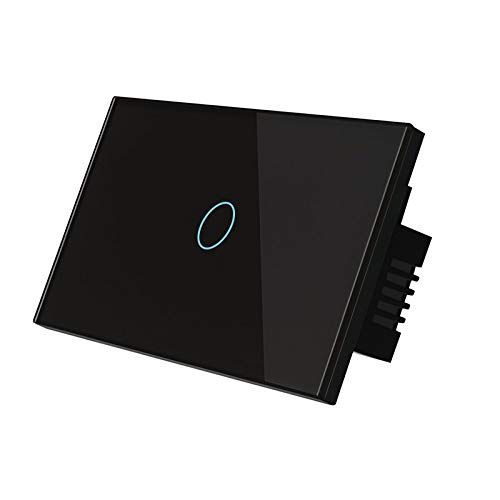
Image: Front view of the NC Smart Light Switch, black with a blue illuminated touch circle.
Setup and Installation
Important: Installation should be performed by a qualified electrician or a person with sufficient knowledge of electrical wiring. Ensure power is turned off at the circuit breaker before beginning installation.
- Power Off: Locate your circuit breaker and turn off the power to the light switch you are replacing. Verify power is off using a voltage tester.
- Remove Old Switch: Carefully remove the existing wall plate and unscrew the old switch from the wall box. Disconnect the wires.
- Identify Wires: Identify the Line (Live), Load, Neutral, and Ground wires. This smart switch requires a neutral wire.
- Wire the Smart Switch: Connect the wires from your wall box to the corresponding terminals on the NC Smart Light Switch. Refer to the wiring diagram provided in the product packaging for precise connections.
- Mount Switch: Gently push the wired switch into the wall box and secure it with screws. Attach the new wall plate.
- Power On: Turn the power back on at the circuit breaker. The indicator light on the switch should illuminate.
- App Download & Pairing: Download the compatible smart home app (e.g., Smart Life, Tuya Smart) from your device's app store. Follow the in-app instructions to add the device and pair it with your Wi-Fi network.

Image: The NC Smart Light Switch seamlessly installed on a wall next to a decorative lamp and potted plant, demonstrating its aesthetic integration into a living space.
Operating Instructions
Manual Control
Simply touch the illuminated circle on the switch panel to turn the connected light on or off.
App Control
Once paired with the smart home app, you can control your light from anywhere with an internet connection. The app allows for:
- Remote On/Off: Turn lights on or off from your smartphone.
- Scheduling: Set timers for lights to turn on or off at specific times (e.g., daily, weekly).
- Countdown Timer: Set a countdown for the light to turn off after a set duration.
- Scene Creation: Group multiple smart devices and control them with a single command.

Image: Visual representation of the light scheduling and countdown timer features, showing a house exterior at dusk and a kitchen interior with lights on, indicating automated lighting control.
Voice Control
The switch is compatible with Amazon Alexa and Google Home. Link your smart home app account to your voice assistant. Use commands such as:
- "Alexa, turn on [device name]."
- "Hey Google, turn off [device name]."
- "Alexa, set [device name] to 50% brightness." (If dimmable, otherwise on/off only)

Image: Depicts the convenience of remote and voice control, showing a baby sleeping peacefully, a woman using a smartphone, and smart speakers (Amazon Echo and Google Home) next to the light switch, illustrating hands-free operation.

Image: A composite image showing the smart light switch integrated into various home environments (garage, kitchen, living room, hallway) and prominently displaying "Works with Amazon Alexa" and "Works with Google Assistant" logos, alongside images of the respective smart speakers.
Maintenance
The NC Smart Light Switch features a luxury toughened glass material for durability and ease of cleaning.
- Cleaning: To clean the switch surface, gently wipe with a soft, damp cloth. Avoid abrasive cleaners or harsh chemicals.
- Safety: The toughened glass is designed to be safe to touch even with wet fingers, waterproof, and prevents leakage. It is also resistant to oxidation and wear for a long lifespan.

Image: Illustrates the features of the luxury toughened glass material, showing a hand touching the switch near a sink and another hand wiping the switch with a cloth, highlighting its safety and ease of cleaning.
Troubleshooting
- Switch Not Responding:
- Check if the circuit breaker is on.
- Ensure the switch is properly wired and all connections are secure.
- If using app/voice control, check your Wi-Fi connection and ensure the switch is online in the app.
- Cannot Connect to Wi-Fi:
- Ensure your Wi-Fi network is 2.4GHz. This switch does not support 5GHz networks.
- Move the switch closer to your Wi-Fi router during the pairing process.
- Restart your Wi-Fi router.
- Perform a factory reset on the switch (refer to app instructions for specific reset procedure).
- Voice Control Not Working:
- Ensure your smart home app account is correctly linked to your Alexa or Google Home account.
- Verify the device name in your smart home app matches the name you are using in voice commands.
- Check your internet connection.
Specifications
| Feature | Detail |
|---|---|
| Model Number | SW-02 |
| Current Rating | 10 Amps |
| Circuit Type | 1-way |
| Connectivity Protocol | Wi-Fi (2.4GHz only) |
| Controller Type | Amazon Alexa, Google Assistant |
| Control Method | App, Remote, Voice |
| Neutral Wire | Required |
| Package Dimensions | 5 x 3.11 x 1.65 inches |
| Item Weight | 5.29 ounces |
| UPC | 788392674978 |
Warranty and Support
For warranty information or technical support, please refer to the contact details provided with your product packaging or visit the official NC website. Keep your purchase receipt for warranty claims.


