
Phlizon FD4000 (PH-F8-I)
Phlizon FD4000 Plant LED Grow Light
User Instruction Manual
1. Product Overview
The Phlizon FD4000 is a high-efficiency LED grow light designed for indoor plant cultivation, providing full spectrum lighting with dimmable and daisy-chain capabilities. This manual provides essential information for the safe and effective use of your FD4000 grow light.

Figure 1.1: Phlizon FD4000 LED Grow Light and accessories.
2. Safety Instructions for Use
Adherence to the following safety instructions is crucial for preventing injury and ensuring proper operation of the Phlizon FD4000 LED Grow Light.

Figure 2.1: Detailed Safety Instructions.
- Children aged 8 and under are not allowed to use this product.
- Individuals with decreased physical, sensory, or mental abilities or lack of experience or knowledge should not use this product under supervision and understanding of the danger.
- Place the equipment and its wires out of reach of children under 8 years old.
- When the device is connected to a power source, do not leave it unattended.
- If the power cord is damaged, the equipment should be scrapped or replaced by the manufacturer, their service agent, or similar qualified personnel to avoid danger.
- The light belongs to class I protection equipment, so the light must be well grounded.
- The power supply should be connected by professionals.
- Before use, make sure that the voltage used is not higher or lower than the specified value in the operation manual.
- For daisy chain operation, the total power cannot exceed the rated power of your timer.
- Do not touch while in operation.
- Do not look directly into lights without protective glasses.
- Only the plug is allowed to connect the power cord. Please do not pull the plug with brute force to pull out the plug.
- Use electricity safely and operate carefully during the installation of light. Avoid touching exposed wires, or you may suffer a fatal electric shock.
- Unplug power cord on rainy days to help prevent lightning strikes. Please unplug the light when cleaning and repairing.
- Do not disassemble, repair or refit the light without the authorization of the manufacturer or non professionals. The maximum operating temperature is 40 C. Do not operate the light above this temperature.
- Do not connect the light to other dimming devices without permission.
- Waterproof IP rate attention: The waterproof rate of the light power driver is IP67, and the waterproof rate of the power cord interface of the lamp is IP20. Therefore, please keep the lamp away from very humid environments.
3. Package Contents
Upon opening the package, verify that all components are present and undamaged. If any items are missing or damaged, contact customer support immediately.
- Phlizon FD4000 LED Grow Light Unit
- Power Cord
- Hanging Kits (Rope Hangers and Steel Wire Hangers)
- Daisy Chain Cables
Figure 3.1: Contents of the Phlizon FD4000 package.
4. Product Features
- Full Spectrum Lighting: Equipped with 1728 high-efficiency SMD LEDs, including 1104pcs 3000K, 288pcs 6000K, 240pcs 660nm red, 48pcs IR (730nm), and 48pcs UV (400nm) LEDs. This spectrum supports all stages of plant growth from germination to flowering.
- High Efficiency and Yield: Utilizes LM281B chips with an efficiency of up to 2.9 µmol/J, designed to maximize plant yield. The actual power consumption is 420 Watts.
- Dimmable Functionality: The light intensity can be adjusted to suit the specific needs of plants at different growth stages.
- Daisy Chain Capability: An innovative feature allowing up to 50 units to be linked together and controlled from a single dimmer, eliminating the need for separate controllers.
- Optimal Coverage: Provides a coverage area of 6x6ft during the vegetative stage and 5x5ft for the flowering stage.
- Efficient Heat Dissipation: Features a thick aluminum heat sink design, ensuring the light runs cooler and extends its lifespan compared to thinner aluminum boards.

Figure 4.1: Full Spectrum LED configuration and Spectral Power Distribution (SPD).
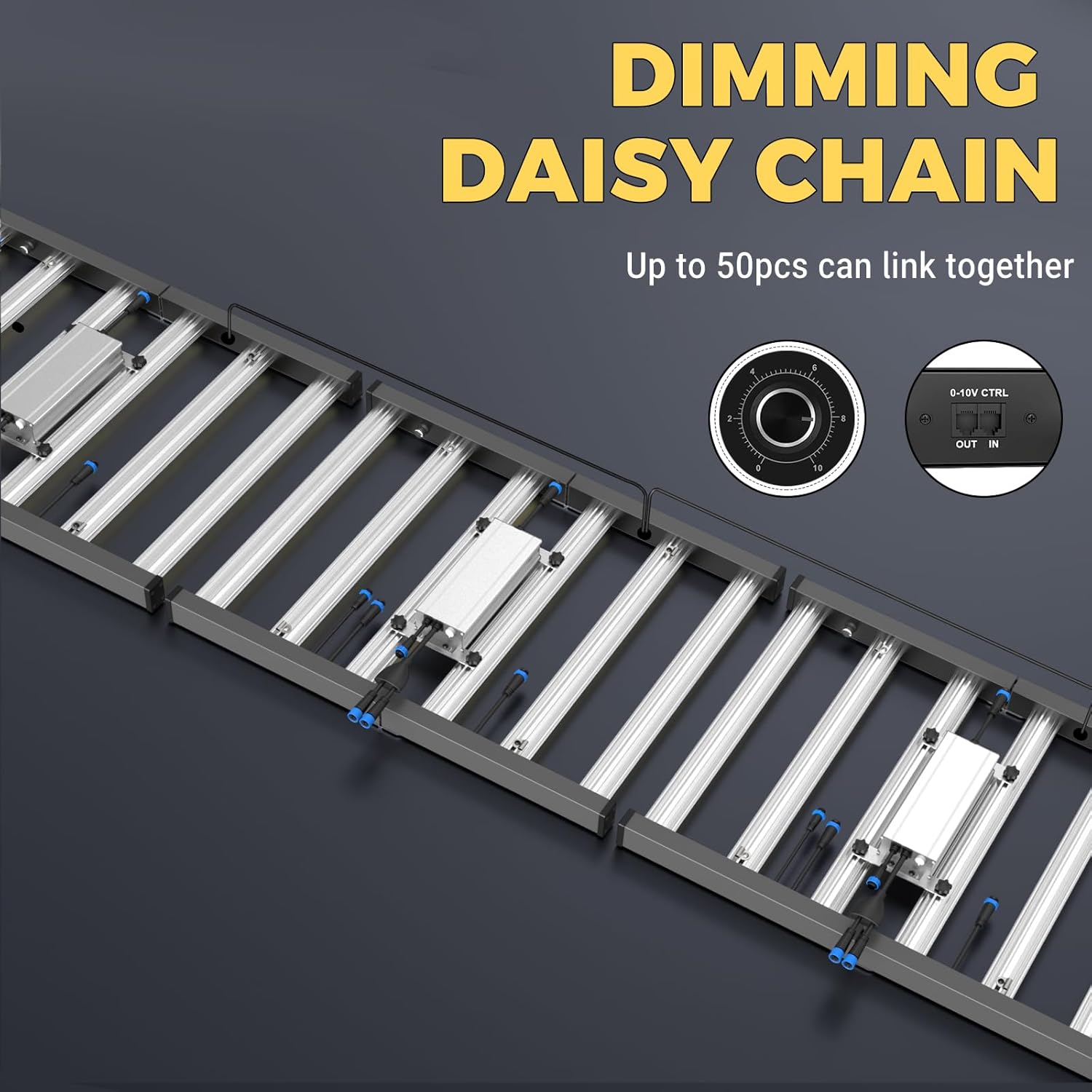
Figure 4.2: Dimming dial and daisy chain ports.

Figure 4.3: Heat sink design comparison for improved cooling.
5. Installation and Setup
Follow these steps to properly install and set up your Phlizon FD4000 LED Grow Light.
5.1 Unfolding and Assembly
The FD4000 light is designed for easy unfolding and requires no complex installation. Simply unfold the light bars into their operational position.
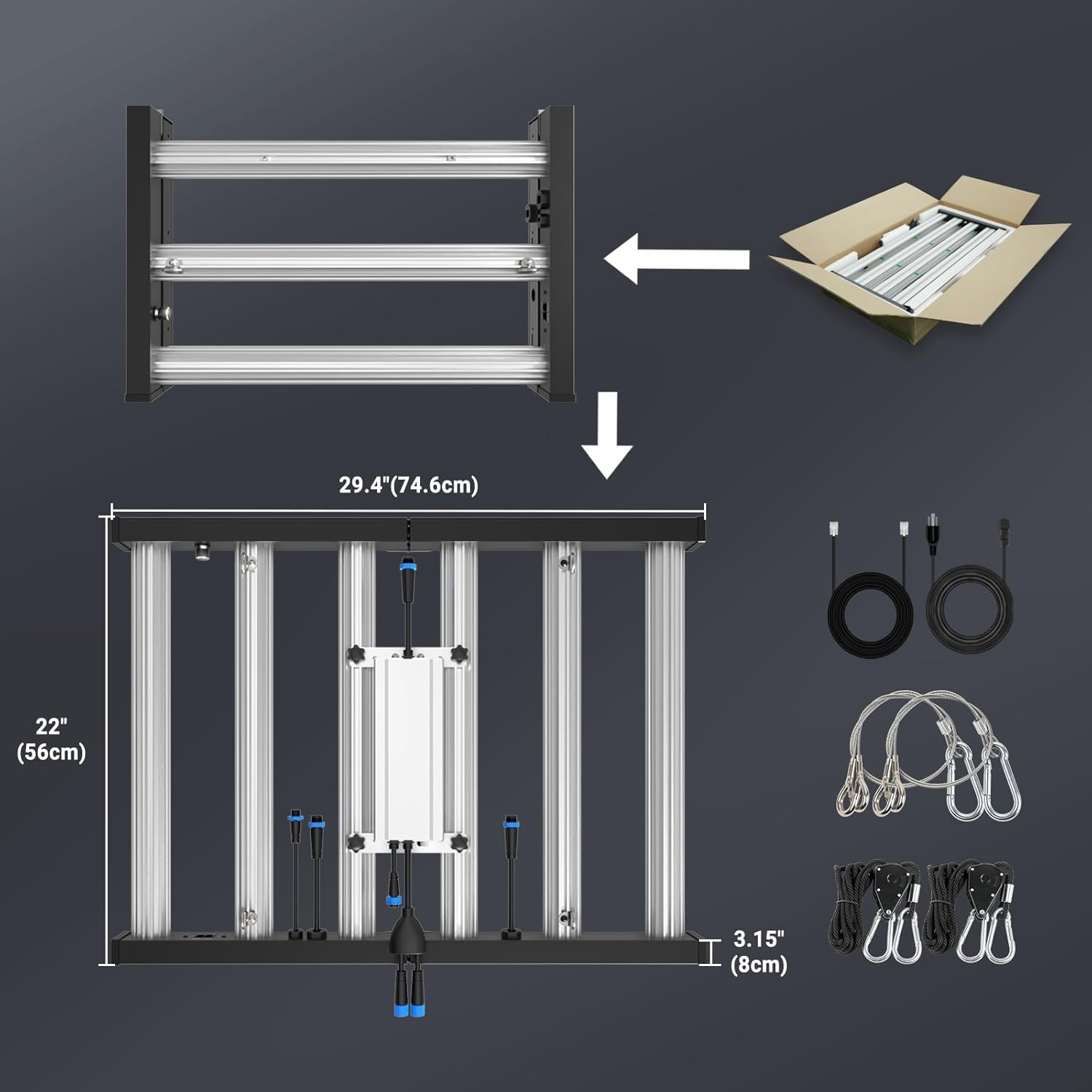
Figure 5.1: Unfolding the Phlizon FD4000 for use.
5.2 Hanging the Light
Use the provided hanging kits (rope hangers and steel wire hangers) to suspend the light securely above your plants. Ensure the hanging structure can support the weight of the light (approximately 13 pounds).
5.3 Power Connection
Connect the power cord to the light and then to a grounded electrical outlet. Ensure the voltage matches the product specifications (100-240Vac).
5.4 Daisy Chain Connection (Optional)
To connect multiple FD4000 lights, use the provided daisy chain cables. Link the 'OUT' port of one light to the 'IN' port of the next. Up to 50 lights can be connected in a single daisy chain. The dimmer on the first light will control all connected lights.
6. Operation Guide
The Phlizon FD4000 offers flexible control to optimize light delivery for various plant growth stages.
6.1 Dimming Control
The integrated dimmer allows you to adjust the light intensity from 0% to 100%. Rotate the dial to increase or decrease the brightness according to your plants' needs.
6.2 Recommended Settings for Growth Stages
The following table provides general recommendations for hanging distance, dimming percentage, and daily light cycle for different plant growth stages. These are starting points and may need adjustment based on specific plant types and environmental conditions.

Figure 6.1: Recommended settings for Germination, Seedling, Veg, and Bloom stages.
| Growth Stage | Distance (inches) | Dimming (%) | Time (hours/day) |
|---|---|---|---|
| Germination | 16" | 15%-20% | 14h/day |
| Seedling | 16" | 20%-25% | 18h/day |
| Vegetative (Veg) | 16" | 45%-50% | 18h/day |
| Flowering (Bloom) | 16" | 85%-100% | 12h/day |
7. Maintenance
Regular maintenance ensures the longevity and optimal performance of your FD4000 grow light.
- Cleaning: Ensure the light is unplugged before cleaning. Gently wipe the surface of the light and LED boards with a soft, dry cloth to remove dust and debris. Do not use liquid cleaners or abrasive materials.
- Ventilation: Ensure adequate airflow around the light to facilitate heat dissipation. Do not block the heat sink fins.
- Cable Inspection: Periodically inspect the power cord and daisy chain cables for any signs of wear, cuts, or damage. Replace damaged cables immediately.
- Environmental Conditions: Avoid operating the light in excessively humid environments, as the power cord interface has an IP20 rating. The maximum operating temperature is 40°C; do not exceed this.
8. Troubleshooting
If you encounter issues with your Phlizon FD4000 grow light, refer to the following common troubleshooting steps.
- Light Does Not Turn On:
- Check if the power cord is securely plugged into both the light and the electrical outlet.
- Verify that the electrical outlet is functional by testing it with another device.
- Ensure the dimmer dial is not set to 0%.
- If using a daisy chain, ensure the first light in the chain is powered and its dimmer is on.
- Light Flickers or Dims Unexpectedly:
- Check for loose connections in the power cord or daisy chain cables.
- Ensure the total wattage of lights in a daisy chain does not exceed the rated power of your timer or circuit.
- Verify that the operating temperature does not exceed 40°C.
- Some LEDs Are Not Lit:
- While rare, individual LED diodes can fail. If a significant number of LEDs are out, contact customer support. Note that IR (730nm) LEDs may appear dim or unlit to the naked eye as they emit light outside the visible spectrum.
If the problem persists after attempting these steps, please contact Phlizon customer support for further assistance.
9. Technical Specifications
Detailed specifications for the Phlizon FD4000 LED Grow Light.

Figure 9.1: Key technical specifications.
| Attribute | Value |
|---|---|
| Model Number | PH-F8-I |
| Actual Power Consumption | 420 Watts |
| Input Voltage | 100-240Vac, 50/60Hz |
| LED Quantity | 1728 pcs SMD LEDs |
| LED Spectrum | Full Spectrum (3000K, 6000K, 660nm Red, IR 730nm, UV 400nm) |
| Light Efficacy | 2.9 µmol/J |
| Coverage Area (Veg) | 6x6 ft |
| Coverage Area (Flower) | 5x5 ft |
| Lifespan | ≥50,000 hours |
| Dimensions (L x W x H) | 36" x 26" x 3" (approx. 91.4cm x 66cm x 7.6cm) |
| Item Weight | 13 Pounds (approx. 5.9 kg) |
| Material | Aluminum |
| Dimmable | Yes |
| Daisy Chain Function | Yes (up to 50 units) |
| Operating Temperature | Max 40°C |
| Waterproof Rating (Driver) | IP67 |
| Waterproof Rating (Cord Interface) | IP20 |
9.1 PPFD Map
The PPFD (Photosynthetic Photon Flux Density) map illustrates the light intensity distribution at different heights and areas, crucial for optimizing plant growth.

Figure 9.2: PPFD map at 12" (30cm) and 18" (45cm) heights.
9.2 Energy Information
For detailed product data and energy efficiency information, refer to the official EPREL database.

Figure 9.3: Energy Label.
Access the product data sheet and energy label details via the EPREL database: https://eprel.ec.europa.eu/qr/1895202
10. Warranty and Support
Phlizon stands behind the quality of its products. The FD4000 LED Grow Light comes with a manufacturer's warranty. For specific warranty terms and duration, please refer to your purchase documentation or contact customer support.
10.1 Customer Support
If you have any questions, require technical assistance, or need to report an issue, please contact our professional R&D team and customer service.
- Email: support@phlizon.net

Figure 10.1: Product label with manufacturer and contact details.
Ask a question about this manual
Ask about setup, troubleshooting, compatibility, parts, safety, or missing instructions. Manuals+ will review the question and use this page’s manual context to help answer it.