
Sonicwall NSA2700
SonicWall NSA 2700 User Manual
Model: NSA2700
1. Product Overview
The SonicWall Network Security Appliance (NSA) 2700 is a next-generation firewall designed for businesses with 250 users and up. It provides advanced threat protection against ransomware, attacks on non-standard ports, and firewall breaches. The NSA 2700 integrates cloud-based and on-box capabilities including TLS/SSL decryption and inspection, application intelligence and control, secure SD-WAN, real-time visualization, and WLAN management.
Key features include:
- 1 RU Form Factor
- 16 x 1 GbE interfaces
- 3 x 10 GbE interfaces
- 2 Gbps Threat and Malware Analysis Throughput
- Enterprise Internet Edge Ready
- Secure Remote Workers via SonicWall NetExtender SSL-VPN client.
- Built-in Wireless Controller for high-speed wireless security when combined with SonicWall SonicWave access points.

Figure 1.1: Front view of the SonicWall NSA 2700 network security appliance.

Figure 1.2: Labeled front panel of the NSA 2700, highlighting the 1 GbE Management port, Dual USB Ports, Console port, 3 x 10-GbE SFP+ Ports, and 16 x 1-GbE Ports.
2. Setup and Deployment
The SonicWall NSA 2700 supports two primary deployment options for medium and distributed enterprises: Internet Edge Deployment and Medium and Distributed Enterprises Deployment.
2.1. Internet Edge Deployment
In this configuration, the NSA 2700 protects private networks from malicious internet traffic. It allows for high port density, including 10 GbE connectivity, and provides visibility and inspection of encrypted traffic (TLS 1.3) without performance compromise. It integrates security services like malware analysis, cloud app security, URL filtering, and reputation services.
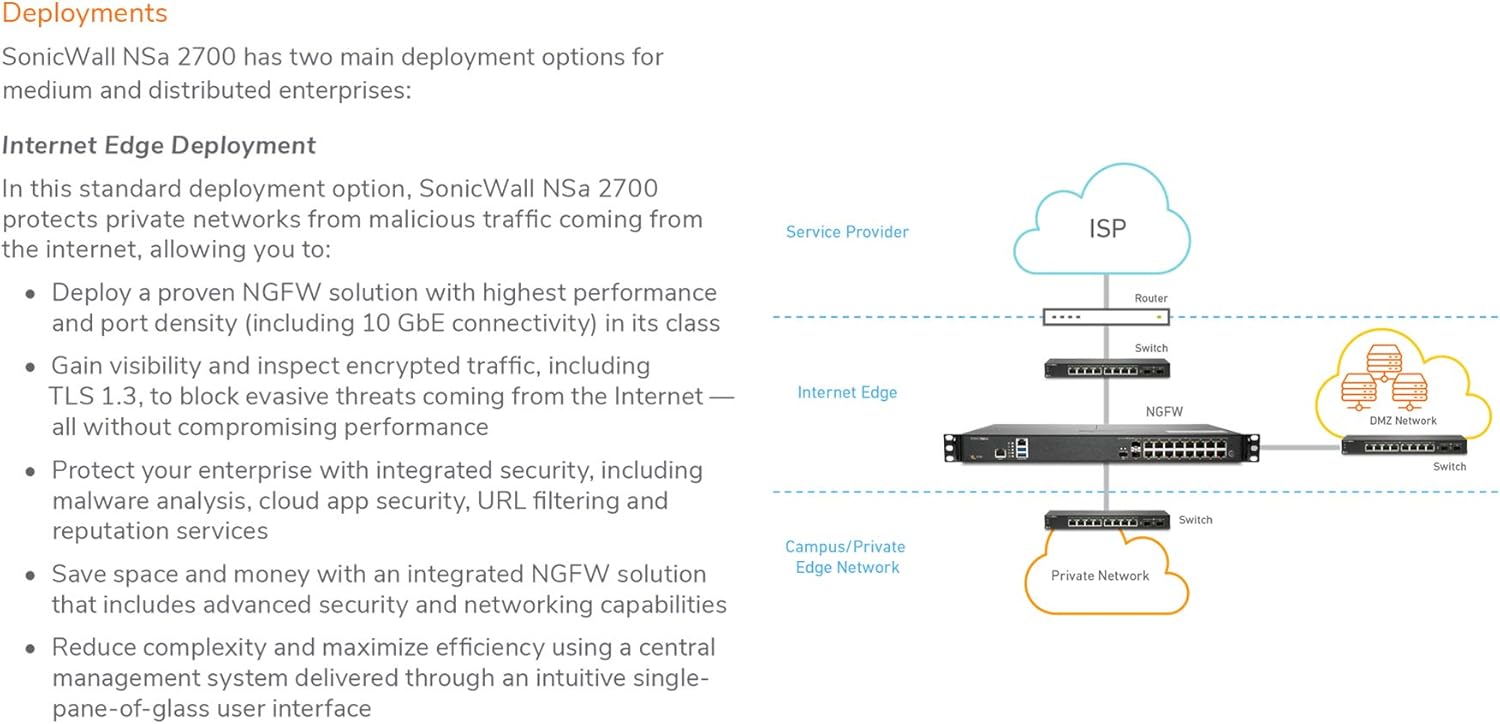
Figure 2.1: Internet Edge Deployment diagram, showing the NSA 2700 positioned between the ISP/Router and the private network, protecting the DMZ and internal networks.
2.2. Medium and Distributed Enterprises Deployment
The NSA 2700 supports SD-WAN and central management, making it suitable for distributed environments. This deployment enables secure access to corporate resources for branch offices, improves application latency, and automatically blocks threats using encrypted protocols like TLS 1.3.

Figure 2.2: Medium and Distributed Enterprises Deployment diagram, illustrating how branch offices connect to enterprise headquarters via SD-WAN using SonicWall Next Generation Firewalls.
3. Operating Principles
3.1. Reassembly-Free Deep Packet Inspection (RFDPI)
The SonicWall RFDPI engine is a single-pass, low-latency inspection system that performs stream-based, bi-directional traffic analysis. It effectively uncovers intrusion attempts and malware downloads regardless of port or protocol. This proprietary engine relies on streaming traffic payload inspection to detect threats at Layers 3-7. It processes network streams through extensive and repeated normalization and decryption to neutralize advanced evasion techniques and malicious code.
Once a packet undergoes pre-processing, including TLS/SSL decryption, it is analyzed against a proprietary memory representation of signature databases for intrusions, malware, and applications. The connection state is then advanced to represent the position of the stream relative to these databases. Upon a "match," a pre-set action is taken, typically terminating the connection and logging the event. The engine can also be configured for inspection only or for Layer 7 bandwidth management.

Figure 3.1: Comparison of traditional proxy-based architecture with SonicWall's stream-based Reassembly-Free Deep Packet Inspection (RFDPI) architecture, highlighting RFDPI's efficiency in eliminating proxy buffer and content size limitations.
3.2. Secure, High-speed Wireless
The NSA 2700 can be combined with a SonicWall 802.11ac Wave 2 wireless access point (e.g., SonicWave 432i) to create a high-speed wireless network security solution. Both the NSA series firewalls and SonicWave access points feature 2.5 GbE ports, enabling multi-gigabit wireless throughput. The firewall scans all wireless traffic for malware and intrusions, even over encrypted connections. Additional security and control capabilities like content filtering, application control, and Capture Advanced Threat Protection can be applied to the wireless network.
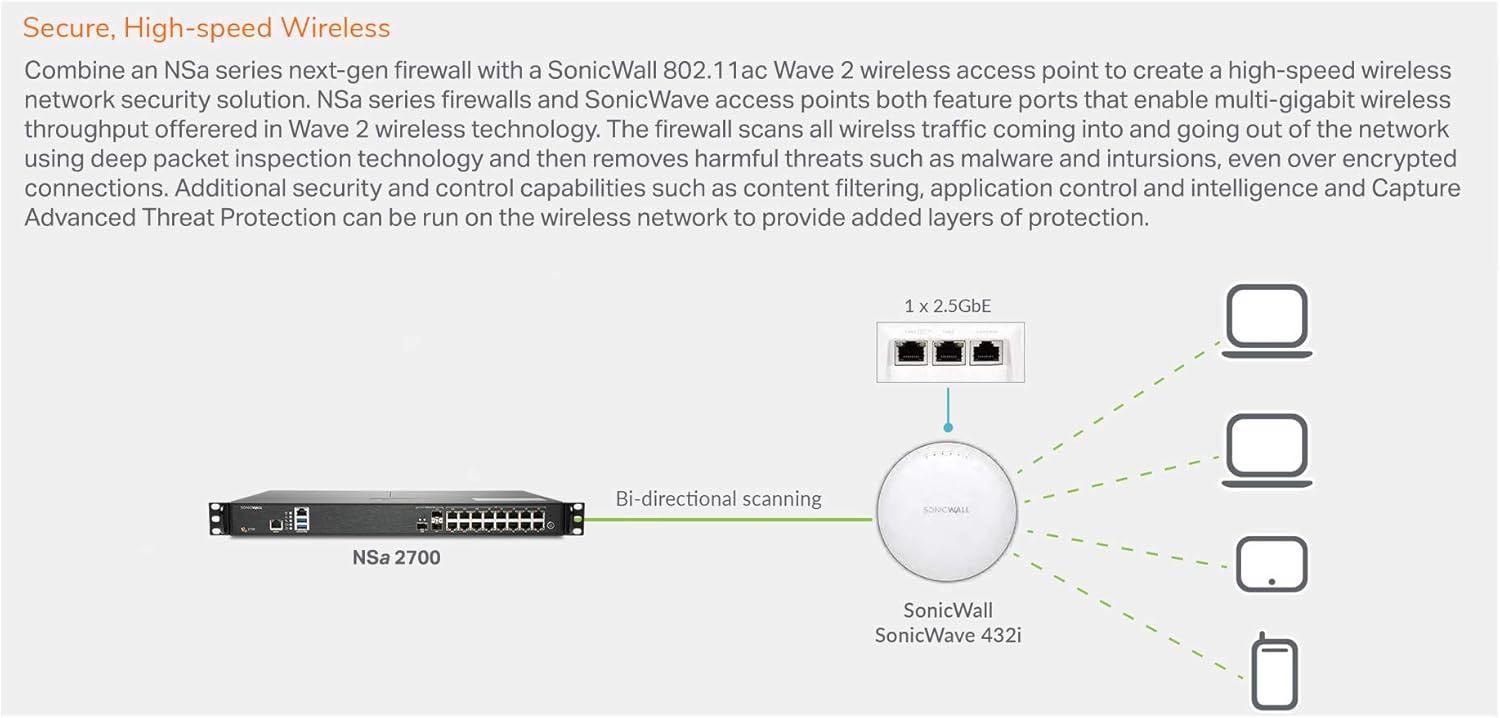
Figure 3.2: Secure, High-speed Wireless setup, showing the NSA 2700 connected to a SonicWave 432i access point, providing bi-directional scanning for wireless clients.
4. Maintenance
Regular maintenance is crucial for optimal performance and security. This includes:
- Firmware Updates: Ensure your device runs the latest SonicOS firmware (version 7.0 or newer) to benefit from the latest security patches, features, and performance improvements. Firmware updates are typically available through your SonicWall support portal.
- Configuration Backups: Periodically back up your device configuration. This allows for quick restoration in case of unexpected issues or hardware replacement.
- Monitoring: Regularly monitor the device's status, logs, and performance metrics through the management interface to identify and address potential issues proactively.
5. Troubleshooting
This section provides general guidance for common issues. For detailed troubleshooting, refer to the official SonicWall documentation or contact technical support.
- Connectivity Issues:
- Verify all network cables are securely connected to the correct ports.
- Check LED indicators on the device for port status and activity.
- Confirm IP configurations and routing settings are correct for your network environment.
- Performance Degradation:
- Review the device's resource utilization (CPU, memory) through the management interface.
- Check for high traffic loads or active security services that might be impacting throughput.
- Ensure the latest firmware is installed.
- Security Alerts:
- Investigate the source and nature of security alerts using the device logs.
- Ensure security subscriptions (e.g., Capture ATP, Gateway Anti-Virus) are active and up-to-date.
6. Technical Specifications
| Feature | Detail |
|---|---|
| Model Number | NSA2700 |
| Operating System | SonicOS 7.0 |
| Storage | 64GB M.2 |
| VLAN Interfaces | 256 |
| Access Points Supported (Max) | 32 |
| Product Dimensions | 19.69 x 19.69 x 11.02 inches |
| Item Weight | 8.8 pounds |
| Connectivity Technology | Ethernet |
| Interfaces | 16 x 1 GbE, 3 x 10 GbE |
| Threat and Malware Analysis Throughput | 2 Gbps |
7. Support and Warranty
7.1. Technical Support
SonicWall Dynamic Support is available for continued protection through ongoing firmware updates and advanced technical assistance. Support options include 8x5 (during normal business hours) or 24x7, depending on your service agreement. Dynamic Support services typically include:
- Chat, Email, Web, and Telephone Support for technical assistance.
- Software/Firmware Updates for all software and firmware updates and upgrades.
- Hardware Replacement via Advance Exchange for defective hardware.
For specific support inquiries, please visit the official SonicWall support portal or refer to your service agreement documentation.
7.2. Warranty Information
Specific warranty terms and conditions for the SonicWall NSA 2700 are provided at the time of purchase and are typically covered under the SonicWall Dynamic Support agreements. Please refer to your purchase documentation or contact SonicWall directly for detailed warranty information.
Related documentsNSA2700


Ask a question about this manual
Ask about setup, troubleshooting, compatibility, parts, safety, or missing instructions. Manuals+ will review the question and use this page’s manual context to help answer it.