1. Introduction
Thank you for choosing the Prestige Induction Cooktop PIC 6.1 V6 and Prestige Omega Select Plus Non-Stick Paniyarakkal with Lid. This manual provides essential information for the safe and efficient operation, maintenance, and care of your new kitchen appliances. Please read these instructions carefully before use and retain them for future reference.
2. Important Safety Instructions
Always follow basic safety precautions when using electrical appliances and cooking equipment to reduce the risk of fire, electric shock, injury, or property damage.
- Do not immerse the induction cooktop in water or any other liquid.
- Ensure the power cord is not damaged and is kept away from hot surfaces.
- Do not operate the cooktop if it malfunctions or has been damaged. Contact customer support.
- Use only induction-compatible cookware on the induction cooktop.
- Keep children away from the appliance during operation and when it is cooling down.
- The ceramic plate of the induction cooktop may remain hot after cooking. Avoid touching it immediately.
- Ensure hot vessels do not come into contact with the control panel of the induction cooktop to prevent damage.
- For the paniyarakkal, use on a stable, level surface on a gas stove.
- Do not use metal utensils on the non-stick paniyarakkal to avoid scratching the coating.
3. Package Contents
Verify that all items are present in the package:
- Prestige Induction Cooktop PIC 6.1 V6 (1 Unit)
- Prestige Omega Select Plus Non-Stick Paniyarakkal (1 Unit)
- Glass Lid for Paniyarakkal (1 Unit)
- User Manual (This document)
4. Product Overview
4.1 Prestige Induction Cooktop PIC 6.1 V6
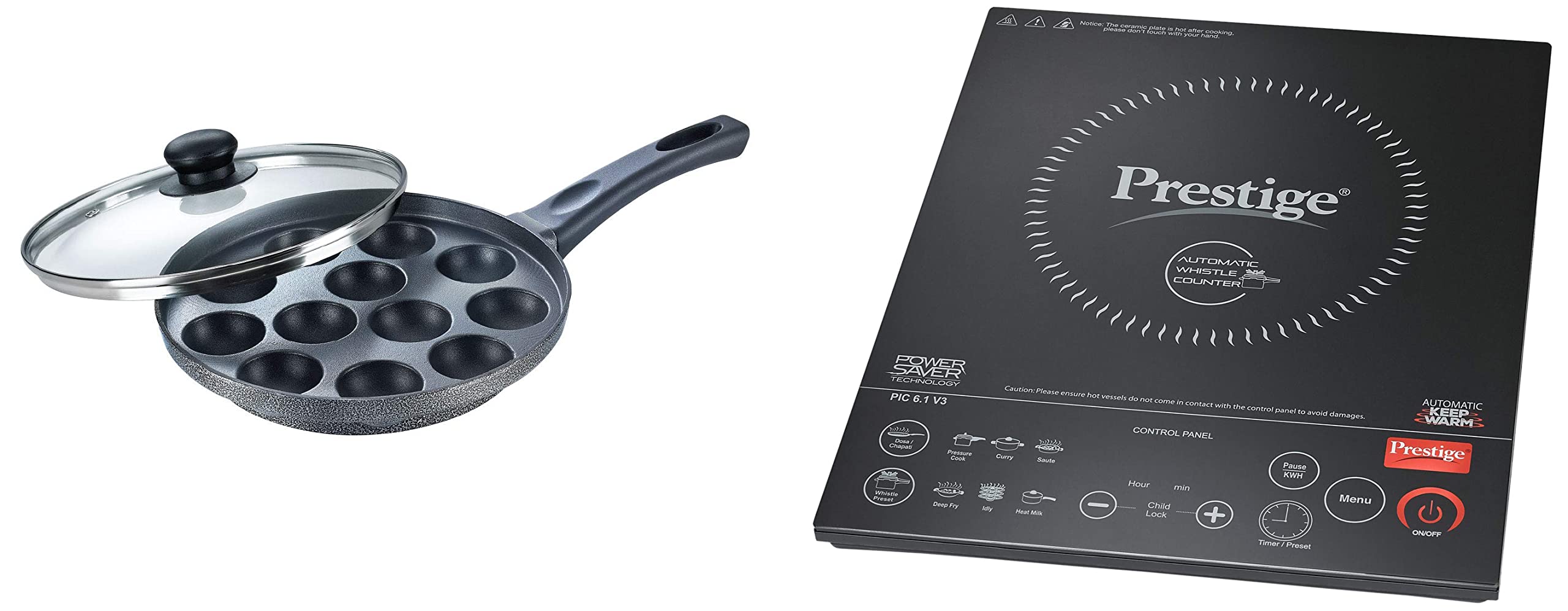
The Prestige Induction Cooktop PIC 6.1 V6 is a 2000-watt appliance designed for efficient cooking. It features an Automatic Whistle Counter, an Automatic Keep Warm Function, and a Built-in Indian Menu for various cooking needs. The cooktop is equipped with a Dual Heat Sensor for precise temperature control, an Automatic Voltage Regulator for stable operation, and an Anti-Magnetic Wall. Its Feather Touch Buttons provide easy and intuitive control.

This image displays the control panel of the Prestige Induction Cooktop PIC 6.1 V6, highlighting the feather touch buttons for various functions like menu selection, timer, power adjustment, and the ON/OFF switch.
4.2 Prestige Omega Select Plus Non-Stick Paniyarakkal

The Prestige Omega Select Plus Non-Stick Paniyarakkal is a 240 mm cooking pan made from aluminum, featuring a 3-layer PFOA-free non-stick coating for healthy cooking. It is designed to be compatible with gas stoves and comes with a lid. The non-stick finish ensures easy food release and cleaning.
5. Setup
5.1 Induction Cooktop Setup
- Placement: Place the induction cooktop on a flat, stable, and heat-resistant surface. Ensure there is adequate ventilation around the appliance.
- Power Connection: Plug the power cord into a suitable electrical outlet. Ensure the voltage matches the cooktop's requirements.
5.2 Paniyarakkal Setup
- Initial Cleaning: Before first use, wash the paniyarakkal and its lid thoroughly with warm soapy water and a soft sponge. Rinse and dry completely.
- Lid Knob Assembly: If the holder/knob for the lid is facing inwards for packaging, unscrew it, turn it to the correct direction, and re-screw it firmly.
6. Operating Instructions
6.1 Using the Induction Cooktop

This image shows the Prestige Induction Cooktop in use with an induction-compatible pressure cooker, demonstrating a typical cooking scenario.
- Power On: Place an induction-compatible vessel on the center of the cooktop. Press the ON/OFF button. The display will light up.
- Select Cooking Mode: Use the Menu button to cycle through the Built-in Indian Menu options (e.g., Deep Fry, Curry, Idly, Milk, etc.). Each mode has pre-set power and time settings.
- Adjust Power/Temperature: Use the + and - buttons to manually adjust the power or temperature if not using a pre-set menu.
- Set Timer/Preset: Press the Timer/Preset button and use + and - to set the desired cooking duration.
- Automatic Whistle Counter: This feature automatically counts the whistles of a pressure cooker, allowing for precise cooking.
- Automatic Keep Warm: After cooking, the cooktop can automatically switch to a low power mode to keep food warm.
- Child Lock: To activate, press and hold the Child Lock button for a few seconds. This prevents accidental operation. Repeat to deactivate.
- Power Off: Press the ON/OFF button to turn off the cooktop after use. The fan may continue to run for a short period to cool the internal components.
6.2 Using the Paniyarakkal

This image shows the Prestige Omega Select Plus Paniyarakkal on a wooden countertop, with a bowl of freshly cooked paniyaram next to it, illustrating its use for preparing traditional Indian snacks.
- Placement: Place the paniyarakkal on a gas stove burner. Ensure it is centered over the flame.
- Preheating: Heat the paniyarakkal on a low to medium flame for a few minutes.
- Cooking: Add a small amount of oil or ghee to each cavity, then pour the paniyaram batter.
- Covering: Place the lid on the paniyarakkal to help cook the paniyaram evenly.
- Turning: Once the bottom is golden brown, use a wooden or silicone skewer to flip the paniyaram to cook the other side.
- Non-Stick Care: Always use wooden, silicone, or plastic utensils to protect the non-stick coating.
7. Maintenance and Cleaning
7.1 Induction Cooktop Cleaning
- Always unplug the cooktop from the power outlet and allow it to cool completely before cleaning.
- Wipe the ceramic glass surface with a soft, damp cloth and mild detergent. For stubborn stains, use a non-abrasive cleaner specifically designed for ceramic cooktops.
- Do not use abrasive pads, harsh chemicals, or steel wool, as these can scratch the surface.
- Wipe the control panel with a soft, damp cloth. Ensure no water enters the internal components.
- Never immerse the cooktop in water.
7.2 Paniyarakkal Cleaning
- Allow the paniyarakkal to cool down completely before washing.
- Wash with warm water, mild dish soap, and a soft sponge or cloth.
- Avoid using abrasive cleaners, scouring pads, or metal utensils, as these can damage the non-stick coating.
- For baked-on food, soak the paniyarakkal in warm soapy water for a while before cleaning.
- Dry thoroughly after washing to prevent water spots.
8. Troubleshooting
8.1 Induction Cooktop Troubleshooting
- Cooktop not turning on: Check if the power cord is securely plugged in. Ensure the power outlet is functional. Verify that an induction-compatible vessel is placed correctly on the cooktop.
- Cooktop not heating: Confirm the vessel is induction-compatible. Ensure the vessel's base covers at least 70% of the cooking zone. Check for error codes on the display and refer to the full manual for specific code meanings.
- Unusual noise during operation: A slight humming sound is normal with induction cooktops. If the noise is loud or unusual, ensure the vessel is flat and stable.
8.2 Paniyarakkal Troubleshooting
- Food sticking: Ensure sufficient oil or ghee is used. Avoid overheating the pan. Do not use metal utensils that could damage the non-stick coating.
- Uneven cooking: Ensure the paniyarakkal is placed centrally on the gas burner. Adjust flame to medium for even heat distribution.
9. Specifications
9.1 Prestige Induction Cooktop PIC 6.1 V6
- Power: 2000 Watts
- Features: Automatic Whistle Counter, Automatic Keep Warm Function, Built-in Indian Menu, Dual Heat Sensor, Automatic Voltage Regulator, Anti Magnetic Wall, Feather Touch Buttons.
9.2 Prestige Omega Select Plus Non-Stick Paniyarakkal
- Material: Aluminum
- Size: 240 mm
- Base Type: Gas Stove Compatible
- Base Thickness: 3 mm
- Coating Type: 3-Layer Non-Stick, PFOA Free
- Included Components: Paniyarakkal (1U), Lid (1U)
- Color: Black
10. Warranty and Support
- Warranty: Both products come with a 1-year warranty covering manufacturing defects. The warranty does not cover damages resulting from improper use, accidents, or normal wear and tear. Refer to the detailed warranty terms provided with the product packaging.
- Customer Support: For any issues, queries, or service requests, please contact Prestige customer support at: 1800-123-334447.


