
1. Introduction
The Funny Kitchen Home Radon Detector (Model HRDM-02) is designed to provide accurate measurements of radon gas levels in your environment. Radon is a naturally occurring radioactive gas that can accumulate in homes and buildings, posing health risks. This device offers both short-term and long-term average readings, enabling continuous monitoring to ensure a safer living or working space. Its portable design and rechargeable battery allow for flexible placement and easy assessment across various locations.

Figure 1: Understanding Radon Gas and its Potential Dangers.
2. Product Overview
The HRDM-02 Radon Detector is a user-friendly device equipped with an LCD screen that displays daily, weekly, and long-term average radon concentrations. Key features include:
- Long-Term Monitoring: Essential for understanding fluctuating radon levels over time.
- On-Screen Results: Provides immediate access to both short-term and long-term readings.
- No Lab Fees: Delivers initial radon level indications within 24 hours without the need for external lab analysis.
- Ease of Use: Battery-powered and portable for convenient measurement in various rooms or locations.

Figure 2: Front view of the Radon Detector with display details. The screen shows long-term average (1.43 pCi/L) and short-term average (3.96 pCi/L over 1 day).

Figure 3: Side view of the Radon Detector highlighting the USB charging port and ON/OFF switch.
3. Setup
- Charging the Device:
The device is powered by a rechargeable battery. Use the provided USB charging cable to charge the unit. A full charge provides extended use. For continuous monitoring, the device can remain plugged in.
- Initial Placement:
Place the radon detector in the area you wish to monitor. Ensure the back of the device is not blocked to allow for proper air circulation and accurate readings. The device should be placed upright.
- First Readings:
The device will begin to display initial radon levels within 24 hours. For a more accurate long-term average, it is recommended to allow the device to monitor for at least 7 days, as radon levels can fluctuate daily.
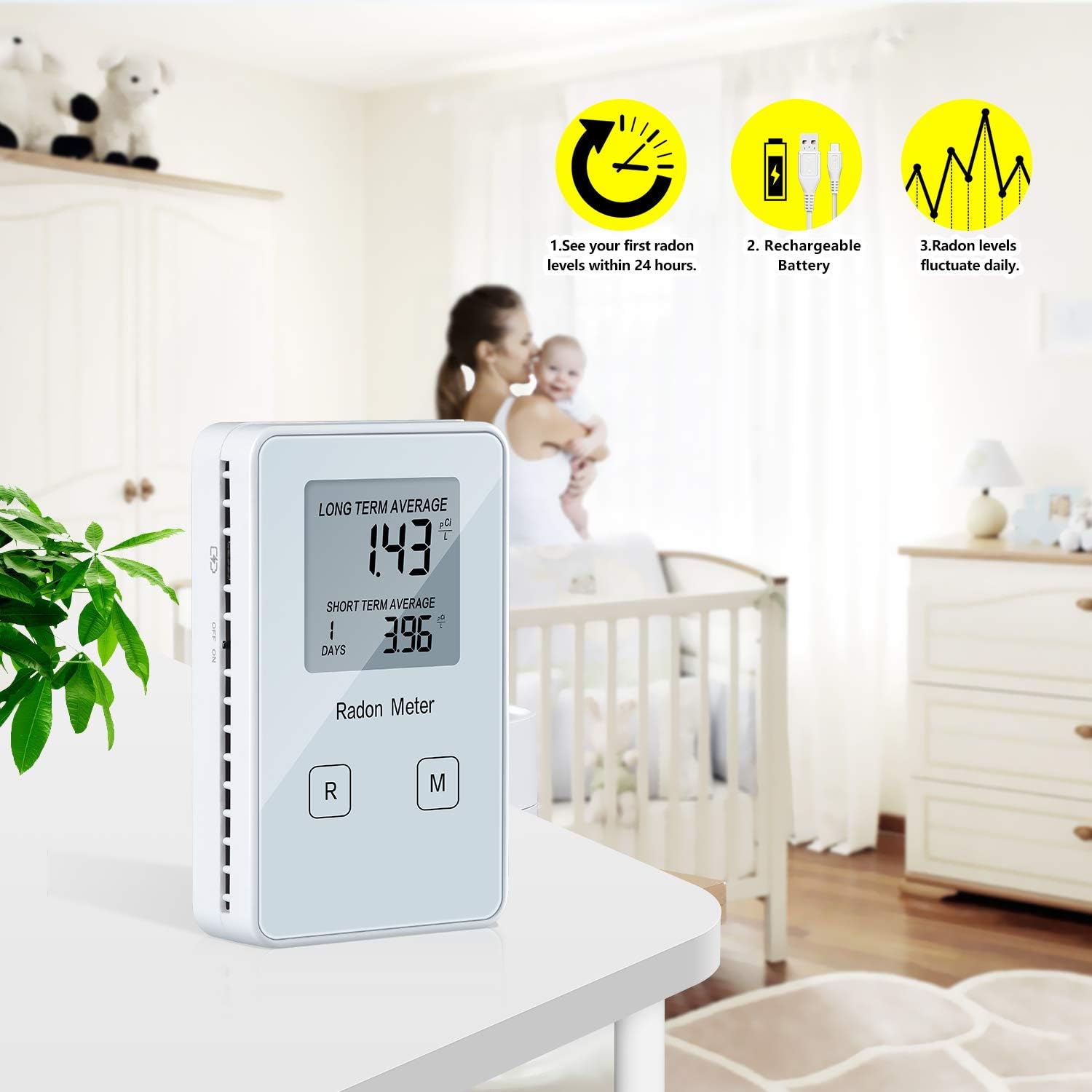
Figure 4: Proper placement and initial monitoring of the Radon Detector.
4. Operating Instructions
The HRDM-02 Radon Detector is designed for straightforward operation.
- Power On/Off: Use the ON/OFF switch located on the side of the device (refer to Figure 3).
- Reading Display: The LCD screen continuously displays the "LONG TERM AVERAGE" and "SHORT TERM AVERAGE" radon levels in pCi/L. The short-term average typically reflects the last 1-7 days of readings.
- Buttons:
- "R" Button (Reset): Pressing this button will reset all accumulated data and restart the measurement cycle. Use with caution, as previous readings will be lost.
- "M" Button (Mode/Menu): This button may cycle through different display modes or provide additional information, if available. Refer to the device's on-screen prompts for specific functions.
- Continuous Monitoring: For the most reliable data, allow the device to operate continuously in the desired location. Radon levels can vary significantly due to environmental factors, so consistent monitoring provides a more accurate assessment of exposure.

Figure 5: The Radon Detector is designed for easy use in various home settings.

Figure 6: Examples of suitable locations for radon monitoring, including residential and commercial spaces.
5. Maintenance
- Charging: Recharge the device when the low battery indicator appears on the screen. Use the provided USB cable.
- Cleaning: Wipe the exterior of the device with a soft, dry cloth. Do not use abrasive cleaners or immerse the device in water.
- Storage: When not in use for extended periods, store the device in a cool, dry place.
6. Troubleshooting
- No Reading Displayed:
- Ensure the device is powered on and fully charged or connected to a power source.
- Initial readings may take up to 24 hours to appear. For stable readings, allow several days of continuous operation.
- Verify the device is placed upright and its back vents are not obstructed.
- Readings Seem Inaccurate or Fluctuating:
- Radon levels naturally fluctuate daily. Long-term averages provide a more reliable assessment.
- Ensure the device has been operating continuously for at least 7 days for a stable long-term average.
- Avoid moving the device frequently during a measurement period, as this can affect readings.
- Accidentally Pressed "R" (Reset) Button:
Pressing the "R" button resets all accumulated data. If this occurs, the device will restart its measurement cycle, and new readings will begin to accumulate from zero. Allow sufficient time for new averages to establish.
7. Specifications
| Brand | Funny Kitchen |
| Model Number | HRDM-02 |
| Power Source | Rechargeable Battery Powered |
| Sampling Method | Passive radon diffusion chamber |
| Detection Method | Alpha spectrometry |
| Measurement Range | 0 - 9999 pCi/L |
| Accuracy | ±5% ±0.14 pCi/L |
| Operating Environment Temperature | 32 ~ 104°F (0 ~ 40°C) |
| Relative Humidity | <85% |
| Item Weight | 0.13 Kilograms (4.6 ounces) |
| Product Dimensions | 2 x 1 x 1 inches |
| Color | White |
| Alarm | Visual |
| UPC | 779288404496 |
8. Warranty and Support
For warranty information and technical support, please refer to the documentation included with your purchase or contact Funny Kitchen customer service directly. Keep your purchase receipt for warranty claims.