
BOMGE 04D
BOMGE 4 Channel DJ Bluetooth Audio Mini Mixer User Manual
Comprehensive guide for setup, operation, and maintenance of your BOMGE 04D mixer.
1. Introduction
The BOMGE 04D is a versatile 4-channel audio mixer designed for various audio applications, including stage performances, live concerts, parties, and home studio recording. It features a built-in 99 DSP effects processor, multiple input/output options, Bluetooth 5.0 connectivity, and USB recording/playback capabilities. This manual provides detailed instructions to help you set up, operate, and maintain your mixer for optimal performance.
Brand: BOMGE
Model: 04D
2. Product Overview and Components
Familiarize yourself with the main components and interfaces of the BOMGE 04D mixer.

Figure 2.1: Labeled diagram of the BOMGE 04D mixer's inputs, outputs, and controls. This image highlights the 48V phantom power, gain knobs, 2-band EQ, effect knob, volume controls, USB/Bluetooth connectivity, and main output/headphone jacks.
- MIC/LINE Inputs (1 & 2): XLR and 1/4'' (6.35mm) combo jacks for microphones and line-level instruments.
- +48V Phantom Power: Provides power for condenser microphones.
- IN L/R 3/4: RCA and 6.35mm stereo inputs for connecting external audio sources.
- OUT L/R (Balanced): XLR and 6.35mm balanced outputs for connecting to main speakers or amplifiers.
- PHONES: 3.5mm headphone output for monitoring.
- USB/MP3/Bluetooth Interface: For connecting USB drives, computers, or Bluetooth devices.
- DSP Effects: Built-in digital signal processing with 99 effects.
- Gain Knobs: Adjust input sensitivity for each channel.
- High/Low EQ: 2-band equalizer for tone adjustment.
- Effect Knobs: Control the amount of DSP effect applied to each channel.
- Level Knobs: Adjust the output level of each channel.
- Main Out Volume: Controls the overall output level.
- Phones Volume: Controls the headphone output level.
- Type-C Power Input: 5V power supply port.
3. Setup
3.1 Power Connection
The BOMGE 04D mixer is powered by a 5V Type-C power supply. Ensure you use a compatible power adapter or connect it to a reliable 5V power source such as a power bank, computer, or wall adapter.
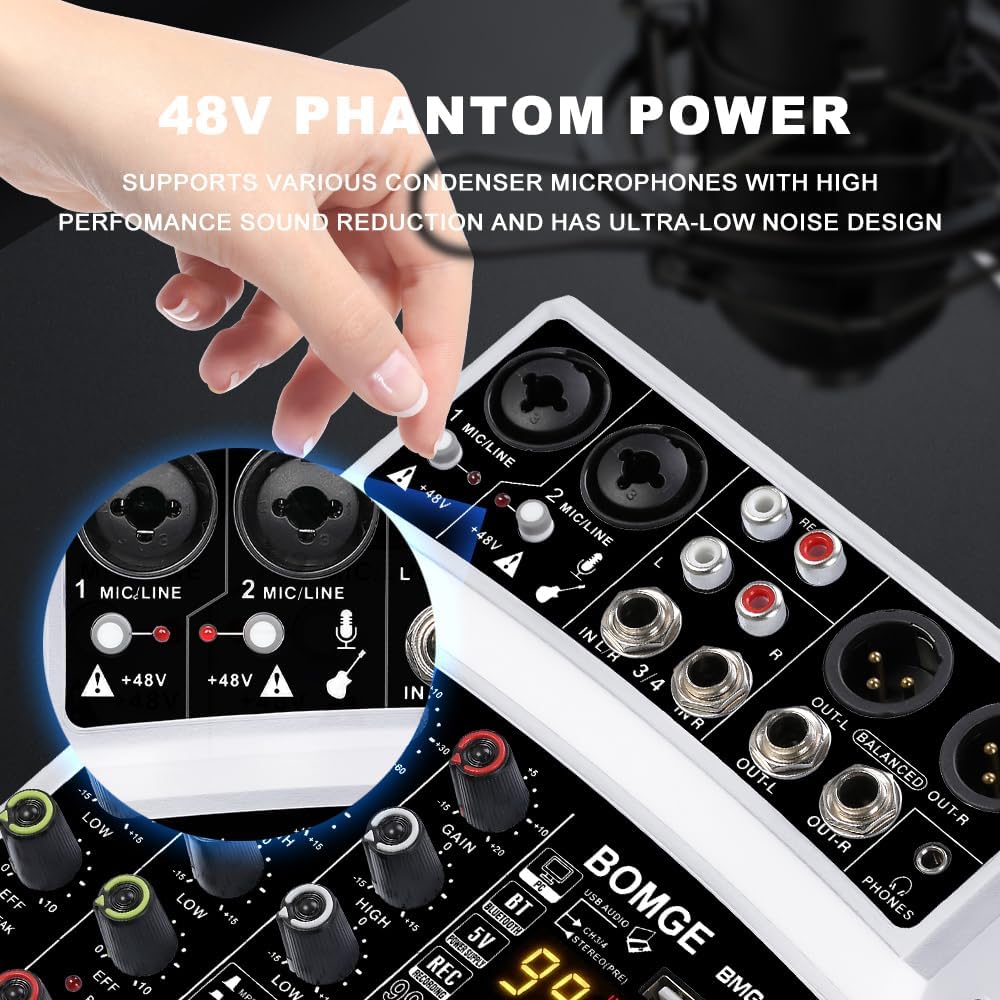
Figure 3.1: The 5V Type-C power input port located on the side of the mixer. The mixer can be powered by a power bank, power socket, or computer.
3.2 Connecting Input Devices
The mixer supports a wide range of input devices. Connect your microphones, instruments, or other audio sources to the appropriate input jacks.
- Microphones: Use XLR or 6.35mm cables for dynamic microphones. For condenser microphones, ensure the +48V phantom power is activated for the respective channel.
- Instruments: Connect guitars, keyboards, or other instruments using 6.35mm cables to the MIC/LINE inputs.
- Stereo Sources: Use RCA or 6.35mm cables to connect devices like CD players, media players, or other mixers to the IN L/R 3/4 inputs.
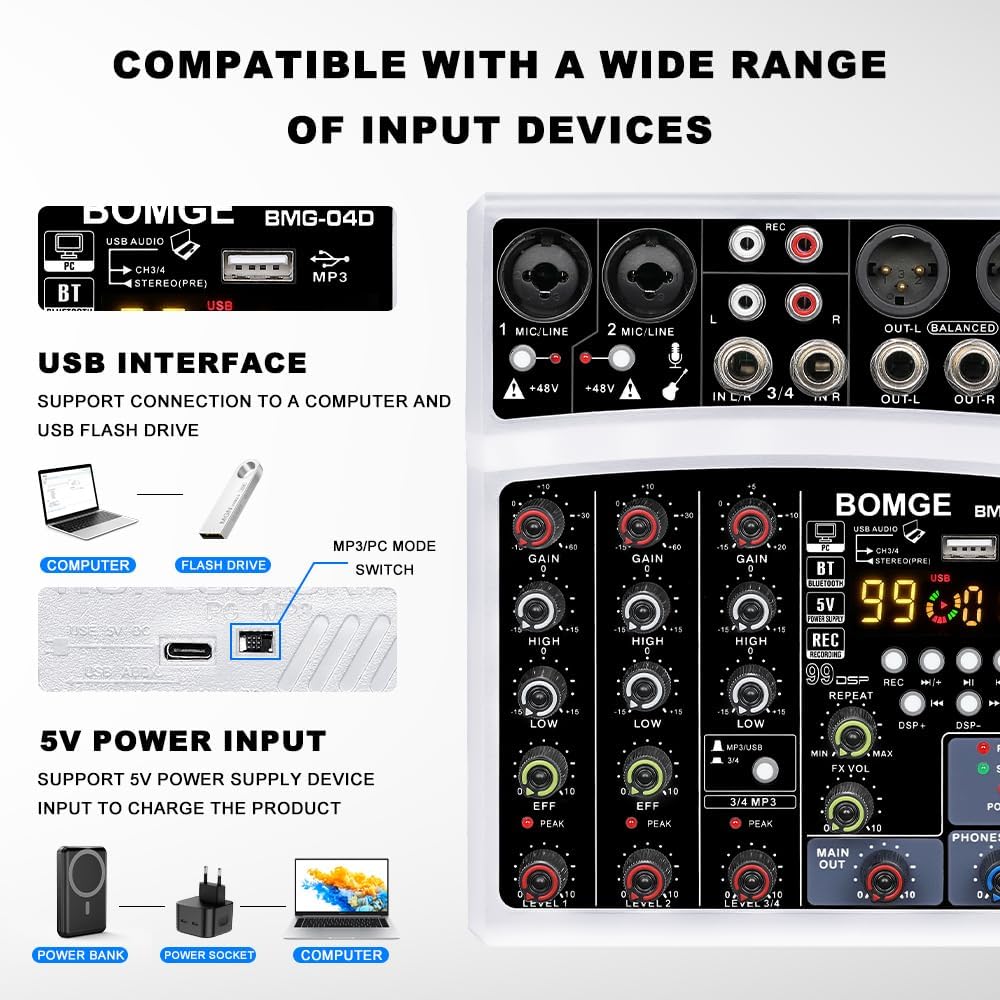
Figure 3.2: Illustration of the mixer's compatibility with various input devices, including PC, USB audio, Bluetooth, and MP3 sources.
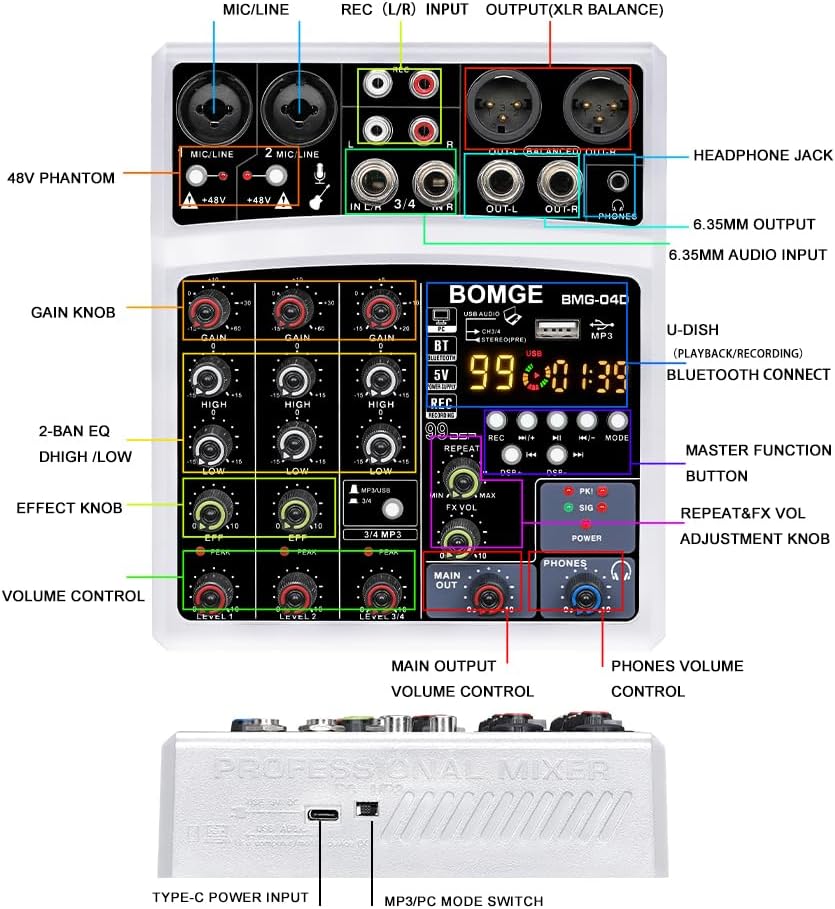
Figure 3.3: Demonstrates connecting a 6.35mm plug or XLR balanced cable to the 2-in-1 input interface.
3.3 Connecting Output Devices
Connect the mixer's outputs to your amplification system, recording device, or headphones.
- Main Output: Use XLR or 6.35mm balanced cables to connect to active speakers, power amplifiers, or other audio interfaces.
- Headphones: Plug your headphones into the 3.5mm PHONES jack for monitoring.
- Recording Devices: The mixer supports recording to a USB disk or directly to a PC/Mac via USB.
4. Operating Instructions
4.1 Basic Audio Mixing
- Adjusting Gain: Use the GAIN knobs for each channel to set the input level. Adjust until the PEAK indicator lights up only occasionally during the loudest parts of the signal.
- Equalization (EQ): Use the HIGH and LOW knobs to adjust the treble and bass frequencies for each channel.
- Channel Level: Use the LEVEL knobs to control the volume of each individual channel in the mix.
- Main Output Level: Adjust the MAIN OUT volume knob to control the overall output level sent to your speakers or recording device.
- Headphone Monitoring: Use the PHONES volume knob to adjust the listening level through your headphones.

Figure 4.1: Top-down view of the BOMGE 04D mixer, showing all control knobs and buttons for mixing audio.
4.2 DSP Effects Processor (99 Effects)
The mixer features a built-in 99 DSP effects processor to enhance your audio. Use the DSP PROGRAM knob to select an effect and the FX VOL knob to adjust its intensity.

Figure 4.2: List of the 99 built-in DSP effects, categorized by type such as Reverb, Delay, Echo, Chorus, Tremolo, and more.
To apply an effect:
- Turn the DSP PROGRAM knob to select the desired effect number (01-99).
- Adjust the EFF (Effect) knob on each channel to send the signal to the DSP processor.
- Adjust the FX VOL knob to control the overall volume of the applied effect.
Video 4.1: Demonstrates the functionality of the 99 DSP effects processor, including effect selection and adjustment. This video also shows the 5V power input and EQ controls.
4.3 Bluetooth Connectivity
The mixer supports Bluetooth 5.0 for wireless audio streaming from your smartphone, tablet, or computer.
- Press the MODE button on the mixer until "BT" is displayed on the screen.
- On your device, enable Bluetooth and search for "BMG04D" (or similar).
- Select the mixer to pair. Once connected, you can stream audio wirelessly.
- Use the playback controls (Play/Pause, Next/Previous) on the mixer or your device.

Figure 4.3: Visual guide for connecting a mobile phone to the BOMGE 04D mixer via Bluetooth.
4.4 USB Recording and Playback
The mixer allows direct recording to a USB flash drive or connection to a computer for recording/playback.
- USB Flash Drive: Insert a USB flash drive into the USB port. Press the REC button to start recording. Press REC again to stop. Press the Play/Pause button to play back recorded audio.
- PC/Mac Connection: Connect the mixer to your computer using a USB cable. The mixer will be recognized as an audio interface. You can then use recording software (e.g., Audacity, GarageBand) to record audio from the mixer or play audio from your computer through the mixer.
Video 4.2: Overview of the BOMGE 4-channel mixer, highlighting its 16 DSP effects, USB/Bluetooth compatibility, and audio recording capabilities to a U-disk or PC/Mac.
5. Maintenance
Proper maintenance ensures the longevity and optimal performance of your BOMGE 04D mixer.
- Cleaning: Use a soft, dry cloth to clean the exterior of the mixer. Avoid using abrasive cleaners, solvents, or waxes.
- Storage: Store the mixer in a cool, dry place away from direct sunlight, extreme temperatures, and excessive dust.
- Handling: Handle the mixer with care. Avoid dropping it or subjecting it to strong impacts.
- Cable Management: Ensure cables are not excessively bent or strained, especially at connection points, to prevent damage to ports.
6. Troubleshooting
If you encounter issues with your mixer, refer to the following common problems and solutions:
| Problem | Possible Cause | Solution |
|---|---|---|
| No power/MP3 display not normal | Insufficient current from power supply. | Replace the power adapter, or directly connect to the computer for power supply. |
| No sound output | Incorrect connections, low volume levels, or incorrect input/output selection. | Check all cable connections. Ensure GAIN, LEVEL, MAIN OUT, and PHONES volume knobs are turned up. Verify correct input source is selected (e.g., USB, Bluetooth, Line). |
| Microphone not working (condenser mic) | +48V Phantom Power not activated. | Activate the +48V phantom power switch for the connected microphone channel. |
| Poor sound quality/noise | Improper gain staging, faulty cables, or interference. | Adjust GAIN levels to avoid clipping (PEAK light constantly on). Use high-quality, shielded cables. Ensure proper grounding and minimize interference from other electronic devices. |
| Bluetooth connection issues | Mixer not in Bluetooth mode, device not discoverable, or interference. | Ensure the mixer is in "BT" mode. Restart both the mixer and your Bluetooth device. Move closer to the mixer to reduce interference. |
7. Specifications
- Model: 04D
- Number of Channels: 4
- Input Interfaces: 2 mono inputs (XLR & 6.35mm combo), 2 stereo inputs (RCA, 6.35mm /JACK), USB/Bluetooth.
- Output Interfaces: 3 balanced outputs (RCA, XLR & 6.35mm), 3.5mm AUX headphone output.
- DSP Effects: Built-in 99 DSP processor.
- Phantom Power: +48V (independent for mono inputs).
- Bluetooth: Version 5.0.
- USB Compatibility: MP3/Flash Reader, PC/Mac audio interface.
- Power Supply: 5V DC, Type-C.
- Item Weight: 1.25 pounds (approx. 0.57 kg).
- Product Dimensions: 7.2 x 6.1 x 1.73 inches (approx. 18.3 x 15.5 x 4.4 cm).

Figure 7.1: Detailed dimensions of the BOMGE 04D mixer in centimeters and inches.
8. Warranty and Support
For warranty information, technical support, or further assistance, please refer to the official BOMGE brand store or the user guide PDF available on the product's Amazon page. BOMGE is dedicated to providing quality audio equipment and support for home studios and music enthusiasts.
Official User Guide (PDF): Download PDF
BOMGE Brand Store: Visit Store
Related documents04D


Ask a question about this manual
Ask about setup, troubleshooting, compatibility, parts, safety, or missing instructions. Manuals+ will review the question and use this page’s manual context to help answer it.