
1. Introduction
This manual provides essential information for the safe and effective use of your EP Extension Cord Storage Reel with 4-Grounded Outlets. Please read all instructions carefully before operating the product and retain this manual for future reference.

Figure 1: Front view of the EP Extension Cord Storage Reel.
2. Safety Information
To prevent personal injury or property damage, always observe the following safety precautions:
- Read Instructions: Fully understand all instructions before using the cord reel.
- Electrical Capacity: Do not exceed the rated electrical capacity of the cord reel or the connected extension cord. Overloading can cause overheating and fire.
- Circuit Breaker: The reel features a built-in 10A circuit breaker. If the circuit breaker trips (power cuts off), disconnect all devices, reduce the load, and press the reset button to restore power.
- Cord Gauge: Ensure the extension cord you use with this reel is of an appropriate gauge for your intended electrical load. Refer to the specifications section for capacity guidelines.
- Environment: Use the cord reel in dry conditions. Avoid exposure to water, rain, or damp environments.
- Grounding: Always ensure proper grounding for all connected devices.
- Modifications: Do not attempt to modify or disassemble the cord reel. Repairs should only be performed by qualified personnel.
- Children and Pets: Keep the cord reel and connected cords out of reach of children and pets.
3. Product Features and Components
The EP Extension Cord Storage Reel is designed for efficient cord management and power distribution. Key components include:
- Grip Handle: For easy portability.
- 4 Grounded Outlets: Allows connection of multiple tools or appliances.
- 10A Circuit Breaker: Provides overload protection.
- Winding Handle: For manual winding and unwinding of the cord.
- On/Off Switch: Controls power to the outlets.
- Male Plug Connector: Internal connector for your extension cord.
- Metal Stand: Provides stability and keeps the reel upright.
- Multifunctional Cable Management Clip: Helps guide and secure the cord.
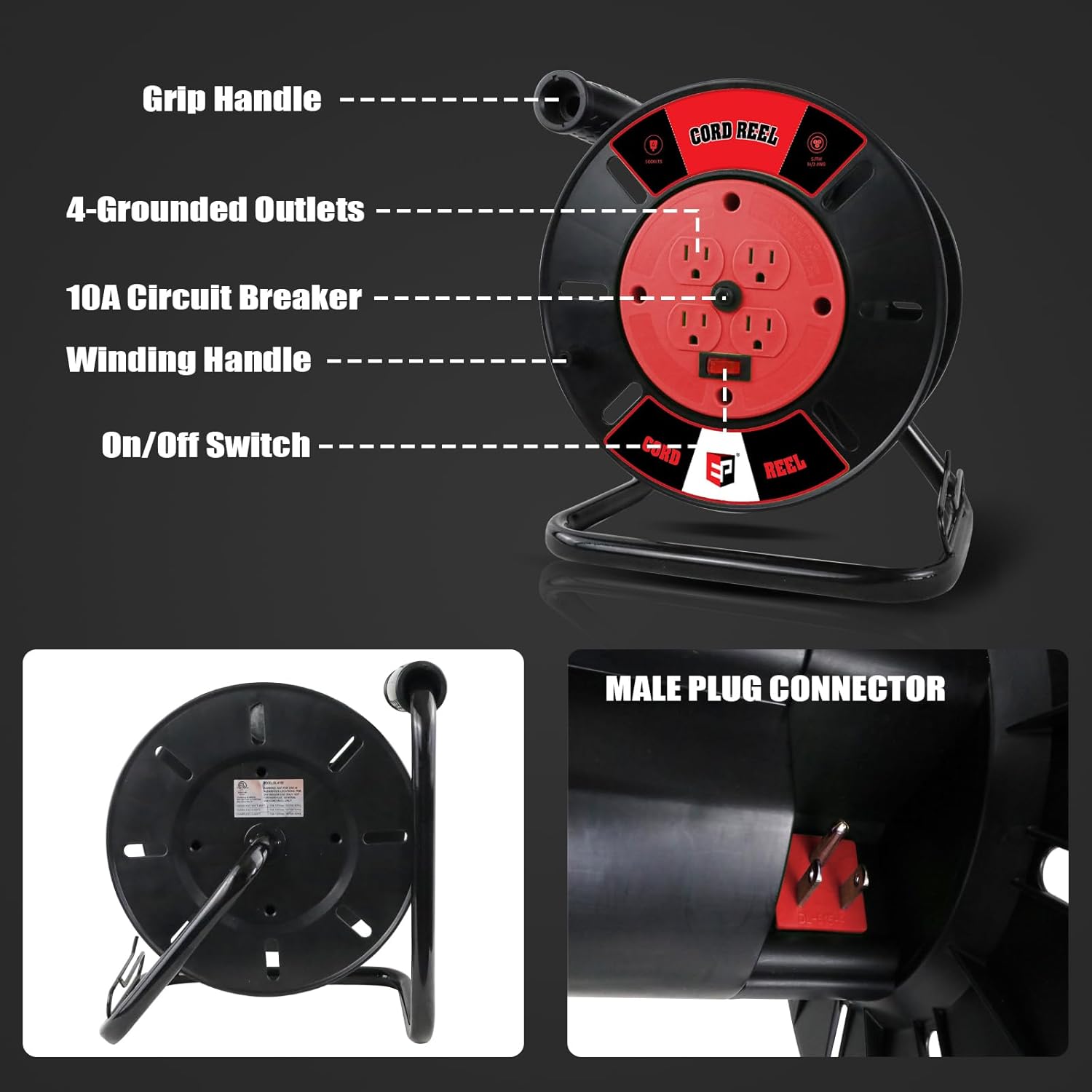
Figure 2: Labeled components of the cord reel.

Figure 3: Cord capacity guidelines for different wire gauges.
4. Setup
Follow these steps to prepare your cord reel for use:
- Unpack: Carefully remove the cord reel from its packaging.
- Prepare Cord: If you are using your own extension cord, ensure it is compatible with the reel's capacity (refer to Section 3).
- Connect Cord: Locate the internal male plug connector on the reel. Plug the female end of your extension cord into this connector.
- Wind Cord: Place the reel on a stable surface. Use the hand crank to neatly wind your extension cord onto the reel. Utilize the cable management clip to guide the cord and ensure even winding.

Figure 4: Steps for connecting and managing the extension cord.
5. Operating Instructions
To operate your EP Extension Cord Storage Reel:
- Unwind Cord: Place the reel on a flat, stable surface. Hold the grip handle and rotate the winding handle counter-clockwise to unwind the desired length of your extension cord. The cable management clip can help lock the cord at the required length.
- Connect to Power Source: Plug the male end of your extension cord (which is now extended from the reel) into a grounded wall outlet.
- Connect Devices: Plug your tools or appliances into the 4 grounded outlets on the face of the reel.
- Power On: If present, switch the On/Off button to the 'On' position to supply power to the outlets.
- Rewind Cord: After use, disconnect all devices from the reel outlets. Unplug the reel's extension cord from the wall outlet. Rotate the winding handle clockwise to neatly rewind the cord onto the reel. Secure the male plug connector in its designated storage position.

Figure 5: Detail of the 4 grounded outlets and 10A circuit breaker.
6. Maintenance
Proper maintenance ensures the longevity and safe operation of your cord reel:
- Inspection: Regularly inspect the entire cord reel, including the housing, outlets, and your extension cord, for any signs of damage, fraying, or loose connections. Do not use if damaged.
- Cleaning: Clean the exterior of the cord reel with a dry, soft cloth. Avoid using abrasive cleaners, solvents, or harsh chemicals, as these can damage the finish or electrical components.
- Storage: Store the cord reel in a cool, dry place, away from direct sunlight and extreme temperatures, when not in use.
7. Troubleshooting
If you encounter issues with your cord reel, refer to the following common problems and solutions:
- No Power to Outlets:
- Check if the 10A circuit breaker button has popped out. If so, disconnect all devices, reduce the load, and press the button to reset.
- Ensure the main extension cord is securely plugged into a live wall outlet.
- Verify the On/Off switch (if present) is in the 'On' position.
- Cord Tangling or Difficulty Winding:
- Ensure the cord is being guided evenly onto the reel using the cable management clip.
- Avoid winding the cord too quickly.
- Check for any obstructions or kinks in the cord.
If problems persist after attempting these solutions, contact customer support.
8. Specifications
| Feature | Detail |
|---|---|
| Brand | EP |
| Model | Extension Cord Storage Reel |
| Material | Metal |
| Color | Red |
| Item Dimensions (L x W x H) | 12.2 x 5.12 x 2.36 inches |
| Item Weight | 4.16 Pounds |
| Operation Mode | Manual |
| Circuit Breaker | 10A |
| Outlets | 4 Grounded |
| Cord Capacity (Max) | 100ft (16AWG), 80ft (14AWG), 50ft (12AWG) |

Figure 6: Cord Reel Capacity & Current Limit Table.
9. Warranty and Support
For warranty information or technical support, please refer to the product packaging or contact EP customer service directly. Keep your purchase receipt as proof of purchase.