
1. Introduction
This manual provides essential information for the proper installation, operation, and maintenance of your Rosewill PMG750 750W ATX Full Modular Power Supply. Please read this manual thoroughly before using the product to ensure safe and efficient performance.

This image displays the Rosewill PMG750 power supply from a front-side angle, highlighting its compact black casing, the top-mounted cooling fan, and the 80 Plus Gold certification badge.
2. Safety Information
Observe the following safety precautions to prevent injury or damage to the power supply and connected components:
- Do not open the power supply unit. High voltage components inside pose a risk of electric shock.
- Ensure the power supply is disconnected from the AC outlet before installation or removal.
- Install the power supply in a well-ventilated area, away from heat sources and moisture.
- Use only the modular cables provided with this power supply. Using incompatible cables may cause damage.
- Ensure proper grounding of the power supply and the computer system.
3. Package Contents
Verify that all items are present in the package:
- Rosewill PMG750 Power Supply Unit
- Modular Cable Set (Main Power, CPU, PCI-E, SATA, Peripheral)
- AC Power Cord
- Mounting Screws
- User Manual
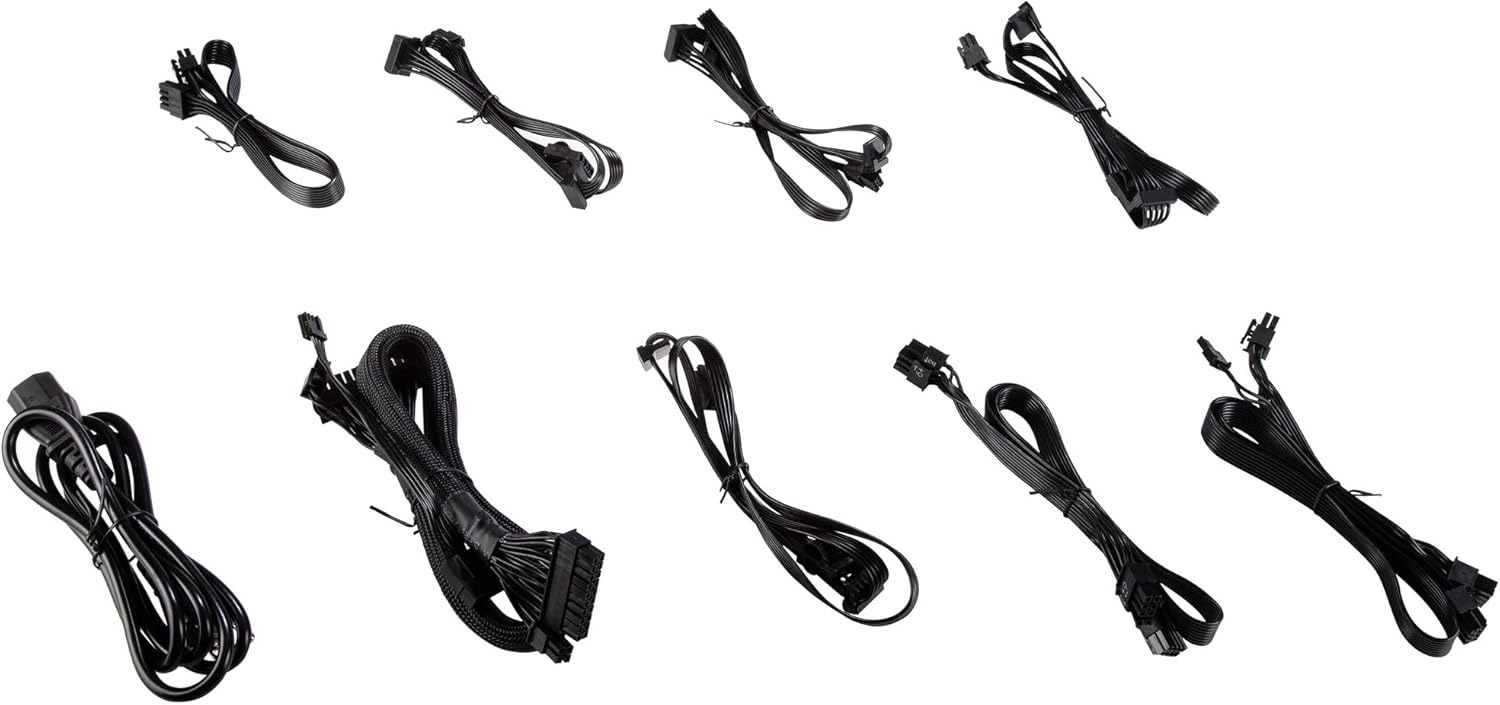
An array of black modular cables included with the Rosewill PMG750 power supply, designed for connecting to various PC components such as the motherboard, CPU, graphics cards, and storage devices.
4. Features
The Rosewill PMG750 Power Supply offers the following key features:
- 80 Plus Gold Certified: Delivers 90% or more efficiency under typical load conditions, reducing energy waste and heat generation.
- Comprehensive Protections: Includes Short-Circuit Protection (SCP), Over-Voltage Protection (OVP), Over-Power Protection (OPP), and Under-Voltage Protection (UVP) for system safety.
- Fully Modular Design: Allows for better cable management by connecting only the necessary cables, improving airflow and reducing clutter within the computer case.
- High-Quality Components: Constructed with durable and reliable components for stable power delivery.
- Ultra-Quiet 135mm Fan: Provides optimal airflow for cooling while maintaining a low noise level, extending the PSU's lifespan.
- 5-Year Warranty: Assures continuous system performance and product reliability.
5. Installation Guide
5.1. Preparation
- Ensure your computer is powered off and unplugged from the wall outlet.
- Open your computer case to access the power supply mounting area.
5.2. Physical Installation
- Carefully place the PMG750 power supply into the designated PSU bay in your computer case.
- Align the screw holes on the power supply with those on the case.
- Secure the power supply using the provided mounting screws.

The rear panel of the Rosewill PMG750 power supply is shown, featuring the AC power input socket, the main power on/off switch, and the exhaust grille for airflow.
5.3. Cable Connections
Connect the modular cables to the power supply and your computer components:
- Connect the 24-pin ATX main power cable to the motherboard.
- Connect the 4+4-pin or 8-pin EPS/ATX 12V CPU power cable to the motherboard.
- Connect the 6+2-pin PCI-E power cables to your graphics card(s) as required.
- Connect SATA power cables to SSDs, HDDs, and optical drives.
- Connect peripheral (Molex) cables to other devices if needed.
- Ensure all connections are secure.

This image illustrates the modular cable connection panel on the Rosewill PMG750 power supply, with clearly labeled ports for Main Power, CPU, PCI-E, SATA/HDD/FDD, and a sensor connection.
6. Operation
6.1. Powering On
- After all cables are connected, close your computer case.
- Plug the AC power cord into the power supply and then into a wall outlet.
- Flip the power switch on the back of the power supply to the 'ON' (I) position.
- Press the power button on your computer case to start the system.
6.2. Powering Off
To power off your system, shut down the operating system normally. For complete power disconnection, flip the power switch on the back of the power supply to the 'OFF' (O) position and unplug the AC cord.
7. Maintenance
Regular maintenance helps ensure the longevity and optimal performance of your power supply:
- Dust Removal: Periodically clean the power supply's fan grille and vents using compressed air to prevent dust buildup, which can impede cooling.
- Environmental Conditions: Operate the power supply within recommended temperature and humidity ranges. Avoid extreme conditions.
- Cable Management: Ensure cables are neatly routed to maintain good airflow within the computer case.
8. Troubleshooting
If you encounter issues with your Rosewill PMG750 power supply, consider the following:
- No Power: Check if the AC power cord is securely connected to both the power supply and the wall outlet. Ensure the power switch on the PSU is in the 'ON' position. Verify the wall outlet is functional.
- System Instability/Crashes: This could indicate insufficient power or a faulty component. Ensure all power cables are correctly seated. If the issue persists, consult a professional technician.
- Fan Noise: A slight fan noise is normal during operation. Excessive or unusual noise may indicate dust buildup or a fan issue. Refer to the maintenance section for cleaning.
- Burning Smell: Immediately power off and unplug the system. Do not attempt to restart. Contact support.
9. Specifications
Detailed technical specifications for the Rosewill PMG750 Power Supply:

A top-down view of the Rosewill PMG750 power supply, clearly showing the product label with detailed electrical specifications for AC input and DC output, including voltage and amperage ratings.
| Specification | Value |
|---|---|
| Model Name | PMG750 |
| Wattage | 750 Watts |
| Form Factor | ATX |
| Efficiency Certification | 80 Plus Gold |
| Cooling Method | Air (135mm fan) |
| Power Supply Design | Full Modular |
| Product Dimensions (L x W x H) | 28.58 x 21.21 x 10.67 cm |
| Item Weight | 2.59 kg |
| Compatible Devices | Personal Computer |
10. Warranty and Support
The Rosewill PMG750 Power Supply comes with a 5-year product guarantee from the date of purchase. This warranty covers defects in materials and workmanship under normal use.
For technical support, warranty claims, or further assistance, please refer to the official Rosewill website or contact their customer service department. Keep your proof of purchase for warranty validation.