
SANNCE DT81BC
SANNCE DVR 8CH 1080P Full HD 5-in-1 Hybrid Digital Video Recorder User Manual
Model: DT81BC
1. Introduction
The SANNCE 8CH 1080P Full HD 5-in-1 Hybrid Digital Video Recorder (DVR) is designed to provide comprehensive security surveillance for your home or business. This DVR supports a wide range of camera types, including TVI, AHD, CVI, CVBS analog, and IP security cameras, up to 1080p Full HD resolution. It offers robust recording capabilities without monthly storage fees, ensuring your data remains private and secure. This manual provides essential information for setting up, operating, and maintaining your SANNCE DVR system.
2. Product Overview
2.1 Key Features
- Powerful 5-in-1 Compatibility: Works with TVI, AHD, CVI, CVBS analog, and IP security cameras (up to 1080p Full HD resolution).
- 1080p Full HD Stream: Supports up to 1080p HDMI & VGA output for local live view and 1080p Lite input for detailed recording.
- Smart Motion Alerts: Advanced motion detection algorithm sends real-time app push notifications and email alerts.
- Remote Access: Control the DVR remotely via 3G/4G/5G or WiFi through smartphones, tablets, computers, laptops, and web browsers.
- Efficient Video Compression: Utilizes H.265+ video format to significantly reduce storage space and bandwidth consumption.
2.2 DVR Components
The SANNCE DVR unit is a compact device designed for efficient video recording and management. Below is an image illustrating the main unit and its dimensions, followed by a diagram of its rear panel connections.

Figure 2.1: Front view of the SANNCE 8CH DVR main unit.

Figure 2.2: Dimensions of the SANNCE 8CH DVR unit (approx. 7.67 x 7.59 x 1.69 inches).
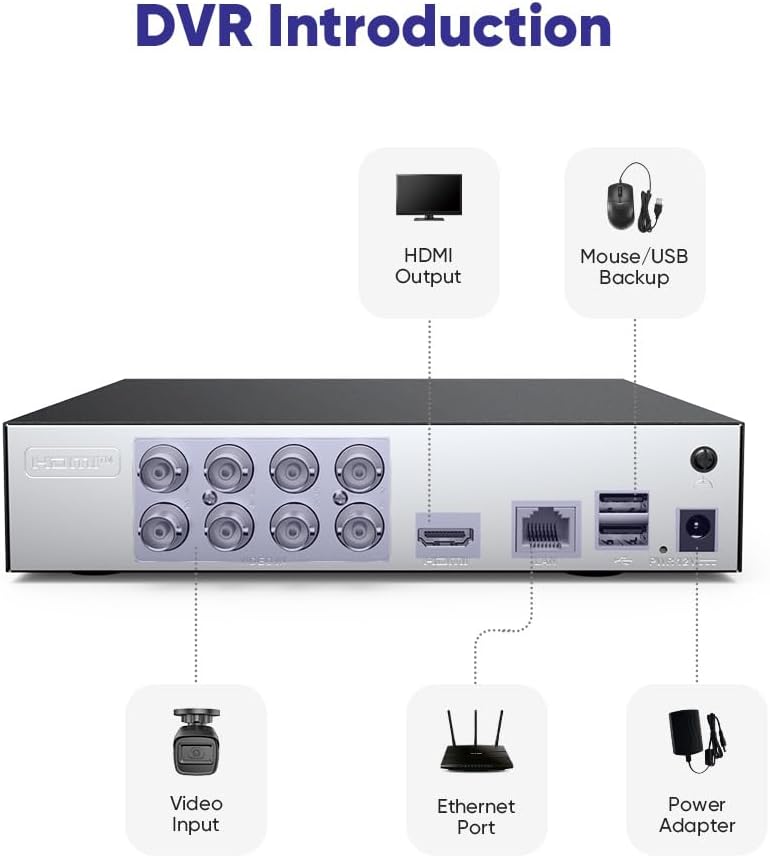
Figure 2.3: Rear panel of the SANNCE DVR showing HDMI output, Mouse/USB backup ports, Video Input (BNC), Ethernet port, and Power Adapter input.
3. Setup Guide
Follow these steps to set up your SANNCE DVR system.
- Hard Drive Installation (Optional): If you wish to install an internal hard drive for local storage, refer to the separate hard drive installation guide or the manufacturer's website for detailed instructions. Ensure the DVR is powered off before installation.
- Connect Cameras: Connect your TVI, AHD, CVI, or CVBS analog cameras to the BNC video input ports on the rear of the DVR. For IP cameras, ensure they are on the same network as the DVR.
- Connect Monitor: Connect a monitor to the DVR using either the HDMI or VGA output port.
- Connect Mouse: Plug the included USB mouse into one of the USB ports on the DVR for local control.
- Connect to Network: Connect an Ethernet cable from the DVR's Ethernet port to your router or network switch for remote access and IP camera support.
- Connect Power: Plug the power adapter into the DVR's power input and then into a power outlet. The DVR will power on automatically.
- Initial Setup: Follow the on-screen prompts to complete the initial setup, including setting up a password, date/time, and network settings.
4. Operating Instructions
4.1 Recording Options
The SANNCE DVR offers flexible recording modes to suit your surveillance needs.
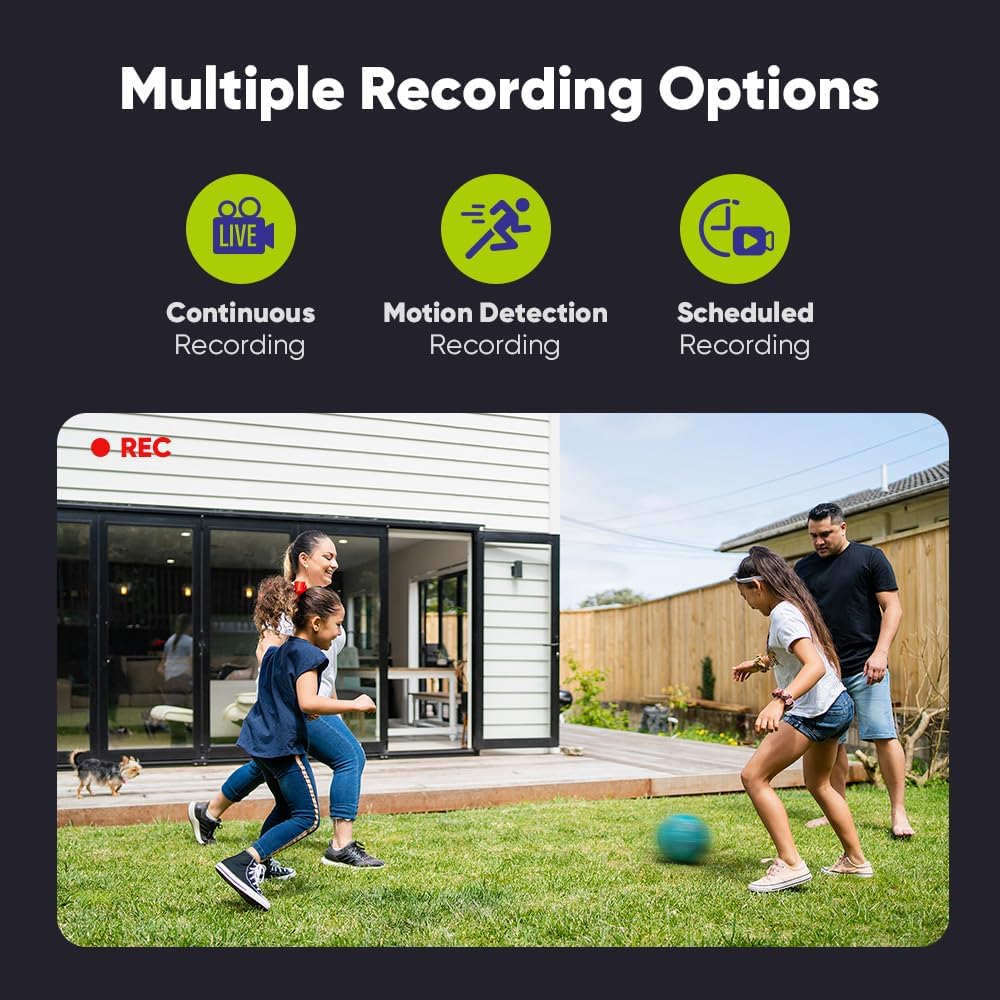
Figure 4.1: The DVR supports Continuous Recording, Motion Detection Recording, and Scheduled Recording.
- Continuous Recording: Records 24/7 without interruption.
- Motion Detection Recording: Records only when motion is detected, saving storage space.
- Scheduled Recording: Set specific times for recording based on your daily needs.
4.2 Smart Motion Alerts and Detection
The DVR's advanced motion detection system can differentiate between human and vehicle movements, significantly reducing false alarms. When an event is detected, you will receive real-time notifications.

Figure 4.2: The DVR's intelligent detection can identify humans and vehicles, reducing false alarms by up to 99%.

Figure 4.3: Real-time alerts are sent via email and the SANNCE HOME app when an alarm is triggered.
4.3 Remote Access
Access your DVR system from anywhere using the SANNCE HOME application on your smartphone or tablet, or through a web browser on your computer.

Figure 4.4: Monitor your security system remotely using the SANNCE HOME mobile application.
4.4 Privacy Protection
The DVR allows you to customize monitor areas and protect privacy by masking specific regions within the camera's view.

Figure 4.5: Define detection areas and set private areas to protect sensitive zones from surveillance.
4.5 H.265+ Video Format
The DVR utilizes H.265+ video compression technology, which significantly reduces the required storage space and network bandwidth compared to older formats like H.264.

Figure 4.6: H.265+ reduces storage and bandwidth usage to approximately 25% of H.264.
5. Maintenance
Regular maintenance ensures the longevity and optimal performance of your SANNCE DVR system.
- Clean the Unit: Periodically wipe the exterior of the DVR with a soft, dry cloth. Do not use liquid cleaners or aerosols.
- Ensure Proper Ventilation: Keep the DVR in a well-ventilated area, free from obstructions to its vents, to prevent overheating.
- Check Connections: Regularly inspect all cable connections (power, video, network) to ensure they are secure.
- Firmware Updates: Check the SANNCE official website for any available firmware updates. Updating firmware can improve performance, add features, and fix bugs.
- Data Backup: If using an internal hard drive, regularly back up important footage to an external storage device.
6. Troubleshooting
This section addresses common issues you might encounter with your SANNCE DVR.
- No Video Output:
- Ensure the monitor is powered on and connected correctly to the DVR's HDMI or VGA port.
- Verify the DVR is powered on and its power indicator light is active.
- Try a different HDMI/VGA cable or monitor.
- No Recording:
- Check if a hard drive is installed and properly initialized in the DVR's settings.
- Verify recording schedules and motion detection settings are configured correctly.
- Ensure cameras are properly connected and displaying live video.
- Remote Access Not Working:
- Ensure the DVR is connected to the internet via the Ethernet port.
- Check your network settings (IP address, gateway, DNS) on the DVR.
- Verify your router's internet connection.
- Ensure the SANNCE HOME app is updated to the latest version.
- Frequent False Motion Alerts:
- Adjust the motion detection sensitivity in the DVR settings.
- Utilize the privacy masking feature to exclude areas with constant movement (e.g., trees swaying, busy roads).
- Ensure the human/vehicle detection feature is enabled if supported by your cameras.
For more detailed troubleshooting or issues not covered here, please refer to the SANNCE support website or contact customer service.
7. Specifications
| Feature | Specification |
|---|---|
| Model Number | DT81BC |
| Video Input | AHD, CVBS, HDTVI (5-in-1 Hybrid) |
| Number of Channels | 8 |
| Video Output | HDMI, VGA (up to 1080p) |
| Audio Input | RCA |
| USB Ports | 2 |
| Connectivity Technology | HDMI, USB, VGA, Ethernet |
| Compatible Devices | Camera, Smartphone, Tablet |
| Memory Storage Capacity (Max) | 6 TB (HDD, not included) |
| Item Weight | 1.13 Kilograms |
| Package Dimensions | 34.79 x 27.9 x 8.6 cm |
8. Warranty and Support
For detailed warranty information, please refer to the product packaging or the official SANNCE website. SANNCE provides customer support for technical assistance and inquiries regarding your DVR system. Please visit their official support page or contact their customer service team for further help.
Ask a question about this manual
Ask about setup, troubleshooting, compatibility, parts, safety, or missing instructions. Manuals+ will review the question and use this page’s manual context to help answer it.