
1. Introduction
This manual provides comprehensive instructions for the safe and efficient operation, maintenance, and troubleshooting of your PULITUO 12V Cordless Drill and Driver Impact Tool. Please read this manual thoroughly before initial use and retain it for future reference.
2. Product Overview

Figure 2.1: PULITUO 12V Cordless Drill and comprehensive accessory set.
The PULITUO 12V Cordless Drill is a versatile tool designed for various drilling and driving tasks. It features a compact design, a powerful motor, and multiple modes to adapt to different materials and applications. The kit includes a 1.5Ah Lithium-Ion battery, a fast charger, and a 50-piece bit set, ensuring you have the necessary components for immediate use.

Figure 2.2: Key components of the drill, including the 3/8" Keyless Chuck, 21+3 Adjustment Torque Clutch, Variable Speed Switch, LED Light, Stepless Speed Trigger, Forward/Reverse Switch, and Soft Grip Handle.
3. Key Features
- 21+3 Clutch & 2-Speed Settings: Offers 21 torque settings (up to 300 In-lbs) for precise control, plus a drill and impact mode. Two variable speeds (0-450 RPM for low speed, 0-1400 RPM for high speed) allow for optimal performance across different tasks.
- Powerful Impact Function with Three Modes:
- IMPACT MODE: Ideal for drilling into hard materials such as brick walls, cement, concrete, ceilings, and pavements.
- DRILL MODE: Suitable for general drilling in wood, iron sheets, metal plates, ceramic tiles, and for loosening screws.
- SCREW DRIVER MODE: Perfect for electrical repairs, toy assembly, furniture assembly, and general mechanical repairs.
- 1300mAh Lithium-Ion Battery and Fast Charger: Provides sufficient power for extended use and recharges quickly.
- 3/8" Keyless Chuck & LED Light: Allows for quick and easy bit changes without a key. The integrated LED light illuminates the work area, enhancing visibility in low-light conditions.
- Comprehensive 24-Piece Accessory Set: Includes various drill bits (brad point, twist, construction), a flexible drill shaft for hard-to-reach areas, a tape measure, a cutting knife, and cleaning brushes.
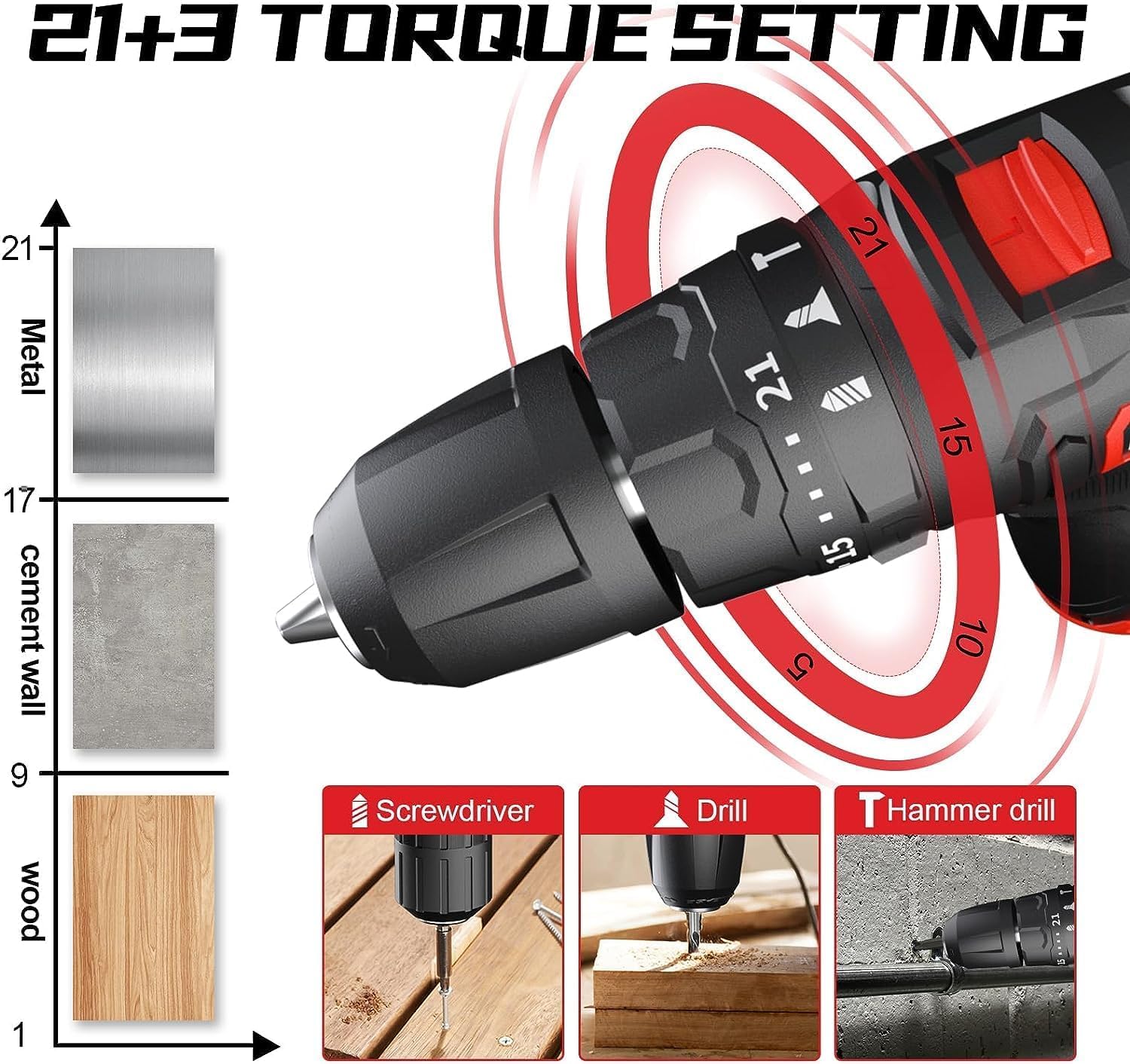
Figure 3.1: Torque adjustment for various materials and modes (Screwdriver, Drill, Hammer Drill).

Figure 3.2: Visual representation of the drill's unique impact force, facilitating easier drilling into tough surfaces.

Figure 3.3: Operating the 3/8" keyless chuck for secure bit installation.

Figure 3.4: Demonstrations of the flexible shaft, LED light, and drill brush set.
4. Setup
4.1 Charging the Battery
- Ensure the battery is securely inserted into the charger.
- Plug the charger into a standard electrical outlet.
- The indicator light on the charger will show the charging status (e.g., red for charging, green for fully charged).
- Once fully charged, disconnect the charger from the outlet and remove the battery.
4.2 Attaching/Removing Drill Bits
- Twist the keyless chuck counter-clockwise to open the jaws.
- Insert the desired drill bit or screwdriver bit into the chuck, ensuring it is seated firmly.
- Twist the chuck clockwise to tighten the jaws securely around the bit. Ensure the bit is centered and cannot be pulled out easily.
- To remove, twist the chuck counter-clockwise until the bit can be pulled out.
5. Operating Instructions
5.1 Selecting Torque and Speed
- Torque Adjustment: Rotate the torque adjustment ring (21+3 positions) to select the appropriate torque setting for your task. Lower settings are for driving screws, preventing overtightening or stripping. Higher settings are for drilling or driving into harder materials.
- Speed Selection: Use the 2-speed switch located on top of the drill. Position 1 (low speed, 0-450 RPM) is for high torque applications like driving screws or drilling large holes. Position 2 (high speed, 0-1400 RPM) is for faster drilling in softer materials.

Figure 5.1: Visualizing the drill's power and speed capabilities.
5.2 Operating Modes
- Screwdriver Mode: Set the torque ring to a lower number. Use the forward/reverse switch to drive or remove screws.
- Drill Mode: Set the torque ring to the drill icon. This mode provides maximum rotational power for drilling holes.
- Impact Mode: Set the torque ring to the hammer icon. This mode adds a hammering action for drilling into masonry and concrete.

Figure 5.2: Drilling into wood, demonstrating the drill's versatility.

Figure 5.3: Using the impact function to drill into a brick wall.
5.3 Safety Precautions
- Always wear appropriate personal protective equipment (PPE), including safety glasses, gloves, and hearing protection.
- Ensure the workpiece is stable and clamped securely before drilling or driving.
- Do not force the tool; let the tool do the work at its own pace.
- Keep hands clear of rotating parts.
- Before changing bits or performing maintenance, ensure the tool is switched off and the battery is removed.
6. Maintenance
- Cleaning: Regularly clean the drill's exterior with a soft, damp cloth. Use the included cleaning brushes to remove dust and debris from vents and the chuck area. Do not use harsh chemicals or abrasive cleaners.
- Battery Care: Store batteries in a cool, dry place away from direct sunlight. Avoid fully discharging the battery before recharging to prolong its lifespan.
- Storage: Store the drill and all accessories in the provided storage bag in a dry, secure location, out of reach of children.
7. Troubleshooting
| Problem | Possible Cause | Solution |
|---|---|---|
| Drill does not turn on. | Battery is not charged or not inserted correctly. | Charge the battery fully. Ensure the battery is clicked firmly into place. |
| Drill lacks power or stops during use. | Low battery charge; incorrect speed/torque setting for the task; bit is dull or damaged. | Recharge the battery. Adjust speed and torque settings appropriately. Replace dull or damaged bits. |
| Drill bit becomes loose in chuck. | Chuck not tightened sufficiently. | Ensure the chuck is hand-tightened firmly after inserting the bit. |
| Excessive vibration during operation. | Bent or damaged drill bit; loose chuck. | Replace the drill bit. Re-tighten the chuck. |
8. Specifications
- Brand: PULITUO
- Model Number: PULITUO 12V Powerful Impact Drill
- Voltage: 12 Volts
- Battery Capacity: 1.5Ah (1300mAh) Lithium Ion
- Max Torque: 35Nm (224 Inch Pounds)
- Speed: 0-450 RPM (Low), 0-1400 RPM (High)
- Impact Rate: 0-19500 BPM
- Chuck Size: 3/8" Keyless
- Material: Metal, Rubber
- Item Weight: 2.11 kg
- Product Dimensions: 20 x 20 x 6 cm
- Special Features: Variable Speed, Cordless, Keyless Chuck, LED Light
- Included Components: Drill Attachments, Flexible Drill Shank, Tape Measure, Cutting Knife, Lithium Ion Battery, Charger, Storage Bag, Cleaning Brushes, 50Pcs Bit Set (including brad point, twist, construction, and screwdriver bits).
9. Warranty and Support
For warranty information and customer support, please refer to the documentation provided with your purchase or visit the official PULITUO website. You may also contact the seller directly for assistance with product-related inquiries.