
1. Introduction
The SMALLRIG V-Mount Battery Plate is designed to provide extended power solutions for your camera rig. It features a standard V-mount design, ensuring compatibility with most V-mount batteries, and seamlessly integrates into your setup to deliver long-lasting power for uninterrupted shooting. This manual provides detailed instructions for the proper setup, operation, and maintenance of your V-Mount Battery Plate.

Figure 1: SMALLRIG V-Mount Battery Plate integrated into a camera rig setup. This plate helps mount an extra battery to power your equipment during shooting.
2. Product Overview
Key Features
- V-Mount Battery Compatibility: Standard V-mount design compatible with most V-mount batteries, including SmallRig VB50, VB99 SE, VB99, VB99 Pro, VB155, VB212, and Neewer V mount battery PS099E.
- Versatile Mounting Options: Features multiple 1/4"-20 and M3/M4 countersinks, threaded holes, and an ARRI locating hole for flexible attachment of dual rod clamps, magic arms, and other accessories.
- Dual 15mm Rod Clamp: Includes a dual 15mm rod clamp for versatile mounting to your 15mm LWS rod system in various configurations.
- Secure Anti-Twist Design: Equipped with dual stoppers to ensure the battery remains firmly in place without twisting during use.
Component Identification
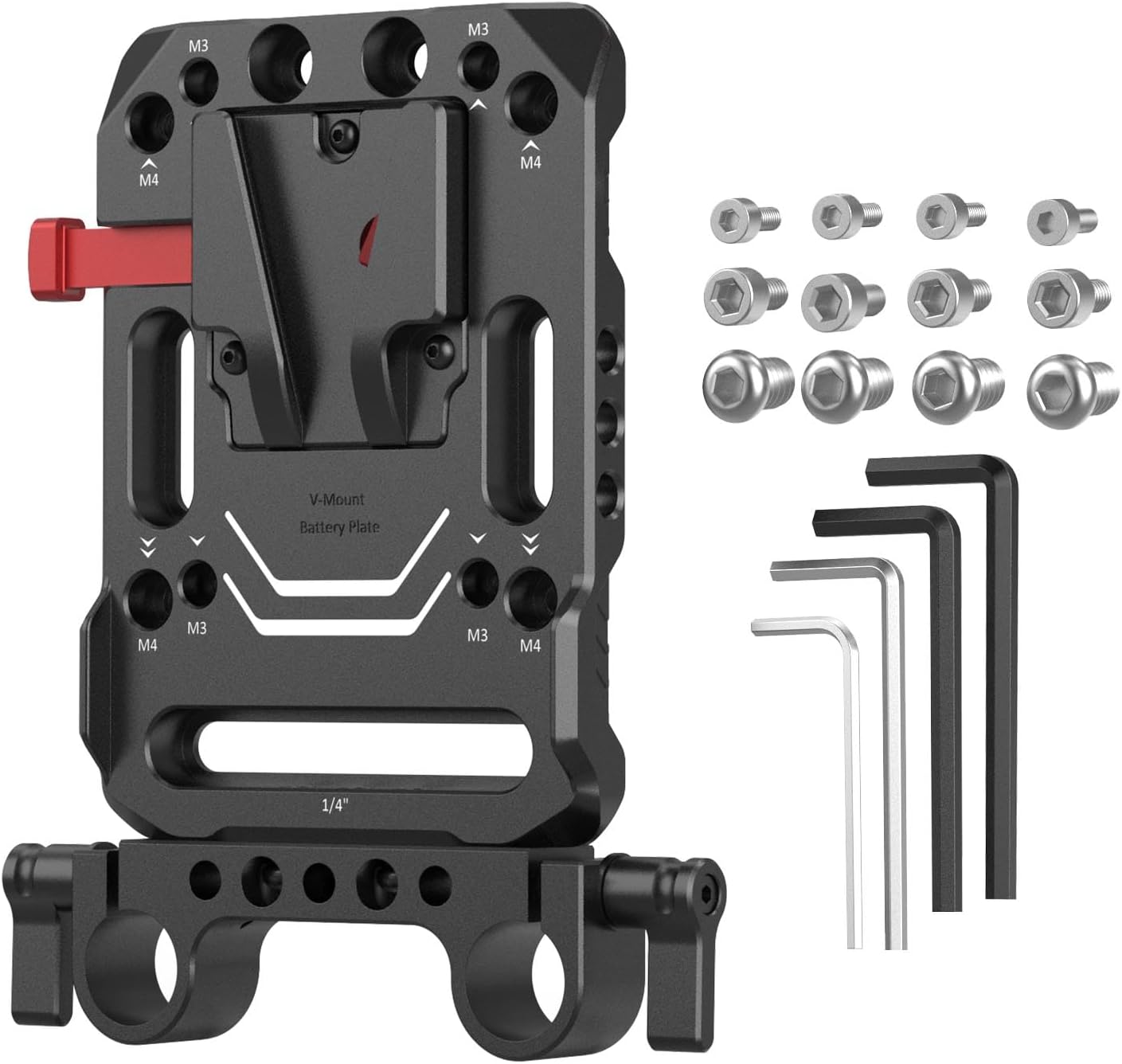
Figure 2: Overview of the V-Mount Battery Plate, highlighting its main components and the included screws and Allen wrenches.

Figure 3: Detailed view of the versatile mounting options available on the plate, including various thread holes and countersinks for accessory attachment.
3. Package Contents
Please verify that all items listed below are included in your package:
- V Mount Battery Plate × 1
- Dual 15mm Rod Clamp × 1
- Allen Wrench × 3
- 1/4"-20 Screw (short) × 4
- 1/4"-20 Screw (long) × 2
- M4 Screw × 4
- M3 Screw × 4

Figure 4: Contents of the package, including the V-Mount Battery Plate, dual 15mm rod clamp, and various fasteners and tools.
4. Setup and Installation
Attaching the Dual 15mm Rod Clamp
- Identify the dual 15mm rod clamp. This clamp allows the battery plate to be mounted onto standard 15mm LWS rod systems.
- Align the screw holes on the rod clamp with the corresponding holes on the bottom of the V-Mount Battery Plate.
- Secure the rod clamp to the battery plate using the provided 1/4"-20 screws and an Allen wrench. Ensure the connection is firm.
- Slide the assembled battery plate and rod clamp onto your 15mm LWS rods.
- Tighten the levers on the rod clamp to secure the plate in your desired position on the rods.
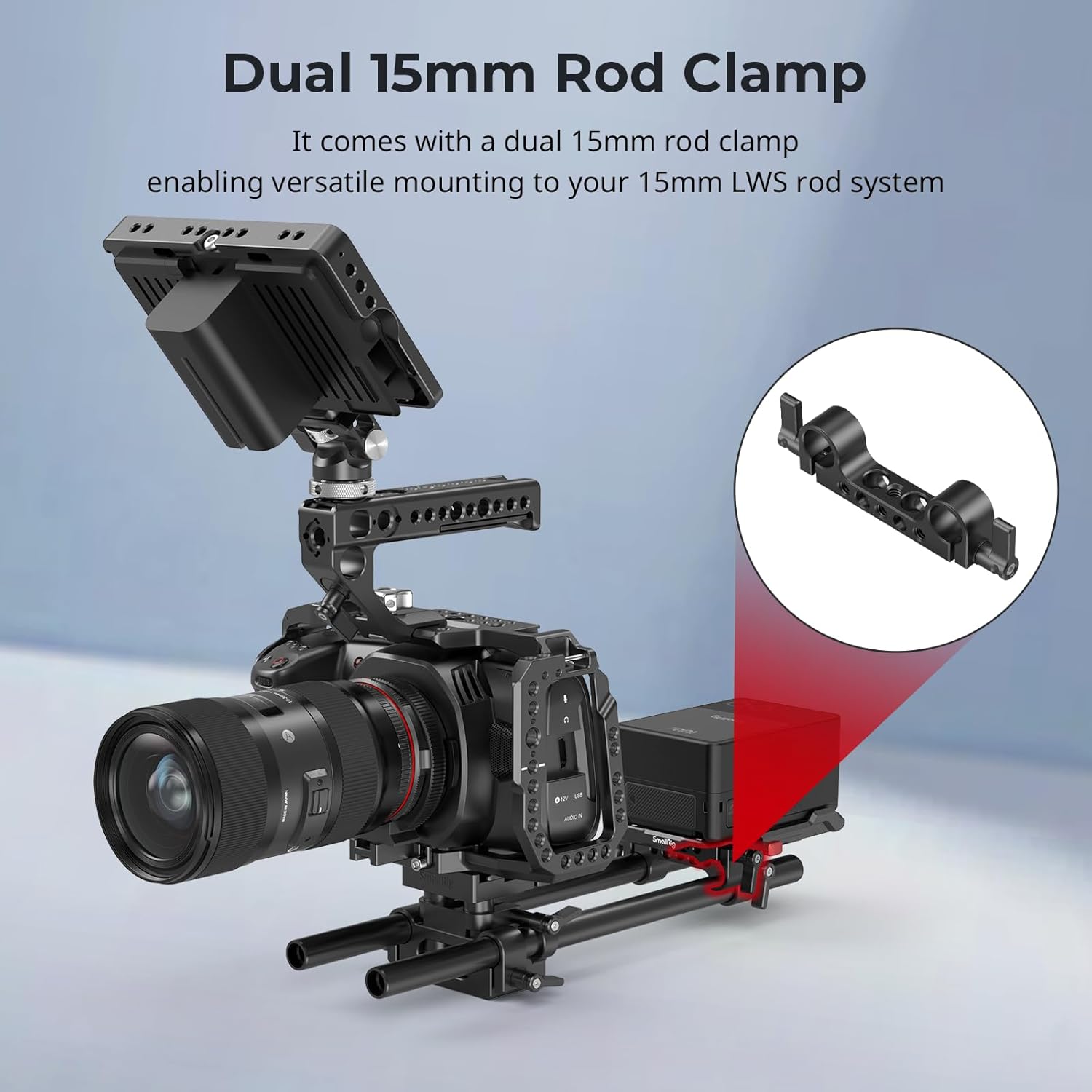
Figure 5: The dual 15mm rod clamp provides a secure and versatile mounting point for the battery plate on your rig.
Utilizing Versatile Mounting Options
The V-Mount Battery Plate offers various threaded holes and countersinks for attaching additional accessories directly to the plate, independent of the rod clamp. These include:
- 1/4"-20 Thread Holes
- 3/8"-16 Thread Holes
- M3 and M4 Countersinks
- ARRI Locating Hole
These points allow for direct attachment of magic arms, monitor mounts, or other rig components, providing maximum flexibility for your setup.
5. Operation
Connecting a V-Mount Battery
- Ensure the V-Mount Battery Plate is securely mounted to your rig.
- Align the V-mount battery with the V-lock mechanism on the plate.
- Slide the battery downwards onto the plate until it clicks into place. The quick-release lever (red) should engage, securing the battery.
- Verify the battery is firmly attached and does not wobble. The dual stoppers on the plate prevent twisting.
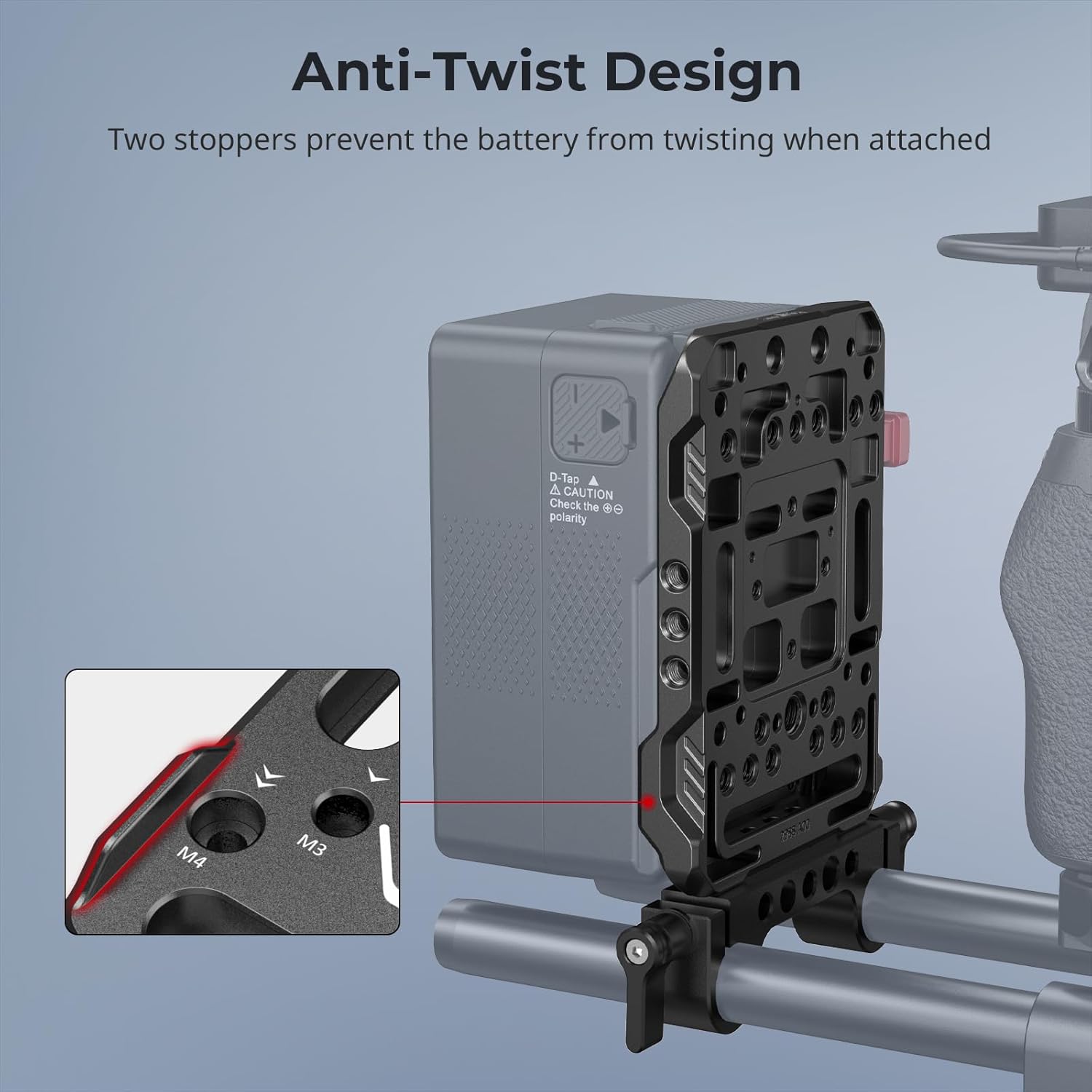
Figure 6: The anti-twist design with dual stoppers ensures a stable and secure connection for your V-mount battery.
Detaching a V-Mount Battery
- Press the red quick-release lever on the side of the V-Mount Battery Plate.
- While holding the lever, slide the V-mount battery upwards to release it from the plate.
Battery Compatibility
The V-Mount Battery Plate is designed for wide compatibility with various V-mount batteries. Confirmed compatible models include:
- SmallRig V-Mount Batteries: VB50, VB99 SE, VB99, VB99 Pro, VB155, VB212
- Neewer V-Mount Battery: PS099E
- Other standard V-mount batteries

Figure 7: The V-Mount Battery Plate is compatible with a wide range of V-mount batteries from SmallRig and other brands.
6. Maintenance
To ensure the longevity and optimal performance of your SMALLRIG V-Mount Battery Plate, follow these maintenance guidelines:
- Cleaning: Use a soft, dry cloth to wipe down the plate. Avoid using abrasive cleaners or solvents that could damage the finish or internal components.
- Storage: Store the battery plate in a cool, dry place away from direct sunlight and extreme temperatures.
- Inspection: Periodically inspect all screws and connections to ensure they are tight. Re-tighten if necessary using the provided Allen wrenches.
- Avoid Overloading: Do not attempt to mount batteries or accessories that exceed the plate's structural integrity or intended use.
7. Troubleshooting
Common Issues and Solutions
- Issue: Battery does not securely attach to the plate.
Solution: Ensure the V-mount battery is correctly aligned with the V-lock mechanism. Apply firm, even pressure until you hear a click. Check for any obstructions in the V-lock mechanism or on the battery. - Issue: Plate twists or moves on the rods.
Solution: Ensure the levers on the dual 15mm rod clamp are fully tightened. If the issue persists, check if the rods are the correct 15mm diameter and free from debris. - Issue: Screws become loose.
Solution: Regularly check and tighten all screws using the appropriate Allen wrench provided in the package. Avoid over-tightening, which can strip threads.
8. Specifications
| Attribute | Value |
|---|---|
| Product Dimensions | 5.22 x 4.25 x 0.67 inches (132.5 x 108.0 x 17 mm) |
| Item Weight | 6.7 ounces (190.0 g) |
| ASIN | B08RMR8X1Q |
| Item Model Number | 12759-SR |
| Brand | SMALLRIG |
| Color | Black |
| Compatible Devices | V mount battery |
| Mounting Type | V-Mount, 15mm Rod Clamp |
| Material | Aluminum Alloy (implied by product description) |
9. Warranty and Support
SMALLRIG products are manufactured to high-quality standards. For specific warranty information and support, please refer to the warranty card included with your product or visit the official SMALLRIG website. You may also contact SMALLRIG customer service directly for assistance with product inquiries, technical support, or warranty claims.
Official SMALLRIG Website: www.smallrig.com
Please retain your proof of purchase for any warranty-related services.


