
1. Introduction
The Konnected Alarm Panel Pro Conversion Kit transforms your existing wired alarm system into a smart, connected home security solution. This 12-zone panel integrates seamlessly with popular smart home platforms like SmartThings, Alexa, Home Assistant, and Hubitat, providing advanced monitoring and automation capabilities without the need for batteries or monthly subscriptions. It supports both Wi-Fi and Ethernet connections, including Power over Ethernet (PoE) for simplified installation.
This manual provides detailed instructions for setting up, operating, and maintaining your Konnected Alarm Panel Pro, ensuring you can maximize its features for enhanced home security and automation.

Image 1.1: The Konnected Alarm Panel Pro integrates with existing wired sensors like door/window contacts, motion sensors, glass break detectors, leak detectors, and smoke/CO detectors.
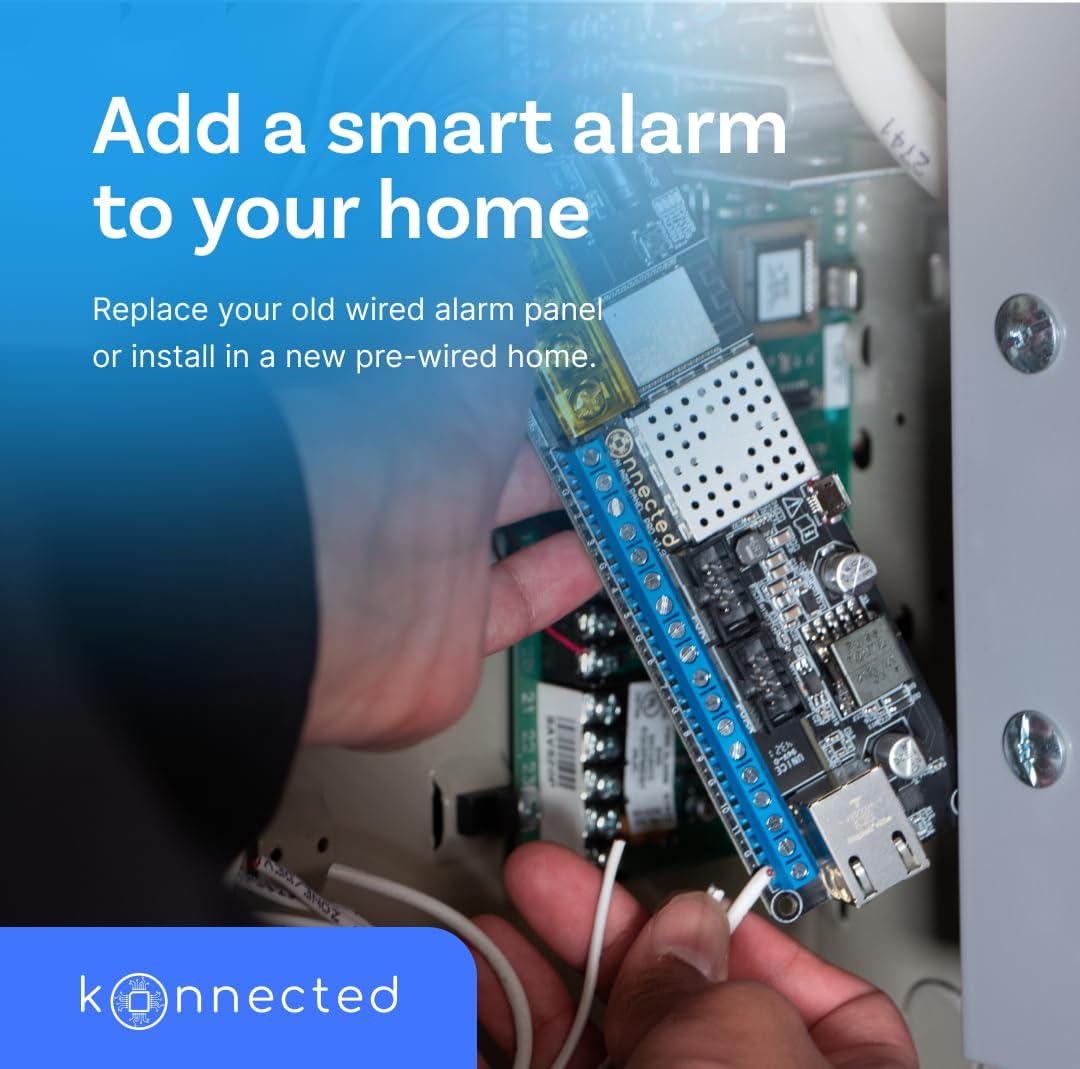
Image 1.2: Installation of the Konnected Alarm Panel Pro into an existing wired alarm system.
2. What's in the Box
Your Konnected Alarm Panel Pro Conversion Kit includes the following components:
- Konnected Alarm Panel Pro Board
- 12V Power Adapter
- Mounting Standoffs
- Jumper Wires
- Screwdriver-Pen
- Wire Labels Sheet
- Window Stickers
- Piezo Buzzer

Image 2.1: Included accessories with the Konnected Alarm Panel Pro Conversion Kit.
3. Setup
3.1. Wiring Your Sensors
The Konnected Alarm Panel Pro is designed to connect to your existing wired sensors. Before disconnecting any wires from your old alarm panel, it is crucial to label each wire clearly to ensure correct re-connection to the Konnected board. Each sensor typically has two wires. Group one wire from each sensor as the common ground (GND) and label the other wire with its specific zone (e.g., 'Dining Room Window').

Image 3.1: The Konnected Alarm Panel Pro board with terminal blocks for connecting up to 12 zones.
3.2. Network Connection and Power
The Konnected Alarm Panel Pro offers flexible connectivity options:
- Wi-Fi: Connect wirelessly using the provided 12V power adapter.
- Ethernet: For a stable wired connection, use an Ethernet cable with the 12V power adapter.
- Power over Ethernet (PoE): If your network infrastructure supports PoE, you can power the board and provide network connectivity through a single Ethernet cable, eliminating the need for the 12V power adapter.
Ensure the board is securely mounted using the provided standoffs to prevent short circuits from contact with metal surfaces.
3.3. App Configuration
Download the Konnected Smart Home app from your device's app store. Follow the in-app instructions to connect your Konnected device to your home network. If using Wi-Fi, you will enter your network's SSID and password. If using Ethernet, the board will automatically obtain an IP address from your router.
Once connected, register your device to the Konnected Cloud. This links your device to the Konnected service and enables integration with smart home platforms. You will then use the app to define and name each of your 12 zones (e.g., 'Dining Room Window', 'Guest Bedroom Motion').
Video 3.1: This video demonstrates the process of connecting the Konnected Alarm Panel Pro to your smart home system, highlighting its compatibility with various wired sensors and smart home platforms. It shows how to integrate the device for seamless communication and control.
4. Operating
After successful setup, your Konnected Alarm Panel Pro allows you to monitor and control your wired sensors through your chosen smart home platform (e.g., SmartThings, Alexa, Home Assistant). Notifications about unusual activity, such as an opened window or detected motion, will be sent directly to your smartphone or tablet.
4.1. Smart Home Integration
Integrate your Konnected device with your preferred smart home platform. This enables you to:
- Arm and disarm your security system remotely.
- Receive instant alerts and notifications.
- Create custom automations and routines based on sensor activity.

Image 4.1: The Konnected app interface showing integration with leading smart home platforms.
4.2. Custom Automations
Leverage your smart home platform to create personalized automations. For example:
- Set up your smart lights to turn on when a door opens.
- Adjust your smart thermostat when a window is left open.
- Trigger a siren or send a notification if a motion sensor detects activity while the system is armed.

Image 4.2: Users can create custom automations to control various smart devices.

Image 4.3: Monitor your home from anywhere and receive instant notifications without monthly fees.
5. Maintenance
The Konnected Alarm Panel Pro is designed for low maintenance. Regular maintenance typically involves:
- Firmware Updates: Periodically check the Konnected app or website for firmware updates to ensure optimal performance and access to new features.
- Sensor Checks: Occasionally test your wired sensors to confirm they are functioning correctly and communicating with the Konnected board.
- Power Supply: Ensure the power adapter or PoE connection is secure and providing consistent power to the device.
- Cleaning: Keep the Konnected board and its connections free from dust and debris. Disconnect power before cleaning.
6. Troubleshooting
If you encounter issues with your Konnected Alarm Panel Pro, consider the following troubleshooting steps:
- Device Offline: Check your internet connection (Wi-Fi or Ethernet). Ensure the power supply is connected and functioning. Reboot your router and the Konnected board.
- Sensor Not Responding: Verify the wiring for the specific sensor. Ensure the sensor is correctly configured in the Konnected app and your smart home platform.
- Notifications Not Received: Check your smart home app's notification settings and your phone's notification permissions. Ensure the Konnected Cloud integration is active.
- Unexpected Behavior: Perform a factory reset of the Konnected board (refer to the Konnected website for specific instructions) and reconfigure it.
For further assistance, visit the official Konnected support website or contact customer service.
7. Specifications
| Feature | Detail |
|---|---|
| Brand | Konnected |
| Model Number | Conversion Kit |
| Color | Black |
| Power Source | DC (12 Volts) / PoE |
| Connectivity Technology | Wi-Fi, Ethernet |
| Compatible Devices | Smartphone (SmartThings, Alexa, Home Assistant, Hubitat) |
| Item Dimensions (L x W x H) | 5.71 x 1.81 x 0.79 inches |
| Item Weight | 0.66 Kilograms |
| Control Method | App |
| Installation Method | Wall mount |
8. Warranty & Support
The Konnected Alarm Panel Pro Conversion Kit comes with a 1 Year Warranty Against Manufacturer Defects.
For product support, additional documentation, or to explore more Konnected products, please visit the official Konnected Store:


