
IMILAB C21
IMILAB C21 2.5K Indoor Security Camera User Manual
Model: C21 (CMSXJ56B) | Brand: IMILAB
1. Introduction
The IMILAB C21 2.5K Indoor Security Camera provides advanced home monitoring with its high-resolution video, comprehensive 360-degree coverage, and intelligent detection features. Designed for indoor use, it offers peace of mind by keeping you connected to your home, pets, or loved ones from anywhere.
Key features include crystal-clear 2.5K QHD video, 360° pan-tilt-zoom functionality, enhanced night vision, two-way audio communication, and smart AI detection for motion, human, and sound events. It supports both local and cloud storage options and integrates seamlessly with popular voice assistants like Alexa and Google Assistant.
Product Overview Video
Official product video introducing the IMILAB C21 Indoor Camera, highlighting its main features and design.
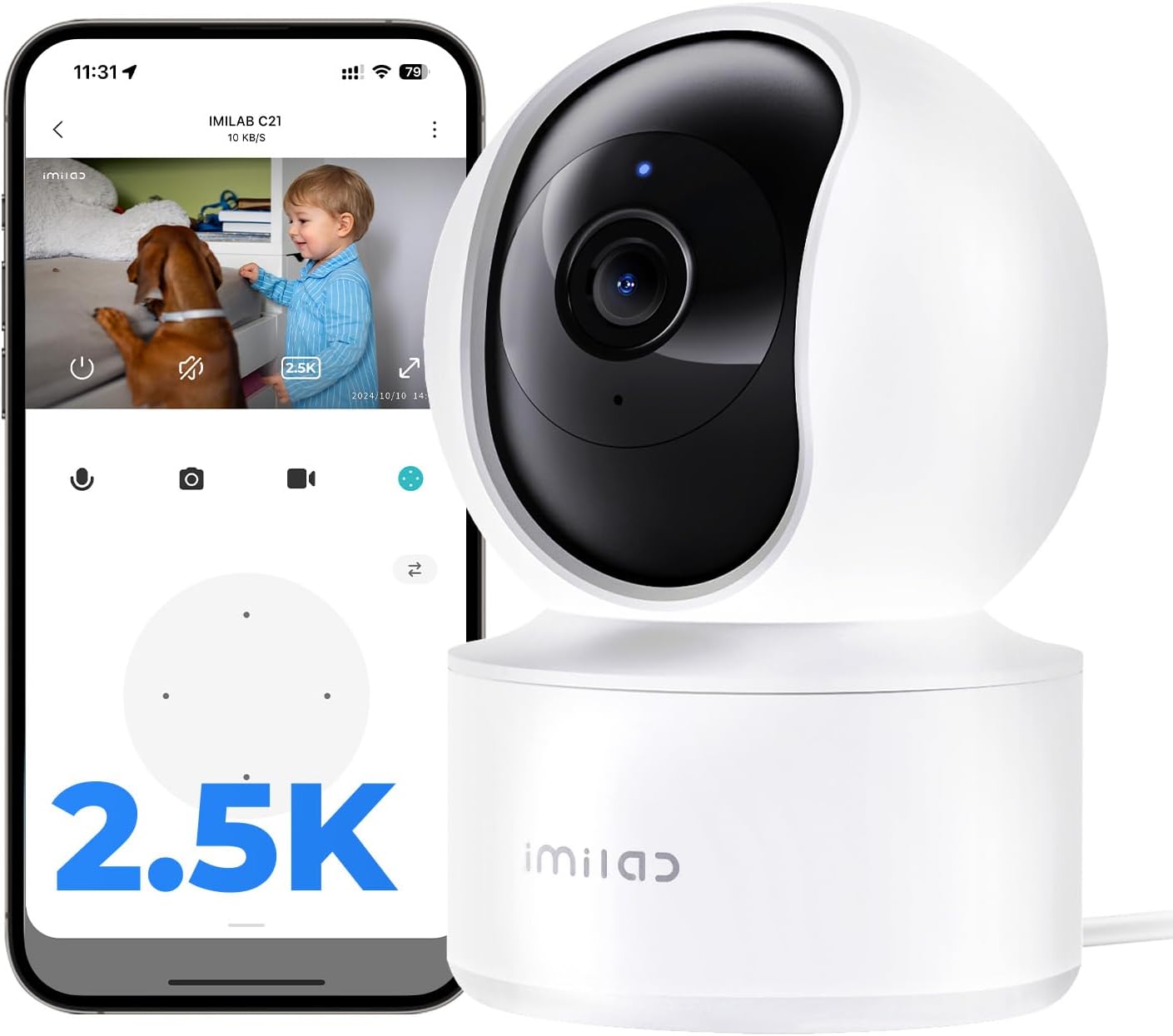
The IMILAB C21 camera, showcasing its compact design and the accompanying mobile application interface for live viewing.
2. What's in the Box
Upon unboxing your IMILAB C21 camera, please ensure all the following components are present:
- IMILAB C21 Indoor Pan-Tilt Cam x 1
- Power Adapter & Cable (6.6ft) x 1
- Mounting Kit x 1
- User Manual & Warranty Card x 1

All components included in the IMILAB C21 product packaging.
3. Setup Guide
Setting up your IMILAB C21 camera is a straightforward process. Follow these steps to get your camera up and running:
- Power On: Connect the camera to a power source using the provided power adapter and cable. The camera will power on and initiate its self-check.
- Download the App: Download the 'Xiaomi Home' or 'Mi Home' app from your device's app store (available for iPhone/Android).
- Add Device: Open the app, log in or create an account. Tap the '+' icon to add a new device.
- Scan QR Code: Use the app to scan the QR code located at the base of your IMILAB C21 camera. The camera will provide audio prompts to guide you through the pairing process.
- Connect to Wi-Fi: Follow the in-app instructions to connect your camera to your 2.4GHz Wi-Fi network. Ensure your Wi-Fi signal is strong in the camera's intended location.
- Placement: Position your camera in the desired indoor location. It can be placed freestanding on a table, shelf, or mounted on a wall or ceiling using the included mounting kit.
Unboxing and Setup Video
An unboxing and setup guide for the IMILAB C21, demonstrating the ease of installation and initial configuration.
4. Operating Instructions
Once your IMILAB C21 camera is set up, you can access and control its features via the Xiaomi Home/Mi Home app.
4.1 Live View and Pan-Tilt-Zoom (PTZ) Control
Open the app and select your camera to view the live feed. Use the on-screen joystick or swipe gestures to control the camera's 360° horizontal and 90° vertical rotation. You can also pinch to zoom up to 6x magnification to see details.

Live view of the camera feed on a smartphone, demonstrating the 2.5K QHD clarity and two-way audio functionality.

Visual representation of the camera's 360° panoramic view and pan-tilt-zoom capabilities.
4.2 Two-Way Audio
The built-in microphone and speaker allow for two-way communication. Tap the microphone icon in the app to speak through the camera, or listen to audio from the camera's environment.
4.3 Smart AI Detection & Alerts
The camera features advanced AI detection for motion, human figures, and abnormal sounds. When an event is detected, you will receive instant alerts on your phone. The auto-tracking feature can follow detected activity within its field of view.

Example of an AI-powered noise detection alert received on the mobile app.
4.4 Night Vision
The IMILAB C21 provides 24/7 monitoring with its infrared night vision, ensuring clear footage even in low-light conditions.
4.5 Storage Options
You have flexible options for storing your footage:
- MicroSD Card: Insert a MicroSD card (up to 256GB, sold separately) for 24/7 local recording.
- Cloud Storage: Utilize the subscription-based cloud storage for motion-triggered event recording. New users may receive free trial periods.

Mobile app interface displaying the available cloud and local MicroSD storage options.
4.6 Voice Assistant Integration
The IMILAB C21 is compatible with Amazon Alexa and Google Assistant. You can voice-control your camera, for example, by saying "Alexa, show the camera" to view the live feed on a compatible smart display.

The IMILAB C21 camera integrated with a smart display, demonstrating voice control capabilities with Amazon Alexa and Google Assistant.
Product Features in Action Video
A short video showcasing the IMILAB C21 camera's features in real-world scenarios.
Never Miss a Thing Video
An official video demonstrating how the IMILAB C21 ensures you don't miss any important moments.
5. Installation Options
The IMILAB C21 camera offers versatile installation options to suit your needs:
- Freestanding: Place the camera on any flat surface like a table, shelf, or cabinet.
- Wall Mount: Use the included mounting kit to securely attach the camera to a wall.
- Ceiling Mount: The camera can also be inverted and mounted on the ceiling for a wider overhead view. Remember to adjust the image orientation in the app settings if mounting upside down.

Illustrations of the IMILAB C21 camera installed in different positions: on a table, wall-mounted, and ceiling-mounted.
6. Maintenance
To ensure optimal performance and longevity of your IMILAB C21 camera, consider the following maintenance tips:
- Clean the Lens: Gently wipe the camera lens with a soft, dry, lint-free cloth to remove dust or smudges. Avoid abrasive cleaners.
- Stable Power Supply: Ensure the camera is connected to a stable power source and the power cable is not damaged.
- Optimal Wi-Fi Signal: Place the camera within good range of your 2.4GHz Wi-Fi router for a stable connection and smooth video streaming.
- Firmware Updates: Regularly check the Xiaomi Home/Mi Home app for firmware updates to ensure your camera has the latest features and security enhancements.
- Environmental Conditions: Keep the camera in a dry, indoor environment within its specified operating temperature range. Avoid direct sunlight or extreme temperatures.
7. Troubleshooting
If you encounter any issues with your IMILAB C21 camera, try the following troubleshooting steps:
- Camera Offline: Check the power connection. Ensure your Wi-Fi network is active and the camera is within range. Restart the camera by unplugging and re-plugging it.
- Poor Video Quality: Verify your Wi-Fi signal strength. Move the camera closer to the router if necessary. Ensure the lens is clean.
- No Alerts: Check the app's notification settings to ensure they are enabled for motion, human, or sound detection. Adjust sensitivity settings if needed.
- Two-Way Audio Issues: Ensure the microphone and speaker settings are enabled in the app. Check your device's volume settings.
- Camera Not Responding: Try resetting the camera using the reset button (refer to the setup guide for location). This will restore factory settings and require re-pairing with the app.
- App Connectivity Issues: Ensure your app is updated to the latest version. Try clearing the app cache or reinstalling the app.
For further assistance, please refer to the detailed User Manual PDF or contact customer support.
8. Specifications
| Feature | Detail |
|---|---|
| Model Name | C21 (CMSXJ56B) |
| Indoor/Outdoor Usage | Indoor |
| Video Capture Resolution | 2.5K QHD (2560p) |
| Viewing Angle | 360 Degrees (Pan-Tilt-Zoom) |
| Night Vision Range | 33 Feet |
| Connectivity Protocol | Wi-Fi (2.4GHz) |
| Controller Type | Xiaomi Home/Mi Home App, Google Assistant, Amazon Alexa |
| Storage Options | Micro SD (up to 256 GB), Cloud Storage |
| Power Source | Corded Electric (6.6ft cable) |
| Dimensions (L x W x H) | 2.87 x 2.95 x 4.33 inches |
| Item Weight | 12 ounces |
9. Warranty & Support
IMILAB provides a 24-month warranty for the C21 Indoor Security Camera, ensuring reliable performance and customer satisfaction.
For detailed information, troubleshooting, or technical assistance, please refer to the comprehensive User Manual (PDF) available online.
You may also contact IMILAB customer support directly:
- Phone: 866-363-8885
- Email: help@imilab.com
Related documentsC21


Ask a question about this manual
Ask about setup, troubleshooting, compatibility, parts, safety, or missing instructions. Manuals+ will review the question and use this page’s manual context to help answer it.