
1. Introduction
The AVMATRIX SE1217 is a compact and versatile SDI Streaming Encoder designed for professional video and audio streaming applications. It supports H.265/H.264 stream encoding up to 1080p60hz and offers a wide range of streaming protocols including RTSP, RTP, RTMPS, RTMP, HTTP, UDP, and SRT. This device facilitates live streaming without requiring a computer, making it suitable for various broadcasting and recording scenarios.
Key features include:
- 1x HDMI input and 1x HDMI loop out for monitoring.
- 1x Analog audio input for external audio sources.
- Support for both video and audio streaming, or single audio streaming.
- Advanced features like image and text overlay, mirror image, and upside-down image functionality.

Figure 1: Front-top view of the AVMATRIX SE1217 SDI Streaming Encoder, showcasing its compact design and primary branding.
2. Setup
2.1 Package Contents
Please verify that all items are present in the package:
- AVMATRIX SE1217 SDI Streaming Encoder Unit
- Power Adapter
- Mounting Brackets (if included)
- User Manual (this document)
2.2 Physical Connections
Follow these steps to connect your SE1217 encoder:
- Connect Video Source: Plug your HDMI video source (e.g., camera, gaming console) into the HDMI IN port on the encoder.
- Connect Display (Optional): If you need to monitor the video signal, connect an HDMI cable from the HDMI LOOP OUT port on the encoder to an HDMI display (e.g., monitor, television).
- Connect Audio Source (Optional): For external audio, connect your analog audio device to the AUDIO IN port.
- Connect to Network: Connect an Ethernet cable from the LAN port on the encoder to your network router or switch. This is essential for streaming.
- Connect Power: Plug the provided power adapter into the POWER input on the encoder, then connect it to a power outlet. The device will power on automatically.
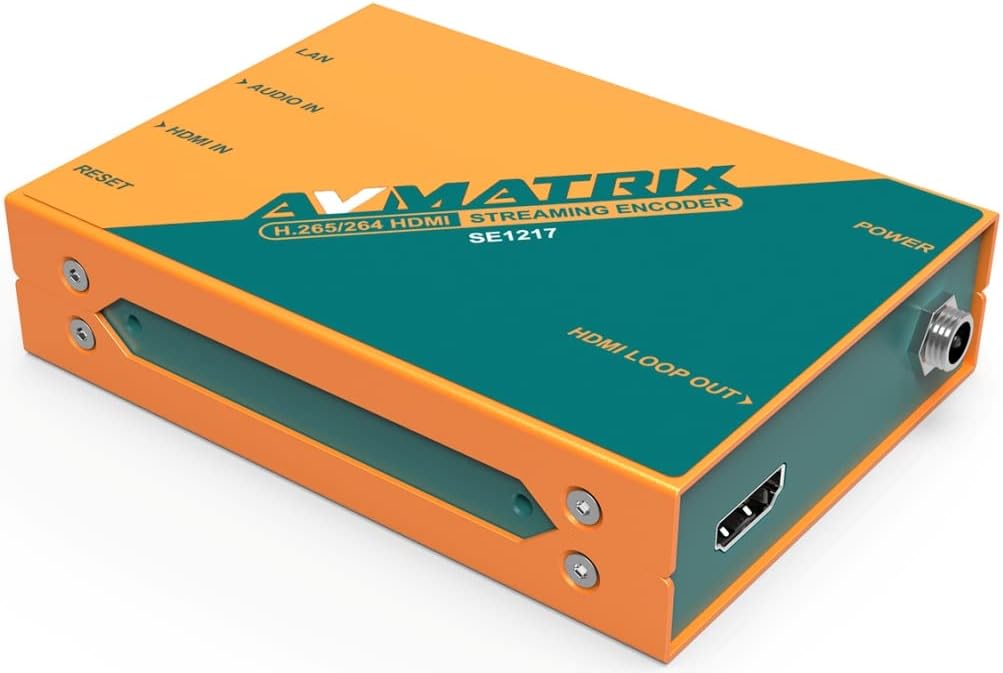
Figure 2: Left side view of the encoder, highlighting the HDMI IN, Audio IN, LAN, and Reset ports.
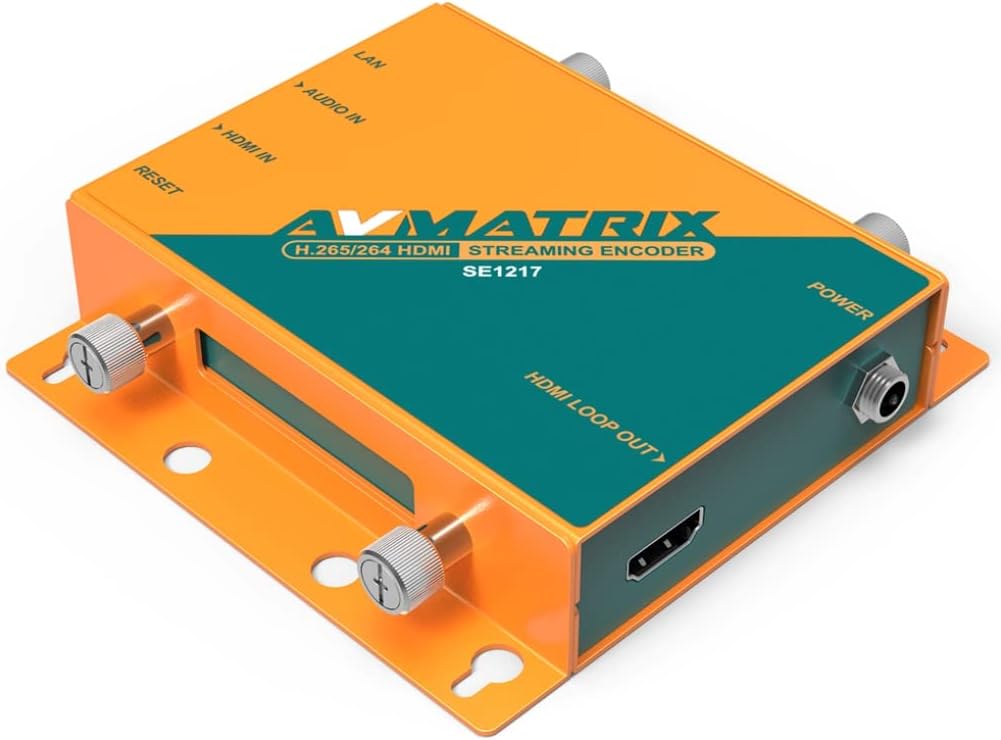
Figure 3: Right side view of the encoder, highlighting the HDMI LOOP OUT and Power ports.
3. Operating Instructions
3.1 Initial Configuration
After connecting the device and powering it on, you will need to access its web-based interface for detailed configuration. Refer to the network settings provided with your device or use a network scanner to find the encoder's IP address. Enter this IP address into a web browser on a computer connected to the same network.
3.2 Streaming Protocols
The SE1217 supports various streaming protocols. You can configure these settings within the web interface:
- RTMP/RTMPS: Commonly used for live streaming to platforms like YouTube, Twitch, and Facebook Live.
- RTSP/RTP: Standard protocols for streaming media over IP networks.
- HTTP/UDP: Basic protocols for various network applications.
- SRT (Secure Reliable Transport): Provides high-quality, low-latency video transport over unreliable networks.
3.3 Video and Audio Settings
Within the web interface, you can adjust:
- Encoding Format: Select between H.265 or H.264.
- Resolution and Frame Rate: Up to 1080p60hz.
- Bitrate: Adjust for desired quality and bandwidth.
- Audio Encoding: Configure audio codecs and bitrates.
- Streaming Mode: Choose between video and audio streaming, or audio-only streaming.
3.4 Advanced Features
The encoder includes advanced image processing capabilities:
- Image and Text Overlay: Add custom graphics or text to your video stream.
- Mirror Image: Flip the video horizontally.
- Upside-Down Image: Rotate the video 180 degrees.
These settings are accessible and configurable through the device's web interface.
4. Maintenance
4.1 Cleaning
To maintain optimal performance, keep the device clean. Use a soft, dry cloth to wipe the exterior. Avoid using liquid cleaners or solvents, as these can damage the unit.
4.2 Firmware Updates
Periodically check the AVMATRIX official website for firmware updates. Firmware updates can provide new features, performance improvements, and bug fixes. Follow the instructions provided with the firmware update package carefully to avoid damaging the device.
4.3 Storage
When not in use for extended periods, store the encoder in a cool, dry place away from direct sunlight and extreme temperatures. Ensure it is disconnected from power and all cables.
5. Troubleshooting
This section addresses common issues you might encounter with the AVMATRIX SE1217 encoder.
- No Power:
- Ensure the power adapter is securely connected to both the encoder and a working power outlet.
- Verify the power outlet is functional.
- No Video Signal:
- Check that the HDMI input cable is securely connected to both the source and the encoder's HDMI IN port.
- Confirm the video source is powered on and outputting a signal.
- If using the HDMI loop out, ensure the display is correctly connected and set to the correct input.
- No Network Connection:
- Verify the Ethernet cable is properly connected to the LAN port and your network router/switch.
- Check your network router/switch for proper operation.
- Ensure the encoder's IP address settings are correct (DHCP or static IP).
- No Stream Output:
- Confirm network connectivity.
- Check streaming protocol settings (RTMP URL, stream key, etc.) in the web interface.
- Ensure the streaming platform is active and ready to receive the stream.
- No Audio:
- If using the analog audio input, ensure the cable is connected correctly and the audio source is active.
- Check audio settings in the web interface to ensure audio encoding is enabled and levels are appropriate.
- Device Unresponsive:
- Press the RESET button briefly to restart the device.
- If a soft reset does not work, disconnect and reconnect the power adapter.
6. Specifications
The following table details the technical specifications of the AVMATRIX SE1217 SDI Streaming Encoder:
| Feature | Description |
|---|---|
| Model | SE1217 |
| Video Input | 1x HDMI |
| Video Output | 1x HDMI Loop Out |
| Audio Input | 1x Analog Audio |
| Network Interface | 1x LAN (Ethernet) |
| Video Encoding | H.265 / H.264 |
| Max Resolution | 1080p60hz |
| Streaming Protocols | RTSP, RTP, RTMPS, RTMP, HTTP, UDP, SRT |
| Special Features | Image & Text Overlay, Mirror Image, Upside-Down Image |
| Color | Orange |
| Compatible Devices | Gaming Console, Monitor, Television |
7. Warranty and Support
For detailed warranty information and technical support, please refer to the official AVMATRIX website or contact your authorized dealer. Keep your purchase receipt as proof of purchase for warranty claims.


