
CAZOKASI CXSM-007
CAZOKASI Digital Day Clock Instruction Manual
Model: CXSM-007
1. Product Overview
The CAZOKASI Digital Day Clock is an advanced timekeeping device designed for clarity and ease of use, particularly beneficial for individuals with impaired vision or those who prefer a large, non-abbreviated display. It features multiple display interfaces, automatic brightness adjustment, and comprehensive alarm and reminder functions to support daily routines.

Figure 1: The CAZOKASI Digital Day Clock, showing a clear display of Friday, August 15, 2019, 10:25 A.M.
2. Setup Guide
2.1 Unboxing and Initial Inspection
Carefully remove the clock from its packaging. Inspect the device for any visible damage. Ensure all components, including the power adapter, are present.
2.2 Power Connection
The clock is powered by a DC 5V/2A power supply. Locate the power input port on the side of the clock and connect the provided power adapter. Plug the adapter into a standard electrical outlet.
Video 1: Demonstrates the physical setup of the clock, including connecting the power supply and deploying the integrated stand. It also shows the multimedia interface with SD card and USB ports.
2.3 Deploying the Integrated Stand
The clock features an integrated stand for easy tabletop deployment. Gently pull out the stand from the back of the unit until it locks into place. This allows the clock to stand upright on any flat surface.
2.4 Multimedia Interface
The clock is equipped with a multimedia interface supporting picture and video playback via an SD card and USB drive. These ports are located on the side of the device.

Figure 2: The clock highlighting its multimedia function, which supports picture carousel, video, and music playback via USB and TF (SD card) slots.
3. Operating Instructions
3.1 Display Interfaces
The clock offers three distinct display interfaces to suit various preferences and usage scenarios:
- UI-1 (Elderly Mode): Designed with large, non-abbreviated fonts for optimal readability, especially for the elderly.
- UI-2 (Wall Clock Mode): A classic analog wall clock display, suitable for general home decor.
- UI-3 (Color Display Mode): A vibrant color display, ideal for younger users or those who prefer a more dynamic visual.
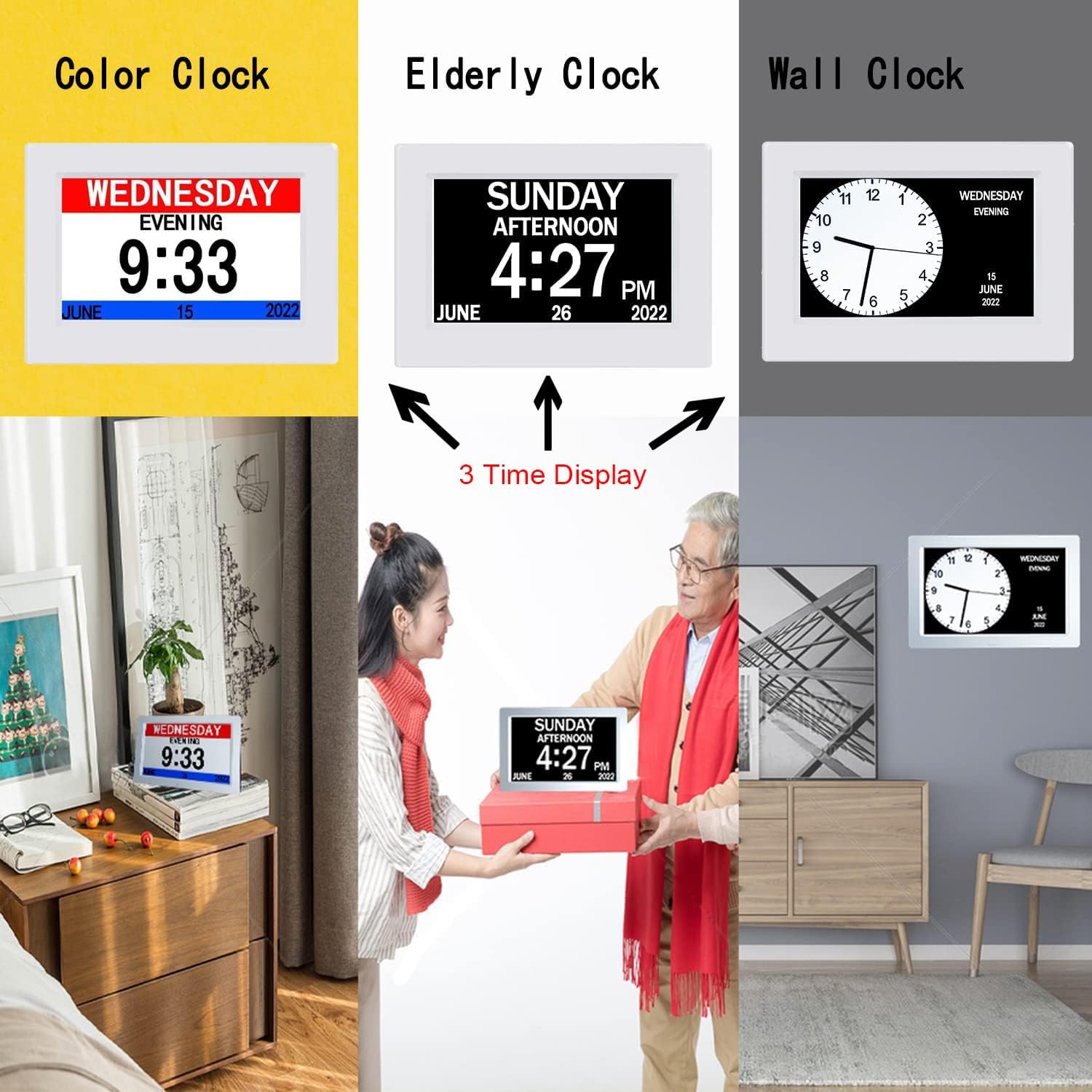
Figure 3: Illustrates the three time display interfaces: Color Clock, Elderly Clock, and Wall Clock, designed to meet different user needs.

Figure 4: Shows the three digital display options and four digital color choices available to satisfy different preferences.
3.2 Large Font and High Contrast
The clock features a large font and high-resolution display, ensuring clear visibility of time, date, week, month, and year. This design is particularly beneficial for users with visual impairments.

Figure 5: A close-up view demonstrating the extra large font and high-resolution display, making it very convenient for the elderly.
3.3 Automatic Brightness Adjustment
The clock automatically adjusts its brightness. It brightens during the day (7:00-18:59) for clear visibility under strong light and automatically dims at night (19:00-6:59) to prevent glare and ensure undisturbed sleep. This auto-dimming feature can be disabled if not desired.

Figure 6: Illustrates the automatic brightness feature, showing the clock's display during daytime (bright) and nighttime (dimmed).
3.4 Alarms and Reminders
The clock supports up to 5 alarms and 3 medicine reminders, allowing users to set multiple alerts for various daily needs. These can be configured through the clock's menu settings.
3.5 Wide Viewing Angle
The high-definition display offers an ultra-wide viewing angle, ensuring the clock display is clearly visible from all angles without distortion or loss of clarity.
3.6 Language and Time/Date Settings
The clock supports display in 8 languages. Users can also switch between 12-hour and 24-hour time formats, and choose between Month-Day-Year or Day-Month-Year date modes.
4. Maintenance
To ensure the longevity and optimal performance of your CAZOKASI Digital Day Clock, follow these simple maintenance guidelines:
- Cleaning: Use a soft, dry cloth to wipe the screen and body of the clock. Avoid using abrasive cleaners, solvents, or spray cleaners directly on the device, as they may damage the surface or internal components.
- Placement: Place the clock on a stable, flat surface or mount it securely on a wall. Avoid exposing the clock to extreme temperatures, direct sunlight for prolonged periods, or high humidity.
- Power: Always use the original power adapter provided with the clock. Disconnect the power adapter during electrical storms or when the device is not in use for extended periods.
5. Troubleshooting
If you encounter any issues with your CAZOKASI Digital Day Clock, please refer to the following common troubleshooting steps:
- Clock not turning on:
- Ensure the power adapter is securely plugged into both the clock and a working electrical outlet.
- Verify that the power outlet is active by plugging in another device.
- Display is dim or too bright:
- Check the auto-dimming setting in the menu. You may need to adjust it or disable it if you prefer a fixed brightness.
- Ensure the clock is not placed in an area with extreme lighting conditions that might interfere with the auto-brightness sensor.
- Time or date is incorrect:
- Access the menu settings to manually set the time and date.
- Verify the time mode (12H/24H) and date mode (M-D-Y/D-M-Y) are set correctly.
- Alarms are not sounding:
- Check the alarm settings in the menu to ensure they are enabled and set to the correct times.
- Verify the volume setting is not set to zero.
- Multimedia playback issues:
- Ensure the SD card or USB drive is inserted correctly.
- Verify that the media files are in a supported format.
- Try using a different SD card or USB drive to rule out media corruption.
If these steps do not resolve the issue, please contact CAZOKASI customer support for further assistance.
6. Specifications
| Feature | Detail |
|---|---|
| Brand | CAZOKASI |
| Model Number | CXSM-007 |
| Color | 7 Inch White |
| Display Type | Digital |
| Product Dimensions | 7.87"W x 5.51"H |
| Power Source | DC Power Supply |
| Special Features | Large Display, Alarm, Adjustable Brightness, Auto Dimmable, Calendar Display |
| Material | Acrylonitrile Butadiene Styrene (ABS) |
| Mounting Type | Wall Mount |
| Item Weight | 0.4 Kilograms (14.1 ounces) |
| Number of Alarms | 5 |
| Medicine Reminders | 3 |
| Supported Languages | 8 (including English, German, French) |
7. Warranty and Support
CAZOKASI is committed to providing high-quality products and customer satisfaction. For any warranty claims, technical support, or inquiries regarding your Digital Day Clock, please contact CAZOKASI customer service through the retailer where the product was purchased or refer to the official CAZOKASI website for contact information.
Please retain your proof of purchase for warranty purposes.
Ask a question about this manual
Ask about setup, troubleshooting, compatibility, parts, safety, or missing instructions. Manuals+ will review the question and use this page’s manual context to help answer it.