
iClever HS22
iClever HS22 Kids Headphones User Manual
Model: HS22 | Brand: iClever
Introduction
Thank you for choosing iClever HS22 Kids Headphones. This manual provides essential information for the proper setup, operation, and maintenance of your new headphones. Designed with children's safety and comfort in mind, these headphones feature volume limiting technology and a durable, foldable design, making them ideal for school, travel, and everyday use.
What's in the Box
- 2 x iClever HS22 Kids Headphones (Green & Blue)
- 1 x Audio Sharing Splitter
- 1 x User Manual

Image: The iClever HS22 headphones, one green and one blue, along with the audio sharing splitter and the product box.
Key Features
1. Safe Volume Limiting (85dBA)
The iClever HS22 headphones are engineered with a built-in volume limiter set at 85dBA to protect children's sensitive hearing from excessive noise exposure. This ensures a safe listening experience without compromising sound clarity.

Image: A child using the headphones, highlighting the safe volume feature for online learning and hearing protection.

Image: A visual representation of how the headphones provide sound isolation and limit volume for hearing safety.
2. Audio Sharing Splitter
The included audio sharing splitter allows two users to connect their headphones to a single audio source simultaneously. This feature promotes shared listening experiences, perfect for siblings or friends.

Image: Two children sharing audio from a tablet using the included splitter, emphasizing shared enjoyment.
Video: An overview of the iClever 2-pack Kids Headphones, demonstrating features like the adjustable headband, rotatable earcups, soft silicone, elastic earmuffs, foldable design, universal 3.5mm jack, sharing splitter, dynamic 40mm drivers, and tangle-free nylon cord.
3. Wide Compatibility
Equipped with a standard 3.5mm audio jack, these headphones are compatible with most devices including laptops, phones, tablets, iPads, and MP4 players. The premium nylon cord is designed to resist tears and tangles, ensuring durability.

Image: The headphones demonstrating compatibility with a range of devices via the 3.5mm audio jack.
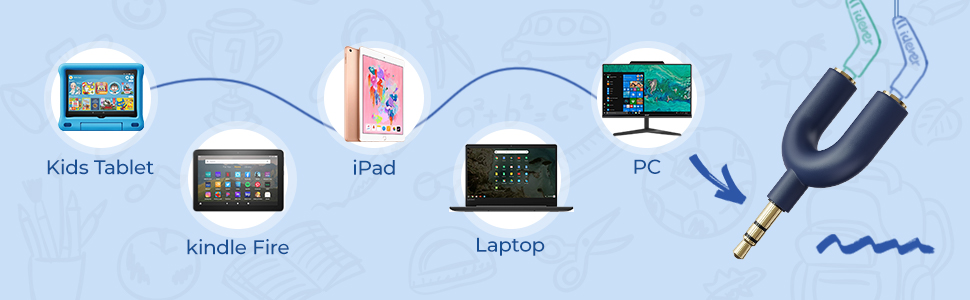
Image: A visual guide to connecting the headphones to different devices using the sharing splitter.

Image: Detail of the durable, tangle-free cord and angled 3.5mm jack, designed for longevity.
4. Comfortable & Foldable Design
The reinforced ear muffs are soft and large, designed to cover the entire ear for extended comfort. The headphones feature a foldable design, allowing the ear muffs to rotate 90 degrees for convenient storage in small spaces, making them highly portable.

Image: Features highlighting the comfort of the protein ear cushions and the space-saving foldable design with swiveling earmuffs.

Image: The headphones in their folded configuration, demonstrating their compact size for easy portability.
5. Adjustable Headband
The adjustable headband ensures a tailored fit for various head sizes, accommodating toddlers, kids, teenagers, and even adults. This versatility makes the 2-pack set ideal for families with multiple children or for parent-child shared activities.

Image: A visual guide to the adjustable headband, illustrating its adaptability for different age groups.
Setup Guide
- Unpack: Carefully remove the headphones and audio sharing splitter from the packaging.
- Adjust Headband: Extend or retract the headband to comfortably fit the user's head. Ensure the earcups fully cover the ears.
- Connect to Device: Insert the 3.5mm audio jack of the headphones into the audio port of your device (e.g., tablet, phone, laptop).
- Using Sharing Splitter (Optional):
- Plug the single end of the audio sharing splitter into your device's audio port.
- Plug the 3.5mm audio jacks of both headphones into the two ports on the audio sharing splitter.

Image: The iClever HS22 headphones and sharing splitter, illustrating the components involved in setup.
Operating Instructions
- Volume Control: Adjust the volume directly on your connected device. The headphones feature an 85dBA volume limit for hearing protection.
- Media Control: Use the inline media control (if present on your specific model's cable) to play/pause audio or answer/end calls.
- Microphone: The integrated microphone allows for clear voice communication during calls or online learning sessions.

Image: A child wearing the headphones, suitable for daily use and travel.
Care and Maintenance
- Cleaning: Use a soft, dry cloth to clean the headphones. Do not use liquid cleaners or aerosols.
- Storage: When not in use, fold the headphones compactly and store them in a dry, safe place to prevent damage.
- Cable Care: Avoid sharp bends or excessive pulling on the cable to prevent internal wire damage. The tangle-free design helps maintain cable integrity.
- Avoid Moisture: These headphones are not water-resistant. Keep them away from liquids and high humidity.
Troubleshooting
| Problem | Possible Solution |
|---|---|
| No sound or low volume |
|
| Sound distortion |
|
| Microphone not working |
|
Technical Specifications
| Feature | Detail |
|---|---|
| Model Name | HS22 |
| Connectivity Technology | Wired |
| Headphones Jack | 3.5 mm Jack |
| Audio Driver Type | Dynamic Driver (40mm) |
| Frequency Range | 20 Hz - 20,000 Hz |
| Volume Limit | 85dBA (Safe Volume) |
| Ear Placement | Over Ear |
| Form Factor | Over Ear |
| Noise Control | Sound Isolation |
| Cable Feature | Tangle Free, Retractable |
| Material | Nylon |
| Item Weight | 0.45 Kilograms (15.8 ounces) |
| Product Dimensions | 5.31 x 5.51 x 5.71 inches |
| Age Range (Description) | All Ages |
| Number of Items | 2 |
| Included Components | User Manual |
Warranty and Support
For warranty information or technical support, please refer to the contact details provided in the included User Manual or visit the official iClever website. Keep your purchase receipt for warranty claims.

Image: A page from the included user manual, which contains detailed warranty and support information.
Related documentsHS22


Ask a question about this manual
Ask about setup, troubleshooting, compatibility, parts, safety, or missing instructions. Manuals+ will review the question and use this page’s manual context to help answer it.