
1. Product Overview
The ALEENFOON AF-HJ Wireless Patient Pager Alarm System is designed to provide a reliable and convenient way for individuals to call for assistance. It is particularly useful for the elderly, children, disabled persons, pregnant women, or patients who may require immediate care. The system consists of a plug-in receiver and waterproof SOS call buttons (transmitters).

Image 1.1: The ALEENFOON Wireless Patient Pager Alarm System, showing the main receiver unit and two portable SOS call buttons.
Key Features:
- Convenient Use: Ideal for quick assistance calls in various settings, including homes, hospitals, and offices.
- Easy Setup: Plug-and-play receiver with a portable, waterproof transmitter.
- Extensive Alert Options: 52 selectable alert sounds with a flashing LED indicator.
- Adjustable Volume: 4-level volume control, up to 110dB, suitable for the elderly.
- Wide Range: Up to 80 meters (260 feet) in open areas.
- Low Battery Indication: Visual alert for transmitter battery replacement.

Image 1.2: Visual representation of the system's key features, including 80-meter range, adjustable volume, 52 melodies, memory function, and one-click call capability.
2. Package Contents
Please verify that all items are present in the package:
- 1 x Plug-in Receiver
- 2 x SOS Call Buttons (Transmitters)
- 2 x Lanyards (for SOS Call Buttons)
- User Manual (this document)
3. Product Components and Dimensions
Receiver:
- Power Plug: For connecting to a standard electrical outlet.
- Horn: Sound output for alerts.
- Volume Adjustment Buttons: To increase or decrease the alert volume.
- Track Selection Buttons: To cycle through alert melodies (Previous Piece, Next Track).
- LED Indicator: Flashes during an alert.
- Fashion Aluminum Alloy Sheet: Decorative element.
SOS Call Button (Transmitter):
- Emergency Call Button (SOS): Main button to trigger an alert.
- LED Indicator: Flashes during transmission and for low battery.
- Lanyard Hole: For attaching the included lanyard.
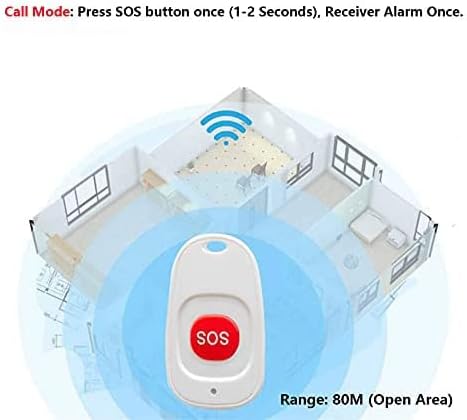
Image 3.1: Detailed diagram illustrating the various components of both the receiver and the SOS call button.
Dimensions:
- Receiver: Approximately 3.2 inches (L) x 3.2 inches (W) x 1.6 inches (H).
- SOS Call Button: Approximately 2.3 inches (L) x 1.3 inches (W).

Image 3.2: Visual representation of the product dimensions for both the receiver and the SOS call button.
4. Setup Instructions
- Unpack Components: Carefully remove all items from the packaging.
- Receiver Placement: Plug the receiver into a standard 90-250V AC power outlet in a central location where the alert needs to be heard. Ensure it is within the effective range of the SOS call buttons.
- Transmitter Preparation: Attach the lanyard to the SOS call button if desired. The waterproof design allows for versatile placement or wearing.
- Initial Pairing (if needed): The units are usually pre-paired. If pairing is lost or you are adding new transmitters, refer to the "Pairing Instructions" section below.

Image 4.1: Visual guide for plugging in the receiver and wearing the SOS button. Also demonstrates the method for opening the transmitter to replace the battery.
5. Operating Instructions
5.1. Triggering an Alert:
- To activate the alarm, press the SOS button on the transmitter once for 1-2 seconds. The receiver will sound the alarm once.
- For a continuous alarm, press the SOS button multiple times.

Image 5.1: Illustration of the system's effective range, demonstrating how the SOS button signal reaches the receiver within an 80-meter radius in an open environment.
5.2. Adjusting Volume and Melody:
- Use the Volume Adjustment Buttons on the side of the receiver to set one of the 4 available volume levels.
- Use the Track Selection Buttons (Previous Piece, Next Track) on the side of the receiver to cycle through the 52 available alert melodies. The system has a memory function to retain your last selected melody and volume.
5.3. Pairing Instructions (if needed):
If your transmitter and receiver are not paired, or if pairing is lost after battery replacement:
- Plug in the receiver.
- Press and hold the "Next Track" button on the receiver for approximately 5 seconds until the LED indicator on the receiver starts flashing rapidly. This indicates pairing mode.
- While the receiver LED is flashing, press the SOS button on the transmitter once. The receiver will emit a short chime or flash to confirm successful pairing.
- Test the pairing by pressing the SOS button again. The receiver should sound the selected alert.
6. Maintenance
6.1. Cleaning:
- Wipe the receiver and transmitters with a soft, dry cloth.
- Do not use abrasive cleaners or solvents.
6.2. Battery Replacement (Transmitter):
The transmitter uses a CR2032 battery. Replace the battery when the transmitter's LED indicator flashes continuously without any button press, indicating a low battery.
- Use a flat-head screwdriver (not included) to gently pry open the side of the transmitter casing.
- Remove the old CR2032 battery.
- Insert a new CR2032 battery with the correct polarity (+ side up).
- Carefully close the transmitter casing.
- After replacing the battery, the pairing between the transmitter and receiver might be lost. Re-pair the units following the "Pairing Instructions" in Section 5.3.
7. Troubleshooting
| Problem | Possible Cause | Solution |
|---|---|---|
| Receiver does not alarm when SOS button is pressed. |
|
|
| Transmitter LED flashes continuously without button press. | Low battery in the transmitter. | Replace the CR2032 battery in the transmitter (refer to Section 6.2). Re-pair if necessary. |
| Alarm sound is too quiet or too loud. | Volume setting needs adjustment. | Use the Volume Adjustment Buttons on the receiver to set the desired volume level. |
| Unwanted interference from other devices. | Rare, but possible in environments with many wireless devices. | The system is designed to minimize interference. If persistent, try relocating the receiver or other wireless devices. |
8. Specifications
| Feature | Detail |
|---|---|
| Brand | ALEENFOON |
| Model Number | AF-HJ |
| Color | White |
| Power Source (Receiver) | AC Powered (90-250V) |
| Power Source (Transmitter) | Battery Powered |
| Battery Type (Transmitter) | 1 x CR2032 (included) |
| Control Method | Tactile (Button Press) |
| Sound Level | Up to 110 dB |
| Maximum Range | 80 Meters (260 Feet) in open area |
| Product Dimensions (Receiver) | 8.13 x 4.06 x 8.13 cm (approx. 3.2 x 1.6 x 3.2 inches) |
| Product Weight | 130 grams |
| Included Components | Receiver, 2 Transmitters, Lanyards |
9. Important Safety Information
- This device is intended as an assistance tool and should not replace direct supervision where critical.
- Keep transmitters and receivers away from extreme temperatures and direct sunlight.
- Do not attempt to disassemble or repair the device yourself. Contact customer support for assistance.
- Dispose of used batteries responsibly according to local regulations.
10. Warranty and Support
For warranty information or technical support, please refer to the contact details provided with your purchase or visit the official ALEENFOON website. Please have your model number (AF-HJ) and ASIN (B08R9HRMJD) ready when contacting support.
Manufacturer: Alinfon-EU