
Introduction
The Lightkiwi N7180 Wi-Fi Smart Controller allows you to control your Lightkiwi modular LED under cabinet lighting system wirelessly. This controller integrates with the Smart Life app, enabling convenient power and brightness adjustments from your smartphone or through voice commands via Amazon Alexa and Google Home. This manual provides essential information for the proper installation, operation, and maintenance of your N7180 controller.
Important Safety Information
- Compatibility: This controller is specifically designed for use with Lightkiwi modular LED under cabinet light panels. Ensure compatibility by checking the connector size and operating voltage when connecting to other products.
- Power Supply: Only use with a compatible 12-24V DC power supply.
- Incompatible Devices: This product is not compatible with any dimmable transformer or hardwire kit. Using it with such devices may cause damage or malfunction.
- Environment: Do not expose the controller to moisture, extreme temperatures, or corrosive environments.
- Disassembly: Do not attempt to open, modify, or repair the controller. This will void the warranty and may pose a safety risk.
- Installation: Ensure all power is disconnected before making any electrical connections.
Package Contents
- 1 x Lightkiwi N7180 Wi-Fi Smart Controller
- 1 x User Manual
Product Overview
The Lightkiwi N7180 is a compact Wi-Fi enabled controller designed to manage your LED lighting. It features input and output ports for connecting to a power source and your LED light panels, respectively. The device is clearly labeled with its model number, voltage requirements, and maximum output.
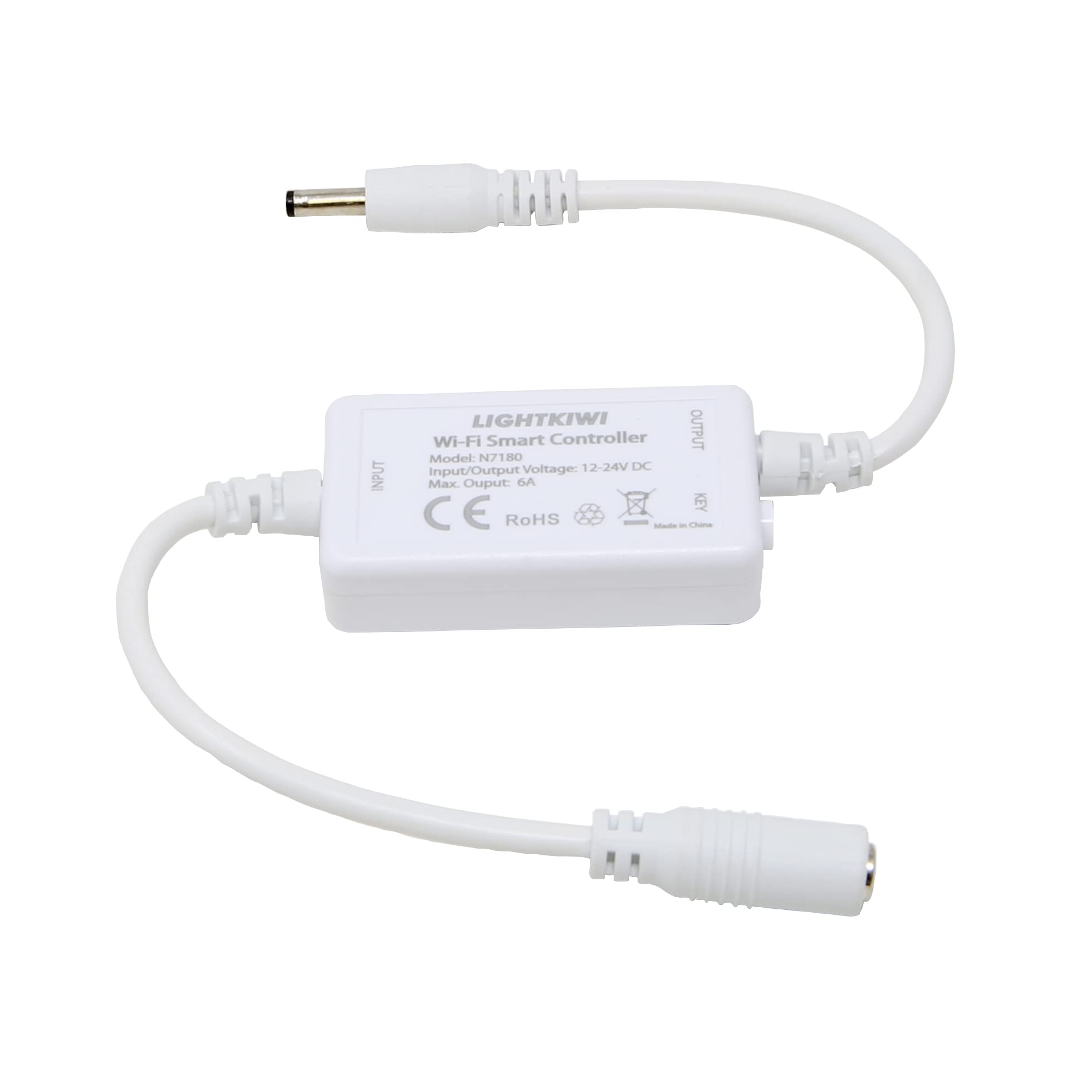
Image: The Lightkiwi N7180 Wi-Fi Smart Controller, showing its compact white casing, input and output cables, and product labeling including model number N7180, input/output voltage 12-24V DC, and max output 6A.
Setup Guide
1. Physical Connection
- Ensure the power supply is disconnected from the main power outlet before making any connections.
- Connect the input cable of the N7180 controller to a compatible 12-24V DC power supply. The connector type is 3.5mm (Outer Diameter) x 1.35mm (Inner Diameter).
- Connect the output cable of the N7180 controller to your Lightkiwi modular LED under cabinet light panel.
- Verify that all connections are secure and that the voltage and connector types are compatible with your lighting system.
- Important: Do not connect this controller to any dimmable transformer or hardwire kit.
2. App Installation
- Download the "Smart Life" app from the Google Play Store (for Android 4.1 and higher) or the Apple App Store (for iOS 8.0 and higher).
- Open the Smart Life app and register for a new account or log in with an existing one.
3. Wi-Fi Pairing
- Plug in the power supply to an electrical outlet to power on the N7180 controller. The indicator light on the controller should begin to blink.
- Ensure your Wi-Fi router is broadcasting a 2.4GHz network (802.11 b/g/n). The controller does not support 5GHz Wi-Fi networks.
- Open the Smart Life app, tap the "+" icon in the top right corner to add a device.
- Select the appropriate device category (e.g., "Lighting" or "Controller") and then choose the Wi-Fi controller option.
- Confirm that the indicator light on the N7180 controller is blinking rapidly. If not, you may need to reset the device by cycling its power off and on several times until it blinks rapidly.
- Enter your 2.4GHz Wi-Fi network name and password in the app.
- Follow the on-screen instructions in the app to complete the pairing process. Once connected, the indicator light will stop blinking and remain solid.
Operating Instructions
Using the Smart Life App
- Open the Smart Life app on your smartphone.
- From the device list, select your Lightkiwi N7180 controller.
- Use the app interface to turn your connected LED lights on or off.
- Adjust the brightness of your lights using the dimmer control within the app.
Voice Control Integration (Alexa / Google Home)
- Ensure your N7180 controller is successfully paired with the Smart Life app.
- Open the Amazon Alexa app or Google Home app on your smartphone.
- Navigate to the "Skills & Games" section (Alexa) or "Works with Google" section (Google Home).
- Search for and enable the "Smart Life" skill/service.
- Link your Smart Life account with your Alexa or Google Home account by following the on-screen prompts.
- Once linked, ask your voice assistant to discover new devices (e.g., "Alexa, discover devices" or "Hey Google, sync my devices").
- You can now control your lights using voice commands, such as:
- "Alexa, turn on the kitchen lights."
- "Hey Google, dim the under cabinet lights to 50%."
- "Alexa, turn off the lights."
Maintenance
- Keep the controller clean by wiping it with a soft, dry cloth. Do not use liquid cleaners or abrasive materials.
- Ensure the controller is placed in a well-ventilated area, away from direct heat sources or excessive humidity.
- Regularly check all cable connections to ensure they remain secure.
Troubleshooting
| Issue | Possible Solution |
|---|---|
| Controller not connecting to Wi-Fi |
|
| Lights not responding to app/voice commands |
|
| Lights are flickering or behaving erratically |
|
Specifications
| Brand | Lightkiwi |
| Model | N7180 |
| Input/Output Voltage | 12-24V DC |
| Max Output Current | 6A |
| Max Wattage | 144 Watts (at 24V) |
| Connectivity Technology | Wi-Fi 802.11 b/g/n (2.4GHz only) |
| App Compatibility | Smart Life App (Android 4.1+, iOS 8.0+) |
| Voice Assistant Compatibility | Amazon Alexa, Google Home |
| Connector Type | 3.5mm (Outer Diameter) x 1.35mm (Inner Diameter) |
| Special Feature | Dimmable (via app/voice control) |
| Compatibility Note | Not compatible with dimmable transformers or hardwire kits. Intended for Lightkiwi modular LED under cabinet light panels. |
Customer Support
For further assistance, technical support, or warranty inquiries, please contact Lightkiwi customer service. Refer to the product packaging or the Lightkiwi official website for the most current contact information.