
1. Introduction
Thank you for choosing the Modern Forms Hydra Smart Indoor/Outdoor 8-Blade Ceiling Fan. This manual provides essential information for the safe installation, operation, and maintenance of your new smart ceiling fan. Please read these instructions thoroughly before beginning installation or use, and retain them for future reference.
The Hydra Smart Fan is designed for both indoor and outdoor applications, featuring an efficient DC motor, integrated 2700K LED light kit, and smart control capabilities through a wall control, mobile app, and voice assistants like Alexa and Google Assistant.
2. Safety Information
Always follow basic safety precautions when installing and operating electrical appliances to reduce the risk of fire, electric shock, and personal injury. This product must be installed in accordance with the applicable installation code by a person familiar with the construction and operation of the product and the hazards involved.
- Disconnect power at the circuit breaker before installation or servicing.
- Ensure all electrical connections are in accordance with local codes, ordinances, and the National Electric Code.
- Mount the fan directly to a structural ceiling joist or an outlet box marked "Acceptable for Fan Support of 35 lbs (15.9 kg) or less."
- Do not insert objects into the path of the fan blades.
- Ensure the fan is installed at a height where blades are at least 7 feet (2.1 meters) from the floor.
- This fan is suitable for wet locations.
3. Package Contents
Verify that all components listed below are included in your package:
- Fan Blades (8x)
- Motor Housing
- Smart Receiver
- LED Light Kit
- Mounting Hardware
- 6-inch Downrod
- Bluetooth Hardwired Wall Control (Part# F-WCBT-WT)
- Installation Instructions & Setup Manual
4. Setup and Installation
Professional installation is recommended for optimal safety and performance. Ensure the power is OFF at the circuit breaker before proceeding.
4.1 Pre-Installation Considerations
- Ceiling Height: The fan requires a minimum of 7 feet clearance from the floor to the blades.
- Electrical Requirements: Ensure a 120V AC/DC power source is available.
- Location: This fan is rated for both indoor and outdoor (wet location) use.
4.2 Mounting the Fan
Follow the detailed instructions provided in the included Installation Instructions & Setup Manual for mounting the fan, connecting the wiring, and attaching the blades and light kit. Ensure all connections are secure and the fan is properly balanced.

Image: Modern Forms Hydra 96-inch 8-blade ceiling fan in matte black with integrated LED light.

Image: Modern Forms Hydra 96-inch 8-blade ceiling fan in matte black shown with the included wall control.
4.3 Downrod Selection
The fan includes a 6-inch downrod. For different ceiling heights or sloped ceilings, optional downrods and a slope ceiling kit (XF-SCK for 32-45 degrees) are available separately. Refer to the diagram below for guidance on selecting the appropriate downrod length.

Image: Diagram illustrating recommended downrod lengths for various ceiling heights, with a 6-inch downrod included.
5. Operating Instructions
5.1 Wall Control
The fan comes with a Bluetooth hardwired wall control (Part# F-WCBT-WT) for immediate control of fan speed and light. Additional switches are available for 3-way or 4-way setups. A battery-operated Bluetooth remote control with a wall cradle (Part # F-RCBT-WT) is sold separately.

Image: Close-up of the Modern Forms wall control unit with buttons for fan speed and light dimming.
5.2 Mobile App Control
The Modern Forms app allows for advanced control of your fan, including fan speed, light brightness, breeze mode, adaptive learning, and group creation. The app is available for free download on iOS and Android devices.
5.2.1 App Download and Account Creation
Download the "Modern Forms" app from the Apple App Store or Google Play Store. Create an account or sign in using your existing Facebook or Google credentials.
Video: Instructions on how to download the Modern Forms app, create an account, and log in. This video demonstrates the initial setup process for app control.
5.2.2 Pairing Your Fan
Once logged into the app, follow the on-screen instructions to pair your Modern Forms fan. This typically involves connecting to a temporary Wi-Fi network broadcast by the fan (named "ModernFormsFan_XXXXXX") and entering the password "intelligence" (all lowercase). Then, select your home 2.4 GHz Wi-Fi network and enter its password.
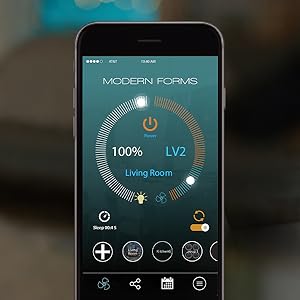
Image: Screenshot of the Modern Forms app interface showing fan speed, light control, and various smart features.
5.3 Smart Home Integration
The Hydra Smart Fan integrates with popular smart home platforms, allowing for voice control and automation.
- Voice Control: Works with Amazon Alexa, Google Assistant, and Josh AI.
- Smart Home Systems: Compatible with Samsung SmartThings, Ecobee, and Control4.
Image: A smart home speaker device, representing integration with voice assistants like Amazon Alexa and Google Assistant.
Video: Overview of Modern Forms Smart Fans features, including wet rating, LED light, DC motor, app control, and smart home integration.
6. Maintenance
Regular maintenance ensures the longevity and optimal performance of your ceiling fan.
- Cleaning: Use a soft, damp cloth to clean the fan blades and motor housing. Do not use abrasive cleaners or solvents.
- LED Light Kit: The integrated LED luminaire is replaceable. Contact Modern Forms support for replacement parts if needed.
- Blade Screws: Periodically check and tighten all blade screws to prevent wobbling and noise.
- Motor: The DC motor is designed for long-term, silent operation and typically requires no lubrication.
7. Troubleshooting
If you experience issues with your Modern Forms Hydra Smart Fan, refer to the common problems and solutions below. If the problem persists, contact customer support.
| Problem | Possible Cause | Solution |
|---|---|---|
| Fan does not start | No power to the fan; Loose wire connections; Incorrect pairing. | Check circuit breaker; Verify all wiring connections; Re-pair the fan with the app. |
| Fan wobbles | Loose blade screws; Unbalanced blades; Improper mounting. | Tighten all blade screws; Use a balancing kit (not included) if necessary; Ensure fan is securely mounted. |
| Light does not work | Loose wire connection; Faulty LED module. | Check light kit wiring; Contact support for LED module replacement. |
| App connectivity issues | Incorrect Wi-Fi password; Fan connected to 5 GHz network; Router issues. | Ensure correct Wi-Fi password; Connect to a 2.4 GHz network only; Restart router and fan. |
8. Specifications
| Feature | Detail |
|---|---|
| Model Name | Hydra |
| Model Number | FR-W1805-96L-27-MB |
| Blade Span | 96 inches |
| Number of Blades | 8 |
| Color | Matte Black |
| Light Kit | 2700K Warm LED, 2100 Lumen, Dimmable |
| Motor Type | 6 Speed Brushless Silent DC Motor |
| Air Flow Capacity | 12950 Cubic Feet Per Minute (CFM) |
| Noise Level | 15 Decibels |
| Power Source | AC/DC, 120 Volts |
| Wattage | 68.5 watts |
| Control Method | Wall Control, Mobile App, Voice (Alexa, Google Assistant) |
| Indoor/Outdoor Usage | Indoor, Outdoor (Wet Location Listed) |
| Item Weight | 46.1 pounds |
| Product Dimensions | 96"D x 96"W x 17.25"H |
| Certifications | ETL, cETL, UL, cUL, CSA CAN Wet Location Listed, Energy Star, EPA, FCC |
8.1 Energy Efficiency
This fan is Energy Star certified, indicating high energy efficiency and reduced operating costs.
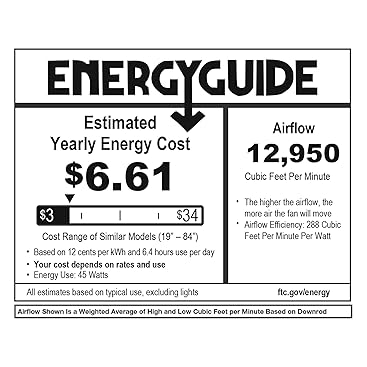
Image: Energy Star Most Efficient 2020 logo, indicating high energy efficiency.
9. Warranty
Modern Forms provides the following warranty for this product:
- LED Module: 5 years
- Motor: Lifetime
- All Other Parts: 1 year
Please retain your proof of purchase for warranty claims.
10. Support
For further assistance, technical support, or to purchase replacement parts and accessories, please visit the Modern Forms website or contact their customer service department. Refer to the contact information provided in your product packaging or on the official Modern Forms website.