
1. Introduction
Thank you for choosing the FLYLINKTECH CF800 Portable Car Jump Starter. This device is designed to provide a reliable solution for jump-starting 12V vehicles, serving as a powerful portable power bank, and offering a multi-functional LED light. Please read this manual thoroughly before use to ensure safe and optimal operation.
Package Contents:
- FLYLINKTECH CF800 Portable Car Jump Starter
- Smart Jumper Clamps
- Micro USB Cable
- User Manual
- EVA Hard Case
2. Safety Information
Always observe the following safety precautions when using the jump starter to prevent electric shock, explosion, fire, or injury.
- Read Instructions: Always read and understand all instructions before operating the device.
- Eye Protection: Wear safety glasses and protective clothing when working with batteries.
- Ventilation: Ensure the area is well-ventilated during jump-starting.
- No Smoking/Sparks: Do not smoke or allow sparks or flames near the battery or engine.
- Keep Dry: Do not expose the jump starter to rain or wet conditions.
- Children: Keep the device out of reach of children.
- Correct Polarity: Connect the jumper clamps to the correct battery terminals (red to positive, black to negative). Reverse polarity can cause damage.
- Avoid Short Circuits: Do not allow the red and black clamps to touch each other.
- Temperature: Do not operate the device in extremely high or low temperatures outside the specified range.
- Damaged Device: Do not use the jump starter if it is damaged, cracked, or leaking.

Image: Visual representation of the CF800's integrated safety protections, including short-circuit, reverse charge, reverse polarity, over-discharge, over-current, over-voltage, and high-temperature protection.
3. Product Overview
The FLYLINKTECH CF800 is a compact and powerful device designed for emergency vehicle starting and portable power needs.
Main Unit Features:
- Power Button: Activates the device and LED light.
- Battery Indicator Lights: Show the remaining battery charge level.
- Jump Start Port: Connects to the smart jumper clamps.
- USB Output Ports (x2): For charging electronic devices.
- Type-C Input Port: For recharging the jump starter unit.
- LED Flashlight: Multi-mode light for illumination, strobe, and SOS.
Smart Jumper Clamps:
The included smart jumper clamps feature built-in protection mechanisms and a digital display for enhanced safety and ease of use.
- Reverse Polarity Protection: Prevents damage if clamps are connected incorrectly.
- Over-Current Protection: Safeguards against excessive current flow.
- Over-Voltage Protection: Protects against voltage surges.
- Short-Circuit Protection: Prevents damage from accidental short circuits.
- Digital Display: Provides real-time feedback on battery voltage and protection status.

Image: The complete FLYLINKTECH CF800 kit, showcasing the jump starter unit, smart jumper clamps, USB charging cable, and the protective EVA hard case.
4. Charging the Jump Starter
Before first use, fully charge the FLYLINKTECH CF800. It is recommended to recharge the unit at least once every three months to maintain battery health, even when not in use.
Charging Procedure:
- Connect the provided Micro USB cable to the Type-C input port on the jump starter.
- Connect the other end of the USB cable to a 5V/2A or 9V/2A USB wall adapter (not included).
- The battery indicator lights will illuminate and flash during charging. All lights will be solid when fully charged.
A full charge typically takes several hours. Disconnect the charger once the unit is fully charged.
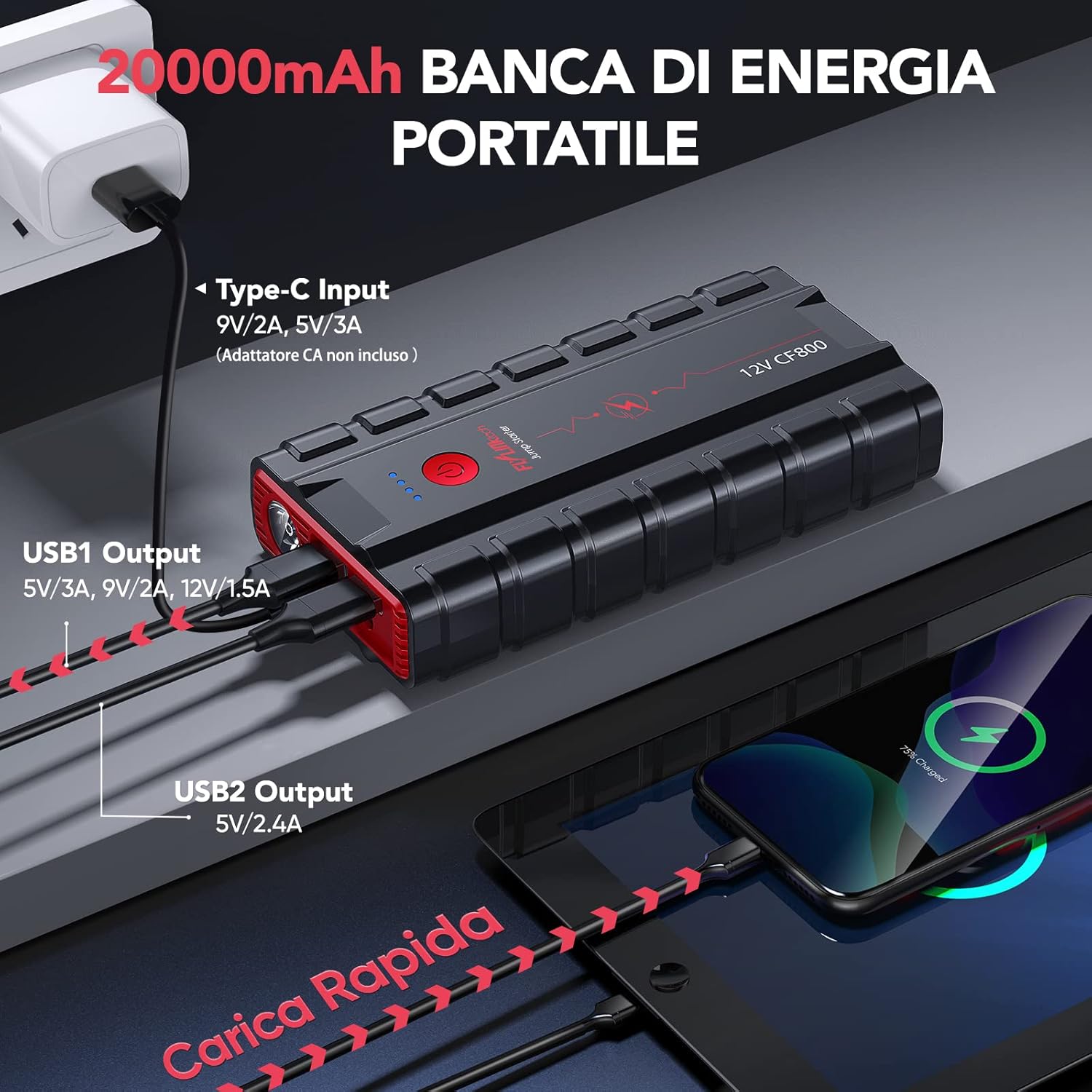
Image: The FLYLINKTECH CF800 unit connected to a power source for charging via its Type-C input, while simultaneously demonstrating its capability to charge external devices like a smartphone and tablet using its USB output ports.
5. Setup for Jump Starting
Before attempting to jump start a vehicle, ensure the jump starter is adequately charged (at least 75% recommended).
- Turn off the vehicle's ignition and all accessories (lights, radio, air conditioning).
- Engage the parking brake and place the vehicle in park (automatic) or neutral (manual).
- Ensure the vehicle's battery terminals are clean and free of corrosion.
6. Operating Instructions (Jump Starting)
The FLYLINKTECH CF800 is designed to jump start 12V vehicles with up to 10.0L gasoline engines or 9.0L diesel engines.

Image: The FLYLINKTECH CF800 jump starter unit positioned in a car's engine bay, with its smart clamps correctly connected to a vehicle battery, ready for jump-starting.
Step-by-Step Guide:
- Connect Clamps to Jump Starter: Insert the blue plug of the smart jumper clamps firmly into the jump start port on the CF800 unit. Ensure a secure connection.
- Connect Clamps to Car Battery:
- Attach the RED (+) clamp to the vehicle's positive battery terminal.
- Attach the BLACK (-) clamp to the vehicle's negative battery terminal.
The smart clamps' digital display will show the battery voltage and indicate if the connection is correct. If an error is displayed, check the connections.

Image: Close-up of the smart jumper clamps featuring a digital display that provides real-time feedback on battery status and active safety protections, such as low voltage, reverse polarity, reverse charge, short circuit, over-temperature, and over-voltage.
- Start Vehicle: Once the clamps are correctly connected and the smart display shows a ready status, start the vehicle's engine.
- Remove Clamps: As soon as the engine starts, immediately remove the smart jumper clamps from the car battery, first the black (-) clamp, then the red (+) clamp. Then, disconnect the clamps from the jump starter unit.
If the vehicle does not start after the first attempt, wait at least 30 seconds before trying again. Do not attempt more than three consecutive jump starts.
7. Power Bank Functionality
The FLYLINKTECH CF800 features a 20000mAh capacity and two USB output ports to charge your electronic devices.
- USB1 Output: 5V/3A, 9V/2A (Quick Charge 3.0 compatible)
- USB2 Output: 5V/2.4A
To Charge Devices:
- Connect your device's USB charging cable to one of the USB output ports on the CF800.
- The CF800 will automatically begin charging your device.
- Monitor the battery indicator lights on the CF800 to check its remaining charge.
8. LED Light Functions
The built-in LED flashlight offers multiple modes for various situations.

Image: The FLYLINKTECH CF800 jump starter held in hand, demonstrating its powerful LED flashlight in action, with icons illustrating its various modes: standard illumination, SOS signal, warning light, and strobe.
Operating the LED Light:
- Turn On/Off: Press and hold the power button for 3 seconds to turn the LED light on or off.
- Change Modes: Once the light is on, short press the power button to cycle through the modes: Steady On (Torch) → Strobe → SOS → Off.
9. Maintenance and Storage
Proper maintenance ensures the longevity and readiness of your FLYLINKTECH CF800.
- Recharge Regularly: Recharge the jump starter at least once every 3 months to prevent deep discharge and prolong battery life.
- Cleaning: Wipe the unit with a dry, soft cloth. Do not use harsh chemicals or abrasive cleaners.
- Storage: Store the device in a cool, dry place, away from direct sunlight, moisture, and flammable materials.
- Temperature Resistance: The CF800 is designed to operate and be stored within a wide temperature range, typically from -20°C to 50°C.

Image: The FLYLINKTECH CF800 jump starter demonstrating its robust design and ability to withstand extreme temperatures, depicted in both a hot environment at 50°C and a cold environment at -20°C.
10. Troubleshooting
If you encounter issues with your FLYLINKTECH CF800, refer to the following common problems and solutions.
| Problem | Possible Cause | Solution |
|---|---|---|
| Vehicle does not start | Jump starter battery low; Incorrect clamp connection; Vehicle battery severely discharged; Engine issues. | Ensure jump starter is fully charged. Check clamp connections for correct polarity. Wait 30 seconds before reattempting. If still no start, vehicle may have other issues. |
| Smart clamps show error | Reverse polarity; Short circuit; Over-voltage; Low voltage. | Refer to the smart clamp display for the specific error code. Disconnect and reconnect clamps correctly. Ensure battery voltage is within acceptable range. |
| Jump starter not charging | Charging cable faulty; Wall adapter insufficient; Charging port damaged. | Try a different USB cable and wall adapter. Ensure the adapter meets the specified output (5V/2A or 9V/2A). |
| USB output not charging devices | Jump starter battery low; Device cable faulty; Device not compatible. | Ensure jump starter has sufficient charge. Try a different USB cable or device. |
If the problem persists after trying these solutions, please contact FLYLINKTECH customer support.
11. Specifications
| Feature | Specification |
|---|---|
| Model | CF800 |
| Peak Current | 3000A |
| Battery Capacity | 20000mAh |
| Start Voltage | 12V |
| Gas Engine Compatibility | Up to 10.0L |
| Diesel Engine Compatibility | Up to 9.0L |
| USB1 Output | 5V/3A, 9V/2A (Quick Charge 3.0) |
| USB2 Output | 5V/2.4A |
| Type-C Input | 5V/2A, 9V/2A, 5V/3A |
| Dimensions (L x W x H) | 17.8 x 8.8 x 3.8 cm |
| Weight | 700 g |
| Operating Temperature | -20°C to 50°C |
12. Warranty and Support
FLYLINKTECH provides a worry-free 12-month warranty for the CF800 Portable Car Jump Starter, along with efficient lifetime after-sales service.
If you have any questions, encounter problems during use, or require technical assistance, please contact FLYLINKTECH customer support. Our professional technical team is available to help resolve issues within 24 hours.
For support, please refer to the contact information provided with your purchase or visit the official FLYLINKTECH website.


