
Introduction
Welcome to your new WAC Smart Fans Hug Ceiling Fan. This manual provides essential information for the safe installation, efficient operation, and proper maintenance of your smart ceiling fan. Please read this manual thoroughly before beginning installation or operation to ensure optimal performance and safety.
Important Safety Instructions
To reduce the risk of fire, electric shock, or personal injury, always follow these basic safety precautions:
- Read all instructions carefully before installing or using the fan.
- Disconnect power at the main circuit breaker or fuse box before beginning installation or performing any maintenance.
- All wiring must be in accordance with national and local electrical codes. Consult a qualified electrician if you are unsure about wiring procedures.
- Ensure the installation site is suitable for the fan's weight and size. The outlet box and support structure must be securely mounted and capable of reliably supporting the fan.
- Do not operate the fan with a damaged cord or plug, or after the fan malfunctions or has been dropped or damaged in any manner.
- Keep hands, hair, and loose clothing away from moving parts of the fan.
What's Included
Your WAC Smart Fans Hug Ceiling Fan package includes the following components:
- Light Kit
- Remote Control (RC20-WT)
- Complete Ceiling Fan (Fan Blades, Motor, Smart Receiver)
- All Necessary Mounting Hardware
- Installation Instructions & Setup Manual

Setup and Installation
For detailed, step-by-step installation instructions, please refer to the official Installation Manual (PDF) provided with your fan or download it online:
Pre-Installation Checklist
- Ensure power is turned off at the circuit breaker.
- Gather all necessary tools (screwdriver, wire strippers, ladder, etc.).
- Confirm the ceiling junction box is rated for fan support.
Mounting the Fan
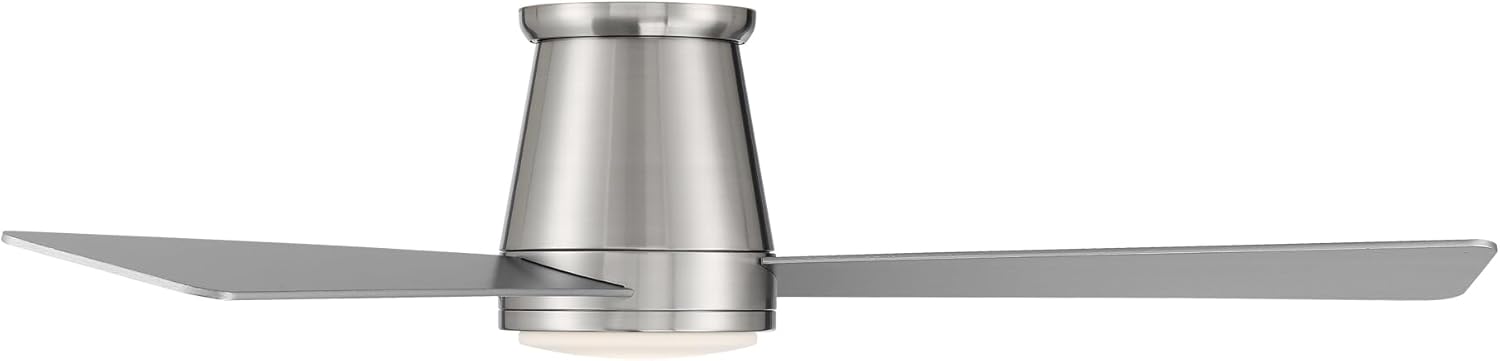
The Hugger Fan is specifically designed for close-to-ceiling installation, making it ideal for average ceiling heights between 7ft and 9ft. Its flush mount design ensures a sleek, integrated look.


Operating Your Smart Fan
Traditional Controls: Bluetooth Remote
Your WAC Smart Fan comes equipped with a battery-operated Bluetooth remote control (Part # RC20-WT) and a convenient wall cradle. This remote allows you to:
- Control fan speed (6 speeds)
- Adjust light brightness (dimmable LED)
- Switch between Summer and Winter modes
- Group and synchronize multiple fans within range

Smart Controls: WAC Smart Fan App
For an enhanced and fully customizable experience, download the WAC Smart Fan app, available for both iOS and Android devices. The app unlocks a suite of smart features:
- Precise fan speed and light brightness control
- Breeze mode for natural airflow simulation
- Adaptive learning to optimize settings based on your preferences
- Ability to create groups for controlling multiple fans simultaneously
- Scheduling to automate fan operation
- Monitoring and reducing energy costs

Download the app from your device's app store:
Voice Control Integration
The WAC Smart Fan seamlessly integrates with popular smart home systems, allowing for convenient voice control:
- Amazon Alexa
- Google Assistant
- Samsung SmartThings
- Ecobee
To enable voice control, ensure your fan is paired with your preferred smart home device through the WAC Smart Fan app.
Fan Modes
- Summer Mode: Fan blades rotate counter-clockwise to create a downward airflow, providing a cooling effect. This mode is ideal for warmer weather.
- Winter Mode: Fan blades rotate clockwise to create an upward airflow, circulating warm air trapped near the ceiling. This helps to redistribute heat and can reduce heating costs in colder months.

Care and Maintenance
Regular care and maintenance will ensure the longevity and optimal performance of your WAC Smart Fans Hug Ceiling Fan:
- Cleaning: To maintain the fan's appearance, regularly wipe it with a soft, damp cloth. Avoid using abrasive cleaners, solvents, or harsh chemicals, as these can damage the finish and electrical components.
- Blade Care: The high-quality ABS blades are designed not to droop or sag over time. Clean them gently to prevent dust buildup.
- LED Luminaire: The integrated LED luminaire is a plug-and-play replaceable unit. If replacement is ever needed, ensure power is disconnected before servicing.
- Motor: The DC motor is designed for quiet and efficient operation and requires no user maintenance.
Troubleshooting
For common issues and solutions, please consult the official Troubleshooting Guide (PDF) available online:
Common Issues:
- Fan not responding to remote/app:
- Ensure the remote control batteries are fresh and correctly inserted.
- Check that your smartphone's Bluetooth and Wi-Fi are enabled and connected to the fan's network.
- Attempt to re-pair the remote or app with the fan according to the setup instructions in the full manual.
- Fan direction not changing:
- Verify that you are correctly selecting the Summer or Winter mode via the remote or app.
- Ensure the fan is completely stopped before attempting to change direction.
- Light not working:
- Check the power supply to the fan.
- Ensure the LED luminaire is properly seated and connected.
If these troubleshooting steps do not resolve the issue, please contact WAC Lighting customer support.
Product Specifications
| Feature | Detail |
|---|---|
| Model Name | Hug |
| Model Number | F-037L-BN |
| Brand | WAC Lighting |
| Blade Span | 52 inches |
| Number of Blades | 3 |
| Motor Type | DC Motor (Brushless, Silent, Energy Efficient) |
| Light Type | LED (1600 Lumens, 3000K Warm White) |
| Control Method | App, Remote, Touch, Voice |
| Indoor/Outdoor Usage | Outdoor, Indoor (Wet Location Listed) |
| Power Source | AC/DC |
| Voltage | 120 Volts |
| Wattage | 45.5 watts |
| Noise Level | 15 dB |
| Air Flow Capacity | 4469 Cubic Feet Per Minute |
| Item Weight | 15.88 pounds |
| Energy Efficiency | Energy Star Rated, 98,095 cubic feet per minute per watt |
| Certifications | CSA, Energy Star, UL, FCC, cUL |

Warranty
WAC Lighting stands behind the quality of its products. Your WAC Smart Fans Hug Ceiling Fan is covered by the following warranty:
- LED Module: 5 years
- Motor: Lifetime warranty
- All Other Parts: 1 year
For full details and terms of the warranty, please refer to the official Warranty (PDF) document:
Customer Support
Should you require further assistance, have questions, or need to report an issue, please utilize the following resources:
- WAC Lighting Store on Amazon: Visit our official store for product information and support: WAC Lighting Store
- Official Website: Explore our full range of products and resources at: waclighting.com
- Tech Support Hotline: For direct technical assistance, call: 1-866-810-6615 Option 1 (Monday-Friday, 8 AM - 8 PM EST)
Official Product Videos
Watch the official product video to see your WAC Smart Fans Hug Ceiling Fan in action and learn more about its features:
WAC Hug Smart Fan Video
This video provides a visual overview of the WAC Hug Smart Fan, highlighting its sleek design, quiet operation, and smart features. It demonstrates the fan's appearance in a living space and its various functionalities, including app and remote control.


