
1. Product Overview
This manual provides essential information for the safe and effective installation, operation, and maintenance of your X-BULL 12V 6000lbs Synthetic Rope Winch. This electric winch is designed for ATV, UTV, powersports, and off-road recovery applications, featuring a 1.9 HP motor, 3-stage planetary gear system, and IP68 waterproof rating.

Image 1.1: X-BULL 6000lbs Synthetic Rope Winch with integrated control box and red synthetic rope.
2. What's in the Box
Verify that all components listed below are included in your package. If any items are missing or damaged, please contact X-BULL customer support.
- 1 x 6000lbs Winch with Synthetic Rope
- 1 x Mounting Plate
- 1 x Heavy Duty Hook
- 1 x Manual Remote (Wired Remote)
- 1 x Wireless Remote
- 4 x Joint Protective Caps
- 1 x Aluminium Hawse Fairlead
- Mounting Bolts
- 1 x Spring Plate
- 1 x Rubber Stopper
- 1 x Movable Pulley Hook
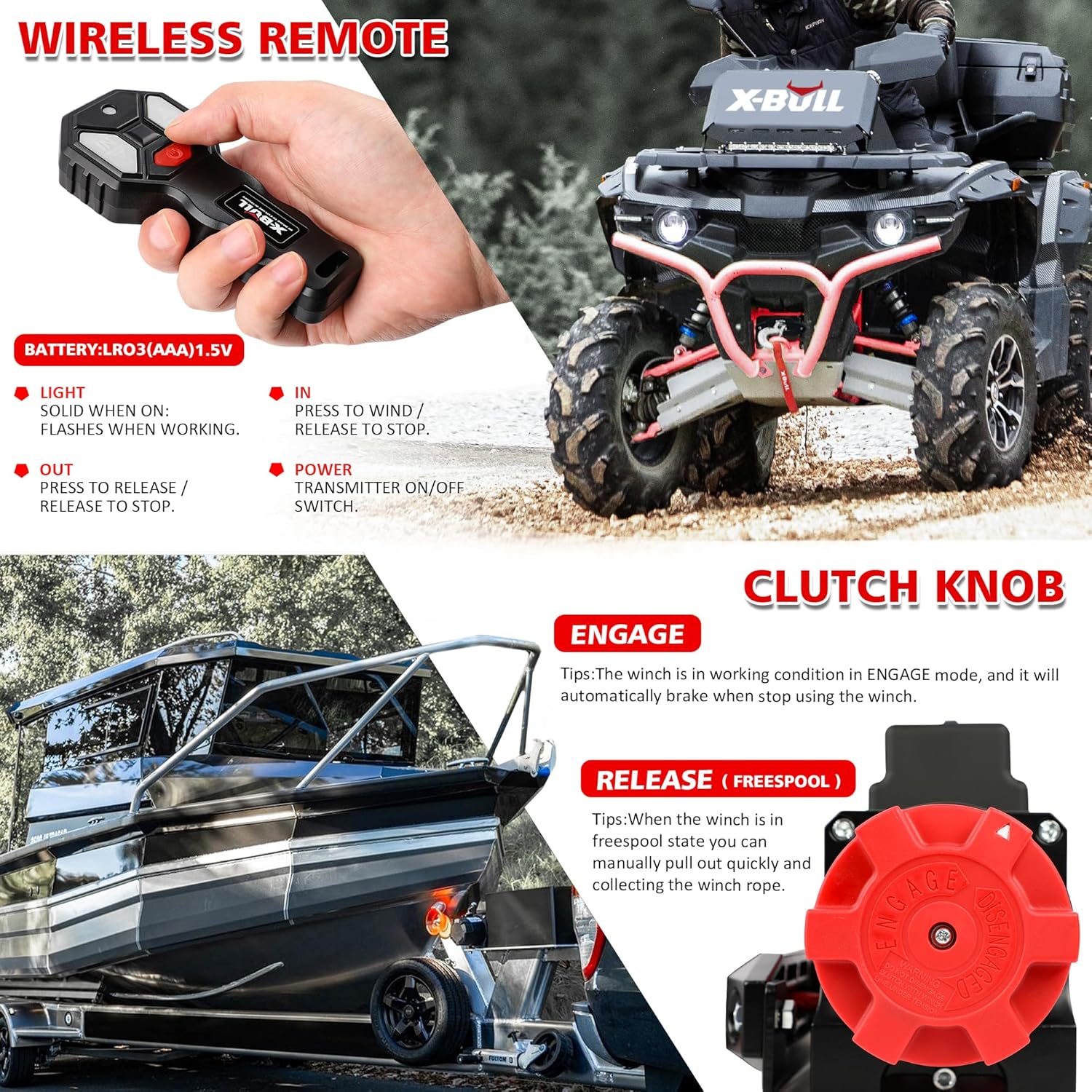
Image 2.1: Visual representation of all components included in the X-BULL 6000lbs Winch package, including the winch, remotes, hook, fairlead, and mounting hardware.
3. Safety Information
Read and understand all safety warnings and instructions before operating this winch. Failure to follow these instructions may result in serious injury or property damage.
- Always wear appropriate personal protective equipment, including gloves and eye protection.
- Never exceed the rated line pull capacity of the winch.
- Ensure the winch is securely mounted to a structurally sound surface.
- Keep hands and clothing clear of the winch rope, hook, and fairlead during operation.
- Always use a winch damper or heavy blanket over the winch rope during recovery operations to reduce whiplash in case of rope failure.
- Inspect the synthetic rope, hook, and all connections for damage before each use. Do not use if damaged.
- Avoid operating the winch at extreme angles that could cause the rope to pile up on one side of the drum.
- Disconnect power to the winch when not in use or during maintenance.
- Do not use the winch for lifting people or for overhead lifting applications.
4. Setup and Installation
The X-BULL winch features an integrated design for simplified installation.
4.1 Mounting the Winch
- Select a suitable mounting location on your ATV, UTV, or vehicle that can support the winch's weight and pulling forces.
- Use the provided mounting plate and bolts to securely fasten the winch to the chosen location. Ensure all bolts are tightened to the manufacturer's specifications.
- Install the Aluminium Hawse Fairlead to guide the synthetic rope smoothly.

Image 4.1: The integrated design of the winch, showing the control box directly attached to the winch body for easier installation.
4.2 Electrical Connection
Connect the winch directly to your vehicle's 12V battery.
- Connect the RED wire from the winch to the POSITIVE (+) terminal of the battery.
- Connect the BLACK wire from the winch to the NEGATIVE (-) terminal of the battery.
- Ensure all connections are tight and secure. Use the provided joint protective caps over the terminals to prevent corrosion and short circuits.

Image 4.2: Wiring diagram illustrating the connection of the winch's red wire to the positive battery terminal and the black wire to the negative battery terminal.
5. Operating Instructions
Your X-BULL winch can be operated using either the wired remote or the wireless remote control.
5.1 Clutch Operation (Engage/Release)
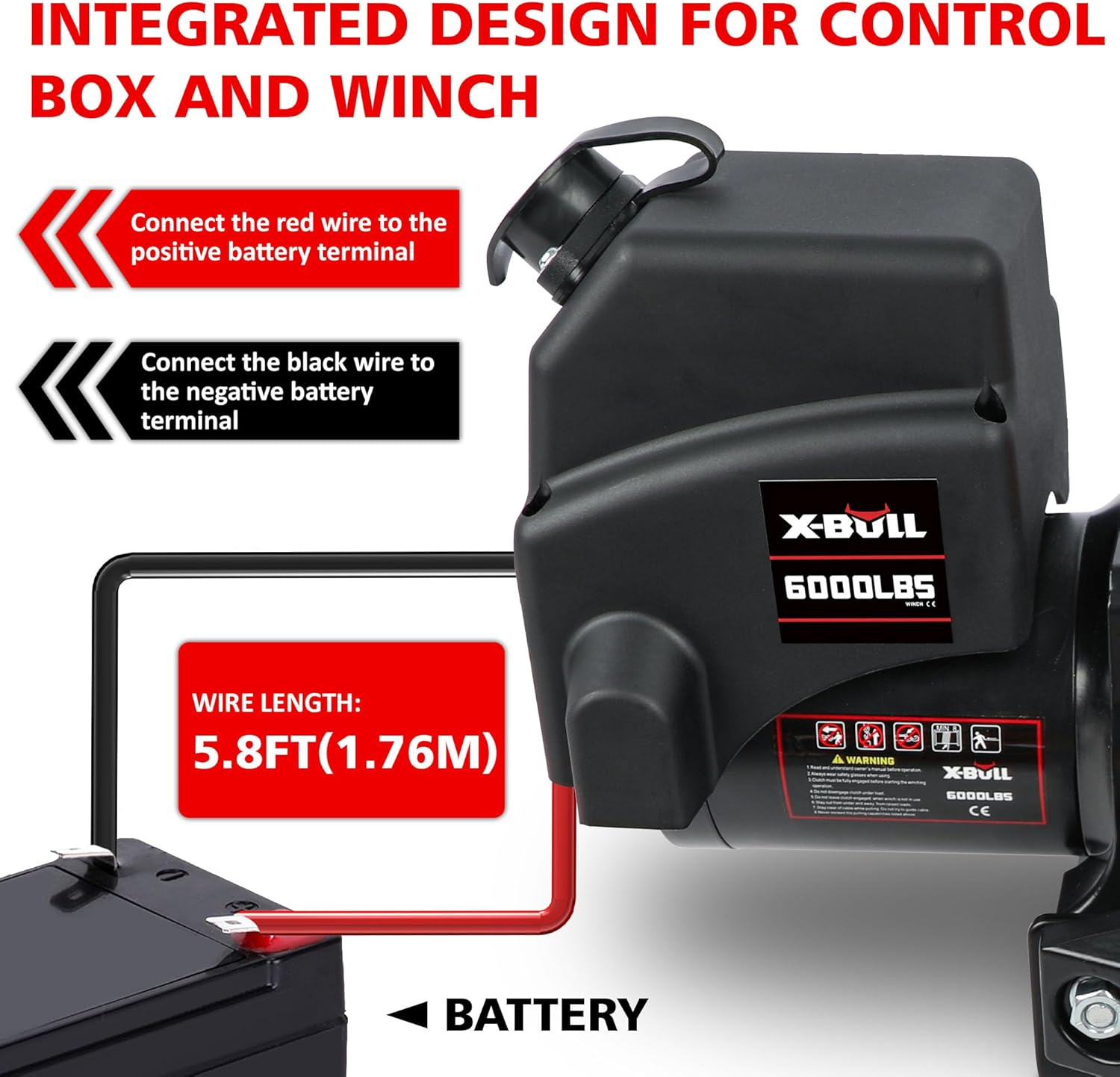
Image 5.1: The winch's clutch knob, showing "ENGAGE" and "RELEASE (FREESPOOL)" positions, alongside the wireless remote control.
- ENGAGE: Turn the clutch knob to the "ENGAGE" position for winching operations. In this mode, the winch is ready to pull, and the automatic braking system is active.
- RELEASE (FREESPOOL): Turn the clutch knob to the "RELEASE" position to allow the synthetic rope to be manually pulled out quickly. This is useful for rapidly deploying the rope to the anchor point. Ensure the clutch is re-engaged before applying power.
5.2 Remote Control Usage

Image 5.2: Both the wired and wireless remote controls for operating the winch. The wireless remote has a range of up to 100 feet.
- Wireless Remote: Press "IN" to wind the rope in, and "OUT" to release the rope. The light flashes when working. Ensure the transmitter is ON. The wireless remote offers operation up to 100 feet.
- Wired Remote: Connect the wired remote to the winch's control port. Use the "IN" and "OUT" buttons to control the rope movement.
5.3 Using the Pulley Hook and Rubber Stopper
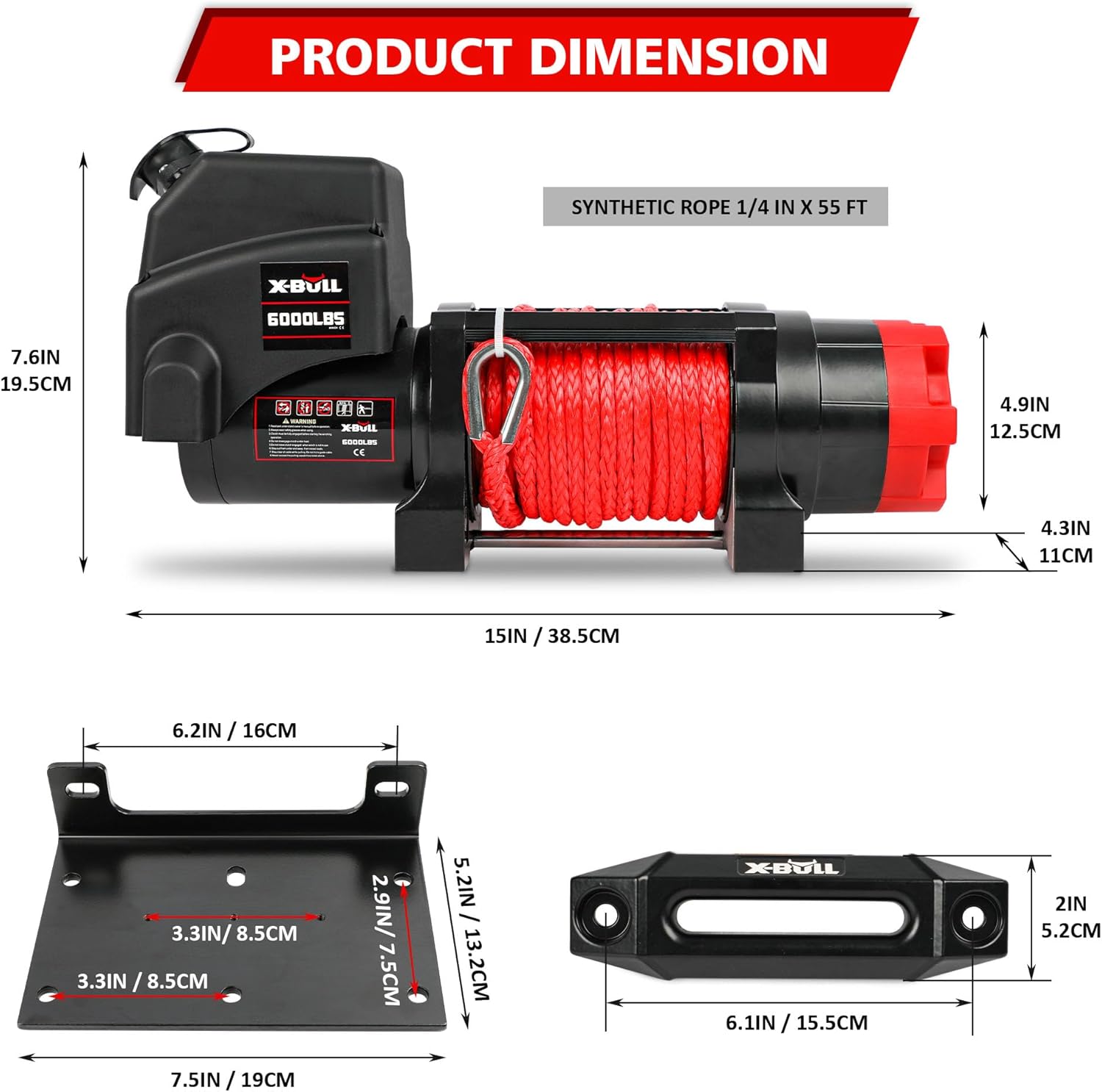
Image 5.3: Illustration of how to use a pulley block to double the winch's pulling capacity and the function of the rubber stopper to protect the fairlead.
- Movable Pulley Hook: For heavier loads or to double your winch's pulling capacity, use the movable pulley hook in a dual-line operation setup. This distributes the load and reduces strain on the winch.
- Rubber Stopper: Install the rubber stopper on the synthetic rope to prevent the hook from being pulled too far into the fairlead, protecting both the fairlead and the winch motor/gears from damage.
6. Maintenance
Regular maintenance ensures the longevity and safe operation of your winch.
- Rope Inspection: Regularly inspect the synthetic rope for frays, cuts, or other damage. Replace the rope if any damage is found.
- Electrical Connections: Check battery terminals and winch connections for corrosion or looseness. Clean and tighten as necessary.
- Winch Body: Keep the winch clean from dirt, mud, and debris. The IP68 rating provides protection against water and dust, but regular cleaning is recommended.
- Lubrication: Periodically check the gearbox for adequate lubrication. Refer to a qualified service technician for internal lubrication if needed.
- Remote Controls: For the wireless remote, check and replace batteries as needed (LR03(AAA) 1.5V).
7. Troubleshooting
If you encounter issues with your winch, refer to the following common troubleshooting steps.
| Problem | Possible Cause | Solution |
|---|---|---|
| Winch does not operate. | No power to winch; Loose electrical connections; Dead remote battery. | Check battery connections and ensure they are tight. Verify battery charge. Replace wireless remote batteries. |
| Winch operates slowly or with reduced power. | Low battery voltage; Overloaded winch; Corroded connections. | Charge vehicle battery. Reduce load on winch. Clean and tighten electrical connections. |
| Rope does not spool evenly. | Operating at extreme angles; Rope not under tension during spooling. | Ensure the rope is spooled under light tension. Avoid extreme angles during recovery. |
| Winch makes unusual noises. | Internal gear damage; Lack of lubrication. | Discontinue use immediately. Contact X-BULL customer support for assistance. |
8. Specifications
| Feature | Specification |
|---|---|
| Model | USAM-XBEW005 |
| Rated Line Pull | 6000 lbs (2721 kg) |
| Motor | 1.9 HP |
| Gear System | 3-Stage Planetary |
| Gear Ratio | 226:1 |
| Rope Type | Synthetic Rope |
| Rope Dimensions | 1/4 inch x 55 feet (6.35 mm x 16.76 m) |
| Fairlead | Aluminium Hawse |
| Braking Action | Automatic |
| Waterproof Rating | IP68 |
| Product Dimensions | 17.5 x 10.4 x 11.2 inches (44.45 x 26.42 x 28.45 cm) |
| Item Weight | 29.6 pounds (13.43 kg) |

Image 8.1: Detailed product dimensions of the X-BULL 6000lbs winch and its components.
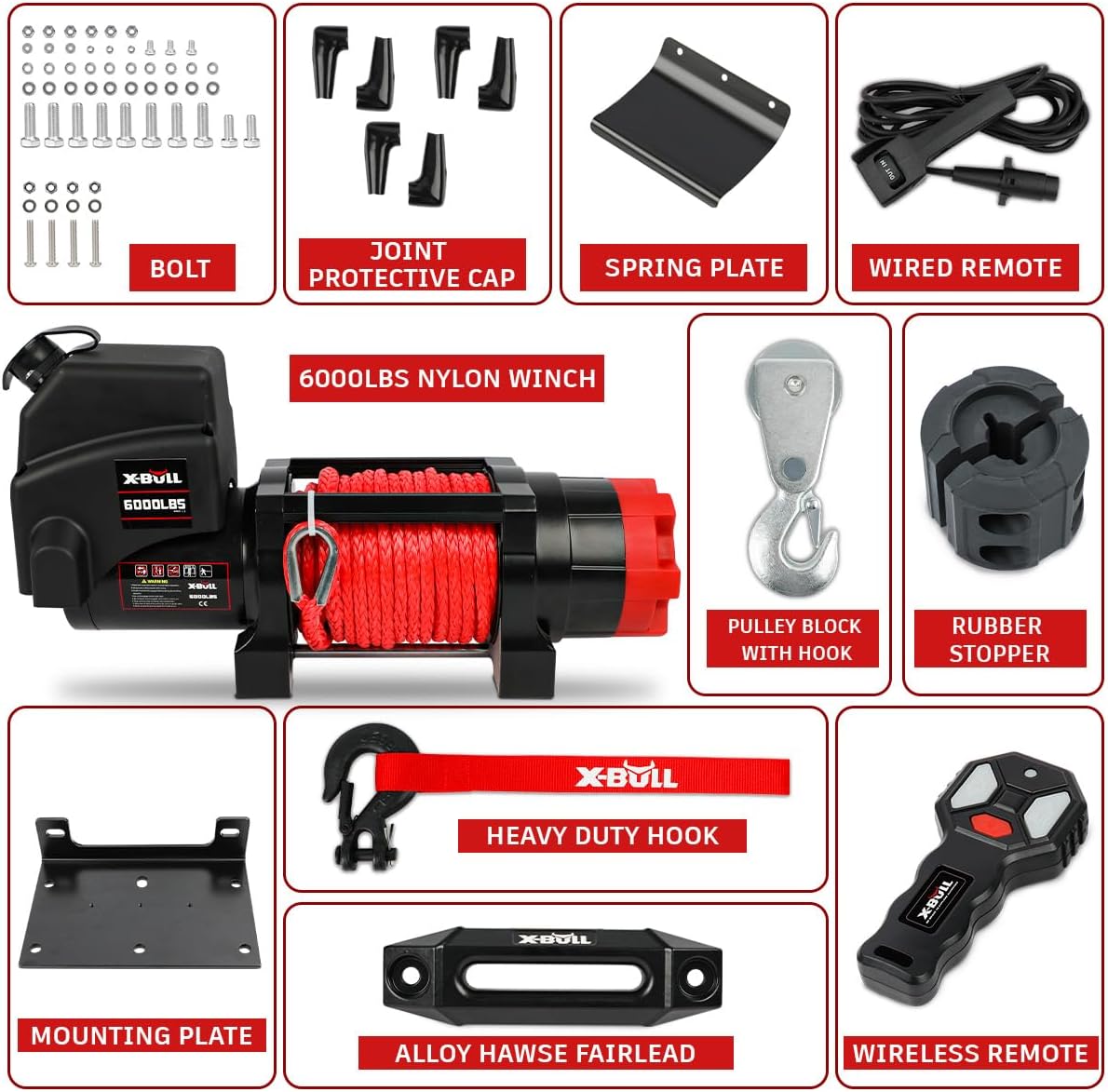
Image 8.2: Performance chart detailing winch line speed (FPM/MPM) versus line pull (LB./KG.) and rolling load capacities for various slopes.
9. Warranty and Support
For warranty information or technical support, please contact X-BULL customer service. Keep your purchase receipt as proof of purchase.
You can typically find contact information on the X-BULL official website or through your retailer.


