
1. Product Overview
The DATOUBOSS 2000W Pure Sine Wave Power Inverter is designed to convert 12V DC power from a battery into 110V AC power, suitable for a wide range of electronic devices and appliances. Utilizing advanced SPWM technology controlled by a MCU microprocessor, this inverter delivers a pure sine wave output, ensuring stable and reliable power for sensitive equipment.
It features strong load adaptability, supporting inductive, capacitive, resistive, and mixed loads. The inverter is equipped with comprehensive protection functions to ensure safe operation and a long service life.

2. Key Features
- Pure Sine Wave Output: Provides clean and stable power, ideal for sensitive electronics, reducing audible and electrical noise.
- LCD Display: A clear Liquid Crystal Display shows real-time input voltage, output voltage, battery capacity, and protection indications, allowing users to monitor the inverter's status.
- Efficient Cooling System: Equipped with two built-in cooling fans to prevent overheating and maintain optimal operating temperature.
- Comprehensive Protection: Features multiple safety mechanisms including input overvoltage, undervoltage, overload, overheating, and output short circuit protection.
- High Conversion Efficiency: Achieves a conversion efficiency of 95%, minimizing power loss.


3. Technical Specifications
| Specification | Value |
|---|---|
| Continuous Power | 2000W |
| Surge Power | 4000W |
| Input Voltage | 12V DC |
| Output Voltage | 110V AC |
| Output Frequency | 50HZ/60HZ |
| Output Waveform | Pure Sine Wave |
| Conversion Efficiency | 95% |
| No-load Current | <0.8A |
| THD (Total Harmonic Distortion) | <3% Linear Load |
| Overload Protection | 2000W > 110% |
| Cooling Method | Built-in Air Cooling |
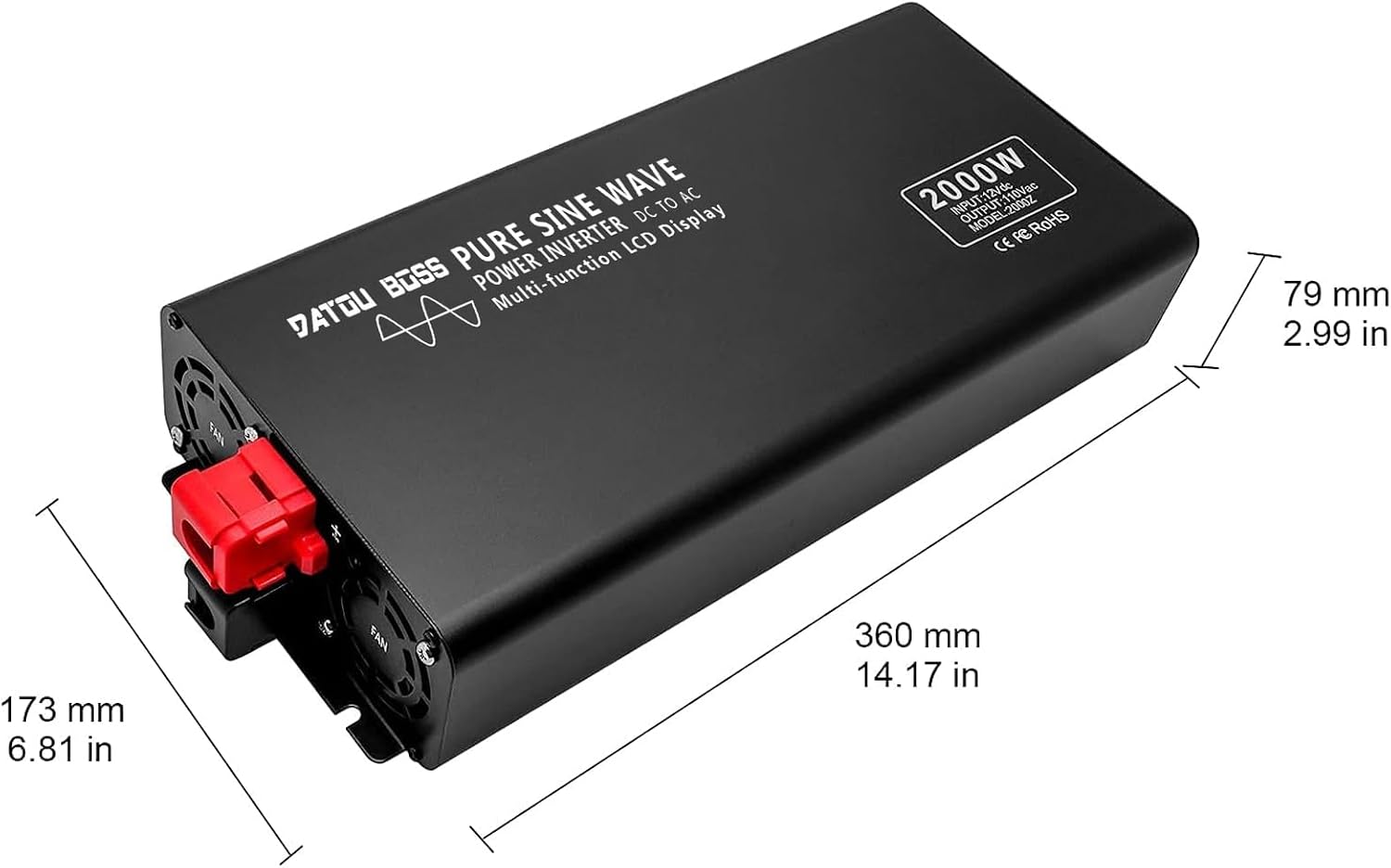
| Dimensions (L x W x H) | 410 x 175 x 78mm (16.14 x 6.88 x 3.07in) |
| Product Weight | 4kg (8.81lb) |
| Certifications | CE/FCC/ROSH |
4. Installation and Setup
4.1 Environmental Requirements
- Install the inverter in a dry, clean, and well-ventilated location.
- Ensure the working temperature is between -30℃ to 80℃.
- Relative humidity should be 0%-95%, with no condensation.
- Avoid direct sunlight, heat sources, and flammable materials.
4.2 Connection Steps
- Ensure the inverter's power switch is in the OFF position before making any connections.
- Connect the red battery cable to the positive (+) terminal of the inverter and the positive (+) terminal of your 12V battery.
- Connect the black battery cable to the negative (-) terminal of the inverter and the negative (-) terminal of your 12V battery.
- Ensure all connections are tight and secure to prevent loose contacts and sparking.
- Verify the input source (battery, accumulator, or photovoltaic panels) is compatible with the inverter's 12V DC input.

5. Operation
5.1 Powering On
- After ensuring all connections are secure and correct, turn on the inverter's power switch.
- The LCD display will illuminate, showing the input voltage, output voltage, and battery capacity.
5.2 Connecting Devices
- Plug your AC devices into the dual AC outlets on the inverter.
- Ensure the total continuous power consumption of all connected devices does not exceed 2000W. For devices with high startup surge, ensure their surge power is within the inverter's 4000W surge capacity.
5.3 Understanding the LCD Display
The LCD provides critical information about the inverter's operation:
- Battery Icon: Indicates the current battery charge level (e.g., 100%, 80%, 60%, 40%, 20%).
- DC Voltage: Shows the input voltage from the battery (e.g., 12.2V).
- AC Voltage: Displays the output AC voltage (e.g., 110V).
- Wattage (W): Shows the current power consumption of connected devices.
- Frequency (Hz): Indicates the output frequency (50Hz/60Hz).
- Protection Indicators: The display will show specific icons or messages if a protection mode is activated (e.g., overload, low voltage).
6. Applications
The DATOUBOSS 2000W Pure Sine Wave Power Inverter is versatile and can be used in various scenarios, providing reliable AC power for a wide range of devices:
- Home Use: Powering household appliances during outages or in off-grid setups.
- Outdoor Activities: Ideal for camping, RVs, and other outdoor adventures to power electronics and small appliances.
- Work Sites: Suitable for powering tools and equipment at construction sites or remote work locations.
- Vehicle Use: Can be connected to a 12V car battery to power devices on the go.


7. Maintenance and Care
- Keep the inverter clean and free from dust and debris. Use a soft, dry cloth for cleaning.
- Ensure the ventilation openings and cooling fans are not blocked to allow proper airflow.
- Store the inverter in a cool, dry place when not in use, away from direct sunlight and moisture.
- Regularly check battery connections for tightness and corrosion.
8. Safety Precautions
- Do not open the inverter casing. There are no user-serviceable parts inside.
- Avoid exposing the inverter to water, rain, or excessive humidity.
- Do not operate the inverter near flammable liquids or gases.
- Ensure adequate ventilation around the inverter during operation to prevent overheating.
- Always connect the inverter to a 12V DC power source. Connecting to a different voltage may damage the unit.
- Disconnect the inverter from the battery before performing any maintenance or cleaning.
9. Troubleshooting Guide
This section provides solutions to common issues you might encounter with your DATOUBOSS Power Inverter.
9.1 No Output Power / Inverter Not Turning On
- Check Battery Connections: Ensure the battery cables are securely connected to both the inverter and the battery terminals. Loose connections can prevent power flow.
- Check Battery Voltage: The inverter requires a 12V DC input. If the battery voltage is too low (undervoltage protection) or too high (overvoltage protection), the inverter will not operate. Charge or replace the battery as needed.
- Check Inverter Switch: Ensure the inverter's power switch is in the ON position.
- Internal Fuse: The inverter has built-in fuses. If the unit experienced a severe overload or short circuit, an internal fuse might have blown. Contact customer support for assistance.
9.2 Overload Protection Activated
The inverter will shut down if the connected load exceeds its continuous power rating (2000W) or surge power rating (4000W).
- Reduce Load: Disconnect some of the connected appliances to reduce the total power draw.
- Check Appliance Wattage: Verify that the wattage of your appliances is within the inverter's capacity. Pay attention to startup surge for motor-driven appliances.
- Reset Inverter: Turn the inverter off, wait a few minutes, and then turn it back on.
9.3 Overheating Protection Activated
The inverter will shut down if its internal temperature becomes too high.
- Improve Ventilation: Ensure the inverter is in a well-ventilated area and its cooling fans are not obstructed.
- Reduce Load: Operating at maximum capacity for extended periods can cause overheating. Reduce the load if possible.
- Allow Cooling: Turn off the inverter and allow it to cool down for at least 15-30 minutes before restarting.
9.4 Short Circuit Protection Activated
The inverter will shut down immediately if a short circuit is detected at the output.
- Inspect Cables and Appliances: Disconnect all appliances and inspect their power cords and plugs for any damage or short circuits.
- Test Appliances: Try connecting one appliance at a time to identify the faulty one.
- Reset Inverter: Turn the inverter off, correct the short circuit issue, and then turn it back on.
10. Warranty and Support
DATOUBOSS is committed to providing high-quality products and excellent customer service. All DATOUBOSS inverters undergo strict inspection before leaving the factory and are certified with CE, FCC, and ROSH standards.
For any questions, technical assistance, or support, please contact our customer service team. We offer 24-hour friendly customer service and strive for 100% customer satisfaction.
For more information or to explore other products, please visit the official DATOUBOSS Store on Amazon.


