
1. Overview
The UBL U-Lite L-Bracket is an accessory designed to facilitate the mounting of the U-Lite Surface Mount by Ultra Bright Lightz. This L-shaped bracket provides a stable and secure platform, enabling versatile installation options for your U-Lite Surface Mount on various surfaces of your vehicle or other applications.
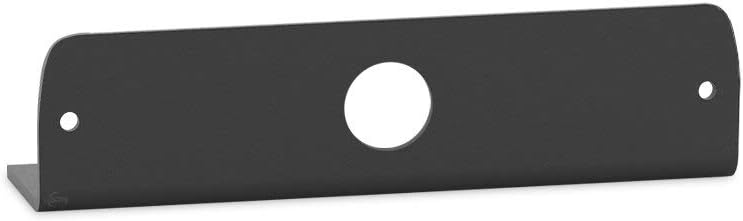
Figure 1: The UBL U-Lite L-Bracket. This image displays the black, powder-coated metal bracket, highlighting its L-shape, the central mounting hole for the U-Lite, and the two smaller holes for securing the bracket itself.
2. Product Features
- Specifically designed as an L-Shaped bracket for the U-lite Surface Mount by Ultra Bright Lightz.
- Enables flexible mounting of the U-Lite Surface Mount in various locations on your vehicle.
- Constructed from powder-coated metal for enhanced durability and resistance to environmental factors.
- Designed for straightforward installation with minimal intrusion.
- Engineered and designed in the USA.
3. Package Contents
Please verify that all components are present upon opening the package:
- 1 x UBL U-Lite L-Bracket (Model: UBL-ULite-LBracket)
- Note: Mounting hardware for the bracket and the U-Lite Surface Mount are sold separately and are not included with this L-Bracket.
4. Setup and Installation
This section outlines the general steps for installing the UBL U-Lite L-Bracket. Specific mounting hardware and tools may vary depending on your application and the surface where the bracket will be installed.
- Identify Mounting Location: Determine the desired location on your vehicle or mounting surface where the U-Lite Surface Mount needs to be positioned. Ensure the location provides adequate space and a stable surface for secure attachment.
- Prepare Mounting Surface: Clean the mounting surface thoroughly to remove any dirt, grease, or debris. A clean surface ensures optimal adhesion or secure fastening.
- Position the L-Bracket: Place the UBL U-Lite L-Bracket against the chosen mounting surface. The L-shape allows for mounting on flat surfaces, corners, or edges, providing an elevated or angled platform for the U-Lite.
- Mark Drilling Points (if applicable): Using the two smaller holes on the L-Bracket as a template, mark the precise drilling points on your mounting surface.
- Drill Pilot Holes (if applicable): Drill pilot holes at the marked locations, ensuring the drill bit size is appropriate for your chosen mounting screws.
- Secure the L-Bracket: Attach the L-Bracket to the mounting surface using appropriate screws, bolts, or other fasteners (not included). Ensure the bracket is firmly secured and does not wobble.
- Mount the U-Lite Surface Mount: Once the L-Bracket is securely installed, align the U-Lite Surface Mount with the large central hole on the L-Bracket. Use the U-Lite's mounting hardware (not included) to attach it to the L-Bracket. Ensure the U-Lite is securely fastened and oriented correctly.
Always ensure that the mounting location does not interfere with vehicle operation, safety features, or existing wiring. Consult a professional if you are unsure about the installation process.
5. Operation and Function
The UBL U-Lite L-Bracket is a passive component designed to provide a stable and adaptable mounting solution. Once installed, its primary function is to securely hold the U-Lite Surface Mount in the desired position. It does not require any active operation or power. The bracket ensures that the U-Lite remains fixed, allowing it to perform its intended function (e.g., illumination, signaling) effectively from its mounted location.
6. Maintenance
The UBL U-Lite L-Bracket requires minimal maintenance due to its durable powder-coated metal construction.
- Cleaning: Periodically wipe the bracket with a soft, damp cloth to remove dust and dirt. Avoid using abrasive cleaners or solvents, as these may damage the powder coating.
- Inspection: Regularly inspect the bracket and its mounting points for any signs of loosening, corrosion, or damage. Ensure all fasteners remain tight. If any damage is observed, replace the bracket or re-secure it as necessary to prevent the U-Lite Surface Mount from becoming dislodged.
7. Troubleshooting
As a passive mounting bracket, troubleshooting is generally limited to installation issues.
| Problem | Possible Cause | Solution |
|---|---|---|
| Bracket is loose after installation. | Fasteners are not tightened sufficiently, or incorrect fasteners were used. | Ensure all screws/bolts are tightened securely. Use appropriate fasteners for the mounting surface. Consider using washers or lock nuts if vibration is a concern. |
| U-Lite Surface Mount does not fit the bracket. | Incorrect U-Lite model or non-compatible device. | Verify that you have the genuine U-Lite Surface Mount by Ultra Bright Lightz. This bracket is specifically designed for that product. |
| Bracket appears damaged or corroded. | Exposure to harsh conditions or physical impact. | Replace the bracket immediately to ensure secure mounting of the U-Lite. |
8. Specifications
| Attribute | Detail |
|---|---|
| Model Number | UBL-ULite-LBracket |
| Brand | UBL (Ultra Bright Lightz) |
| Material | Metal |
| Exterior Finish | Black Powder Coated |
| Product Dimensions (L x W x H) | 2 x 3 x 1 inches |
| Item Weight | 8 ounces |
| Designed In | USA |
9. Warranty and Support
Warranty Information
This product is sold by Ultra Bright Lightz. For specific warranty details, please refer to the terms and conditions provided by Ultra Bright Lightz at the time of purchase or contact their customer service directly. Standard return policy for this item is 30 days for refund/replacement.
Customer Support
For technical assistance, installation queries, or any other support needs regarding your UBL U-Lite L-Bracket, please contact Ultra Bright Lightz directly. You can typically find their contact information on their official website or through the retailer where the product was purchased.
Ultra Bright Lightz Store: Visit Store on Amazon
