
Introduction
This manual provides essential information for the safe and efficient use of your Fagor 8H-875TCN electric oven. Please read these instructions carefully before installation, operation, or maintenance. Keep this manual for future reference.
Important Safety Instructions
- Electrical Safety: Ensure the oven is properly grounded. Do not use extension cords.
- Burn Hazard: Oven surfaces become hot during operation. Use oven mitts.
- Children Safety: Keep children away from the oven during operation and cooling.
- Cleaning: Disconnect power before cleaning. Use non-abrasive cleaners.
- Ventilation: Ensure adequate ventilation around the oven.
- Repairs: Only qualified service personnel should perform repairs.
Setup and Installation
The Fagor 8H-875TCN oven is designed for built-in installation. Professional installation is recommended.
Unpacking
- Carefully remove all packaging materials.
- Inspect the oven for any damage. Do not install if damaged.
- Remove all accessories from inside the oven cavity.
Electrical Connection
This is an electric oven. Ensure the electrical supply matches the specifications on the rating plate. The oven must be properly grounded. Consult a qualified electrician for connection.
First Use
Before first use, clean the oven interior with a damp cloth. Heat the empty oven at maximum temperature for approximately 30 minutes to burn off any manufacturing residues. Ensure good ventilation during this process.
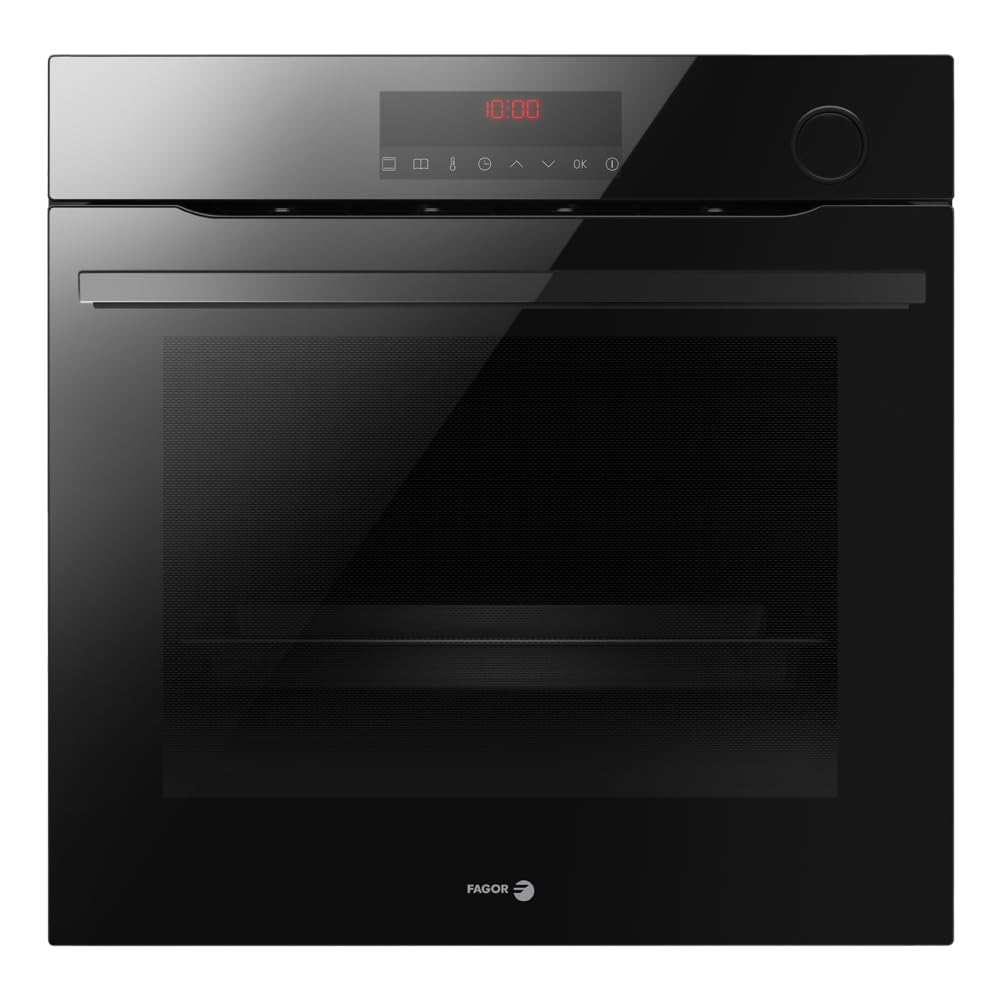
Figure 1: Front view of the Fagor 8H-875TCN Electric Oven. This image shows the oven's sleek black finish with stainless steel accents, control panel, and oven door.
Operating Instructions
Control Panel Overview
The control panel features a digital display, function selector knob, and temperature control knob. Specific icons indicate various cooking functions and settings.
Setting the Time
- When the oven is first connected, the display will flash.
- Use the '+' and '-' buttons to set the current time.
- Confirm by pressing the clock icon or waiting a few seconds.
Selecting a Cooking Function
- Turn the function selector knob to choose the desired cooking mode (e.g., Conventional, Fan Assisted, Grill).
- Turn the temperature control knob to set the desired temperature.
- The oven will begin to preheat. An indicator light will turn off when the set temperature is reached.
Using the Timer Function
The oven features a timer function for setting cooking duration or a delayed start.
- Minute Minder: Set a countdown timer without affecting oven operation.
- Cooking Duration: Set the desired cooking time. The oven will switch off automatically.
- Delayed Start: Set a cooking duration and an end time. The oven will calculate the start time.
Refer to the specific icons on your control panel for timer settings.
Maintenance and Cleaning
Regular cleaning and maintenance ensure optimal performance and longevity of your oven.
General Cleaning
- Always ensure the oven is cool and disconnected from the power supply before cleaning.
- Clean the interior and exterior surfaces with a soft cloth and mild detergent.
- Avoid abrasive cleaners, scourers, or harsh chemicals that can damage surfaces.
- For stubborn stains, use a specialized oven cleaner, following the product instructions carefully.
Oven Racks and Accessories
Remove oven racks and other accessories for easier cleaning. They can be washed in warm soapy water or in a dishwasher.
Replacing the Oven Light
- Disconnect the oven from the power supply.
- Allow the oven to cool completely.
- Unscrew the protective glass cover inside the oven.
- Replace the old bulb with a new, heat-resistant oven bulb (check specifications for wattage).
- Screw the protective glass cover back on.
- Reconnect the power supply.
Automatic Defrosting System
The Fagor 8H-875TCN features an auto-defrosting system. Ensure the oven is kept clean to allow this system to function efficiently. Regular wiping of condensation is recommended.
Troubleshooting Guide
Before contacting customer service, please refer to the following common issues and solutions.
| Problem | Possible Cause | Solution |
|---|---|---|
| Oven does not heat up. | No power supply; incorrect settings; tripped circuit breaker. | Check power connection; ensure oven is plugged in; reset circuit breaker; verify function and temperature settings. |
| Oven light not working. | Bulb is faulty or loose. | Replace the oven bulb (refer to Maintenance section). |
| Uneven cooking. | Incorrect rack position; overloaded oven; faulty heating element. | Use recommended rack positions; avoid overcrowding; if problem persists, contact service. |
| Excessive smoke during cooking. | Food spills; grease buildup. | Clean the oven thoroughly, especially the bottom and heating elements. |
If the problem persists after attempting these solutions, please contact Fagor customer support.
Technical Specifications
- Model Name: 8H-875TCN
- Brand: Fagor Commercial
- Fuel Type: Electric
- Installation Type: Built-in
- Color: Black with Stainless Steel Finish
- Timer Function: Available
- Door Orientation: Right
- Defrost System Type: Auto-defrosting
- Finish: Polished
Warranty Information
Fagor Commercial products are covered by a manufacturer's warranty. The specific terms and duration of the warranty may vary by region and purchase date. Please retain your proof of purchase for warranty claims.
For detailed warranty information, please refer to the warranty card included with your product or visit the official Fagor Commercial website.
Customer Support
If you require assistance with your Fagor 8H-875TCN oven, please contact Fagor Commercial customer support.
- Online Support: Visit the official Fagor Commercial website for FAQs, product registration, and service requests. Fagor Commercial Store
- Service: For technical assistance or to schedule a service appointment, please have your model number (8H-875TCN) and serial number ready.


