
Introduction
Welcome to your new Fastrack Street Line Quartz Digital Analog Watch, model NR68016PP01. This timepiece combines the classic appeal of analog timekeeping with the modern functionality of digital features. Designed for durability and versatility, it is a suitable accessory for various daily activities.
Key features of your watch include:
- Hybrid Display: Combines digital features with analog hands for a dual-time experience.
- Durable Polyurethane Strap: Lightweight, strong, and designed for daily use.
- Multifunctional Utility: Includes stopwatch, alarm, date, backlight, and more.
- Water-Resistant Design: Suitable for everyday adventures and outdoor activities.
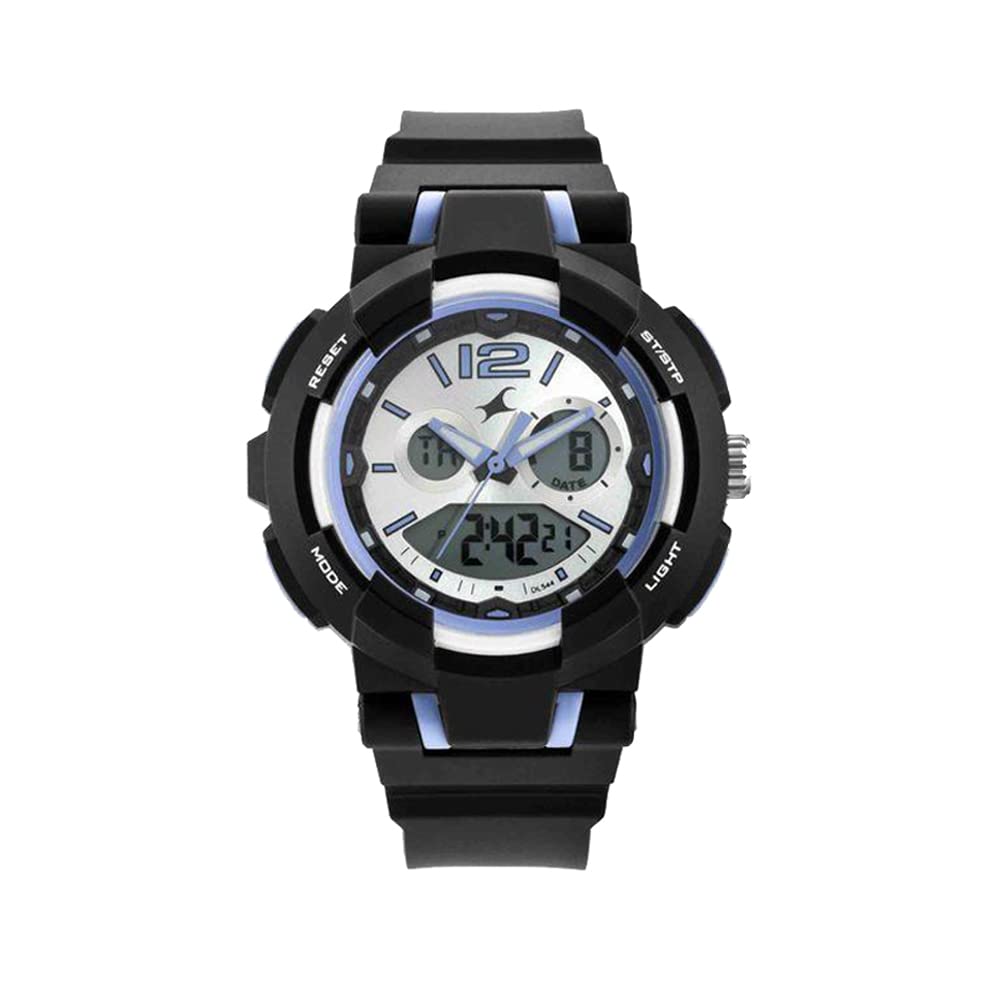
Image: Front view of the Fastrack Street Line Quartz Digital Analog Watch, showcasing its hybrid display and black polyurethane strap.
Setup
Before using your watch, please familiarize yourself with its buttons and basic functions.

Image: Close-up of the watch face and side, indicating the positions of the 'RESET', 'MODE', 'ST/STP', and 'LIGHT' buttons.
Button Functions:
- MODE Button (Bottom Left): Cycles through different modes (Time, Alarm, Stopwatch).
- RESET Button (Top Left): Used for resetting values or selecting options during setting.
- ST/STP Button (Top Right): Starts/stops functions like the stopwatch or adjusts values during setting.
- LIGHT Button (Bottom Right): Activates the backlight for the digital display.
- Crown (Right Side): Used to set the analog time.
Setting Analog Time:
- Pull the crown out to the first position.
- Rotate the crown to adjust the hour and minute hands to the desired time.
- Push the crown back in to its normal position to start the analog time.
Setting Digital Time and Date:
- Press the MODE button repeatedly until the digital time display starts flashing (indicating setting mode).
- Use the RESET button to cycle through the settings (seconds, hour, minute, month, date, day).
- Use the ST/STP button to adjust the flashing value.
- Once all settings are correct, press the MODE button again to exit the setting mode.
Operating Instructions
Using the Stopwatch:
- Press the MODE button until "ST" or "STOPWATCH" appears on the digital display.
- Press the ST/STP button to start the stopwatch.
- Press the ST/STP button again to pause the stopwatch.
- To resume, press ST/STP. To reset to zero, press RESET while the stopwatch is paused.
- Press MODE to return to time display.
Setting and Using the Alarm:
- Press the MODE button until "AL" or "ALARM" appears on the digital display.
- Press the RESET button to select the hour or minute to set. The selected value will flash.
- Use the ST/STP button to adjust the flashing value.
- Once the alarm time is set, press MODE to exit.
- To turn the alarm ON/OFF, press ST/STP while in alarm mode. An alarm icon will appear/disappear.
- When the alarm sounds, press any button to stop it.
Using the Backlight:
Press the LIGHT button (bottom right) to illuminate the digital display for a few seconds in low-light conditions.

Image: Side view of the Fastrack Street Line Watch, highlighting the 'LIGHT' button on the bottom right.
Maintenance
Proper care will ensure the longevity and performance of your Fastrack watch.
Cleaning Your Watch:
- Wipe the watch case and strap with a soft, dry cloth.
- For stubborn dirt, use a slightly damp cloth and mild soap, then wipe dry immediately.
- Avoid using harsh chemicals, solvents, or abrasive cleaners, as these can damage the watch's finish or strap material.
Water Resistance:
Your watch is designed to be water-resistant. However, it is important to note the following:
- Do not operate any buttons or the crown while the watch is wet or submerged in water.
- Avoid exposing the watch to hot water, steam, or extreme temperature changes, as this can compromise the water seals.
- Water resistance is not a permanent condition and may decrease over time with normal wear and tear. Have your watch checked periodically by an authorized service center.
Battery Replacement:
The watch is powered by a Lithium Polymer battery. When the display dims or functions become erratic, it may be time for a battery replacement. It is recommended to have the battery replaced by an authorized Fastrack service center to ensure proper sealing and functionality.

Image: Back view of the Fastrack Street Line Watch, showing the case back where the battery is housed.
Troubleshooting
If you encounter any issues with your watch, please refer to the following common problems and solutions:
| Problem | Possible Cause / Solution |
|---|---|
| Analog hands not moving. |
|
| Digital display is blank or dim. |
|
| Digital time is incorrect. |
|
| Buttons are unresponsive. |
|
Specifications
| Feature | Detail |
|---|---|
| Brand | Fastrack |
| Model Number | NR68016PP01 |
| Model Name | Street Line |
| Display Type | Analog-Digital |
| Special Features | Light Up, Second Hand |
| Power Source | Battery Powered |
| Battery Type | Lithium Polymer (included) |
| Product Dimensions | 14 x 7 x 10 cm |
| Item Weight | 200 g |
| Country of Origin | India |
Warranty and Support
Your Fastrack watch is covered by a manufacturer's warranty against defects in materials and workmanship. Please refer to the warranty card included with your purchase for specific terms and conditions, including the warranty period.
For service, repairs, or further assistance, please contact an authorized Fastrack service center. You can find contact information and service center locations on the official Fastrack website or through your retailer.
Note: Unauthorized repairs or modifications may void your warranty.