
1. Introduction
Thank you for choosing the Cecotec PureAroma Diffuser 550 Connected Stone. This device combines aromatherapy, humidification, and an integrated Bluetooth speaker, all controllable via a smartphone application. Please read this manual carefully before use to ensure proper operation and maintenance.

The Cecotec PureAroma Diffuser 550 Connected Stone, a stylish aromatherapy diffuser with integrated LED lighting and mist output.
2. Safety Instructions
To prevent injury or damage, always follow these basic safety precautions:
- Do not use undiluted essential oils directly in the diffuser. Always mix with water.
- Keep the device out of reach of children and pets.
- Ensure adequate ventilation during use.
- Do not operate the device for more than 12 consecutive hours. Allow it to cool down before restarting.
- Only use the provided power adapter.
- Do not immerse the device in water or any other liquid.
- Unplug the device before cleaning or refilling.
- Place the diffuser on a stable, flat surface away from direct sunlight or heat sources.
3. Product Components
The Cecotec PureAroma Diffuser 550 consists of the following main parts:
- Main Unit: Contains the ultrasonic plate, water tank, and control electronics.
- Top Cover: Protects the water tank and directs the mist.
- LED Display: Shows time and current settings.
- Control Buttons: For power, mist, light, and timer functions.
- Power Adapter: For connecting the device to an electrical outlet.
- Measuring Cup: For accurate water filling.
4. Setup
- Unpack: Carefully remove all components from the packaging.
- Placement: Place the diffuser on a flat, stable, and water-resistant surface. Ensure it is not near electronic devices sensitive to moisture.
- Fill Water Tank: Remove the top cover. Using the measuring cup, fill the water tank with clean tap water up to the maximum fill line (500 ml capacity). Do not overfill.
- Add Essential Oils (Optional): Add 2-3 drops of your preferred essential oil directly into the water tank. Adjust the quantity based on personal preference and room size.
- Replace Cover: Securely place the top cover back onto the main unit.
- Connect Power: Plug the power adapter into the diffuser's power port, then into a suitable electrical outlet.

To fill the diffuser, remove the top cover and carefully pour water into the reservoir up to the maximum fill line.
5. Operating Instructions
The diffuser can be operated via its control panel or the dedicated smartphone application.
5.1 Control Panel Operation

The intuitive control panel allows manual adjustment of mist intensity, light settings, and timer functions. The LED display shows the current time and settings.
- Power On/Off: Press the power button (I/O) to turn the diffuser on or off.
- Mist Modes: Press the mist button (Mist) repeatedly to cycle through Low, Medium, and High mist output settings.
- LED Light Control: Press the light button (Light) to activate the LED lighting. Press again to cycle through 7 colors, set a fixed color, or enable random color cycling. Hold the button to turn off the light.
- Timer Function: Press the timer button (Timer) to set the operating time for up to 12 hours. The diffuser will automatically shut off when the timer expires.
- Alarm Function: Use the control panel or app to set an alarm. The diffuser will alert you at the set time.
5.2 Smartphone App Control
The Cecotec PureAroma Diffuser 550 can be controlled remotely via a dedicated smartphone application. This allows for advanced settings and music playback.

Control the diffuser's functions and play music through its integrated speaker using the dedicated smartphone application.
- Download App: Search for the 'Cecotec' app in your smartphone's app store (iOS or Android).
- Pair Device: Enable Bluetooth on your smartphone. Open the app and follow the on-screen instructions to pair with your PureAroma Diffuser 550.
- Control Functions: Once connected, you can control all diffuser functions (mist, light, timer, alarm) and play music through the integrated speaker directly from your phone.
- Speaker Usage: The integrated speaker allows you to play your favorite music or audio content. Connect your smartphone via Bluetooth and select the diffuser as the audio output device.
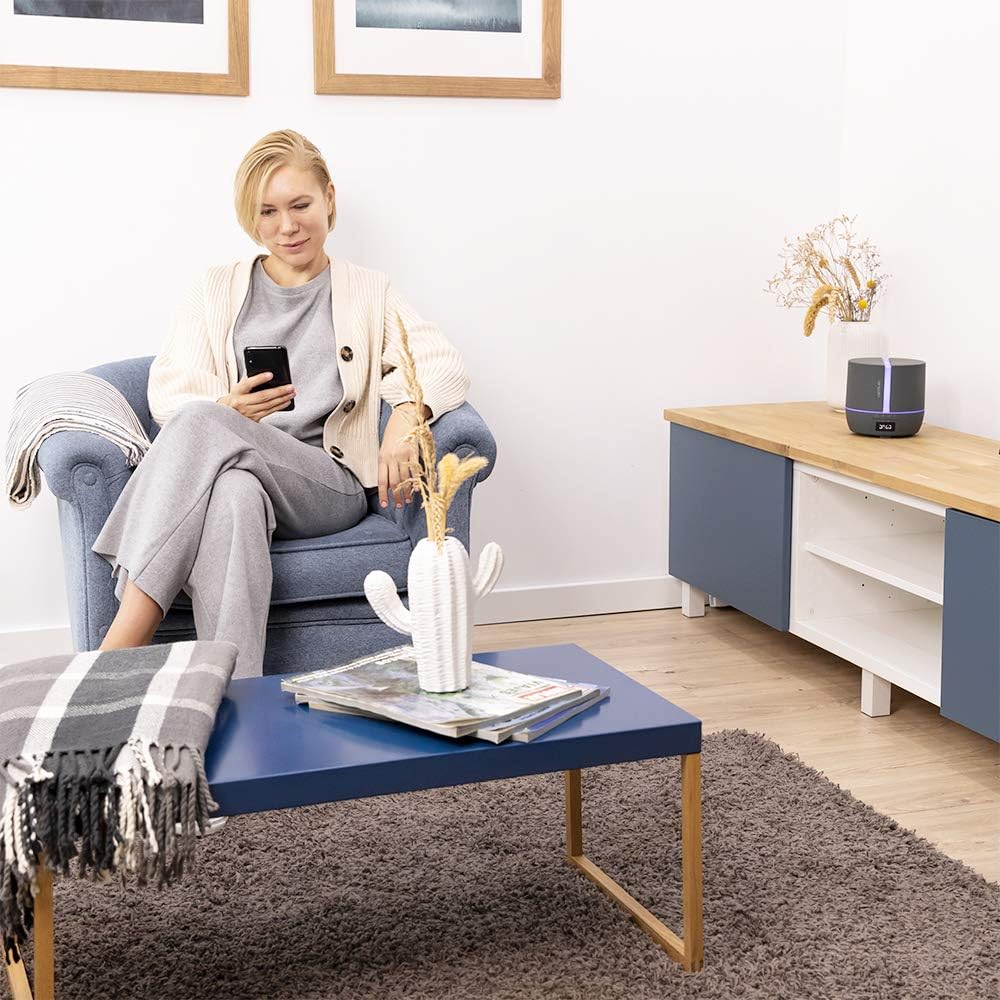
Enjoy relaxation and control your diffuser remotely via the smartphone app, managing aromatherapy and audio settings.
6. Maintenance
Regular cleaning ensures optimal performance and extends the lifespan of your diffuser.
- Daily Cleaning: After each use, empty any remaining water from the tank. Wipe the inside of the tank with a soft, damp cloth.
- Weekly Deep Clean:
- Unplug the diffuser.
- Remove the top cover and empty the water tank.
- Add a small amount of white vinegar (about 10 ml) to the water tank and let it sit for 10-15 minutes to dissolve mineral buildup.
- Gently wipe the ultrasonic plate with a cotton swab dipped in vinegar. Do not scrub or use abrasive materials.
- Rinse the tank thoroughly with clean water, ensuring no vinegar residue remains.
- Wipe the exterior with a soft, dry cloth.
- Storage: If not in use for an extended period, clean and dry the diffuser completely before storing it in a cool, dry place.
7. Troubleshooting
If you encounter issues with your diffuser, refer to the following common problems and solutions:
| Problem | Possible Cause | Solution |
|---|---|---|
| No mist or weak mist | Low water level; Ultrasonic plate dirty; Air inlet blocked; Too much water. | Add water; Clean ultrasonic plate; Clear air inlet; Do not exceed MAX line. |
| Device does not power on | Power adapter not connected; No power from outlet. | Check power connection; Test outlet with another device. |
| App cannot connect to diffuser | Bluetooth off; Diffuser not in pairing mode; App issue. | Ensure Bluetooth is on; Restart diffuser and app; Check app permissions. |
| Speaker audio quality is poor | Bluetooth interference; Device too far from phone; Low quality audio source. | Move phone closer; Reduce interference; Use high-quality audio. |
If the problem persists after trying these solutions, please contact customer support.
8. Specifications
| Feature | Detail |
|---|---|
| Brand | Cecotec |
| Model Name | 05646 |
| Color | Stone |
| Capacity | 500 Milliliters |
| Coverage Area | 30 Square meters |
| Power Source | Power adapter |
| Wattage | 15.6 watts |
| Run Time | 7 hours |
| Automatic Shut-off | Yes |
| Special Features | Diffuser, Timer, App Control, Bluetooth Speaker, LED Lighting |
| Light Source | LED |
| Material | Plastic |
| Item Dimensions (L x W x H) | 17.5L x 17.5W x 17H centimeters |
9. Warranty and Support
This Cecotec product comes with a standard manufacturer's warranty. For detailed warranty terms and conditions, please refer to the warranty card included with your product or visit the official Cecotec website.
For technical support, troubleshooting assistance, or spare parts, please contact Cecotec customer service. Contact information can typically be found on the product packaging, the official website, or by searching for 'Cecotec support' online.
Please have your model number (05646) and proof of purchase ready when contacting support.
