
1. Introduction and Overview
The Insta360 2-in-1 Invisible Selfie Stick + Tripod is a versatile accessory designed for Insta360 action cameras. It functions both as an extendable selfie stick and a stable tripod, offering flexibility for various shooting scenarios. Its unique design ensures it becomes completely invisible in 360-degree footage, enabling creative third-person perspectives and simulated drone shots.
2. Product Features
- Versatile 2-in-1 Design: Seamlessly switch between using it as an invisible selfie stick for dynamic shots or deploying the integrated tripod for stationary recording.
- Invisible in 360 Footage: Engineered to disappear from your 360-degree videos and photos, providing unobstructed views and immersive content.
- Durable Aluminum Alloy Construction: Crafted from high-quality aluminum alloy, ensuring durability and a lightweight feel for portability.
- Universal 1/4" Screw Mount: Features a standard 1/4" screw mount at the top, allowing secure attachment of a wide range of cameras and accessories.
- Integrated Tripod: The handle cleverly conceals foldable tripod legs, providing a stable base for hands-free shooting.
3. Package Contents
The package includes the Insta360 2-in-1 Invisible Selfie Stick + Tripod. Please ensure all components are present upon unboxing.

Figure 1: Insta360 2-in-1 Invisible Selfie Stick + Tripod (collapsed)
4. Setup Instructions
4.1 Attaching Your Camera
- Locate the 1/4" screw mount at the top of the selfie stick.
- Align your compatible Insta360 camera (or other camera with a 1/4" thread) with the screw mount.
- Gently rotate your camera clockwise onto the screw mount until it is securely fastened. Do not overtighten.
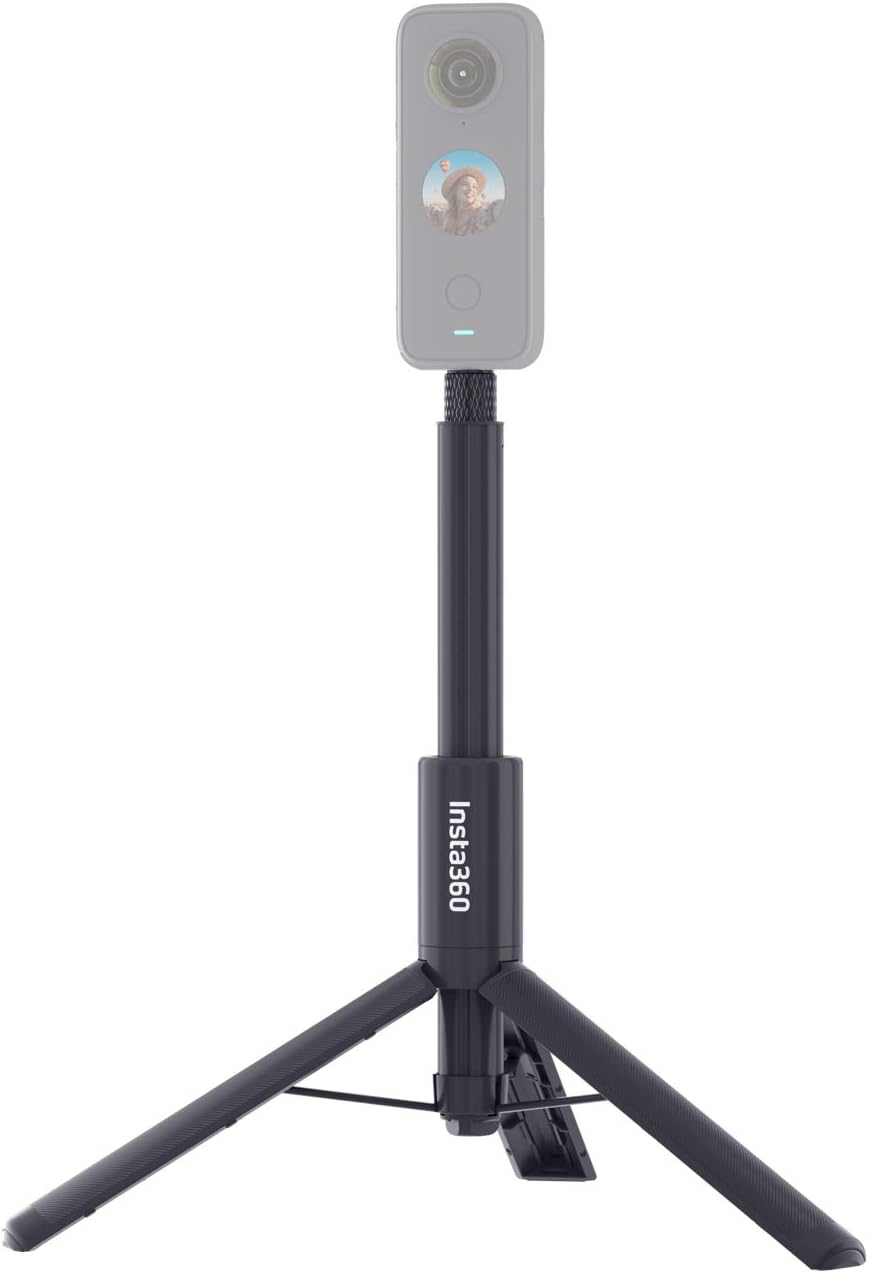
Figure 2: Securely attaching your camera to the 1/4" screw mount.
4.2 Extending the Selfie Stick
- Hold the base of the stick firmly.
- Pull the top section of the stick upwards to extend it to your desired length. The friction-based design will hold it in place.
- To retract, simply push the extended sections back into the base.

Figure 3: Selfie stick extended with camera attached.
4.3 Deploying the Tripod
- With the stick in its collapsed state, locate the button or release mechanism near the base.
- Press the button to release the integrated tripod legs.
- Gently pull the legs outwards until they fully extend and lock into a stable position.
- Place the tripod on a flat, stable surface.
- To fold the tripod, push the legs back towards the main body until they click into place.

Figure 4: Selfie stick with tripod legs deployed and camera attached.
5. Operating Instructions
5.1 Using as a Selfie Stick
Extend the stick to your desired length. For 360 cameras, ensure the stick is aligned with the camera's stitching line to achieve the invisible effect. Hold the stick firmly and capture your footage.
5.2 Using as a Tripod
Deploy the tripod legs and place it on a stable surface. This allows for hands-free recording, time-lapses, or stable shots without needing to hold the camera.
5.3 Invisible Effect for 360 Cameras
When used with compatible Insta360 cameras, the stick is designed to be automatically removed from 360-degree footage during post-processing, creating a seamless, floating camera perspective.
Video 1: Official Insta360 demonstration of the Invisible Selfie Stick for X5 / X4 / X3.
6. Compatibility
This 2-in-1 Invisible Selfie Stick + Tripod is compatible with the following Insta360 cameras:
- Insta360 ONE X2
- Insta360 X3
- Insta360 X4
- Insta360 X5
- Insta360 ONE R
- Insta360 ONE X
- Insta360 EVO
- Insta360 GO 2 (requires 3-Prong to 1/4" Adapter or Quick Release Mount, sold separately)
- Insta360 GO 3 (requires 3-Prong to 1/4" Adapter or Quick Release Mount, sold separately)
- Insta360 GO Ultra (requires 3-Prong to 1/4" Adapter or Quick Release Mount, sold separately)
- Insta360 GO 3S (requires 3-Prong to 1/4" Adapter or Quick Release Mount, sold separately)
- Insta360 Ace (requires 3-Prong to 1/4" Adapter or Quick Release Mount, sold separately)
- Insta360 Ace Pro (requires 3-Prong to 1/4" Adapter or Quick Release Mount, sold separately)
- Insta360 Ace Pro 2 (requires 3-Prong to 1/4" Adapter or Quick Release Mount, sold separately)
7. Maintenance
- Cleaning: Wipe the selfie stick and tripod with a soft, dry cloth after each use. If used in wet or dusty environments, ensure it is thoroughly cleaned and dried to prevent corrosion.
- Storage: Store the accessory in a cool, dry place away from direct sunlight and extreme temperatures. Keep it in its collapsed state to protect the extending sections and tripod legs.
- Inspection: Periodically check the 1/4" screw mount and tripod legs for any signs of wear or damage. Ensure all moving parts operate smoothly.
8. Troubleshooting
- Camera Not Secure: Ensure the 1/4" screw mount is fully tightened. If using an adapter, verify it is correctly installed and secure.
- Stick Not Extending/Retracting Smoothly: Check for any debris or obstructions in the extending sections. Clean the sections if necessary. Avoid forcing the mechanism.
- Tripod Legs Not Deploying/Folding: Ensure the release button is fully pressed. Check for any obstructions preventing the legs from moving freely.
- Selfie Stick Visible in 360 Footage: Verify that your Insta360 camera's settings are configured for invisible selfie stick mode and that the stick is aligned correctly with the camera's stitching line.
9. Specifications
- Product Dimensions: 9.45 x 1.57 x 1.57 inches (24.5 cm folded)
- Item Weight: 7.6 ounces (216 Grams)
- Material: Aluminum Alloy
- Color: Black
- Mounting: Standard 1/4" screw mount
10. Warranty and Support
For warranty information and customer support, please refer to the official Insta360 website or the documentation included with your product. Keep your proof of purchase for warranty claims.


