
1. Introduction
The RIBAO BC-40 is a compact and portable money counting machine designed for efficient and accurate banknote processing. It features a user-friendly interface with a 3.5-inch TFT touch panel and supports counting and counterfeit detection for multiple currencies including USD, EUR, CAD, and JPY. This manual provides detailed instructions for setting up, operating, maintaining, and troubleshooting your BC-40 machine.

Figure 1: RIBAO BC-40 Money Counting Machine overview.
2. Setup
2.1 Unpacking
Carefully remove the BC-40 machine from its packaging. Ensure all components are present:
- RIBAO BC-40 Money Counting Machine
- Power Cable
- User Manual (this document)
- Cleaning Brush (if included)
2.2 Power Connection
- Place the machine on a stable, flat surface.
- Connect the power cable to the power input port on the back of the machine.
- Plug the other end of the power cable into a suitable electrical outlet.
2.3 Initial Power On
Press the power button to turn on the machine. The 3.5-inch TFT touch panel will illuminate, displaying the initial setup screen or default counting mode.

Figure 2: User-friendly interface with durable silicone buttons.
3. Operating Modes
The BC-40 offers various operating modes to suit different counting needs. Navigate through these modes using the touch panel.
3.1 MIX Mode (Mixed Denomination Counting)
In MIX mode, the machine counts all denominations of a currency simultaneously. The total quantity and amount will be displayed. This mode is ideal for processing mixed batches of banknotes.
3.2 SDC Mode (Single Denomination Counting)
SDC mode is used for counting single denomination banknotes. If a different denomination is detected, the machine will stop and alert the user.
3.3 Auto Recognition Mode
This mode automatically recognizes the currency and denomination of the first banknote placed in the hopper and proceeds to count the rest accordingly.
3.4 Multi-Currency Mixed Counting
The BC-40 supports mixed counting for up to four currencies (USD, EUR, CAD, JPY). This feature allows for efficient processing of international transactions.
3.5 Piece Count Mode
This mode counts the number of banknotes without regard to their denomination, providing a simple piece count.
3.6 Batch Mode
Set a desired batch quantity, and the machine will stop counting once that number of banknotes has been processed. This is useful for preparing specific bundles of cash.
3.7 Accumulation Mode
In accumulation mode, the machine adds the current count to the previous count, allowing for continuous counting of large volumes of banknotes across multiple batches.

Figure 3: Display showing various counting modes and currency selection.
4. Counterfeit Detection
The BC-40 is equipped with multiple advanced detection methods to ensure reliable counterfeit identification, protecting your business from losses.
- UV (Ultraviolet) Detection: Checks for UV security features present in genuine banknotes.
- MG (Magnetic) Detection: Verifies the magnetic ink patterns on banknotes.
- IR (Infrared) Detection: Analyzes infrared security features, including IR reflection and IR transmission.
- CIS (Contact Image Sensor) Detection: Captures full-image scans of banknotes for detailed analysis of security threads, watermarks, and other features.
- RGB Light Source: Utilizes RGB light for comprehensive image analysis.
- Size Detection: Measures the length and width of banknotes to detect discrepancies.
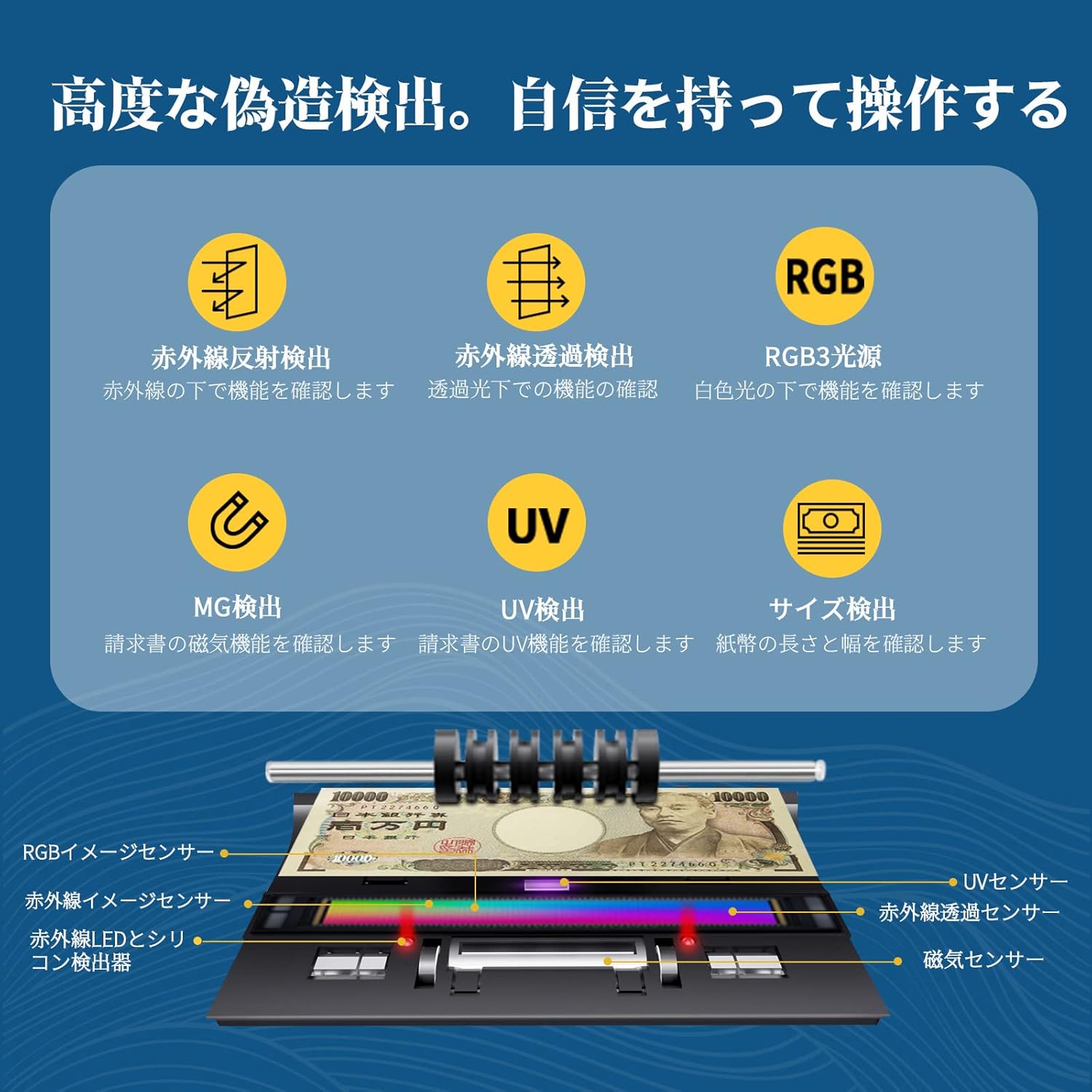
Figure 4: Illustration of the various counterfeit detection sensors within the machine.
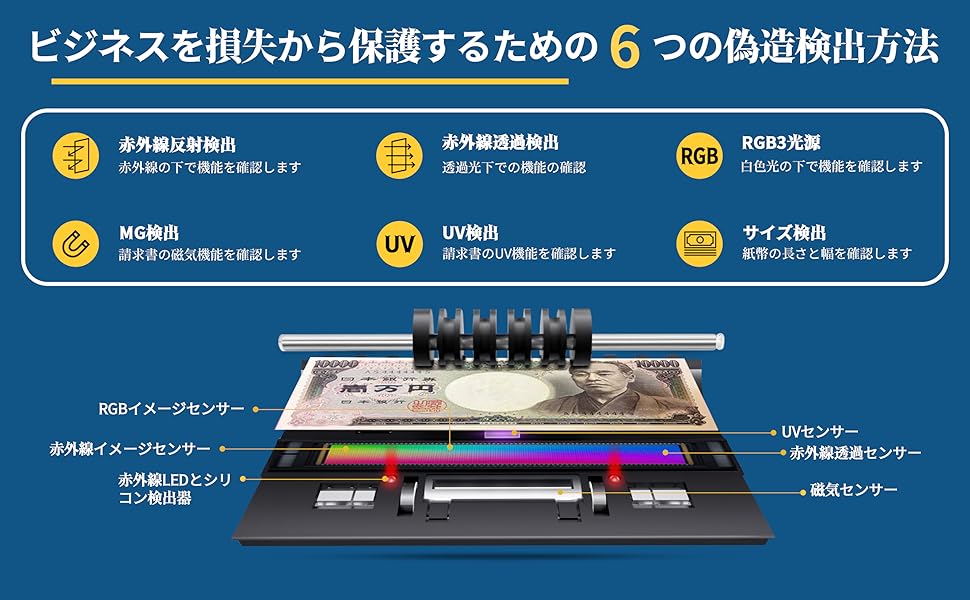
Figure 5: Core HD High Frequency Image Sensor for accurate detection.
5. Maintenance
Regular cleaning and maintenance are crucial for ensuring the longevity and optimal performance of your BC-40 machine. The machine features an accessible pathway from the back for easy cleaning.
5.1 Daily Cleaning
- Turn off and unplug the machine before cleaning.
- Open the back cover of the machine to access the internal sensors and rollers.
- Use a soft brush or a lint-free cloth to gently remove any dust, paper fibers, or debris from the sensors, rollers, and banknote pathways.
- Ensure no foreign objects are lodged within the machine.
- Close the back cover securely.
5.2 Software Updates
The BC-40 supports free software upgrades via USB flash drive. This ensures compatibility with new banknote designs and improved detection algorithms. When a new version is released, download the update file to a USB stick and follow the on-screen instructions on the machine to perform the upgrade.

Figure 6: Easy access for cleaning and maintenance from the back.
6. Troubleshooting
This section addresses common issues you might encounter with your BC-40 machine.
| Problem | Possible Cause | Solution |
|---|---|---|
| Machine does not power on. | Power cable not connected properly; power outlet issue. | Check power cable connection. Try a different power outlet. |
| Banknotes jam frequently. | Worn or damaged banknotes; dirty rollers/sensors; improper banknote placement. | Ensure banknotes are flat and not excessively worn. Clean rollers and sensors (refer to Maintenance section). Place banknotes neatly in the hopper. |
| Inaccurate counting results. | Dirty sensors; mixed denominations in single-denomination mode; software outdated. | Clean all sensors. Ensure correct operating mode is selected. Perform a software update if available. |
| Counterfeit detection errors. | Dirty sensors; software outdated; banknote quality. | Clean all detection sensors. Update software. Ensure banknotes are not excessively damaged or folded. |
| Display is unresponsive or frozen. | Temporary software glitch. | Turn off the machine, wait 10 seconds, then turn it back on. If the issue persists, contact customer support. |
If you encounter issues not listed here or if the suggested solutions do not resolve the problem, please contact RIBAO TECHNOLOGY customer support.
7. Specifications
- Brand: RIBAO TECHNOLOGY
- Model: BC-40
- Dimensions: 36.7 x 31 x 30.8 cm
- Weight: 7.64 kg
- Display: 3.5-inch TFT Touch Panel
- Supported Currencies: USD, EUR, CAD, JPY (and others via software update)
- Detection Methods: UV, MG, IR, CIS, RGB, Size
- Counting Modes: MIX, SDC, Auto Recognition, Multi-Currency Mixed, Piece Count, Batch, Accumulation
- Connectivity: USB (for software updates)
8. Warranty and Support
8.1 Product Warranty
The RIBAO BC-40 comes with a 2-year quality guarantee from the date of purchase. This warranty covers defects in materials and workmanship under normal use. Please retain your proof of purchase for warranty claims.
8.2 Customer Support
For any questions, technical assistance, or warranty inquiries, please contact RIBAO TECHNOLOGY customer support. Our team is dedicated to providing prompt and helpful service.
You can also visit the official RIBAO TECHNOLOGY store on Amazon for more information and resources: RIBAO TECHNOLOGY Store

Figure 7: RIBAO TECHNOLOGY Company Logo.
