
Ataller KS-4099CAN
Ataller Food Scale with Nutritional Calculator Instruction Manual
Brand: Ataller | Model: KS-4099CAN
Introduction
The Ataller Food Scale with Nutritional Calculator is designed to provide precise weight measurements and detailed nutritional information for your food items. Ideal for meal preparation, baking, and tracking dietary intake, this scale combines accuracy with advanced features to support your health and culinary goals.
- Accurate Measurement Weighing: Equipped with 4 sensitive sensors for precise measurements from 3g to 5000g in 1g increments.
- Comprehensive Nutritional Calculator: Features an integrated database to calculate calories, macronutrients (proteins, fats, carbohydrates), and micronutrients.
- Intuitive Digital Display: A backlit LCD screen provides clear and organized nutritional information and weight readings.
- Multi-Functional Design: Offers 5 different units of measurement (g, ml, oz, lb:oz, fl.oz) and a tare function for convenience.
- Multi-Purpose Functionality: Perfect for portion control, precise baking, and tracking daily calorie intake for weight management.

Figure 1: Ataller Food Scale with Nutritional Calculator, showing a bowl of yogurt and berries on the weighing surface, with the digital display showing weight and nutritional data.
Setup
Before first use, ensure the batteries are correctly installed and the scale is placed on a flat, stable surface.
Battery Installation
The scale requires two AAA batteries (included). Locate the battery compartment on the underside of the scale, open it, insert the batteries according to the polarity indicators, and close the compartment securely.
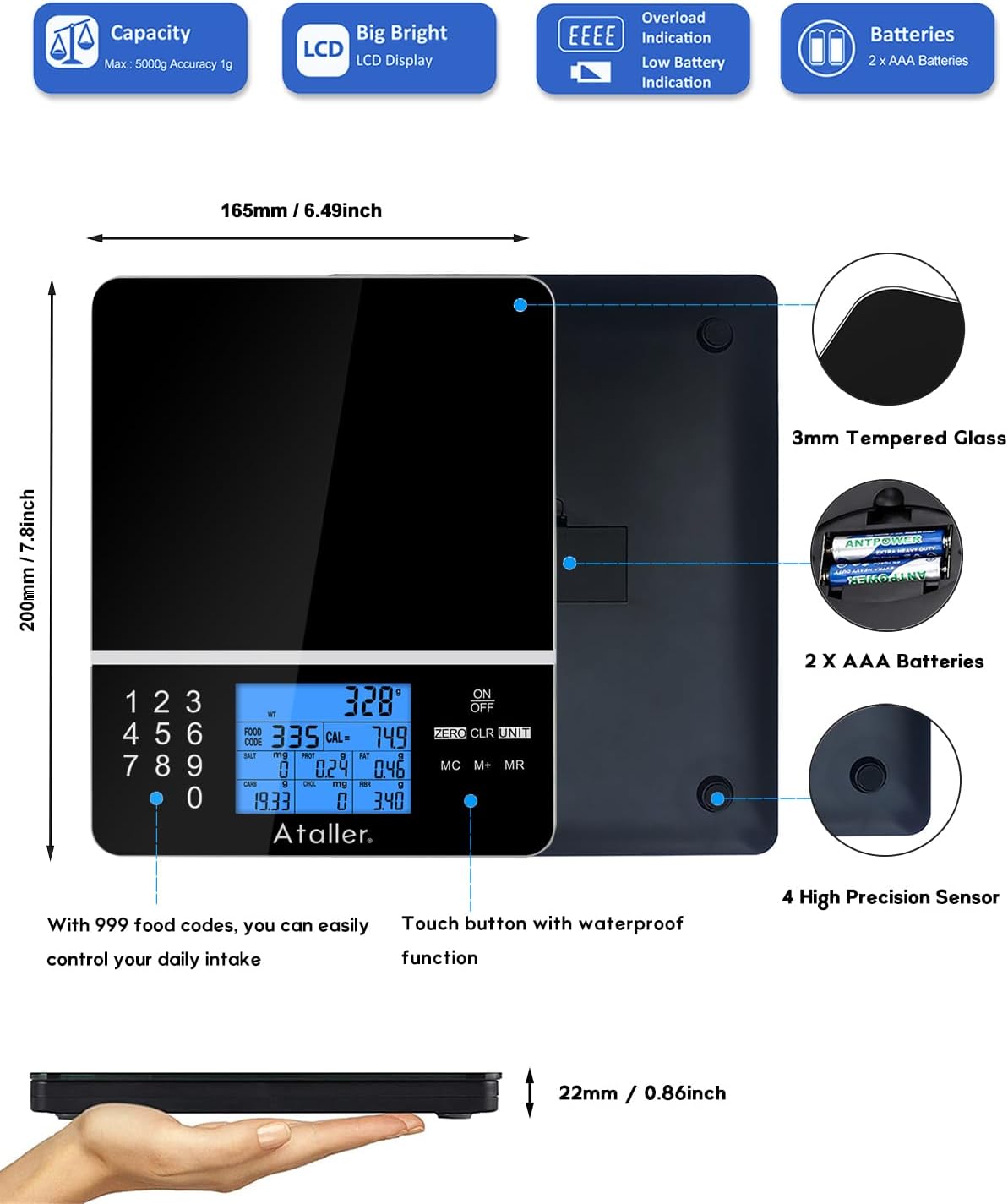
Figure 2: Underside of the Ataller Food Scale, highlighting the battery compartment for two AAA batteries and the four high-precision sensors.
Initial Power On and Zeroing
- Press the 'ON/OFF' button to turn on the scale. The display will light up and show '0.0' when ready.
- If using a container (e.g., a bowl) for weighing, place the empty container on the scale before adding ingredients.
- Press the 'ZERO' or 'TARE' button to reset the display to '0.0'. This will subtract the weight of the container, allowing you to measure only the ingredients.

Figure 3: The Ataller Food Scale with a clear bowl, demonstrating the tare function by showing a zero reading on the display.
Video 1: Official Ataller product video demonstrating the scale's tare function, unit changes, and nutritional data input for various food items.
Operating Instructions
Changing Units
The scale supports 5 different units of measurement. To switch between units (g, ml, oz, lb:oz, fl.oz), press the 'UNIT' button repeatedly until your desired unit is displayed.

Figure 4: The Ataller Food Scale showcasing its ability to display measurements in grams, pounds:ounces, ounces, milliliters, and fluid ounces.
Nutritional Calculator and Food Codes
The scale features a built-in nutritional database with 999 food codes. To access nutritional data:
- Find the food code for your item in the provided instruction manual or by scanning the QR code on the scale to access an online food catalog.
- Place the food item on the scale.
- Enter the corresponding food code using the numerical keypad. The LCD will then display 7 kinds of nutritional data: Calories, Sodium, Protein, Fat, Carbohydrate, Cholesterol, and Fiber.
- Press 'CLR' to clear the currently entered food code.

Figure 5: The Ataller Food Scale's display showing comprehensive nutritional data for a weighed item, including calories, protein, fat, and carbohydrates.

Figure 6: Instructions on how to find food codes for the Ataller Food Scale, either through the provided manual or by scanning a QR code with a smartphone.
Saving and Clearing Data
The scale allows you to save and manage nutritional data for multiple items.
- Save Data: Press 'M+' to save the current nutritional data. The LCD will display 'M01' (or subsequent numbers) to indicate that the data has been stored. A maximum of 99 nutritional data entries can be stored.
- View Stored Data: Press 'MR' to view the stored data.
- Clear All Data: Double-click the 'MC' key to clear all stored data.
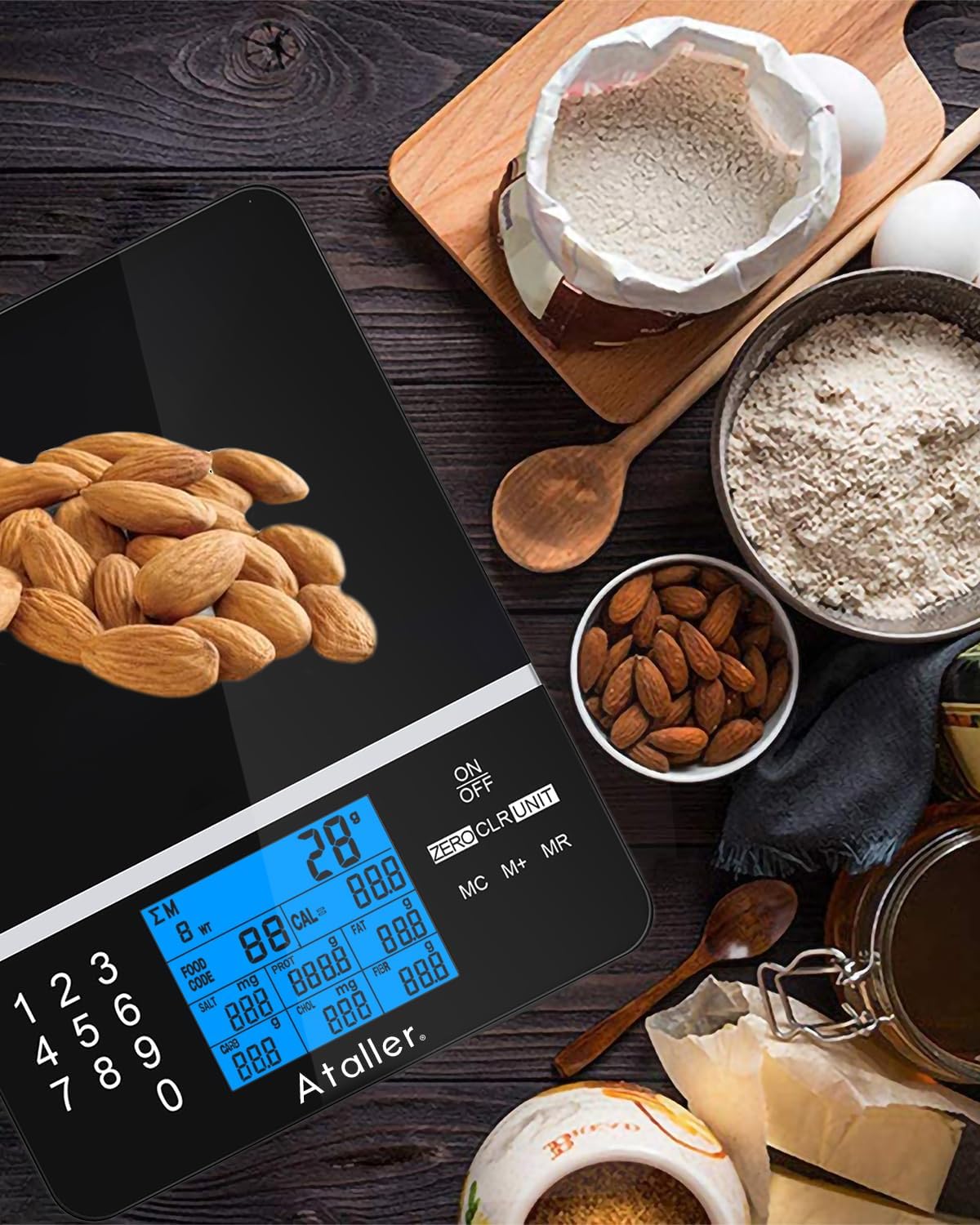
Figure 7: The Ataller Food Scale demonstrating how to save nutritional data using the 'M+' button and clear all data by double-clicking 'MC'.
Maintenance
Proper care and maintenance will ensure the longevity and accuracy of your Ataller Food Scale.
Cleaning
The scale features a 3mm tempered glass surface, making it easy to clean. Wipe the surface with a damp cloth and mild detergent if necessary. Avoid abrasive cleaners or immersing the scale in water, as it is not waterproof.

Figure 8: The tempered glass surface of the Ataller Food Scale being wiped clean, highlighting its waterproof and easy-to-maintain design.
Specifications
| Feature | Detail |
|---|---|
| Brand | Ataller |
| Model Number | KS-4099CAN |
| Color | Black |
| Weight Limit | 11 Pounds (5kg) |
| Readout Accuracy | 1g-grams / 0.1oz |
| Display Type | LED (Backlit) |
| Material | Tempered Glass |
| Power Source | 2 AAA batteries (included) |
| Product Dimensions | 7.87 x 6.3 x 0.71 inches |
Troubleshooting
For detailed troubleshooting steps and solutions to common issues, please refer to the complete user manual (PDF) provided with your product. Ensure batteries are correctly installed and replaced when low. Keep the scale on a flat, stable surface to ensure accurate readings.
Warranty & Support
The Ataller Food Scale comes with a 2-year EU spare part availability duration. For any support inquiries, warranty claims, or to access the full user manual, please visit the official Ataller store on Amazon or refer to the contact information provided in your product packaging.
Visit the Ataller Store for more information and products.
Related Documents - KS-4099CAN
 |
Ataller Diet Kitchen Scale KS-4099 User Manual User manual for the Ataller Diet Kitchen Scale, model KS-4099. This guide provides instructions on setup, operation, features, and maintenance for the digital kitchen scale. |
 |
Ataller KS-2099 Smart Kitchen Scale User Manual Official user manual for the Ataller KS-2099 Smart Kitchen Scale. Learn how to use features, convert units, perform weighing operations, troubleshoot common issues, connect via Bluetooth, and understand warranty information. Includes detailed setup and usage guides. |
 |
Ataller KS-5000 Multi-function Electronic Coffee Scale User Manual Comprehensive user manual for the Ataller KS-5000 multi-function electronic coffee scale. Learn about specifications, operation, features, and troubleshooting for precise coffee brewing and kitchen use. |
 |
Ataller Smart Kitchen Scale User Manual Comprehensive user manual for the Ataller Smart Kitchen Scale (Model KS-2099), detailing features, operation, unit conversion, troubleshooting, Bluetooth connectivity, warranty, and customer support. |
 |
Ataller KS-2099 Smart Kitchen Scale User Manual Comprehensive user manual for the Ataller KS-2099 Smart Kitchen Scale, detailing features, operations, troubleshooting, and warranty information. Learn how to connect the scale to your smartphone via Bluetooth and use the Smart Apple app for nutrition tracking. |
 |
Ataller CK-2150 Coffee Scale User Manual This user manual provides detailed instructions for operating the Ataller CK-2150 Coffee Scale, including specifications, charging, unit conversion, timer functions, weighing procedures, and important cautions. |
Ask a question about this manual
Ask about setup, troubleshooting, compatibility, parts, safety, or missing instructions. Manuals+ will review the question and use this page’s manual context to help answer it.