
Introduction
The PROHEAR 037 Bluetooth 5.3 Hearing Protection Headphones are designed to provide superior hearing protection while allowing seamless audio streaming and communication. Featuring a 30dB SNR (Single Number Rating) for effective noise reduction, these ear muffs are ideal for environments such as mowing, workshops, and snowblowing. Equipped with a rechargeable 1500mAh battery, they offer extended playtime and convenience.
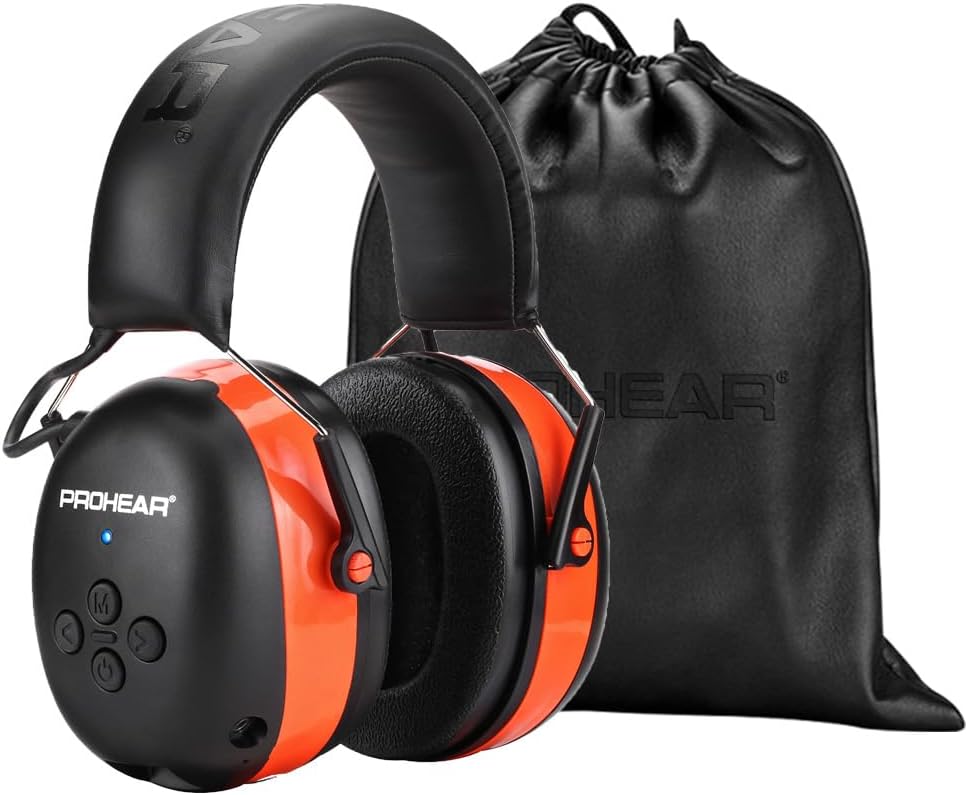
Figure 1: PROHEAR 037 Headphones with included carrying bag.
Key Features
- Extremely Smooth Bluetooth 5.3 Technology: Offers a smoother, faster, and more stable connection with a wireless range of up to 80ft.
- Both Entertainment and Hearing Protection: Provides 30dB SNR noise reduction and stereo sound quality for an immersive audio experience.
- Long Battery Life: Built-in 1500mAh lithium battery provides up to 120 hours of playtime.
- Work Safely and Comfortably: Ideal for building, lawn mowing, woodworking, and landscaping. Features a comfortable headband and soft breathable ear pads for prolonged wear.
- Easy-to-Use Controls: Raised buttons allow for easy volume adjustment, song switching, and call management without removing the muffs.

Figure 2: Comparison of PROHEAR 037 features against competitors.

Figure 3: Battery life and charging details for the PROHEAR 037.
Setup Guide
Charging the Headphones
Before first use, fully charge your PROHEAR 037 headphones. Use the provided charging cable to connect the headphones to a USB power source. The built-in 1500mAh lithium battery allows for faster charging and long service time.

Figure 4: Charging port and battery indicators.
Bluetooth Pairing
- Ensure the headphones are charged.
- Press and hold the Power Button (U) on the ear muff until the LED indicator flashes blue, indicating pairing mode.
- On your mobile device, enable Bluetooth and search for available devices.
- Select "PROHEAR 037" from the list to connect. The LED indicator will turn solid blue once successfully paired.

Figure 5: Bluetooth Quickstart Guide and button layout.
Operating Instructions
Button Controls
The PROHEAR 037 features intelligent, raised buttons for easy control, even when wearing work gloves. Refer to Figure 5 for the exact location of each button.
- Power Button (U): Press and hold to power on/off.
- Volume Up (>): Increase volume.
- Volume Down (<): Decrease volume.
- Multi-function Button (M): Play/Pause music (single press), Answer/End calls (single press), Decline call (long press for 2s), Redial last call (double press).
- Next Track (>>): Double press.
- Previous Track (<<): Triple press.

Figure 6: Large, easy-to-use control buttons.
Dual Mode Operation
In addition to Bluetooth wireless connectivity, the PROHEAR 037 supports a wired mode via a 3.5mm audio connector. This allows you to continue listening to audio even if the battery is depleted, ensuring uninterrupted use in any scenario.

Figure 7: Dual mode functionality.
Official Product Video
Video 1: PROHEAR 037 Bluetooth 5.0 Hearing Protection for Mowing. This video demonstrates the headphones' use during mowing, highlighting their noise protection and Bluetooth capabilities.
Maintenance
Cleaning and Care
To ensure the longevity and performance of your PROHEAR 037 headphones, regularly wipe them with a soft, damp cloth. Avoid using harsh chemicals or abrasive materials. Store them in the provided black leather bag to prevent dust accumulation and damage.
Ear Pad Replacement
The PROHEAR 037 features a "snap-in design" for its ear pads, allowing for easy maintenance and replacement. If ear pads become worn or damaged, they can be easily removed and new ones snapped into place.

Figure 8: Snap-in ear pad design for easy replacement.
Troubleshooting
Common Issues
- No Power: Ensure the headphones are fully charged. Connect to a power source and check the LED indicator.
- No Sound: Check the volume level on both the headphones and your connected device. Ensure the headphones are properly paired via Bluetooth or the 3.5mm audio cable is securely connected.
- Pairing Issues: Make sure the headphones are in pairing mode (flashing blue LED). Turn off and on Bluetooth on your device, then try pairing again. Ensure no other devices are actively connected to the headphones.
- Poor Sound Quality: Check the distance between the headphones and your device (wireless range is 80ft). Ensure there are no obstructions causing interference.
Specifications
| Feature | Detail |
|---|---|
| Manufacturer | PROHEAR |
| Part Number | PROHERA |
| Item Weight | 11.5 ounces |
| Package Dimensions | 8.15 x 6.26 x 4.21 inches |
| Country of Origin | China |
| Item model number | PROHEAR 037-ORANGE |
| Batteries | 1 Lithium Ion batteries required. (included) |
| Size | Small |
| Color | 037orange |
| Style | 037orange-bluetooth |
| Material | ABS plastic |
| Pattern | Solid |
| Item Package Quantity | 1 |
| Batteries Included? | Yes |
| Batteries Required? | Yes |
| Battery Cell Type | Lithium Ion |
| ASIN | B08R1SQGDG |
| Customer Reviews | 4.3 out of 5 stars (6,806 ratings) |
| Best Sellers Rank | #1,062 in Tools & Home Improvement, #12 in Safety Earmuffs |
| Date First Available | December 19, 2020 |
Safety and Certifications
The PROHEAR 037 headphones are designed with user safety in mind and comply with various international standards for noise reduction and product safety.

Figure 9: Overview of International Standard Certifications.
- SNR 30dB: High noise reduction level to protect hearing against loud noise.
- ROHS Compliant: Materials are safe and harmless, ensuring long-term wear without irritation.
- FCC Certification: Low radiation, safer use.
- Battery Safety: Features overcharge protection for ultra-long battery life without overheating risk.
- International Standards: Passed multiple noise reduction certifications including European EN 352-1, American ANSI S3.19, and Australia AS/NZS 1270.

Figure 10: Global Noise Reduction Certifications.
Warranty and Support
PROHEAR offers a 3-year exclusive warranty for the 037 headphones, ensuring peace of mind with your purchase. For detailed information on warranty claims or product support, please refer to the official user manual.
An electronic version of the user manual is available for download:
