
1. Product Overview
The Speck Presidio2 Grip Case is engineered to provide superior protection and enhanced usability for your Samsung Galaxy S21 Ultra 5G. This case combines advanced impact technology with a comfortable, secure grip, ensuring your device remains safe and functional in daily use.
Key features include:
- 13-foot Drop Protection: Designed to withstand significant drops, protecting your device from accidental damage.
- Presidio2 Armor Cloud Technology: Innovative air capsules line the perimeter, compressing on impact to cushion and protect your phone like an airbag.
- Enhanced No-Slip Grips: Newly innovated grips provide a secure hold, reducing the chance of drops.
- Soft-Touch Finish: Offers a comfortable feel and added scratch resistance.
- Microban® Antimicrobial Protection: Built-in treatment reduces stain and odor-causing bacteria on the case surface by 99%.
- Raised Bezel: Protects your screen from direct impact and scratches when placed face-down.
- Responsive Buttons: Ensures smooth and precise clicks for volume and power control.

Image 1.1: Angled view of the Speck Presidio2 Grip Case installed on a Samsung Galaxy S21 Ultra 5G, highlighting its textured grip and camera cutout.
2. Setup and Installation
Follow these steps to properly install your Speck Presidio2 Grip Case onto your Samsung Galaxy S21 Ultra 5G.
- Prepare Your Device: Ensure your Samsung Galaxy S21 Ultra 5G is clean and free of dust or debris. It is recommended to clean the phone's surface with a soft, dry cloth before installation.
- Align the Case: Hold the case with the back facing up. Carefully align the phone with the case, starting with the top edge where the camera module is located.
- Insert the Phone: Gently push the phone into the case, ensuring all corners and edges snap securely into place. Apply even pressure around the perimeter of the phone until it is fully seated within the case.
- Check Fit: Verify that all buttons (power, volume) are accessible and functional, and that the charging port and speakers are unobstructed. The case should fit snugly around the device without any gaps.
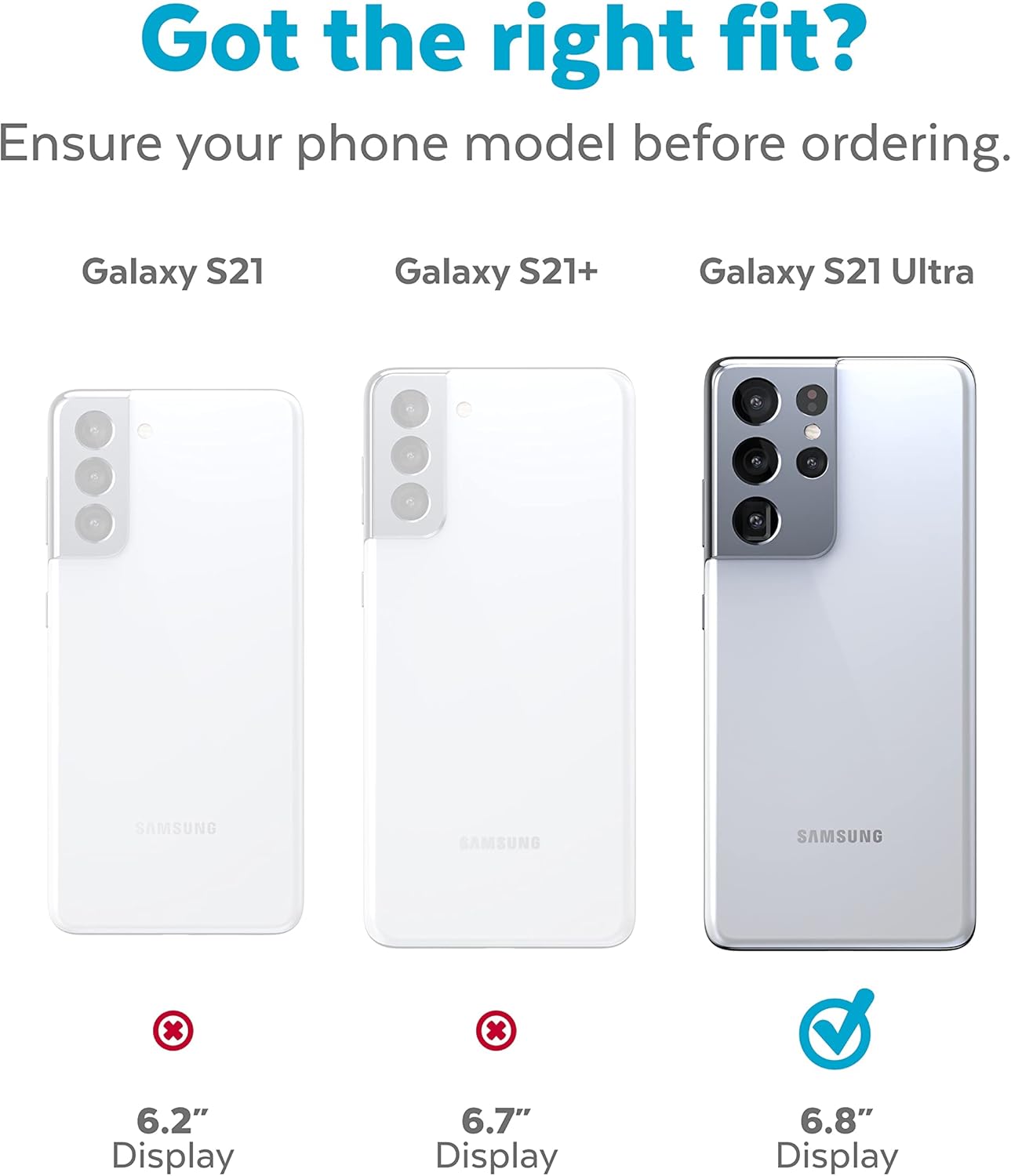
Image 2.1: Visual guide confirming compatibility with the Samsung Galaxy S21 Ultra (6.8" Display). Ensure your phone model matches for proper fit.

Image 2.2: The case provides a raised bezel around the screen for enhanced protection against drops and scratches.
3. Operating and Usage
The Presidio2 Grip Case is designed to enhance your phone's usability while providing robust protection.
- Secure Grip: The textured ridges on the back and sides of the case are engineered to provide a firm, non-slip grip, reducing the likelihood of accidental drops during texting, calling, or photography.
- Button Responsiveness: The case features precisely engineered button covers that maintain the tactile feedback and responsiveness of your phone's native buttons. Press the power and volume buttons as you normally would.
- Port Accessibility: All ports (charging, speakers) and microphone cutouts are precisely aligned for easy access and unhindered functionality.
- Wireless Charging Compatibility: The case is designed to be compatible with most wireless charging pads, allowing you to charge your device without removing the case.

Image 3.1: Side view illustrating the precise button covers that ensure responsive feedback.

Image 3.2: Bottom view of the case, showing precise cutouts for the charging port and speakers.
4. Maintenance and Care
To ensure the longevity and effectiveness of your Speck Presidio2 Grip Case, follow these simple maintenance guidelines:
- Cleaning: Regularly wipe the case with a soft, damp cloth. For deeper cleaning, use a mild soap solution and then wipe dry. Avoid harsh chemicals, abrasive cleaners, or solvents, as these can damage the case's finish and antimicrobial treatment.
- Antimicrobial Protection: The built-in Microban® treatment works continuously to reduce bacteria. However, regular cleaning is still recommended to maintain hygiene.
- Avoid Extreme Conditions: Do not expose the case to extreme temperatures or direct prolonged sunlight, as this may affect its material integrity and color over time.
- Inspection: Periodically inspect the case for any signs of wear or damage. While highly durable, severe impacts can compromise its protective capabilities.
5. Troubleshooting
If you encounter any issues with your Speck Presidio2 Grip Case, consider the following common solutions:
- Case Not Fitting Properly:
Solution: Ensure you have the correct model of phone (Samsung Galaxy S21 Ultra 5G). Refer to Image 2.1 in the Setup section. Remove the phone and re-install, ensuring all corners snap into place firmly. Check for any foreign objects between the phone and the case.
- Buttons Not Responsive:
Solution: Remove the case and check if the phone's native buttons are functioning correctly. Re-install the case, ensuring it is perfectly aligned. Sometimes a slight misalignment can affect button responsiveness.
- Wireless Charging Issues:
Solution: Ensure your wireless charger is compatible with your phone and is functioning correctly without the case. Try repositioning the phone on the charging pad. Very thick third-party screen protectors or accessories might interfere with wireless charging, though this is rare with the case itself.
6. Specifications
| Feature | Detail |
|---|---|
| Product Dimensions | 9 x 4.75 x 0.75 inches |
| Item Weight | 2.89 ounces |
| Model Number | 139904-9133 |
| Compatible Phone Models | Samsung Galaxy S21 Ultra 5G |
| Color | Graphite Grey/Black/Bold |
| Material | Polycarbonate |
| Drop Protection | Up to 13 feet |
| Antimicrobial Treatment | Microban® (99% reduction in stain and odor-causing bacteria) |
7. Warranty and Support
Speck products are designed for durability and performance. For information regarding product warranty, returns, or technical support, please visit the official Speck website or contact their customer service directly.
You can find more information and contact details on the Speck Brand Store on Amazon or their official company website.


