
Introduction
Thank you for choosing the ELIVED EV024 Monitor and Laptop Arm Desk Mount. This product is designed to enhance your workspace ergonomics and organization by securely holding your monitor and laptop above your desk surface. Please read this manual thoroughly before installation and use to ensure proper setup and safe operation.
Package Contents
The package includes all necessary hardware and components for assembly. Please verify all parts are present before beginning installation. A detailed list of components can be found in the included assembly guide.
Compatibility
- Monitors: Fits most flat and curved LCD/LED monitors from 13 to 27 inches.
- VESA Compatibility: Supports VESA mounting patterns of 75x75mm and 100x100mm.
- Laptops: Compatible with laptops up to 15.6 inches.
- Weight Capacity: Each arm supports a maximum weight of 8 kg (17.6 lbs).

Image: Overview of the ELIVED EV024 Monitor and Laptop Arm components, including the desk clamp, pole, articulating arms, VESA plate, and laptop tray.
Setup and Installation
Follow these instructions carefully to install your monitor and laptop arm.
Mounting Options
The ELIVED EV024 offers two methods for securing the mount to your desk:
- C-Clamp Mount: Suitable for desk thicknesses between 10-50 mm. This method clamps the mount to the edge of your desk.
- Grommet Mount: Suitable for desk thicknesses between 10-50 mm and existing desk holes with a diameter of 10-60 mm. This method secures the mount through a hole in your desk.

Image: Illustration showing the C-clamp and grommet mounting options for securing the desk mount.
Assembly Steps
- Secure the Pole: Choose either the C-clamp or grommet mount. Attach the pole to your desk according to the chosen method, ensuring it is stable and tight.
- Attach Arms to Pole: Slide the articulating arms onto the pole and secure them at your desired height using the provided clamps.
- Attach VESA Plate to Monitor: Remove the VESA plate from the monitor arm. Attach it to the back of your monitor using the appropriate screws. Ensure the screws are tightened securely.
- Mount Monitor to Arm: Slide the monitor (with attached VESA plate) onto the monitor arm. Ensure it clicks into place or is secured with the locking mechanism.
- Attach Laptop Tray to Arm: Attach the laptop tray to the second articulating arm. The tray features ventilation holes and anti-slip lips to secure your laptop. Velcro straps are also provided for additional security.
- Cable Management: Utilize the integrated cable clips along the arms to route and organize your cables, maintaining a tidy workspace.
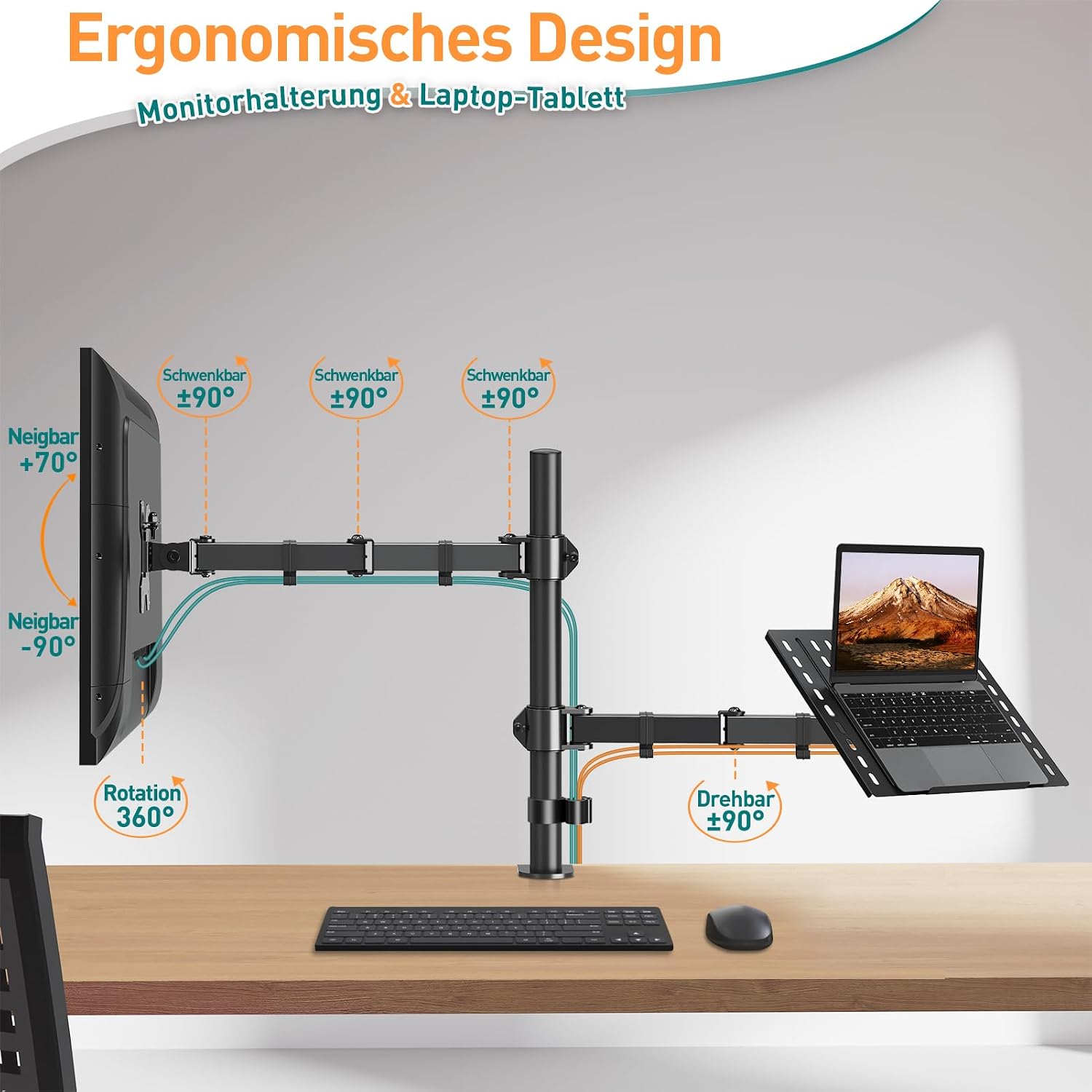
Image: Diagram illustrating the easy installation process, highlighting the removable VESA plate for convenient monitor attachment.
Operation and Adjustments
The ELIVED EV024 is designed for flexible positioning to achieve an ergonomic setup.
Ergonomic Adjustments
- Height Adjustment: The entire arm assembly can be adjusted vertically along the pole, offering up to 403 mm of height adjustment to align your screen at eye level.
- Monitor Tilt: The monitor can be tilted from +90° to -90° to reduce glare and optimize viewing angles.
- Monitor Swivel: The monitor arm can swivel ±90° at the pole connection and the VESA plate connection, allowing for easy screen sharing.
- Monitor Rotation: The monitor can rotate 360° for landscape or portrait orientation.
- Arm Extension: Each arm can extend horizontally up to 380mm, providing flexibility in screen placement.

Image: Visual representation of the ergonomic adjustments, including tilt, swivel, rotation, and height for both the monitor and laptop tray.
Laptop Tray Usage
The laptop tray is designed to hold your laptop securely while promoting airflow.
- Ventilation: The tray features multiple ventilation holes to prevent your laptop from overheating.
- Security: Use the integrated anti-slip lips and the provided Velcro straps to ensure your laptop remains stable on the tray, even when tilted.

Image: Comparison showing the difference in posture with and without the monitor and laptop arm, highlighting ergonomic benefits.
Maintenance
Regular maintenance ensures the longevity and safe operation of your ELIVED EV024 mount.
- Cleaning: Wipe the mount with a soft, damp cloth. Avoid abrasive cleaners or solvents that could damage the finish.
- Periodic Checks: Periodically check all screws and connections to ensure they remain tight. Re-tighten if necessary to maintain stability.
- Cable Management: Ensure cables are neatly routed and not pinched or stressed, which could lead to damage.

Image: Depiction of a stable and organized workspace, showcasing the robust steel tube clamp and effective cable management features of the mount.
Troubleshooting
If you encounter issues with your ELIVED EV024 mount, refer to the following table for common problems and solutions.
| Problem | Possible Cause | Solution |
|---|---|---|
| Monitor/Laptop is unstable or sags. | Screws are loose; weight exceeds capacity; arm tension needs adjustment. | Ensure all mounting screws and arm connections are tightened. Verify monitor/laptop weight is within the 8 kg (17.6 lbs) per arm limit. Adjust the tension screws on the articulating arms as per the assembly guide. |
| Difficulty adjusting arm movement. | Arm tension is too tight or too loose. | Use the provided Allen key to adjust the tension screws on the arm joints. Turn clockwise to increase tension (for heavier devices) or counter-clockwise to decrease tension (for lighter devices). |
| Laptop slides off the tray. | Laptop not properly secured; tray tilted too steeply. | Ensure the anti-slip lips are correctly positioned and use the provided Velcro straps to secure the laptop. Adjust the tray's tilt angle to a less steep position if necessary. |
| Mount does not fit desk. | Desk thickness or grommet hole size is incompatible. | Verify your desk thickness (10-50 mm) and grommet hole diameter (10-60 mm) against the product specifications. If incompatible, consider an alternative mounting solution. |
Specifications
| Feature | Detail |
|---|---|
| Brand | ELIVED |
| Model Number | EV024-DE |
| Material | Metal |
| Color | Black |
| Monitor Size Compatibility | 13 - 27 inches |
| Laptop Size Compatibility | Up to 15.6 inches |
| VESA Compatibility | 75x75mm, 100x100mm |
| Weight Capacity (per arm) | 8 kg (17.6 lbs) |
| Movement Type | Articulating |
| Max Tilt Angle | ±90 degrees |
| Swivel Angle | ±90 degrees |
| Rotation | 360 degrees |
| Height Adjustment | Up to 403 mm |
| Desk Thickness (C-clamp) | 10-50 mm |
| Desk Thickness (Grommet) | 10-50 mm |
| Grommet Hole Diameter | 10-60 mm |
| Item Weight | 4.12 Kilograms |

Image: Detailed diagram showing the product dimensions and maximum height adjustment capabilities.
Warranty and Support
ELIVED is committed to providing high-quality products and customer satisfaction. While specific warranty details are not provided in this manual, we offer dedicated customer support.
If you have any questions regarding the product, installation, or require assistance, please do not hesitate to contact our friendly customer service team. Refer to your purchase documentation or the ELIVED official website for contact information.
