
CANDY CDCP 6S
Candy CDCP 6S Compact Dishwasher User Manual
Model: CDCP 6S | Brand: CANDY
1. Introduction
This user manual provides essential information for the safe and efficient operation, installation, and maintenance of your Candy CDCP 6S compact dishwasher. Please read this manual thoroughly before using the appliance and keep it for future reference.

Image 1.1: Front view of the Candy CDCP 6S Compact Dishwasher.
The Candy CDCP 6S is a compact dishwasher designed for small spaces or occasional use, such as in apartments or secondary residences. It offers a capacity for 6 place settings and features 6 different washing programs to suit various needs. Key features include a delayed start option, indicators for salt and rinse aid levels, an anti-overflow system, and foldable grids for flexible loading.
2. Safety Instructions
Always adhere to the following safety precautions to prevent damage to the appliance or injury to yourself and others.
- Ensure the appliance is properly grounded before use.
- Do not operate the dishwasher if the power cord is damaged.
- Keep children and pets away from the dishwasher when it is in operation.
- Only use detergents and rinse aids specifically designed for dishwashers.
- Do not open the door during operation, especially during the hot wash or drying cycle, as hot water or steam may escape.
- Sharp items should be loaded with their handles up to prevent injury.
- Disconnect the appliance from the power supply before cleaning or performing any maintenance.
- In case of malfunction, do not attempt to repair the appliance yourself. Contact qualified service personnel.
3. Setup and Installation
The Candy CDCP 6S is a free-standing compact dishwasher. Follow these steps for proper installation.
3.1 Unpacking and Placement
Carefully remove all packaging materials. Inspect the dishwasher for any damage incurred during transit. Place the dishwasher on a flat, stable surface. Ensure there is adequate space around the unit for ventilation and access.

Image 3.1: Dimensions of the Candy CDCP 6S Dishwasher (Height: 43.8 cm, Width: 55 cm, Depth: 50 cm).
3.2 Connections
The dishwasher comes with the necessary connection components:
- Power connector cable
- Drain hose
Connect the water inlet hose to a cold water supply tap. Ensure the connection is secure to prevent leaks. Position the drain hose into a suitable drain or sink, ensuring it is not kinked or blocked. Plug the power cord into a grounded electrical outlet (230 Volts).
3.3 Initial Use
Before the first wash cycle, it is recommended to:
- Fill the salt dispenser with dishwasher salt. The salt indicator light will turn off once sufficient salt is added.
- Fill the rinse aid dispenser with rinse aid. The rinse aid indicator light will turn off once sufficient rinse aid is added.
- Run an empty cycle (e.g., a quick wash) to clean the interior of the appliance.
4. Operating Instructions
This section details how to load your dishwasher and select the appropriate wash program.
4.1 Loading the Dishwasher
The Candy CDCP 6S is designed for 6 place settings. For optimal cleaning performance, arrange dishes as follows:
- Scrape off large food particles from dishes before loading.
- Place larger items like plates and bowls in the lower basket. The lower basket features a stopper to prevent accidental falls and foldable grids for accommodating larger items.
- Smaller items, glasses, and cups should be placed in the upper basket.
- Cutlery should be placed in the cutlery basket, ensuring sharp ends face downwards for safety.
- Ensure that items do not block the spray arms.

Image 4.1: Interior view showing optimal loading of dishes in the Candy CDCP 6S.

Image 4.2: User demonstrating loading of the compact dishwasher.
4.2 Program Selection
The dishwasher offers 6 washing programs:
| Program | Temperature | Approx. Duration | Description |
|---|---|---|---|
| Intensive | 70°C | 140 min | For heavily soiled dishes, pots, and pans. |
| Normal | 60°C | 120 min | For normally soiled dishes. |
| Economy (Eco) | 50°C | 195 min | Energy and water efficient program for normally soiled dishes. |
| Glass | 45°C | 75 min | For delicate items like glasses and fine china. |
| Daily | 65°C | 90 min | For daily use with mixed loads. |
| Rapid | 40°C | 30 min | Quick wash for lightly soiled dishes without drying. |
4.3 Special Functions
- Delayed Start: You can set the dishwasher to start after 2, 4, or 8 hours.
- Salt Indicator: A light on the control panel indicates when the salt dispenser needs refilling.
- Rinse Aid Indicator: A light on the control panel indicates when the rinse aid dispenser needs refilling.
- Anti-overflow System: This system prevents water leaks by automatically shutting off the water supply if an overflow is detected.
5. Maintenance and Cleaning
Regular maintenance ensures optimal performance and extends the lifespan of your dishwasher.
5.1 Cleaning the Filters
The filter system prevents larger food particles from entering the pump. Clean the filters regularly to ensure efficient washing. To clean, remove the filter assembly at the bottom of the dishwasher and rinse it under running water. Reassemble and replace securely.
5.2 Cleaning the Spray Arms
Check the spray arm nozzles for blockages (e.g., from food particles). If blocked, remove the spray arms and clean the nozzles with a thin object like a toothpick.
5.3 Exterior and Interior Cleaning
- Wipe the exterior of the dishwasher with a damp cloth. Do not use abrasive cleaners.
- Clean the interior with a damp cloth and a mild detergent if necessary.
- Periodically run a dishwasher cleaner to remove grease and limescale buildup.
5.4 Refilling Salt and Rinse Aid
Monitor the salt and rinse aid indicator lights on the control panel. Refill these dispensers as needed to ensure proper washing and drying results.
6. Troubleshooting
Before contacting service, refer to the following table for common issues and their solutions.
| Problem | Possible Cause | Solution |
|---|---|---|
| Dishwasher does not start | No power; Door not closed properly; Program not selected. | Check power connection; Ensure door is latched; Select a program and press start. |
| Dishes are not clean | Improper loading; Clogged spray arms; Insufficient detergent; Clogged filters. | Reload dishes correctly; Clean spray arms; Add more detergent; Clean filters. |
| Water not draining | Clogged drain hose; Clogged filter; Drain pump malfunction. | Check and clear drain hose; Clean filter; Contact service if pump is faulty. |
| White streaks on dishes | Lack of salt; Insufficient rinse aid; Hard water. | Refill salt dispenser; Refill rinse aid dispenser; Adjust water hardness setting if available. |
| Dishwasher is noisy | Dishes rattling; Foreign object in pump; Improper installation. | Rearrange dishes; Check for foreign objects; Ensure dishwasher is level. |
7. Specifications
Detailed technical specifications for the Candy CDCP 6S Compact Dishwasher.
| Parameter | Value |
|---|---|
| Model Name | CDCP 6S |
| Manufacturer | Candy |
| Rated Capacity | 6 Place Settings |
| Dimensions (H x W x D) | 43.8 x 55 x 50 cm |
| Weight | 21 kg |
| Noise Level | 51 dB |
| Energy Efficiency Class | F |
| Water Consumption (Eco Program) | 6.5 Liters/cycle |
| Power Consumption (Eco Program) | 0.613 kWh/cycle |
| Program Duration (Eco Program) | 3:50 (h:min) |
| Voltage | 230 Volts |
| Power (Watts) | 3600 W |
| Material | Stainless Steel |
| Installation Type | Free-standing |
| Part Number | 32002229 |
| EAN | 8059019025773 |

Image 7.1: EU Energy Label for the Candy CDCP 6S, showing Class F efficiency.
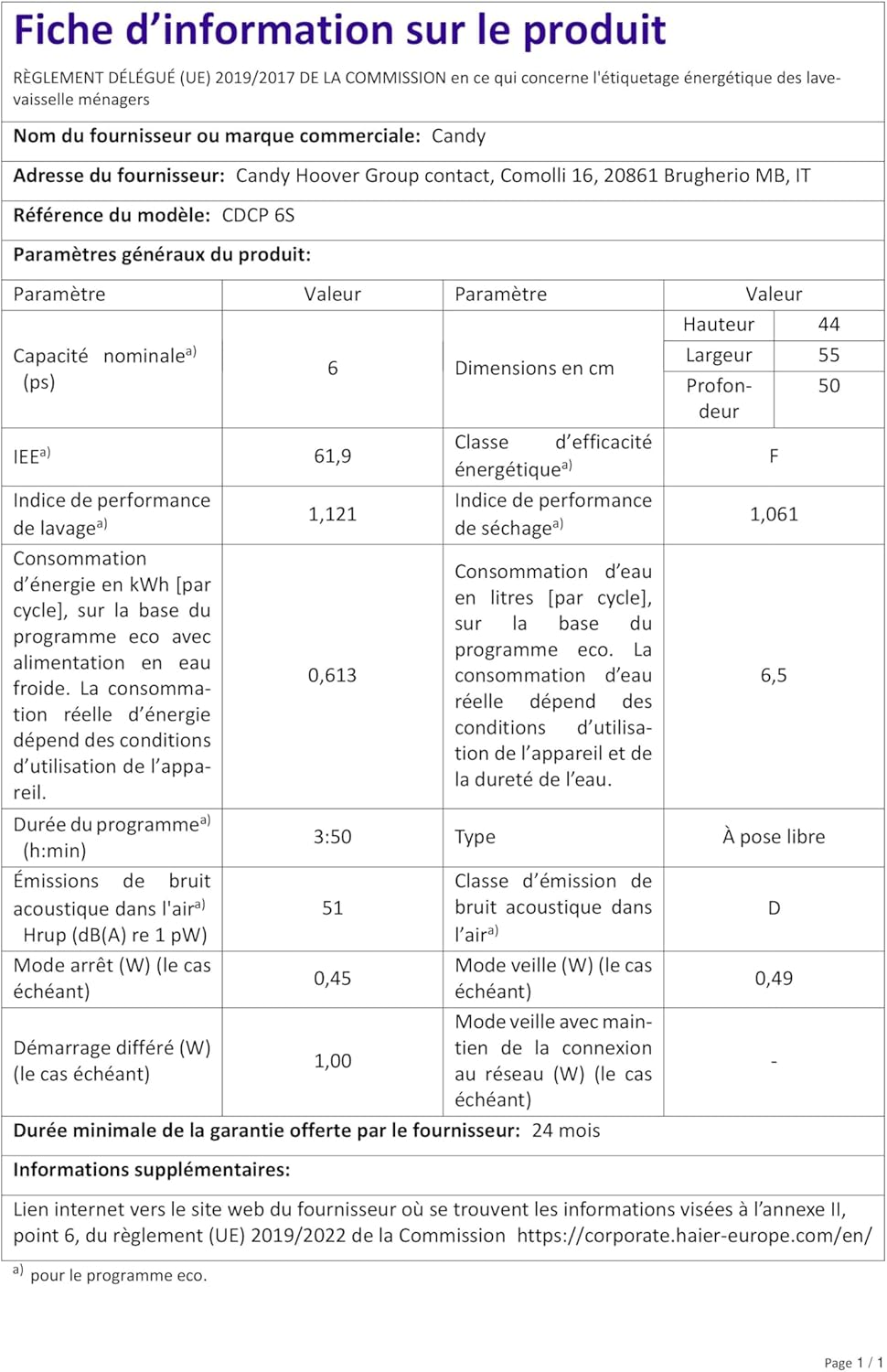
Image 7.2: Product Information Sheet detailing specifications and energy consumption.
For more detailed product information, including the official EPREL database entry, please visit: https://eprel.ec.europa.eu/qr/379793
8. Warranty and Support
8.1 Warranty Information
The manufacturer provides a minimum guarantee period of 24 months from the date of purchase. Please retain your proof of purchase for warranty claims.
8.2 Customer Support
For technical assistance, spare parts, or warranty claims, please contact Candy customer service. You can find additional information and support resources on the supplier's official website:
https://corporate.haier-europe.com/en/
When contacting support, please have your product model (CDCP 6S) and serial number (if applicable) ready.
Related documentsCDCP 6S


Ask a question about this manual
Ask about setup, troubleshooting, compatibility, parts, safety, or missing instructions. Manuals+ will review the question and use this page’s manual context to help answer it.