
1. Introduction
The Vicco Joel Gaming Desk is designed to provide a functional and organized workspace for gaming and computer use. It features integrated storage solutions, including open and closed compartments, a dedicated space for a system unit, and an elevated monitor riser. This manual provides essential information for the safe assembly, operation, and maintenance of your desk.

Image 1: The Vicco Joel Gaming Desk in Goldkraft Oak, showcasing its design and functionality within a typical gaming environment.
2. Safety Information
Please read and understand all safety warnings before assembly and use. Failure to follow these instructions may result in injury or damage to the product.
- Follow the assembly instructions carefully.
- Do not exceed the weight limit during assembly or use.
- Secure the desk to a wall if it will be used for heavy loads or in high-traffic areas to prevent tipping.
- Be aware that the stability of the desk may be influenced by its design.
- Do not leave heavy objects unattended on the desk, especially on shelves or risers.
3. Package Contents
Verify that all components are present before beginning assembly.
- Gaming Desk components
- Assembly instructions (in German)
- Assembly hardware (screws, dowels, connectors)
4. Setup and Assembly
Assembly requires approximately 2 people and a screwdriver. It is recommended to sort all hardware before starting. Refer to the included German assembly instructions for detailed diagrams and step-by-step guidance.

Image 2: Dimensional diagram of the Vicco Joel Gaming Desk, illustrating overall height, width, depth, and specific shelf measurements.
Important Assembly Notes:
- Ensure all parts are clean and free of sawdust before assembly.
- Carefully identify screws and connectors as some may appear similar but have different uses.
- Avoid overtightening screws to prevent damage to the particle board.
- For optimal stability, consider securing the desk to a wall using appropriate wall anchors (not included).
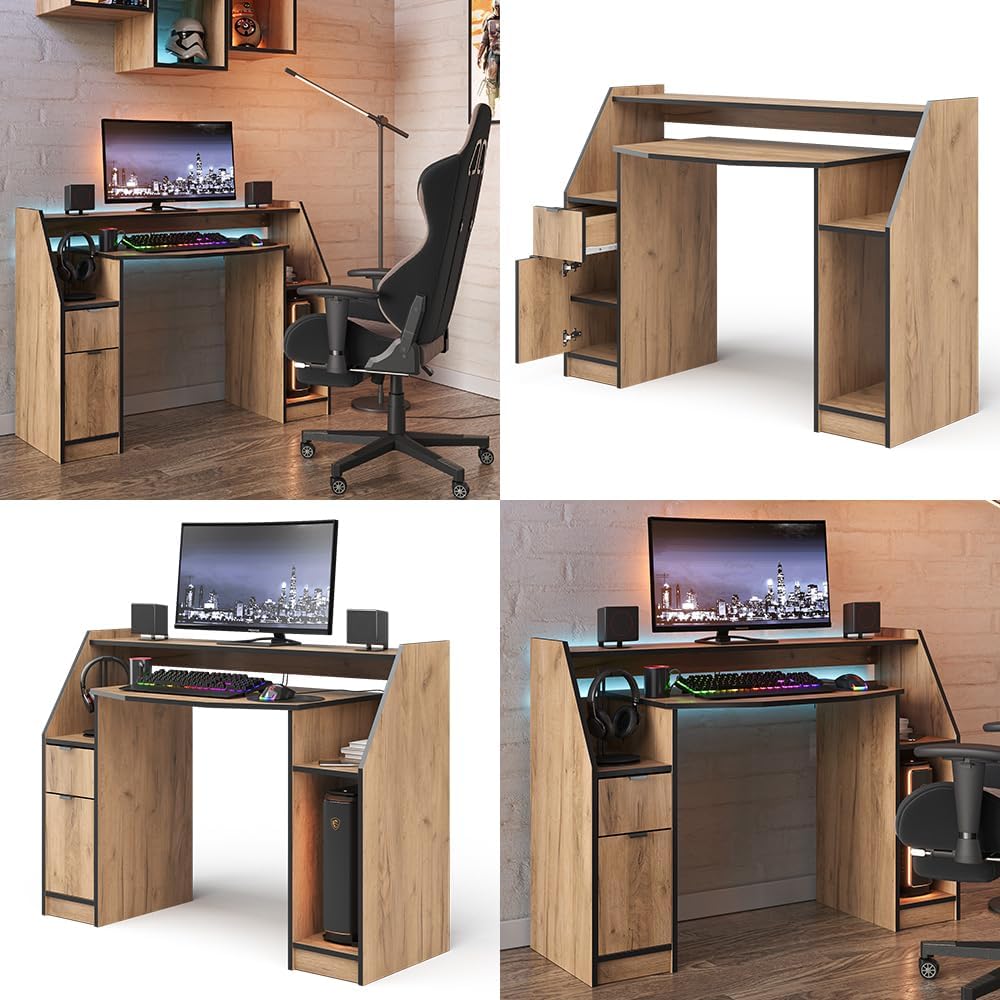
Image 3: Various perspectives of the Vicco Joel Gaming Desk, highlighting its drawer, door, and open shelving for storage.
5. Operating Instructions (Usage)
The Vicco Joel Gaming Desk is designed for versatile use in home offices or gaming setups.
- Monitor Riser: The elevated platform is suitable for placing a monitor, allowing for better ergonomics and freeing up space on the main desk surface.
- Keyboard/Mouse Area: The main desk surface provides ample space for a keyboard, mouse, and other peripherals.
- Storage Compartments: Utilize the single drawer and the cabinet with a door for organized storage of accessories, documents, or personal items.
- System Unit Shelf: A dedicated open shelf is provided for your computer's system unit, ensuring proper ventilation.
- Open Shelves: Additional open shelves offer convenient access to frequently used items or for displaying decorative objects.

Image 4: Detail view of the desk's main surface and monitor riser, showing space for peripherals and a headphone hook.

Image 5: Detailed view of the desk's integrated storage, including a pull-out drawer and a cabinet with a hinged door.

Image 6: The Vicco Joel Gaming Desk featuring a computer tower in its designated open compartment, ensuring adequate airflow.
6. Maintenance
To ensure the longevity and appearance of your Vicco Joel Gaming Desk, follow these maintenance guidelines:
- Cleaning: Wipe the surfaces with a damp cloth. Avoid abrasive cleaners or harsh chemicals that could damage the melamine resin coating.
- Spills: Immediately wipe up any spills to prevent moisture damage to the particle board.
- Heat and Moisture: Protect the desk from direct heat sources and excessive moisture. Use coasters for drinks.
- Inspections: Periodically check all screws and connections to ensure they remain tight. Retighten if necessary.
7. Troubleshooting
This section addresses common issues you might encounter.
| Problem | Possible Cause | Solution |
|---|---|---|
| Desk feels unstable or wobbly. | Loose connections; uneven floor; heavy load. | Ensure all screws are tightened. Place shims under legs if the floor is uneven. Secure the desk to a wall if necessary. Distribute weight evenly. |
| Drawer or door does not close properly. | Misaligned during assembly; obstruction. | Check alignment of drawer slides or door hinges. Ensure no items are blocking the mechanism. Re-adjust if possible. |
| Sawdust present on components. | Residue from manufacturing process. | Wipe all components thoroughly with a damp cloth before and after assembly. |
| Sharp edges on laminated parts. | Standard manufacturing finish. | Carefully smooth sharp edges with fine-grit sandpaper or apply edge protectors. |
8. Specifications
| Feature | Detail |
|---|---|
| Brand | Vicco |
| Model Name | Joel |
| Model Number | 41595 (Item Number: 16854) |
| Color | Goldkraft Oak |
| Dimensions (W x D x H) | 123.2 cm x 45 cm x 90 cm |
| Material | 16 mm Melamine Resin Coated Particle Board |
| Weight | 40.8 kg |
| Storage | 1 Drawer, 1 Door, 7 Open Shelves |
| Special Features | Integrated System Unit Shelf, Elevated Monitor Riser |
| Assembly Required | Yes (Recommended 2 persons, screwdriver) |
| Care Instructions | Wipe with a damp cloth |
9. Warranty
This product comes with a limited warranty. For details regarding warranty coverage and claims, please refer to the documentation provided at the time of purchase or contact customer support.
10. Support
For further assistance, missing parts, or technical inquiries, please contact Vicco customer service. Contact information can typically be found on the packaging or the official Vicco website.
You can also visit the Vicco Store on Amazon for more product information.
